Community project
Dual H-Bridge Motor Control
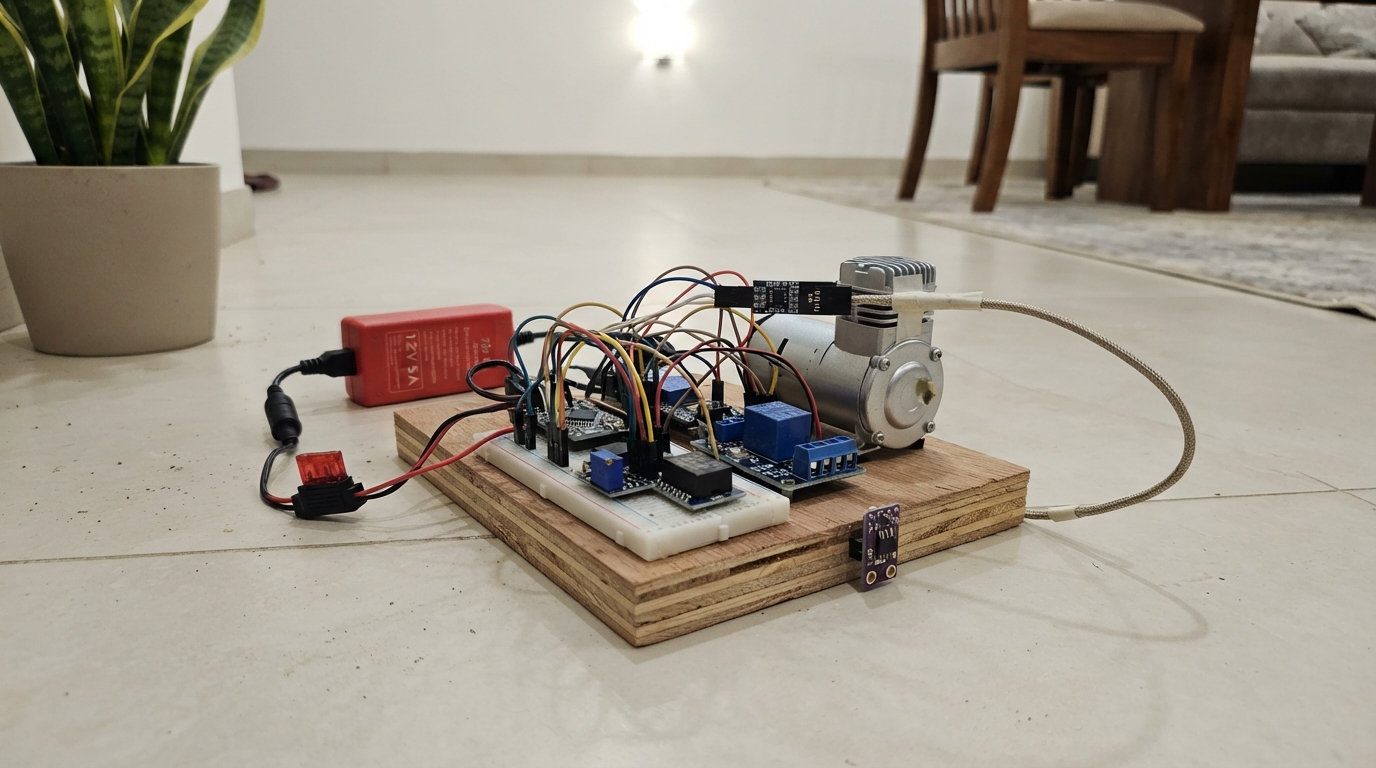
This project builds a dual H-bridge motor control system for a bioreactor chamber, using an ESP32 to manage a brushed DC motor and relay-controlled air compressor. The system monitors water temperature via K-type thermocouple, tracks chamber temperature and humidity with an AHT20 sensor, and provides web-based control over a local WiFi network. Readers will receive a complete wiring diagram showing connections between the MAX6675 thermocouple module, IBT-2 motor driver, relay module, and ESP32, along with a detailed parts list and power distribution layout using dual buck converters.
The guide includes step-by-step assembly instructions for safely routing the air path, calibrating the power supplies, and integrating all sensors and actuators. Complete firmware is provided with configurable motor ramp rates, direction-reversal logic, and sensor polling intervals, allowing makers to adapt the system for environmental control applications like fungal cultivation or other bioreactor experiments.
Wiring diagram
Gather all the parts
Assemble it in 7 steps
1. Keep the air path safely vented
Keep the water jar and grow container vented through suitable filters; do not seal either glass container. Put the metal tip of thermocouple_1 into the water, but keep its cable joint dry.
- A sealed glass jar can burst when air is pumped into it, causing flying glass and hot-water injuries.
2. Wire the water temperature probe
Connect thermocouple_1 `+` to max6675_1 `T+` (water-temperature signal) and `-` to `T-` (water-temperature signal). Connect MAX6675 `VCC` to ESP32 `3V3` (power), `GND` to ESP32 `GND` (ground), `SCK` to GPIO18 (clock), `SO` to GPIO19 (temperature data), and `CS` to GPIO4 (select signal).
3. Wire the chamber temperature and humidity sensor
Place aht20_1 where it senses chamber air but cannot be splashed or covered by condensation. Connect `VIN` to ESP32 `3V3` (power), `GND` to ESP32 `GND` (ground), `SDA` to GPIO21 (data), and `SCL` to GPIO22 (data timing).
- Water on the sensor board can cause incorrect readings or damage it.
4. Set the 5 V controller power converter
With power disconnected, connect power_supply_12v_1 `+12V` to buck_converter_1 `IN+` (power) and supply `GND` to `IN-` (ground). Adjust and measure `OUT+` at exactly 5.0 V before connecting it to ESP32 `5V`/`VIN` (power) and `OUT-` to ESP32 `GND` (ground).
- Do not connect 12 V directly to the ESP32 5V or 3V3 pins; it can permanently damage the board.
5. Set the 7.4 V motor supply
Connect power_supply_12v_1 `+12V` to motor_buck_7v4_1 `VIN+` (power) and supply `GND` to `VIN-` (ground). Before attaching the H-bridge, adjust and measure the converter from `VOUT+` to `VOUT-` at exactly 7.4 V. Connect `VOUT+` to motor_driver_hw039_1 `B+` (motor power) and `VOUT-` to `B-` (motor ground).
- Do not send 12 V directly to the 7.4 V motor. Use a motor buck converter with enough current capacity for the motor's startup current.
6. Wire the HW-039 and grid motor
Connect motor_driver_hw039_1 `VCC` to the measured 5 V supply (logic power), `GND` to ESP32 `GND` (shared ground), `RPWM` to ESP32 GPIO25 (forward slow-speed signal), and `LPWM` to GPIO27 (reverse slow-speed signal). Connect `R_EN` and `L_EN` to ESP32 `3V3` (enable). Connect HW-039 `M+` to grid_motor_380_1 `M+` (motor wire) and HW-039 `M-` to grid_motor_380_1 `M-` (motor wire).
- The software begins at a low speed, ramps gently, pauses before reversing, then changes direction every 30 seconds when automatic reversing is selected.
- Secure the motor and grid so moving parts cannot catch wires.
7. Wire the relay and compressor
Connect relay_1 `VCC` to measured 5 V (power), relay `GND` to ESP32 `GND` (ground), and relay `IN1` to GPIO26 through a 3.3 V-compatible relay driver (compressor switch signal). Connect supply `+12V` to fuse_1 `IN` (protected power), fuse `OUT` to relay `COM1` (incoming switched power), relay `NO1` to compressor_1 `+12V` (power when switched on), and compressor `GND` to supply `GND` (ground).
- Use `NO1`, not `NC1`, so loss of controller power turns the compressor off.
- A 5 V relay input connected straight to GPIO26 can fail to switch or send an unsafe voltage into the ESP32.
Review all connections
1. Connections between "thermocouple_1" and "ESP32"
2. Connections between "max6675_1" and "ESP32"
3. Connections between "power_supply_12v_1" and "ESP32"
4. Connections between "fuse_1" and "ESP32"
5. Connections between "relay_1" and "ESP32"
6. Connections between "compressor_1" and "ESP32"
7. Connections between "buck_converter_1" and "ESP32"
8. Connections between "motor_buck_7v4_1" and "ESP32"
9. Connections between "motor_driver_hw039_1" and "ESP32"
10. Connections between "aht20_1" and "ESP32"
Deploy the firmware
#include <Arduino.h>
#include <WiFi.h>
#include <WebServer.h>
#include <Wire.h>
#include <max6675.h>
#include <Adafruit_AHTX0.h>

// These values match the physical wiring in this project.
constexpr int THERMO_SCK_PIN = 18;
constexpr int THERMO_CS_PIN = 4;
constexpr int THERMO_SO_PIN = 19;
constexpr int COMPRESSOR_RELAY_PIN = 26;
constexpr int GRID_MOTOR_AIN1_PIN = 25;
constexpr int GRID_MOTOR_AIN2_PIN = 27;
constexpr int AHT20_SDA_PIN = 21;
constexpr int AHT20_SCL_PIN = 22;
constexpr int GRID_MOTOR_PWM_FREQUENCY_HZ = 20000;
constexpr int GRID_MOTOR_PWM_RESOLUTION_BITS = 8;
// Keep this small gearmotor gentle. The phone page limits the setting to 5–30%.
constexpr int GRID_MOTOR_DEFAULT_PERCENT = 20;
constexpr int GRID_MOTOR_MIN_PERCENT = 5;
constexpr int GRID_MOTOR_MAX_PERCENT = 30;
constexpr int GRID_MOTOR_RAMP_STEP = 3;
constexpr unsigned long GRID_MOTOR_RAMP_STEP_MS = 30;
constexpr unsigned long GRID_MOTOR_REVERSE_INTERVAL_MS = 30000;
constexpr unsigned long GRID_MOTOR_DIRECTION_CHANGE_PAUSE_MS = 100;
constexpr unsigned long SENSOR_INTERVAL_MS = 2000;

// The ESP32 creates this local network. Change this password before a public deployment.
const char *WIFI_AP_NAME = "Fungi-Bioreactor";
const char *WIFI_AP_PASSWORD = "FungiControl2026";

// Most 5 V relay modules switch on when their input is pulled LOW.
constexpr bool RELAY_ON_LEVEL = LOW;
constexpr bool RELAY_OFF_LEVEL = HIGH;

MAX6675 waterThermocouple(THERMO_SCK_PIN, THERMO_CS_PIN, THERMO_SO_PIN);
Adafruit_AHTX0 chamberSensor;
WebServer server(80);

float waterTemperatureC = NAN;
float chamberTemperatureC = NAN;
float chamberHumidityPercent = NAN;
bool chamberSensorReady = false;
bool motorEnabled = true;
bool motorForward = true;
bool compressorEnabled = false;
bool autoReverse = true;
bool reversalPauseActive = false;
int motorPercent = GRID_MOTOR_DEFAULT_PERCENT;
int appliedMotorDuty = 0;
unsigned long lastSensorReadMs = 0;
unsigned long lastMotorRampMs = 0;
unsigned long lastMotorDirectionChangeMs = 0;
unsigned long reversalPauseStartedMs = 0;

int targetMotorDuty() {
  return motorEnabled && !reversalPauseActive ? map(motorPercent, 0, 100, 0, 255) : 0;
}

void applyMotorDrive(int duty) {
  // HW-039 / BTS7960: drive only one PWM input at a time.
  // RPWM is forward and LPWM is reverse, so the 7.4 V grid motor sees one polarity at a time.
  if (motorForward) {
    ledcWrite(GRID_MOTOR_AIN1_PIN, duty);
    ledcWrite(GRID_MOTOR_AIN2_PIN, 0);
  } else {
    ledcWrite(GRID_MOTOR_AIN1_PIN, 0);
    ledcWrite(GRID_MOTOR_AIN2_PIN, duty);
  }
}

void updateMotor(unsigned long now) {
  if (reversalPauseActive && now - reversalPauseStartedMs >= GRID_MOTOR_DIRECTION_CHANGE_PAUSE_MS) {
    motorForward = !motorForward;
    reversalPauseActive = false;
    lastMotorDirectionChangeMs = now;
  }

  if (autoReverse && motorEnabled && !reversalPauseActive &&
      now - lastMotorDirectionChangeMs >= GRID_MOTOR_REVERSE_INTERVAL_MS) {
    reversalPauseActive = true;
    reversalPauseStartedMs = now;
  }

  if (now - lastMotorRampMs < GRID_MOTOR_RAMP_STEP_MS) return;
  lastMotorRampMs = now;
  const int target = targetMotorDuty();
  if (appliedMotorDuty < target) appliedMotorDuty = min(appliedMotorDuty + GRID_MOTOR_RAMP_STEP, target);
  if (appliedMotorDuty > target) appliedMotorDuty = max(appliedMotorDuty - GRID_MOTOR_RAMP_STEP, target);
  applyMotorDrive(appliedMotorDuty);
}

String numberOrNull(float value, unsigned int decimals) {
  return isnan(value) ? "null" : String(value, decimals);
}

void sendState() {
  String json = "{\"waterC\":" + numberOrNull(waterTemperatureC, 1) +
                ",\"airC\":" + numberOrNull(chamberTemperatureC, 1) +
                ",\"humidity\":" + numberOrNull(chamberHumidityPercent, 1) +
                ",\"sensorReady\":" + String(chamberSensorReady ? "true" : "false") +
                ",\"motorEnabled\":" + String(motorEnabled ? "true" : "false") +
                ",\"compressorEnabled\":" + String(compressorEnabled ? "true" : "false") +
                ",\"forward\":" + String(motorForward ? "true" : "false") +
                ",\"autoReverse\":" + String(autoReverse ? "true" : "false") +
                ",\"speed\":" + String(motorPercent) + "}";
  server.send(200, "application/json", json);
}

void handleMotorControl() {
  if (server.hasArg("enabled")) motorEnabled = server.arg("enabled") == "1";
  if (server.hasArg("speed")) motorPercent = constrain(server.arg("speed").toInt(), GRID_MOTOR_MIN_PERCENT, GRID_MOTOR_MAX_PERCENT);
  if (server.hasArg("direction")) {
    motorForward = server.arg("direction") == "forward";
    autoReverse = false;
    reversalPauseActive = false;
    lastMotorDirectionChangeMs = millis();
  }
  if (server.hasArg("auto")) {
    autoReverse = server.arg("auto") == "1";
    lastMotorDirectionChangeMs = millis();
  }
  sendState();
}

void handleCompressorControl() {
  // This is only an on/off command. It does not make a glass vessel pressure-safe.
  compressorEnabled = server.arg("enabled") == "1";
  digitalWrite(COMPRESSOR_RELAY_PIN, compressorEnabled ? RELAY_ON_LEVEL : RELAY_OFF_LEVEL);
  sendState();
}

void handleRoot() {
  const char page[] PROGMEM = R"HTML(
<!doctype html><html><head><meta name="viewport" content="width=device-width,initial-scale=1">
<title>Fungi Bioreactor</title><style>
body{font-family:Arial,sans-serif;background:#10231c;color:#eff8f0;margin:0;padding:18px}main{max-width:620px;margin:auto}.card{background:#1c382c;border-radius:14px;padding:16px;margin:12px 0}.reading{font-size:1.5rem;margin:10px 0}button{background:#55b87a;border:0;border-radius:8px;padding:12px;margin:4px;color:#07150d;font-weight:bold;font-size:1rem}button.off{background:#e88979}input{width:100%}small{color:#c5d8cb}</style></head>
<body><main><h1>Fungi Bioreactor</h1><div class="card"><h2>Conditions</h2><div class="reading">Water: <b id="water">--</b> °C</div><div class="reading">Chamber: <b id="air">--</b> °C</div><div class="reading">Humidity: <b id="humidity">--</b> % RH</div><small id="sensor"></small></div>
<div class="card"><h2>Grid motor</h2><p id="motorState">Loading…</p><button id="run" onclick="motor('enabled='+ (state.motorEnabled?0:1))">Start / stop</button><button onclick="motor('direction=forward')">Forward</button><button onclick="motor('direction=reverse')">Reverse</button><button onclick="motor('auto='+(state.autoReverse?0:1))">Auto reverse</button><p>Slow speed: <b id="speedLabel">20</b>%</p><input id="speed" type="range" min="5" max="30" value="20" oninput="speedLabel.textContent=this.value" onchange="motor('speed='+this.value)"><small>The motor gently ramps up, pauses before each reversal, and reverses every 30 seconds while Auto reverse is on.</small></div>
<div class="card"><h2>Compressor</h2><p id="compressorState">Loading…</p><button id="compressor" onclick="compressorControl()">Turn compressor on</button><small>Use only for gentle airflow through vented containers. This button is not a pressure-safety control.</small></div></main>
<script>let state={};function show(v){return v===null?'--':v.toFixed(1)}async function get(){state=await (await fetch('/api/state')).json();water.textContent=show(state.waterC);air.textContent=show(state.airC);humidity.textContent=show(state.humidity);sensor.textContent=state.sensorReady?'AHT20 sensor connected.':'Check the AHT20 sensor wiring.';motorState.textContent=state.motorEnabled?'Running slowly at '+state.speed+'% — '+(state.forward?'forward':'reverse')+(state.autoReverse?' — auto reverse on':''):'Stopped';run.textContent=state.motorEnabled?'Stop motor':'Start motor';run.className=state.motorEnabled?'off':'';speed.value=state.speed;speedLabel.textContent=state.speed;compressorState.textContent=state.compressorEnabled?'Compressor is on.':'Compressor is off.';compressor.textContent=state.compressorEnabled?'Turn compressor off':'Turn compressor on';compressor.className=state.compressorEnabled?'off':''}async function motor(q){state=await (await fetch('/api/motor?'+q)).json();get()}async function compressorControl(){state=await (await fetch('/api/compressor?enabled='+(state.compressorEnabled?0:1))).json();get()}get();setInterval(get,2000);</script></body></html>
)HTML";
  server.send(200, "text/html", page);
}

void readSensors(unsigned long now) {
  if (now - lastSensorReadMs < SENSOR_INTERVAL_MS) return;
  lastSensorReadMs = now;
  waterTemperatureC = waterThermocouple.readCelsius();
  if (chamberSensorReady) {
    sensors_event_t humidityEvent, temperatureEvent;
    chamberSensor.getEvent(&humidityEvent, &temperatureEvent);
    chamberTemperatureC = temperatureEvent.temperature;
    chamberHumidityPercent = humidityEvent.relative_humidity;
  }
}

void setup() {
  Serial.begin(115200);

  // Start with compressor power disconnected after every reset.
  pinMode(COMPRESSOR_RELAY_PIN, OUTPUT);
  digitalWrite(COMPRESSOR_RELAY_PIN, RELAY_OFF_LEVEL);

  ledcAttach(GRID_MOTOR_AIN1_PIN, GRID_MOTOR_PWM_FREQUENCY_HZ, GRID_MOTOR_PWM_RESOLUTION_BITS);
  ledcAttach(GRID_MOTOR_AIN2_PIN, GRID_MOTOR_PWM_FREQUENCY_HZ, GRID_MOTOR_PWM_RESOLUTION_BITS);
  applyMotorDrive(0);
  lastMotorDirectionChangeMs = millis();

  Wire.begin(AHT20_SDA_PIN, AHT20_SCL_PIN);
  chamberSensorReady = chamberSensor.begin();

  WiFi.mode(WIFI_AP);
  WiFi.softAP(WIFI_AP_NAME, WIFI_AP_PASSWORD);
  server.on("/", HTTP_GET, handleRoot);
  server.on("/api/state", HTTP_GET, sendState);
  server.on("/api/motor", HTTP_GET, handleMotorControl);
  server.on("/api/compressor", HTTP_GET, handleCompressorControl);
  server.onNotFound([]() { server.send(404, "text/plain", "Not found"); });
  server.begin();

  Serial.println("Fungi controller started.");
  Serial.print("Connect to Wi-Fi: ");
  Serial.println(WIFI_AP_NAME);
  Serial.println("Open http://192.168.4.1 in a phone browser.");
}

void loop() {
  const unsigned long now = millis();
  server.handleClient();
  readSensors(now);
  updateMotor(now);
  delay(1);
}
Remix this project
Make it yours in one click
Open a full copy of this project in your own Schematik workspace — diagram, code, parts, and assembly steps included. Swap the sensor, add features, or redesign the whole thing with AI. The author's original stays untouched.