Community project
ESP32 Plane Radar
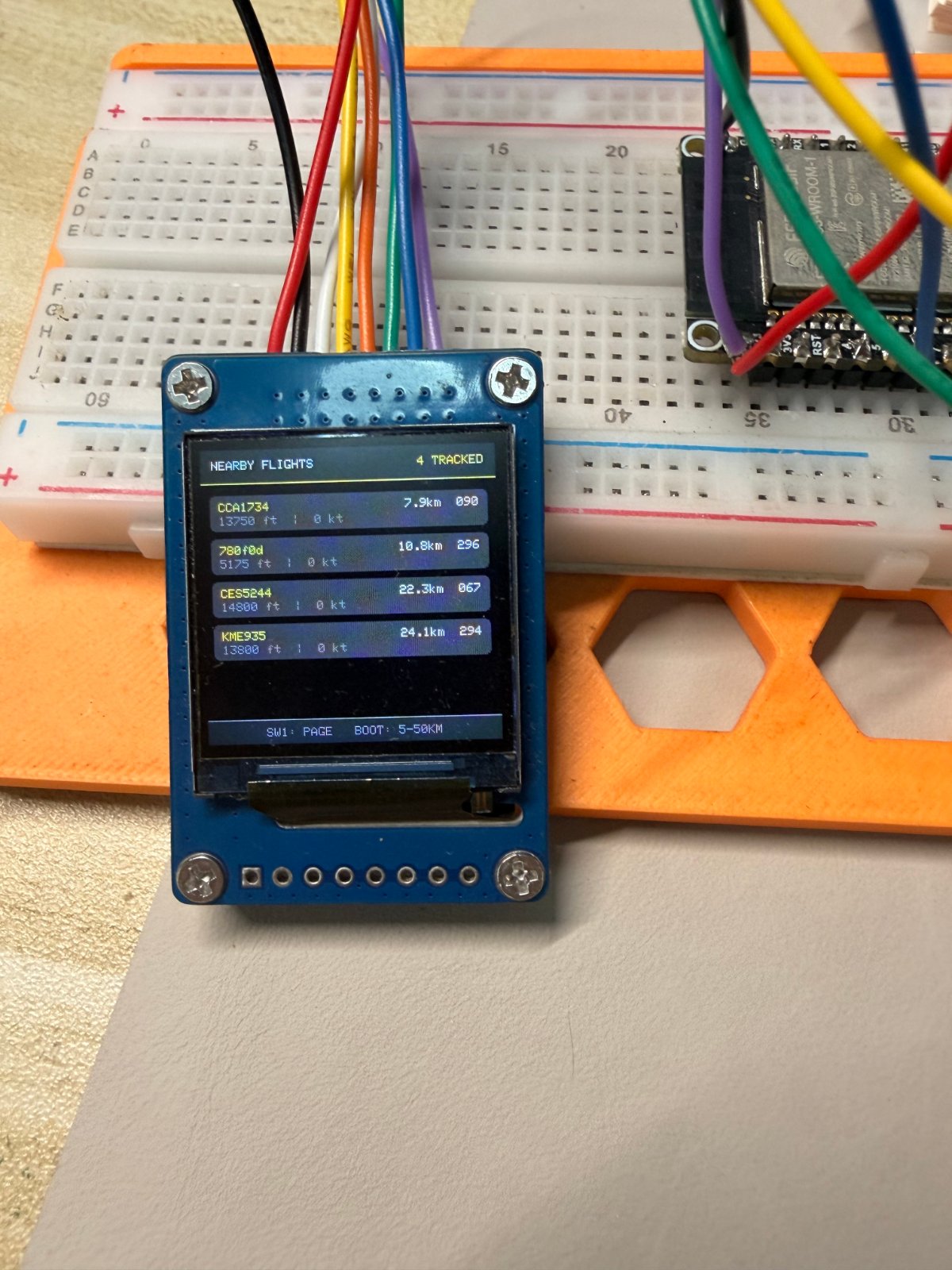
Build a real-time aircraft radar display powered by the ESP32 and a 2-inch ST7789 TFT screen. This project fetches live aircraft data from public ADS-B sources and plots nearby planes on a circular radar interface, showing bearing, distance, altitude, and speed for up to 12 aircraft at a time.
The guide includes a complete wiring diagram, parts list, and step-by-step assembly instructions for connecting the display and button to the ESP32. You'll also get the full firmware with WiFi connectivity, a web-based setup portal, and a three-page interface controlled by a push button—just power it up and watch planes appear on your radar.
Wiring diagram

Gather all the parts
Assemble it in 7 steps
1. Place the board and screen
Put the Waveshare ESP32-S3-DEV-KIT-N16R8 and the 1.3-inch ST7789 screen on a non-metal surface with their pin labels facing up. Leave the USB-C socket accessible so the board can be powered and flashed.
- Do not power the board while moving jumper wires.
- Do not let the underside of either board touch loose metal or a conductive surface; that can short the board.
2. Connect screen power
Use a red jumper wire from the ST7789 VCC pin to the ESP32-S3 3V3 pin (power). Use a black jumper wire from ST7789 GND to an ESP32-S3 GND pin (ground). If the display has a BL or LED pin, connect it to 3V3 (backlight power).
- Read the labels printed beside the display header; VCC and GND must not be swapped.
- Swapped VCC and GND can damage the screen. Do not connect the screen VCC pin to 5V.
3. Connect the screen control wires
Connect ST7789 RST to GPIO7 (screen reset), CS to GPIO10 (screen select), and DC to GPIO14 (command/data signal). These three wires tell the display when a new picture starts and what kind of data it is receiving.
- Use three different wire colours and check each printed pin name before inserting the wire.
- A wire one position off can leave the screen blank or show corrupted colours.
4. Connect the screen picture-data wires
Connect ST7789 SDA, DIN, or MOSI to GPIO11 (picture data). Connect ST7789 SCL, CLK, or SCK to GPIO12 (picture clock). The different labels mean the same two screen connections on many ST7789 modules.
- Keep these two wires short and do not swap them; short, direct wires give a steadier picture.
- Do not connect the display MISO pin if it has one; this project does not use it.
5. Add the page-change button
Place the momentary push button so its two used legs are on opposite sides of the button's centre gap. Connect one button leg to GPIO21 (page-change signal) and the opposite connected leg to GND (ground). Each quick press changes between radar, nearby flights, and system status.
- On a four-leg button, the two legs on the same side are already joined together; use one leg from each side.
- Do not connect GPIO21 directly to 3V3; the button must connect GPIO21 to GND only when pressed.
6. Leave the board BOOT button free
Do not add a jumper to GPIO0. Use the built-in BOOT button on the Waveshare board: a quick press changes the radar range from 5 to 50 km, and holding it for about three seconds clears saved Wi-Fi and location details.
- The BOOT button is part of the board, so it is not shown as a separate external item.
- Do not connect GPIO0 to the screen or another module; it can affect startup and the range button.
7. Power and deploy
Check that every screen wire matches its printed label, then plug the USB-C data cable into the board and your computer (power and flashing). In Schematik, press Deploy to install the firmware. On first start, connect a phone to PlaneRadar-Setup, open 192.168.4.1, and save your Wi-Fi name, password, latitude, and longitude.
- The radar rings, labels, aircraft count, refresh age, and green scanning wedge update after the board joins Wi-Fi and receives ADS-B data.
- Use a USB data cable rather than a charge-only cable, otherwise the computer cannot flash the board.
Review all connections
1. Connections between "round-display" and "ESP32"
2. Connections between "page-button" and "ESP32"
Deploy the firmware
/*
 * ESP32 Plane Radar — three-page ST7789 interface
 * Data source: https://opendata.adsb.fi/
 * Original inspiration: https://github.com/MatixYo/ESP32-Plane-Radar
 */
#include <Arduino.h>
#include <WiFi.h>
#include <WebServer.h>
#include <Preferences.h>
#include <HTTPClient.h>
#include <WiFiClientSecure.h>
#include <ArduinoJson.h>
#include <LovyanGFX.hpp>
#include <freertos/FreeRTOS.h>
#include <freertos/task.h>
#include <math.h>

#define RADAR_RST   7
#define RADAR_CS    10
#define RADAR_DC    14
#define RADAR_MOSI  11
#define RADAR_SCLK  12
#define BOOT_BUTTON 0
#define PAGE_BUTTON 21

#define FETCH_INTERVAL_MS 5000UL
#define HOLD_CLEAR_MS     3000UL
#define DEBOUNCE_MS       35UL
#define SCAN_INTERVAL_MS  50UL
#define AP_SSID           "PlaneRadar-Setup"
#define NVS_NAMESPACE     "planeradar"
#define SCREEN_W          240
#define SCREEN_H          240
#define CENTER_X          120
#define CENTER_Y          126
#define RADAR_RADIUS      88
#define MAX_AIRCRAFT      12


struct Aircraft {
  char label[11];
  float bearing;
  float distance;
  int altitudeFt;
  int speedKt;
};

class RadarDisplay : public lgfx::LGFX_Device {
  lgfx::Bus_SPI _bus;
  lgfx::Panel_ST7789 _panel;
public:
  RadarDisplay() {
    auto busCfg = _bus.config();
    busCfg.spi_host = SPI2_HOST;
    busCfg.freq_write = 40000000;
    busCfg.pin_sclk = RADAR_SCLK;
    busCfg.pin_mosi = RADAR_MOSI;
    busCfg.pin_miso = -1;
    busCfg.pin_dc = RADAR_DC;
    _bus.config(busCfg);
    _panel.setBus(&_bus);
    auto panelCfg = _panel.config();
    panelCfg.pin_cs = RADAR_CS;
    panelCfg.pin_rst = RADAR_RST;
    panelCfg.memory_width = 240;
    panelCfg.memory_height = 320;
    panelCfg.panel_width = 240;
    panelCfg.panel_height = 240;
    panelCfg.offset_x = 0;
    panelCfg.offset_y = 0;
    panelCfg.invert = true;
    panelCfg.rgb_order = true;
    _panel.config(panelCfg);
    setPanel(&_panel);
  }
};


// Forward declarations
double haversineKm(double lat1, double lon1, double lat2, double lon2);
double initialBearing(double lat1, double lon1, double lat2, double lon2);
void header(const char *title, const char *detail);
void footer();
void drawRadarPage();
void drawRadarContent();
void animateRadarScan();
void drawFlightsPage();
void drawStatusPage();
void drawCurrentPage();
void showMessage(const char *line1, const char *line2);
void handleConfigRoot();
void handleConfigSave();
void startConfigPortal();
void sortAircraft();
void fetchAircraft();
void radarFetchTask(void *parameter);
void processButtons();

RadarDisplay display;
lgfx::LGFX_Sprite radarSprite(&display);
Preferences prefs;
WebServer configServer(80);
Aircraft aircraft[MAX_AIRCRAFT];
uint8_t aircraftCount = 0;
uint8_t currentPage = 0;
float radarRangeKm = 10.0f;
double radarLat = 0.0, radarLon = 0.0;
bool configMode = false;
bool dataReceived = false;
int lastHttpCode = 0;
unsigned long lastFetchMs = 0;
unsigned long lastFetchOkMs = 0;
unsigned long bootPressedAt = 0;
unsigned long pageChangedAt = 0;
unsigned long lastScanMs = 0;
float scanAngleDeg = 0.0f;
volatile bool fetchRequested = false;
volatile bool radarDataDirty = false;
portMUX_TYPE aircraftMux = portMUX_INITIALIZER_UNLOCKED;
bool bootWasLow = false;
bool pageStableLow = false;
bool pageLastRead = false;

static const uint16_t NAVY = 0x0861;
static const uint16_t PANEL = 0x10A3;
static const uint16_t CYAN = 0x07FF;
static const uint16_t MINT = 0x9FF3;
static const uint16_t DIM = 0x5ACB;
static const uint16_t AMBER = 0xFD20;
// This ST7789 module swaps red and blue relative to the RGB565 panel setting.
// Use the panel-mapped value that renders as a clear red HOME target on this LCD.
static const uint16_t REDACCENT = 0x001F;
static const double DEG2RAD = M_PI / 180.0;

double haversineKm(double lat1, double lon1, double lat2, double lon2) {
  double dlat = (lat2 - lat1) * DEG2RAD, dlon = (lon2 - lon1) * DEG2RAD;
  double a = sin(dlat / 2) * sin(dlat / 2) + cos(lat1 * DEG2RAD) * cos(lat2 * DEG2RAD) * sin(dlon / 2) * sin(dlon / 2);
  return 6371.0 * 2.0 * atan2(sqrt(a), sqrt(1.0 - a));
}

double initialBearing(double lat1, double lon1, double lat2, double lon2) {
  double dlon = (lon2 - lon1) * DEG2RAD;
  double y = sin(dlon) * cos(lat2 * DEG2RAD);
  double x = cos(lat1 * DEG2RAD) * sin(lat2 * DEG2RAD) - sin(lat1 * DEG2RAD) * cos(lat2 * DEG2RAD) * cos(dlon);
  return fmod(atan2(y, x) / DEG2RAD + 360.0, 360.0);
}

void header(const char *title, const char *detail) {
  display.fillRect(0, 0, SCREEN_W, 28, NAVY);
  display.drawFastHLine(0, 27, SCREEN_W, CYAN);
  display.setTextSize(1);
  display.setTextColor(TFT_WHITE, NAVY);
  display.drawString(title, 9, 9);
  display.setTextColor(CYAN, NAVY);
  display.drawRightString(detail, 231, 9);
}

void footer() {
  display.fillRect(0, 220, SCREEN_W, 20, NAVY);
  display.drawFastHLine(0, 220, SCREEN_W, DIM);
  display.setTextColor(DIM, NAVY);
  display.setTextSize(1);
  display.drawCentreString("SW1: PAGE   BOOT: 5-50KM", 120, 227);
}

void drawRadarContent() {
  // This 240 x 192 sprite is only the area below the header and above the footer.
  // Repainting this local area keeps the 360-degree sweep smooth without flashing the whole LCD.
  const int cy = CENTER_Y - 28;
  radarSprite.fillSprite(TFT_BLACK);
  // Thick green range rings remain visible behind the fading scan sector.
  // Use native RGB565 colours here. The previous 8-bit sprite palette quantised
  // the greens, which made the radar rings and sweep appear yellowish or uneven.
  const uint16_t RING_GREEN = 0x05C0;
  // Every ring is a real 5 km step.  The outer ring always equals the range
  // selected with BOOT, so the scale remains honest at 5, 10, 15, 25, or 50 km.
  const int ringCount = max(1, (int)lroundf(radarRangeKm / 5.0f));
  for (int ring = 1; ring <= ringCount; ++ring) {
    const float ringKm = ring * 5.0f;
    const int r = (int)lroundf((ringKm / radarRangeKm) * RADAR_RADIUS);
    radarSprite.drawCircle(CENTER_X, cy, r, RING_GREEN);
    radarSprite.drawCircle(CENTER_X, cy, max(1, r - 1), RING_GREEN);

    // Put the scale labels 135 degrees clockwise from north (the lower-right
    // diagonal). This keeps them away from the N/E/S/W letters and the top status text.
    char ringLabel[8];
    snprintf(ringLabel, sizeof(ringLabel), "%.0fkm", ringKm);
    const float labelAngle = 45.0f * DEG_TO_RAD; // 135° clockwise from north.
    const int labelX = CENTER_X + (int)(cosf(labelAngle) * r) + 3;
    const int labelY = cy + (int)(sinf(labelAngle) * r) - 4;
    radarSprite.setTextSize(1);
    radarSprite.setTextColor(MINT, TFT_BLACK);
    radarSprite.drawString(ringLabel, labelX, labelY);
  }
  radarSprite.drawFastHLine(CENTER_X - RADAR_RADIUS, cy, RADAR_RADIUS * 2, RING_GREEN);
  radarSprite.drawFastHLine(CENTER_X - RADAR_RADIUS, cy + 1, RADAR_RADIUS * 2, RING_GREEN);
  radarSprite.drawFastVLine(CENTER_X, cy - RADAR_RADIUS, RADAR_RADIUS * 2, RING_GREEN);
  radarSprite.drawFastVLine(CENTER_X + 1, cy - RADAR_RADIUS, RADAR_RADIUS * 2, RING_GREEN);
  // Large cardinal labels sit outside the outer ring so they remain readable
  // without covering aircraft labels or the rotating scan sector.
  radarSprite.setTextSize(2);
  radarSprite.setTextColor(MINT, TFT_BLACK);
  // Keep N exactly centred over the vertical crosshair. Move W/E one character
  // width inward so both sit close to, but outside, the outer range ring.
  radarSprite.drawCentreString("N", CENTER_X, 2);
  radarSprite.drawCentreString("S", CENTER_X, 174);
  radarSprite.drawString("W", 12, cy - 8);
  radarSprite.drawRightString("E", 227, cy - 8);
  radarSprite.setTextSize(1);

  // A ten-degree clockwise sector: ten 1-degree triangles form a true-green wedge.
  // The trailing slices are dark green and the leading edge is bright green, giving
  // a smooth fade without the colour shifts caused by the old indexed palette.
  const uint16_t SCAN_GREEN[10] = {
    0x0040, 0x0060, 0x0080, 0x00A0, 0x00E0,
    0x0140, 0x01A0, 0x0240, 0x03C0, 0x07E0
  };
  for (int slice = 0; slice < 10; ++slice) {
    float startDeg = scanAngleDeg - 10.0f + slice;
    float endDeg = startDeg + 1.15f;
    float startRad = (startDeg - 90.0f) * DEG_TO_RAD;
    float endRad = (endDeg - 90.0f) * DEG_TO_RAD;
    int x1 = CENTER_X + (int)(cosf(startRad) * (RADAR_RADIUS - 2));
    int y1 = cy + (int)(sinf(startRad) * (RADAR_RADIUS - 2));
    int x2 = CENTER_X + (int)(cosf(endRad) * (RADAR_RADIUS - 2));
    int y2 = cy + (int)(sinf(endRad) * (RADAR_RADIUS - 2));
    radarSprite.fillTriangle(CENTER_X, cy, x1, y1, x2, y2, SCAN_GREEN[slice]);
  }
  float leadingRad = (scanAngleDeg - 90.0f) * DEG_TO_RAD;
  radarSprite.drawLine(CENTER_X, cy,
                       CENTER_X + (int)(cosf(leadingRad) * (RADAR_RADIUS - 1)),
                       cy + (int)(sinf(leadingRad) * (RADAR_RADIUS - 1)), 0x9FF3);
  // The fixed red HOME target identifies the configured latitude/longitude.
  radarSprite.fillCircle(CENTER_X, cy, 5, REDACCENT);
  radarSprite.fillCircle(CENTER_X, cy, 2, TFT_WHITE);
  radarSprite.drawCircle(CENTER_X, cy, 7, REDACCENT);
  for (uint8_t i = 0; i < aircraftCount; i++) {
    const Aircraft &a = aircraft[i];
    float angle = (a.bearing - 90.0f) * DEG_TO_RAD;
    float radius = (a.distance / radarRangeKm) * RADAR_RADIUS;
    int x = CENTER_X + (int)(cosf(angle) * radius);
    int y = cy + (int)(sinf(angle) * radius);
    // Red aircraft markers are reserved for the closest, 5 km radar range.
    uint16_t aircraftColor = (radarRangeKm == 5.0f) ? REDACCENT : MINT;
    radarSprite.fillTriangle(x, y - 5, x - 4, y + 4, x + 4, y + 4, aircraftColor);
    radarSprite.setTextColor(TFT_WHITE, TFT_BLACK);
    radarSprite.drawString(a.label, constrain(x + 5, 2, 194), constrain(y - 8, 2, 180));
  }
  // Keep live data outside the upper part of the outer ring: the count sits in
  // the clear top-left corner and refresh information in the clear top-right
  // corner. This preserves the centre, cardinal labels, scale labels, and aircraft.
  radarSprite.setTextSize(1);
  if (!dataReceived) {
    radarSprite.setTextColor(REDACCENT, TFT_BLACK);
    radarSprite.drawString("WAIT DATA", 2, 18);
    radarSprite.drawRightString("REFRESH 5S", 238, 18);
  } else {
    char countText[14];
    char refreshText[22];
    unsigned long ageSeconds = (millis() - lastFetchOkMs) / 1000UL;
    snprintf(countText, sizeof(countText), "%u AIRCRAFT", aircraftCount);
    snprintf(refreshText, sizeof(refreshText), "5S / %lus", ageSeconds);
    radarSprite.setTextColor(MINT, TFT_BLACK);
    radarSprite.drawString(countText, 2, 18);
    radarSprite.drawRightString(refreshText, 238, 18);
  }
  // This local canvas is redrawn so aircraft labels never leave trails behind the sweep.
  radarSprite.pushSprite(0, 28);
}

void drawRadarPage() {
  display.fillScreen(TFT_BLACK);
  char rangeText[12];
  snprintf(rangeText, sizeof(rangeText), "%.0f KM", radarRangeKm);
  header("DAYAO RADAR", rangeText);
  footer();
  drawRadarContent();
}

void animateRadarScan() {
  if (configMode || currentPage != 0 || millis() - lastScanMs < SCAN_INTERVAL_MS) return;
  lastScanMs = millis();
  // 2 degrees every 50 ms gives a visibly smoother 10-second clockwise rotation.
  scanAngleDeg += 2.0f;
  if (scanAngleDeg >= 360.0f) scanAngleDeg -= 360.0f;
  drawRadarContent();
}

void drawFlightsPage() {
  display.fillScreen(TFT_BLACK);
  char countText[16];
  snprintf(countText, sizeof(countText), "%u TRACKED", aircraftCount);
  header("NEARBY FLIGHTS", countText);
  if (aircraftCount == 0) {
    display.setTextColor(AMBER, TFT_BLACK);
    display.drawCentreString(dataReceived ? "No aircraft in range" : "Waiting for data", 120, 112);
  }
  for (uint8_t i = 0; i < aircraftCount && i < 5; i++) {
    int y = 37 + i * 35;
    const Aircraft &a = aircraft[i];
    display.fillRoundRect(7, y, 226, 29, 4, PANEL);
    display.setTextColor(CYAN, PANEL);
    display.drawString(a.label, 14, y + 6);
    char right[25];
    snprintf(right, sizeof(right), "%.1fkm  %03d%c", a.distance, (int)a.bearing, 247);
    display.setTextColor(TFT_WHITE, PANEL);
    display.drawRightString(right, 226, y + 6);
    char sub[32];
    if (a.altitudeFt > 0) snprintf(sub, sizeof(sub), "%d ft  |  %d kt", a.altitudeFt, a.speedKt);
    else snprintf(sub, sizeof(sub), "altitude / speed unavailable");
    display.setTextColor(DIM, PANEL);
    display.drawString(sub, 14, y + 17);
  }
  footer();
}

void drawStatusPage() {
  display.fillScreen(TFT_BLACK);
  header("SYSTEM STATUS", configMode ? "SETUP MODE" : "ONLINE");
  const char *wifiText = WiFi.status() == WL_CONNECTED ? WiFi.SSID().c_str() : "Not connected";
  const uint16_t wifiColor = WiFi.status() == WL_CONNECTED ? MINT : REDACCENT;
  display.fillRoundRect(8, 38, 224, 39, 5, PANEL);
  display.setTextColor(DIM, PANEL); display.drawString("WI-FI", 16, 46);
  display.setTextColor(wifiColor, PANEL); display.drawString(wifiText, 16, 59);
  display.fillRoundRect(8, 84, 224, 39, 5, PANEL);
  display.setTextColor(DIM, PANEL); display.drawString("RADAR CENTRE", 16, 92);
  char coordinates[34]; snprintf(coordinates, sizeof(coordinates), "%.4f, %.4f", radarLat, radarLon);
  display.setTextColor(TFT_WHITE, PANEL); display.drawString(coordinates, 16, 105);
  display.fillRoundRect(8, 130, 224, 39, 5, PANEL);
  display.setTextColor(DIM, PANEL); display.drawString("DATA SOURCE", 16, 138);
  display.setTextColor(CYAN, PANEL); display.drawString("opendata.adsb.fi", 16, 151);
  display.fillRoundRect(8, 176, 224, 34, 5, PANEL);
  display.setTextColor(DIM, PANEL); display.drawString("LAST UPDATE", 16, 184);
  char updateText[30];
  if (lastFetchOkMs == 0) snprintf(updateText, sizeof(updateText), "waiting (HTTP %d)", lastHttpCode);
  else snprintf(updateText, sizeof(updateText), "%lus ago  |  %u aircraft", (millis() - lastFetchOkMs) / 1000, aircraftCount);
  display.setTextColor(TFT_WHITE, PANEL); display.drawRightString(updateText, 224, 197);
  footer();
}

void drawCurrentPage() {
  if (currentPage == 0) drawRadarPage();
  else if (currentPage == 1) drawFlightsPage();
  else drawStatusPage();
}

void showMessage(const char *line1, const char *line2 = nullptr) {
  display.fillScreen(TFT_BLACK);
  display.setTextColor(CYAN, TFT_BLACK); display.drawCentreString("PLANE RADAR", 120, 85);
  display.setTextColor(TFT_WHITE, TFT_BLACK); display.drawCentreString(line1, 120, 110);
  if (line2) { display.setTextColor(DIM, TFT_BLACK); display.drawCentreString(line2, 120, 128); }
}

static const char CONFIG_HTML[] PROGMEM = R"HTML(<!doctype html><html><head><meta name="viewport" content="width=device-width,initial-scale=1"><title>Plane Radar Setup</title><style>body{font-family:system-ui;background:#071426;color:#e9f9ff;max-width:380px;margin:0 auto;padding:26px}h1{color:#39d9ff}p{color:#abc2d1}label{display:block;margin-top:14px;color:#9fb7c9}input{width:100%;box-sizing:border-box;padding:11px;margin-top:5px;background:#102a40;color:white;border:1px solid #287391;border-radius:5px}button{width:100%;padding:12px;margin-top:20px;background:#00bcd4;border:0;border-radius:5px;font-weight:bold}small{color:#7c98aa}</style></head><body><h1>Plane Radar</h1><p>Save your Wi-Fi and the location at the centre of the radar.</p><form method="POST" action="/save"><label>Wi-Fi name</label><input name="ssid" required><label>Wi-Fi password</label><input name="pass" type="password"><label>Latitude</label><input name="lat" required placeholder="52.3676"><label>Longitude</label><input name="lon" required placeholder="4.9041"><button>Save and connect</button></form><p><small>After saving, the board restarts automatically.</small></p></body></html>)HTML";
static const char SAVED_HTML[] PROGMEM = R"HTML(<!doctype html><html><body><h2>Saved</h2><p>The radar is restarting and connecting to Wi-Fi.</p></body></html>)HTML";

void handleConfigRoot() { configServer.send(200, "text/html", CONFIG_HTML); }
void handleConfigSave() {
  String ssid = configServer.arg("ssid"), pass = configServer.arg("pass");
  String lat = configServer.arg("lat"), lon = configServer.arg("lon");
  prefs.begin(NVS_NAMESPACE, false);
  prefs.putString("ssid", ssid); prefs.putString("pass", pass);
  prefs.putDouble("lat", lat.toDouble()); prefs.putDouble("lon", lon.toDouble());
  prefs.end();
  configServer.send(200, "text/html", SAVED_HTML);
  delay(1200); ESP.restart();
}
void startConfigPortal() {
  configMode = true; WiFi.mode(WIFI_AP); WiFi.softAP(AP_SSID);
  configServer.on("/", HTTP_GET, handleConfigRoot);
  configServer.on("/save", HTTP_POST, handleConfigSave); configServer.begin();
  showMessage("Connect to PlaneRadar-Setup", "Then open 192.168.4.1");
}

void sortAircraft() {
  for (uint8_t i = 0; i < aircraftCount; i++) for (uint8_t j = i + 1; j < aircraftCount; j++)
    if (aircraft[j].distance < aircraft[i].distance) { Aircraft t = aircraft[i]; aircraft[i] = aircraft[j]; aircraft[j] = t; }
}

// Runs only on the second ESP32-S3 core.  The UI core never waits for DNS, TLS,
// JSON parsing, or a slow ADS-B server response.
void fetchAircraft() {
  if (WiFi.status() != WL_CONNECTED) return;
  WiFiClientSecure client; client.setInsecure();
  float nm = radarRangeKm / 1.852f;
  String url = "https://opendata.adsb.fi/api/v3/lat/" + String(radarLat, 5) + "/lon/" + String(radarLon, 5) + "/dist/" + String(nm, 1);
  HTTPClient http; http.begin(client, url); http.setTimeout(4500);
  lastHttpCode = http.GET();
  if (lastHttpCode == HTTP_CODE_OK) {
    JsonDocument doc;
    if (!deserializeJson(doc, http.getStream())) {
      aircraftCount = 0;
      for (JsonObject plane : doc["ac"].as<JsonArray>()) {
        if (aircraftCount >= MAX_AIRCRAFT || !plane["lat"].is<double>() || !plane["lon"].is<double>()) continue;
        double d = haversineKm(radarLat, radarLon, plane["lat"].as<double>(), plane["lon"].as<double>());
        if (d > radarRangeKm) continue;
        Aircraft &a = aircraft[aircraftCount++];
        const char *label = plane["flight"] | plane["hex"] | "AIRCRAFT";
        snprintf(a.label, sizeof(a.label), "%.10s", label);
        a.bearing = initialBearing(radarLat, radarLon, plane["lat"].as<double>(), plane["lon"].as<double>());
        a.distance = d; a.altitudeFt = plane["alt_baro"] | 0; a.speedKt = plane["gs"] | 0;
      }
      portENTER_CRITICAL(&aircraftMux);
      sortAircraft(); dataReceived = true; lastFetchOkMs = millis();
      radarDataDirty = true;
      portEXIT_CRITICAL(&aircraftMux);
    }
  }
  http.end();
}

void radarFetchTask(void *parameter) {
  for (;;) {
    if (fetchRequested) {
      fetchRequested = false;
      fetchAircraft();
    }
    // Yield frequently so Wi-Fi and the display DMA driver retain CPU time.
    vTaskDelay(pdMS_TO_TICKS(20));
  }
}

void processButtons() {
  bool bootLow = digitalRead(BOOT_BUTTON) == LOW;
  if (bootLow && !bootWasLow) { bootPressedAt = millis(); bootWasLow = true; }
  if (!bootLow && bootWasLow) {
    unsigned long held = millis() - bootPressedAt; bootWasLow = false;
    if (held >= HOLD_CLEAR_MS) {
      prefs.begin(NVS_NAMESPACE, false); prefs.clear(); prefs.end(); showMessage("Settings cleared", "Opening Wi-Fi setup"); delay(500); ESP.restart();
    }
    if (held < HOLD_CLEAR_MS) {
      if (radarRangeKm == 5) radarRangeKm = 10; else if (radarRangeKm == 10) radarRangeKm = 15; else if (radarRangeKm == 15) radarRangeKm = 25; else if (radarRangeKm == 25) radarRangeKm = 50; else radarRangeKm = 5;
      lastFetchMs = 0; drawCurrentPage();
    }
  }
  bool rawPageLow = digitalRead(PAGE_BUTTON) == LOW;
  if (rawPageLow != pageLastRead) pageChangedAt = millis();
  if (millis() - pageChangedAt > DEBOUNCE_MS && rawPageLow != pageStableLow) {
    pageStableLow = rawPageLow;
    if (pageStableLow) { currentPage = (currentPage + 1) % 3; drawCurrentPage(); }
  }
  pageLastRead = rawPageLow;
}

void setup() {
  Serial.begin(115200); pinMode(BOOT_BUTTON, INPUT_PULLUP); pinMode(PAGE_BUTTON, INPUT_PULLUP);
  display.init(); display.setRotation(0); display.setTextSize(1);
  // Native RGB565 keeps the green rings and fading sweep colour-accurate.
  // The display is updated only in this local radar area; Wi-Fi runs on the other core.
  radarSprite.setColorDepth(16);
  radarSprite.createSprite(SCREEN_W, 192);
  prefs.begin(NVS_NAMESPACE, true);
  String ssid = prefs.getString("ssid", ""), pass = prefs.getString("pass", "");
  radarLat = prefs.getDouble("lat", 0.0); radarLon = prefs.getDouble("lon", 0.0); prefs.end();
  if (ssid.isEmpty()) { startConfigPortal(); return; }
  showMessage("Connecting to Wi-Fi", ssid.c_str()); WiFi.mode(WIFI_STA); WiFi.begin(ssid.c_str(), pass.c_str());
  unsigned long started = millis(); while (WiFi.status() != WL_CONNECTED && millis() - started < 15000) delay(250);
  if (WiFi.status() != WL_CONNECTED) { startConfigPortal(); return; }
  drawCurrentPage();
  xTaskCreatePinnedToCore(radarFetchTask, "adsbFetch", 8192, nullptr, 1, nullptr, 0);
  lastFetchMs = 0;
}

void loop() {
  if (configMode) { configServer.handleClient(); return; }
  processButtons();
  animateRadarScan();
  // This is only a non-blocking request flag; the network operation is on core 0.
  if (!fetchRequested && millis() - lastFetchMs >= FETCH_INTERVAL_MS) {
    lastFetchMs = millis();
    fetchRequested = true;
  }
  // List/status pages update as soon as fresh data is ready. The radar page already
  // incorporates the new aircraft on its next 50 ms local sweep redraw.
  if (radarDataDirty && currentPage != 0) {
    portENTER_CRITICAL(&aircraftMux);
    radarDataDirty = false;
    portEXIT_CRITICAL(&aircraftMux);
    drawCurrentPage();
  }
  delay(1);
}
Remix this project
Make it yours in one click
Open a full copy of this project in your own Schematik workspace — diagram, code, parts, and assembly steps included. Swap the sensor, add features, or redesign the whole thing with AI. The author's original stays untouched.