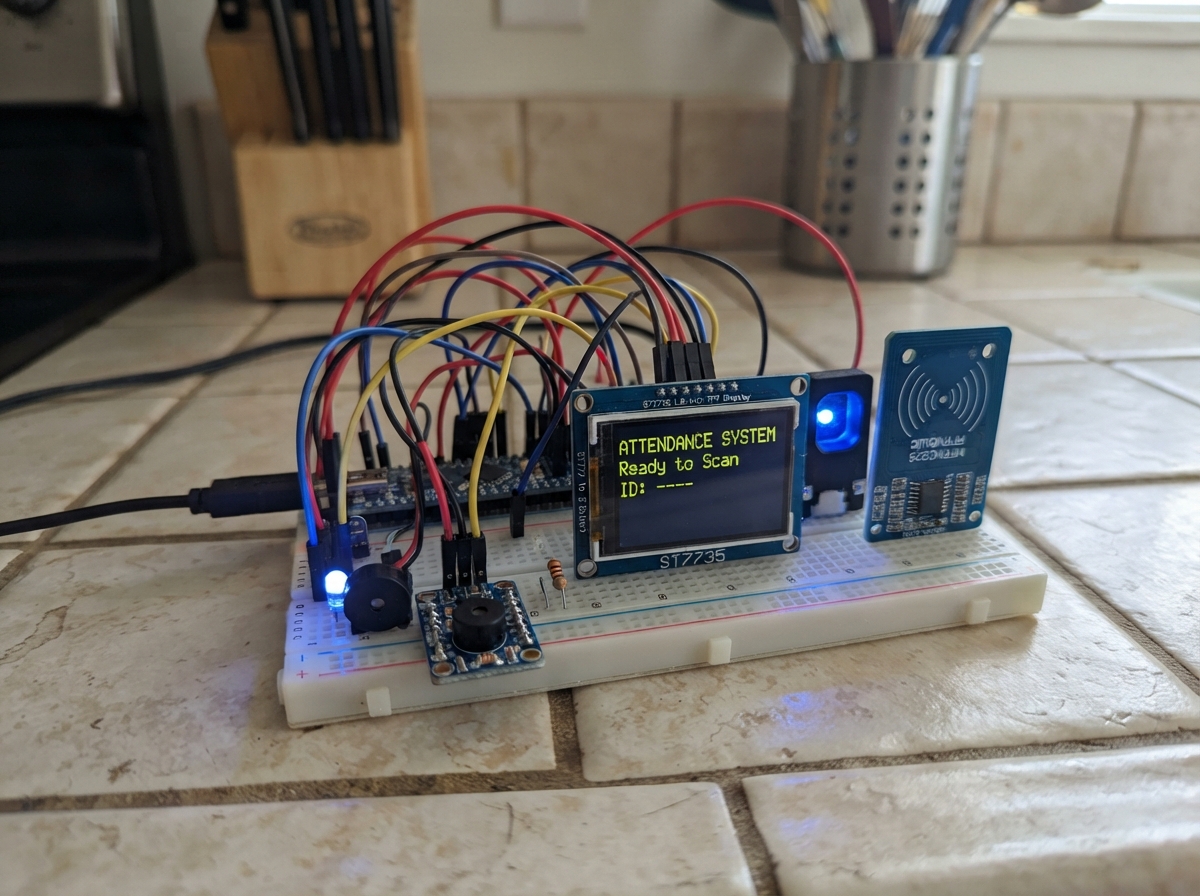
This project combines fingerprint recognition and RFID card reading to create a dual-authentication attendance system. The ESP32 microcontroller manages a 1.8-inch color display, RFID reader, fingerprint sensor, RGB status LED, and buzzer to provide real-time feedback during enrollment and verification. A battery-backed real-time clock ensures accurate timestamping even during power loss.
The guide provides a complete wiring diagram, parts list, and step-by-step assembly instructions to get the system running. Firmware handles WiFi connectivity, web-based configuration, local storage of enrolled users, and a state machine that guides users through fingerprint and card enrollment or attendance verification with visual and audio feedback.
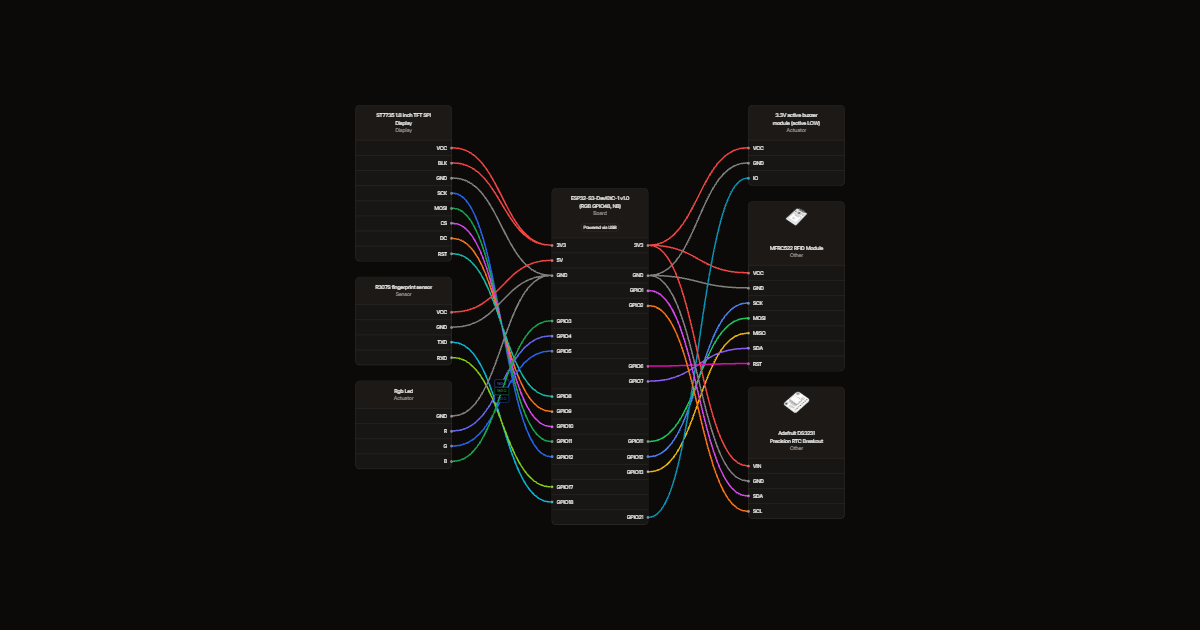
Wiring diagram
Gather all the parts
Assemble it in 7 steps
1. Start with USB unplugged
Use a breadboard and jumper wires. Connect the board GND to a shared ground row. Use USB power only; never connect another supply to the 5V pin at the same time.
2. Connect the screen
Use the eight-pin header in your photo. VCC and LED go to 3V3; GND to GND. SCK to GPIO12 (clock); SDA to GPIO11 (data); A0/DC to GPIO9; RESET to GPIO8; CS to GPIO10 (select). The screen SDA label means SPI data, not I2C. The unused four-pin SD header stays disconnected.
- Use 3.3V power and logic. This design assumes the common 128 by 160 ST7735 screen with onboard backlight current limiting.
3. Connect the card reader
VCC to 3V3, GND to GND, SCK to GPIO12, MOSI to GPIO11, MISO to GPIO13, SDA to GPIO7 (select), RST to GPIO6. Leave IRQ disconnected.
- Never use 5V on the RC522. Use compatible 13.56 MHz cards; 125 kHz tags do not work.
4. Connect the fingerprint sensor
Use connector pin numbers in your photo, not cable colors. Pin 1 VCC to board 5V; pin 2 GND to GND; pin 3 TXD to GPIO18 (ESP32 receive); pin 4 RXD to GPIO17 (ESP32 transmit). Leave pins 5 TOUCH and 6 3.3VT disconnected. Leave the USB pads disconnected.
- Use the factory 5V supply configuration with the 3.3V solder bridge OPEN. R307S UART uses 3.3V logic despite its 5V supply. Never apply 5V logic to the ESP32.
5. Connect one common-cathode RGB LED
With USB unplugged, remove the three separate LEDs. Keep all three 330 ohm resistors. Connect GPIO4 through r_red to RGB R (red anode), GPIO5 through r_green to RGB G (green anode), and GPIO3 through r_blue to RGB B (blue anode). Connect the common cathode to GND. Blue means ready, green accepted, red rejected. Deploy the updated firmware before use.
- Use a low-current four-pin common-cathode RGB LED, not common-anode or an addressable LED. Check its own pin diagram; leg order varies. Keep one resistor per color, not one resistor in the common ground leg.
6. Connect the three-pin active buzzer module
With power unplugged, remove the old two-pin piezo. Connect module VCC (+) to 3V3, GND (-) to GND, and IO (S or IN) to GPIO21. Follow printed labels, not pin position. Use a 3.3V-compatible active-LOW module with onboard transistor driver. Successful actions give a short beep; errors give a longer beep at the same fixed pitch.
- Do not use a KY-012 whose middle pin is unconnected, or drive a bare buzzer directly from GPIO21. This design needs separate supply and logic pins and an onboard driver.
- Firmware uses BUZZER_ACTIVE_LOW=true. If your transistor-driven module is active HIGH instead, set this constant to false and Deploy again.
7. Add the battery-backed clock
With power unplugged, connect RTC VIN (sometimes labelled VCC) to 3V3, GND to GND, SDA to GPIO1 (clock data), and SCL to GPIO2 (clock pulses). Leave SQW, 32K, RST and BAT header pins disconnected. This diagram uses the Adafruit DS3231 breakout with its onboard battery holder. Install a CR1220 backup coin cell in that holder, observing polarity. After Deploy, open the website and press Set clock from this phone once. The clock then survives USB power loss. Records remain in UTC.
- Power the RTC at 3.3V so its I2C pullups are safe for the ESP32. Do not use 5V.
- Use the battery type specified for your exact module. The selected Adafruit board uses a non-rechargeable CR1220 and has no charger. Generic ZS-042 charging modules are different; never put a non-rechargeable CR2032 in an enabled charging circuit.
- Keep coin cells away from children. Set the clock again if the battery is removed or exhausted. A missing or unset RTC is reported on the website; attendance requires a valid clock.
Review all connections
1. Connections between "screen" and "ESP32"
2. Connections between "rfid" and "ESP32"
3. Connections between "finger" and "ESP32"
4. Connections between "buzzer" and "ESP32"
5. Connections between "r_red" and "ESP32"
6. Connections between "r_green" and "ESP32"
7. Connections between "r_blue" and "ESP32"
8. Connections between "rgb" and "ESP32"
9. Connections between "rtc" and "ESP32"
Deploy the firmware
#include <Arduino.h>
#include <SPI.h>
#include <Wire.h>
#include <RTClib.h>
#include <WiFi.h>
#include <WebServer.h>
#include <Preferences.h>
#include <LittleFS.h>
#include <time.h>
#include <sys/time.h>
#include <Adafruit_ST7735.h>
#include <Fonts/FreeSans9pt7b.h>
#include <Adafruit_Fingerprint.h>
#include <MFRC522.h>
#include "web_style.h"
// Shared SPI: SCK12, MOSI11, MISO13. Separate chip selects.
Adafruit_ST7735 tft(&SPI,10,9,8);
MFRC522 reader(7,6);
HardwareSerial sensorSerial(1);
Adafruit_Fingerprint finger(&sensorSerial);
WebServer web(80);
Preferences prefs;
RTC_DS3231 rtc;
bool rtcOK=false,rtcValid=false;
struct Person { char name[25]; char uid[21]; } people[1001] = {};
enum Mode {IDLE, ENROLL_CARD, ENROLL_FIRST, ENROLL_LIFT, ENROLL_SECOND, VERIFY, RESULT};
Mode mode=IDLE;
int selected=0; unsigned long deadline=0,lastPoll=0,lastSeen[1001]={};
bool sensorOK=false,fsOK=false;
bool enrollmentActive=false;
String enrollmentOutcome="idle", enrollmentMessage="";
constexpr bool BUZZER_ACTIVE_LOW=false;
bool buzzerOn=false;
unsigned long buzzerUntil=0;
void buzzerWrite(bool on){digitalWrite(21,BUZZER_ACTIVE_LOW?!on:on);}
void beep(unsigned long duration){buzzerUntil=millis()+duration;buzzerOn=true;buzzerWrite(true);}
String statusText,lastScreen, pendingName,pendingUID;
// Render the changing card off-screen, then copy it in one pass.
// The header/footer remain untouched between status changes.
GFXcanvas16 panel(160,88);
uint16_t lastColor=0;
String lastHeading;
bool frameDrawn=false;
constexpr uint16_t UI_BG=0x0843, UI_CARD=0x10A5, UI_MUTED=0x9CF3, UI_BLUE=0x4DFF;
void show(String s,int color=ST77XX_WHITE){
statusText=s;
String heading="READY TO CHECK IN";
if(mode==ENROLL_CARD||mode==ENROLL_FIRST||mode==ENROLL_LIFT||mode==ENROLL_SECOND)heading="ENROLLMENT";
else if(mode==VERIFY)heading="VERIFY IDENTITY";
else if(mode==RESULT)heading=color==ST77XX_YELLOW?"ACTION NEEDED":(color==ST77XX_GREEN?"COMPLETED":"PLEASE TRY AGAIN");
else if(color==ST77XX_RED)heading="DEVICE NOTICE";
if(frameDrawn&&s==lastScreen&&color==lastColor&&heading==lastHeading)return;
lastScreen=s;lastColor=color;lastHeading=heading;
if(!frameDrawn){
tft.fillScreen(UI_BG);tft.setTextWrap(false);tft.setFont();tft.setTextSize(1);
tft.fillRect(0,0,160,24,UI_CARD);tft.fillRect(0,0,3,24,UI_BLUE);
tft.setTextColor(ST77XX_WHITE);tft.setCursor(12,8);tft.print("ATTENDANCE");
tft.setTextColor(UI_MUTED);tft.setCursor(8,117);tft.print("WEB 192.168.4.1");
frameDrawn=true;
}
if(!panel.getBuffer())return;
panel.fillScreen(UI_BG);panel.setTextWrap(false);panel.setFont();panel.setTextSize(1);
uint16_t accent=color==ST77XX_WHITE?UI_BLUE:color;
panel.setTextColor(accent);panel.setCursor(9,5);panel.print(heading);
panel.fillRoundRect(5,19,150,66,6,UI_CARD);
panel.fillRect(5,25,3,54,accent);
panel.setFont(&FreeSans9pt7b);panel.setTextColor(color);
// Word-wrap with measured glyph widths, including long names.
String lines[8];int count=0;String line,word;
for(size_t i=0;i<=s.length();i++){
char c=i<s.length()?s[i]:'\n';
if(c!=' '&&c!='\n'){word+=c;continue;}
if(word.length()){
String candidate=line.length()?line+" "+word:word;
int16_t x,y;uint16_t w,h;panel.getTextBounds(candidate,0,0,&x,&y,&w,&h);
if(w>132&&line.length()){if(count<8)lines[count++]=line;line="";}
for(size_t j=0;j<word.length();j++){
String next=line+word[j];
// Preserve a word separator only once.
if(j==0&&line.length())next=line+" "+word[j];
panel.getTextBounds(next,0,0,&x,&y,&w,&h);
if(w>132&&line.length()){if(count<8)lines[count++]=line;line=String(word[j]);}
else line=next;
}
word="";
}
if(c=='\n'&&line.length()){if(count<8)lines[count++]=line;line="";}
}
// Typical pages use the smooth font; compact fallback keeps long notices visible.
if(count>3){panel.setFont();panel.setTextSize(1);}
int step=count>3?10:19;
int baseline=count>3?29:36+(3-count)*9;
for(int i=0;i<count&&i<5;i++){panel.setCursor(14,baseline+i*step);panel.print(lines[i]);}
tft.drawRGBBitmap(0,25,panel.getBuffer(),160,88);
}
void lights(bool r,bool g,bool b){digitalWrite(4,r);digitalWrite(5,g);digitalWrite(3,b);}
void idle(){if(enrollmentActive){enrollmentActive=false;enrollmentOutcome="failed";enrollmentMessage="Enrollment cancelled. Your entries are kept.";}mode=IDLE;lights(0,0,1);show("Tap your card\nTo begin check-in");}
void result(String s,bool ok,bool warning=false){if(enrollmentActive){enrollmentActive=false;enrollmentOutcome=ok?"success":"failed";enrollmentMessage=s;}mode=RESULT;deadline=millis()+2500;lights(warning||!ok,warning||ok,0);beep(ok?120:400);show(s,warning?ST77XX_YELLOW:(ok?ST77XX_GREEN:ST77XX_RED));}
String key(int id){return String("p")+id;}
bool savePerson(int id){return prefs.putBytes(key(id).c_str(),&people[id],sizeof(Person))==sizeof(Person);}
String card(){
if(!reader.PICC_IsNewCardPresent()||!reader.PICC_ReadCardSerial())return "";
String s;for(byte i=0;i<reader.uid.size;i++){if(reader.uid.uidByte[i]<16)s+='0';s+=String(reader.uid.uidByte[i],HEX);}s.toUpperCase();reader.PICC_HaltA();return s;
}
String clean(String s){String out;for(size_t i=0;i<s.length()&&out.length()<24;i++)if(isalnum((unsigned char)s[i])||s[i]==' '||s[i]=='-'||s[i]=='_')out+=s[i];return out;}
bool auth(){if(web.authenticate("admin","CC0000CC"))return true;web.requestAuthentication();return false;}
struct Details { char dob[11]; uint16_t slot; uint8_t field, department, stage, shift; } details[1001]={}, pendingDetails={};
const char* fields[]={"Medical Group","Medical and Health Technologies","Science","Engineering","Engineering Technologies","Law","Administration and Economics","Arts","Physical Education and Sports Sciences"};
const char* departments[][5]={
{"General Medicine","Dentistry","Pharmacy"},
{"Anesthesia Techniques","Medical Laboratory Techniques","Radiology and Sonar"},
{"Pathological Analysis Science"},
{"Oil Engineering","Civil Engineering","Control and Computers Engineering","Cyber Security Engineering","Artificial Intelligence Engineering"},
{"Power Mechanical Engineering Techniques"},{"Law"},
{"Business Administration","Oil and Gas Marketing Administration"},{"English Language"},
{"Physical Education and Sports Sciences"}};
const uint8_t departmentCounts[]={3,3,1,5,1,1,2,1,1};
String detailPath(int id){return "/student"+String(id)+".bin";}
String htmlEscape(String v){v.replace("&","&");v.replace("<","<");v.replace(">",">");v.replace("\"",""");v.replace("'","'");return v;}
String csvCell(String v){v.replace("\"","\"\"");return "\""+v+"\"";}
String ageOf(const Details& d){
if(!d.dob[0])return "";
time_t now=time(nullptr);if(now<1700000000)return "";struct tm t;gmtime_r(&now,&t);
int y=String(d.dob).substring(0,4).toInt(),m=String(d.dob).substring(5,7).toInt(),day=String(d.dob).substring(8,10).toInt();
return String(t.tm_year+1900-y-((t.tm_mon+1<m)||(t.tm_mon+1==m&&t.tm_mday<day)));
}
void records(bool registration,bool csv){
if(!auth())return;
if(!fsOK){web.send(503,"text/plain","Storage unavailable");return;}
web.setContentLength(CONTENT_LENGTH_UNKNOWN);
if(csv)web.sendHeader("Content-Disposition",registration?"attachment; filename=registration.csv":"attachment; filename=attendance.csv");
web.send(200,csv?"text/csv; charset=utf-8":"text/html; charset=utf-8","");
if(!csv){
web.sendContent(String("<!doctype html><html><head><meta charset='utf-8'><meta name='viewport' content='width=device-width,initial-scale=1'><style>")+PAGE_STYLE+"</style></head><body><div class='container'><header><div class='brand'><h1>G30 ATTENDANCE</h1></div><a class='btn secondary' style='width:auto;text-decoration:none' href='/'>HOME</a></header><section class='hero'><h2>"+(registration?"Registration":"Attendance Records")+"</h2></section><a class='btn secondary' style='text-decoration:none' href='"+(registration?"/registration.csv":"/attendance.csv")+"'>DOWNLOAD CSV</a>");
if(!registration)web.sendContent("<form method='post' action='/attendance/clear' style='margin-top:18px' onsubmit=\"return confirm('Permanently clear all attendance records? Download a CSV backup first. Student registrations and fingerprints will not be deleted.');\"><input type='hidden' name='confirm' value='clear-attendance'><button type='submit' class='btn secondary'>CLEAR RECORDS</button></form>");
web.sendContent("<div class='card' style='margin-top:18px;overflow-x:auto'><table style='width:100%;text-align:left;border-spacing:12px'><thead><tr>");
}
const char* headersReg[]={"ID","Name","Date Of Birth","Age","Field","Department","Stage","Shift"};
const char* headersAtt[]={"ID","Name","Record Date"};
for(int c=0;c<(registration?8:3);c++){String v=registration?headersReg[c]:headersAtt[c];web.sendContent(csv?(String(c?",":"")+csvCell(v)):("<th>"+v+"</th>"));}
web.sendContent(csv?"\r\n":"</tr></thead><tbody>");
auto row=[&](String* cells,int count){if(!csv)web.sendContent("<tr>");for(int c=0;c<count;c++)web.sendContent(csv?(String(c?",":"")+csvCell(cells[c])):("<td>"+htmlEscape(cells[c])+"</td>"));web.sendContent(csv?"\r\n":"</tr>");};
if(registration){for(int id=1;id<=1000;id++)if(people[id].name[0]){
const Details& d=details[id];bool filled=d.dob[0];
String cells[]={String(id),String(people[id].name),String(d.dob),ageOf(d),filled?fields[d.field]:"",filled?departments[d.field][d.department]:"",filled?String(d.stage):"",filled?(d.shift?"Evening":"Morning"):""};row(cells,8);
}}else{
File f=LittleFS.open("/attendance.csv","r");if(f){while(f.available()){String line=f.readStringUntil('\n');line.trim();int a=line.indexOf(','),b=line.indexOf(',',a+1);if(a<0||b<0||line.startsWith("utc,"))continue;String cells[]={line.substring(a+1,b),line.substring(b+1),line.substring(0,a)};row(cells,3);}f.close();}
}
if(!csv)web.sendContent("</tbody></table></div><footer class='footer'>G2 ATTENDANCE CONTROL SYSTEM • OFFLINE</footer></div></body></html>");
web.sendContent("");
}
void home() {
if (!auth()) return;
auto esc = [](const String& input) -> String {
String out;
for (size_t i = 0; i < input.length(); i++) {
char c = input[i];
if (c == '&') out += "&";
else if (c == '<') out += "<";
else if (c == '>') out += ">";
else if (c == '"') out += """;
else if (c == '\'') out += "'";
else out += c;
}
return out;
};
String h = R"rawliteral(
<!DOCTYPE html>
<html lang="en">
<head>
<meta charset="UTF-8">
<meta name="viewport" content="width=device-width, initial-scale=1">
<meta name="theme-color" content="#080f18">
<title>G2 | Attendance Control</title>
<style>
:root {
--bg: #080f18;
--panel: #101d29;
--panel2: #142532;
--cyan: #22e6d0;
--cyan2: #00bfc9;
--white: #f1f7fa;
--muted: #8ca4b2;
--border: rgba(34,230,208,.22);
--red: #ff647c;
}
* { box-sizing: border-box; }
body {
margin: 0;
min-height: 100vh;
background:
radial-gradient(ellipse at 50% -15%, #103d49 0%, transparent 48%),
var(--bg);
color: var(--white);
font-family: "Segoe UI", Arial, sans-serif;
}
button, input, select { font: inherit; }
.container {
width: min(100% - 30px, 900px);
margin: auto;
padding: 25px 0 45px;
}
header {
display: flex;
align-items: center;
justify-content: space-between;
gap: 12px;
margin-bottom: 28px;
}
.brand {
display: flex;
align-items: center;
gap: 12px;
}
.logo {
width: 45px;
height: 45px;
border: 1px solid var(--border);
background: #102b35;
color: var(--cyan);
border-radius: 13px;
display: grid;
place-items: center;
box-shadow: 0 0 20px rgba(34,230,208,.12);
}
.logo svg { width: 25px; }
.brand h1 {
font-size: 17px;
letter-spacing: 1.5px;
margin: 0;
}
.brand small {
display: block;
color: var(--cyan);
font-size: 10px;
letter-spacing: 2px;
margin-top: 4px;
}
.online {
border: 1px solid rgba(34,230,208,.3);
background: rgba(34,230,208,.08);
color: var(--cyan);
border-radius: 30px;
padding: 8px 12px;
font-size: 10px;
letter-spacing: 1px;
white-space: nowrap;
}
.dot {
display: inline-block;
width: 7px;
height: 7px;
background: var(--cyan);
border-radius: 50%;
margin-right: 6px;
box-shadow: 0 0 9px var(--cyan);
}
.hero {
background: linear-gradient(135deg,#122c39,#101b29);
border: 1px solid var(--border);
border-radius: 18px;
padding: 24px;
margin-bottom: 18px;
box-shadow: 0 10px 35px rgba(0,0,0,.2);
position: relative;
overflow: hidden;
}
.hero:after {
content: "";
position: absolute;
width: 160px;
height: 160px;
right: -65px;
top: -65px;
border: 1px solid rgba(34,230,208,.12);
border-radius: 50%;
box-shadow: 0 0 0 20px rgba(34,230,208,.025),
0 0 0 40px rgba(34,230,208,.02);
}
.eyebrow {
color: var(--cyan);
font-size: 10px;
letter-spacing: 2px;
margin-bottom: 12px;
}
.hero h2 {
margin: 0 0 9px;
font-size: clamp(21px,5vw,29px);
letter-spacing: .4px;
}
.hero p {
color: var(--muted);
font-size: 13px;
margin: 0;
white-space: pre-wrap;
line-height: 1.7;
}
.section-title {
font-size: 12px;
letter-spacing: 1.8px;
color: var(--muted);
margin: 26px 0 13px;
}
.grid {
display: grid;
grid-template-columns: repeat(2,minmax(0,1fr));
gap: 14px;
}
.card {
background: linear-gradient(145deg,var(--panel2),var(--panel));
border: 1px solid var(--border);
border-radius: 15px;
padding: 19px;
min-width: 0;
transition: .2s ease;
}
.card:hover {
border-color: rgba(34,230,208,.55);
transform: translateY(-2px);
}
.card h3 {
font-size: 14px;
margin: 0 0 7px;
}
.card p {
font-size: 12px;
color: var(--muted);
line-height: 1.6;
margin: 0 0 15px;
}
.icon {
width: 40px;
height: 40px;
display: grid;
place-items: center;
border-radius: 11px;
color: var(--cyan);
background: rgba(34,230,208,.09);
border: 1px solid rgba(34,230,208,.17);
margin-bottom: 14px;
}
.icon svg { width: 21px; height: 21px; }
input, select {
width: 100%;
background: #09141e;
border: 1px solid #294653;
border-radius: 9px;
padding: 12px;
color: white;
outline: none;
margin: 7px 0 13px;
transition: .2s;
}
input:focus, select:focus {
border-color: var(--cyan);
box-shadow: 0 0 0 3px rgba(34,230,208,.08);
}
label {
font-size: 11px;
color: #a9c1cb;
}
.btn {
width: 100%;
display: flex;
justify-content: center;
align-items: center;
gap: 9px;
border: 1px solid var(--cyan);
background: rgba(34,230,208,.1);
color: var(--cyan);
padding: 12px;
border-radius: 9px;
cursor: pointer;
font-size: 12px;
font-weight: 650;
transition: .2s;
}
.btn svg { width: 17px; height: 17px; }
.btn:hover {
background: var(--cyan);
color: #06141a;
box-shadow: 0 0 18px rgba(34,230,208,.2);
}
.btn:active { transform: scale(.98); }
.btn.secondary {
border-color: #31515e;
background: #142632;
color: #d8e9ed;
}
.btn.secondary:hover {
border-color: var(--cyan);
color: var(--cyan);
}
.btn.danger {
width: auto;
padding: 8px 11px;
color: var(--red);
border-color: rgba(255,100,124,.3);
background: rgba(255,100,124,.08);
}
.btn.danger:hover {
background: var(--red);
color: #fff;
}
.people {
display: grid;
gap: 10px;
}
.person {
display: flex;
align-items: center;
justify-content: space-between;
gap: 12px;
padding: 15px;
background: var(--panel);
border: 1px solid #213b49;
border-radius: 12px;
}
.person-info {
display: flex;
align-items: center;
gap: 12px;
min-width: 0;
}
.avatar {
width: 37px;
height: 37px;
flex-shrink: 0;
border-radius: 10px;
background: #12323c;
border: 1px solid var(--border);
color: var(--cyan);
display: grid;
place-items: center;
font-size: 12px;
font-weight: bold;
}
.person-name {
font-size: 13px;
font-weight: 600;
overflow-wrap: anywhere;
}
.person-id {
color: var(--muted);
font-size: 10px;
margin-top: 5px;
}
.notice {
background: rgba(34,230,208,.045);
border: 1px solid var(--border);
border-radius: 12px;
padding: 15px;
color: var(--muted);
font-size: 11px;
line-height: 1.8;
margin-top: 17px;
}
.notice strong { color: var(--cyan); }
.footer {
text-align: center;
border-top: 1px solid #1b303c;
margin-top: 28px;
padding-top: 18px;
color: #67818e;
font-size: 10px;
letter-spacing: 1px;
}
.toast {
position: fixed;
bottom: 22px;
left: 50%;
transform: translate(-50%,20px);
background: #142b37;
border: 1px solid var(--cyan);
color: white;
padding: 13px 19px;
border-radius: 10px;
font-size: 12px;
opacity: 0;
pointer-events: none;
transition: .25s;
z-index: 10;
width: max-content;
max-width: 90%;
text-align: center;
}
.toast.show {
opacity: 1;
transform: translate(-50%,0);
}
@media(max-width:520px) {
.container { width: min(100% - 22px,900px); }
.hero { padding: 19px; }
.grid { gap: 10px; }
.card { padding: 14px; }
.brand h1 { font-size: 14px; }
.online { font-size: 9px; padding: 7px 9px; }
}
</style>
</head>
<body>
<div class="container">
<header>
<div class="brand">
<div class="logo">
<svg viewBox="0 0 24 24" fill="none" stroke="currentColor" stroke-width="1.8">
<path d="M12 3l8 4v5c0 5-3.5 8-8 10-4.5-2-8-5-8-10V7l8-4z"/>
<path d="M8 12l2.5 2.5L16 9"/>
</svg>
</div>
<div>
<h1>G30 ATTENDANCE</h1>
<small>CONTROL SYSTEM</small>
</div>
</div>
<div class="online"><span class="dot"></span>OFFLINE SYSTEM</div>
</header>
<section class="hero">
<div class="eyebrow">SYSTEM OVERVIEW / 01</div>
<h2>Attendance Control</h2>
<p id="statusText">)rawliteral";
h += esc(statusText);
h += R"rawliteral(</p>
</section>
<div class="section-title">SYSTEM MANAGEMENT</div>
<div class="grid">
<section class="card">
<div class="icon">
<svg viewBox="0 0 24 24" fill="none" stroke="currentColor" stroke-width="1.8">
<path d="M16 21v-2a4 4 0 00-4-4H6a4 4 0 00-4 4v2"/>
<circle cx="9" cy="7" r="4"/>
<path d="M19 8v6m-3-3h6"/>
</svg>
</div>
<h3>Student Enrollment</h3>
<p>Register a new student using an RFID card and fingerprint.</p>
<form id="enrollmentForm" method="post" action="/enroll">
<label>STUDENT ID (1–1000)</label>
<input name="id" type="number" min="1" max="1000" placeholder="Enter student ID" required>
<label>FULL NAME</label>
<input name="name" maxlength="24" placeholder="Enter student name" required>
<label>DATE OF BIRTH</label>
<input name="dob" id="dob" type="date" required>
<label>FIELD</label><select name="field" id="field" required><option value="">Select field</option></select>
<div id="departmentBox" hidden><label>DEPARTMENT</label><select name="department" id="department" required></select></div>
<div id="stageBox" hidden><label>STAGE</label><select name="stage" id="stage" required><option value="">Select stage</option><option>1</option><option>2</option><option>3</option><option>4</option></select></div>
<div id="shiftBox" hidden><label>SHIFT</label><select name="shift" required><option value="">Select shift</option><option value="0">Morning</option><option value="1">Evening</option></select></div>
<button class="btn" type="submit">
<svg viewBox="0 0 24 24" fill="none" stroke="currentColor" stroke-width="2">
<path d="M12 5v14M5 12h14"/>
<circle cx="12" cy="12" r="10"/>
</svg>
START ENROLLMENT
</button>
</form>
<p id="enrollmentStatus" role="status" aria-live="polite"></p>
</section>
<section class="card">
<div class="icon">
<svg viewBox="0 0 24 24" fill="none" stroke="currentColor" stroke-width="1.8">
<circle cx="12" cy="12" r="9"/>
<path d="M12 7v5l3 2"/>
<path d="M8 2h8"/>
</svg>
</div>
<h3>RTC Synchronization</h3>
<p>Synchronize the DS3231 clock with your phone's current UTC time.</p>
<button class="btn" type="button" onclick="syncClock()">
<svg viewBox="0 0 24 24" fill="none" stroke="currentColor" stroke-width="1.8">
<circle cx="12" cy="12" r="9"/>
<path d="M12 7v5l3 2"/>
</svg>
SET CLOCK FROM PHONE
</button>
<div style="margin-top:17px;font-size:11px;color:var(--muted);line-height:1.8">
RTC STATUS:
<strong style="color:var(--cyan)">)rawliteral";
h += rtcOK ? (rtcValid ? "READY" : "CLOCK NOT SET") : "NOT DETECTED";
h += R"rawliteral(</strong>
</div>
</section>
<section class="card">
<div class="icon">
<svg viewBox="0 0 24 24" fill="none" stroke="currentColor" stroke-width="1.8">
<path d="M4 7h16M10 11v6m4-6v6"/>
<path d="M6 7l1 14h10l1-14M9 7V4h6v3"/>
</svg>
</div>
<h3>Attendance Records</h3>
<p>Download the locally stored attendance records in CSV format.</p>
<a href="/attendance" style="text-decoration:none">
<button class="btn secondary" type="button">
<svg viewBox="0 0 24 24" fill="none" stroke="currentColor" stroke-width="1.8">
<path d="M12 3v12m-5-5l5 5 5-5"/>
<path d="M5 19h14"/>
</svg>
ATTENDANCE RECORDS
</button>
</a>
<a href="/registration" style="text-decoration:none;margin-top:12px;display:block"><button class="btn secondary" type="button">REGISTRATION</button></a>
</section>
<section class="card">
<div class="icon">
<svg viewBox="0 0 24 24" fill="none" stroke="currentColor" stroke-width="1.8">
<path d="M4 12h16M12 4v16"/>
<circle cx="12" cy="12" r="9"/>
</svg>
</div>
<h3>Enrollment Control</h3>
<p>Cancel an ongoing card or fingerprint enrollment operation.</p>
<form method="post" action="/cancel">
<button class="btn secondary" type="submit">
<svg viewBox="0 0 24 24" fill="none" stroke="currentColor" stroke-width="2">
<path d="M6 6l12 12M18 6L6 18"/>
</svg>
CANCEL OPERATION
</button>
</form>
</section>
</div>
<div class="section-title">REGISTERED PEOPLE</div>
<div class="people">
)rawliteral";
web.setContentLength(CONTENT_LENGTH_UNKNOWN);web.send(200,"text/html; charset=utf-8","");web.sendContent(h);h="";
int total = 0;
for (int i = 1; i <= 1000; i++) {
if (!people[i].name[0]) continue;
total++;
String name = esc(String(people[i].name));
h += R"rawliteral(
<div class="person">
<div class="person-info">
<div class="avatar">)rawliteral";
h += String(i);
h += R"rawliteral(</div>
<div>
<div class="person-name">)rawliteral";
h += name;
h += R"rawliteral(</div>
<div class="person-id">STUDENT ID: )rawliteral";
h += String(i);
h += R"rawliteral(</div>
</div>
</div>
<form method="post" action="/delete"
onsubmit="return confirm('Delete this person, card link and fingerprint? Past attendance records will remain.');">
<input type="hidden" name="id" value=")rawliteral";
h += String(i);
h += R"rawliteral(">
<button class="btn danger" type="submit" aria-label="Delete student">
<svg viewBox="0 0 24 24" fill="none" stroke="currentColor" stroke-width="2">
<path d="M6 6l12 12M18 6L6 18"/>
</svg>
</button>
</form>
</div>
)rawliteral";
web.sendContent(h);h="";
}
if (total == 0) {
h += R"rawliteral(
<div class="card" style="text-align:center;color:var(--muted);font-size:12px">
No registered students yet.
</div>
)rawliteral";
}
h += R"rawliteral(
</div>
<div class="notice">
<strong>IMPORTANT INFORMATION</strong><br>
Student IDs: 1–1000. Simultaneous enrollment is limited by fingerprint sensor capacity.<br>
Fingerprint templates remain inside the fingerprint sensor.<br>
Deleting a person removes their card link and fingerprint template.
Past attendance records are preserved.<br>
Download attendance records regularly. No cloud backup is available.
</div>
<footer class="footer">
G2 ATTENDANCE CONTROL SYSTEM<br>
LOCAL NETWORK • 192.168.4.1 • OFFLINE
</footer>
</div>
<div class="toast" id="toast"></div>
<script>
const catalog=[["Medical Group", ["General Medicine", "Dentistry", "Pharmacy"]], ["Medical and Health Technologies", ["Anesthesia Techniques", "Medical Laboratory Techniques", "Radiology and Sonar"]], ["Science", ["Pathological Analysis Science"]], ["Engineering", ["Oil Engineering", "Civil Engineering", "Control and Computers Engineering", "Cyber Security Engineering", "Artificial Intelligence Engineering"]], ["Engineering Technologies", ["Power Mechanical Engineering Techniques"]], ["Law", ["Law"]], ["Administration and Economics", ["Business Administration", "Oil and Gas Marketing Administration"]], ["Arts", ["English Language"]], ["Physical Education and Sports Sciences", ["Physical Education and Sports Sciences"]]];
const field=document.getElementById('field'),dept=document.getElementById('department'),stage=document.getElementById('stage');
const dob=document.getElementById('dob');dob.max=new Date().toLocaleDateString('en-CA');
catalog.forEach((entry,i)=>field.add(new Option(entry[0],i)));
field.onchange=()=>{dept.innerHTML='';dept.add(new Option('Select department',''));if(field.value!=='')catalog[Number(field.value)][1].forEach((v,i)=>dept.add(new Option(v,i)));document.getElementById('departmentBox').hidden=field.value==='';document.getElementById('stageBox').hidden=true;document.getElementById('shiftBox').hidden=true;stage.value='';};
dept.onchange=()=>{document.getElementById('stageBox').hidden=dept.value==='';document.getElementById('shiftBox').hidden=true;stage.value='';};
stage.onchange=()=>document.getElementById('shiftBox').hidden=stage.value==='';
function showToast(message) {
const toast = document.getElementById('toast');
toast.textContent = message;
toast.classList.add('show');
clearTimeout(window.toastTimer);
window.toastTimer = setTimeout(() => {
toast.classList.remove('show');
}, 3500);
}
const enrollmentForm=document.getElementById('enrollmentForm');
const enrollmentStatus=document.getElementById('enrollmentStatus');
const enrollmentButton=enrollmentForm.querySelector('button[type="submit"]');
let enrollmentWaiting=false;
enrollmentForm.addEventListener('submit',async event=>{
event.preventDefault();
if(enrollmentWaiting)return;
enrollmentWaiting=true;enrollmentButton.disabled=true;
enrollmentStatus.textContent='Starting enrollment...';
try {
const response=await fetch('/enroll',{method:'POST',body:new URLSearchParams(new FormData(enrollmentForm))});
const message=await response.text();
if(!response.ok)throw new Error(message);
enrollmentStatus.textContent=message;
pollEnrollment();
} catch(error) {
enrollmentStatus.textContent=error.message+' Your entries are kept. Retry when the device is ready.';
enrollmentWaiting=false;enrollmentButton.disabled=false;
}
});
async function pollEnrollment(){
try {
const response=await fetch('/enrollment-status',{cache:'no-store'});
if(!response.ok)throw new Error('Status unavailable');
const state=await response.json();
enrollmentStatus.textContent=state.message;
if(state.outcome==='success'){location.reload();return;}
if(state.outcome==='failed'||state.outcome==='idle'){
enrollmentStatus.textContent+=' Your entries are kept. Press Start Enrollment to retry.';
enrollmentWaiting=false;enrollmentButton.disabled=false;return;
}
} catch(error) {enrollmentStatus.textContent='Connection interrupted. Keeping your entries and checking again...';}
setTimeout(pollEnrollment,700);
}
async function syncClock() {
const button = document.querySelector('[onclick="syncClock()"]');
button.disabled = true;
button.style.opacity = '.6';
try {
const epoch = Math.floor(Date.now() / 1000);
const response = await fetch('/clock', {
method: 'POST',
headers: {
'Content-Type': 'application/x-www-form-urlencoded'
},
body: 'epoch=' + epoch
});
const message = await response.text();
if (!response.ok) {
throw new Error(message);
}
showToast(message);
} catch (error) {
showToast('Clock synchronization failed: ' + error.message);
} finally {
button.disabled = false;
button.style.opacity = '1';
}
}
</script>
</body>
</html>
)rawliteral";
web.sendContent(h);web.sendContent("");
}
void setup(){
Serial.begin(115200);
Wire.begin(1,2);rtcOK=rtc.begin(&Wire);
if(rtcOK&&!rtc.lostPower()){
DateTime dt=rtc.now();
if(dt.isValid()&&dt.year()>=2024&&dt.year()<2100){timeval tv={(time_t)dt.unixtime(),0};settimeofday(&tv,nullptr);rtcValid=true;}
}
pinMode(4,OUTPUT);pinMode(5,OUTPUT);pinMode(3,OUTPUT);pinMode(21,OUTPUT);buzzerWrite(false);
pinMode(7,OUTPUT);digitalWrite(7,HIGH);pinMode(10,OUTPUT);digitalWrite(10,HIGH);
SPI.begin(12,13,11,10);tft.initR(INITR_BLACKTAB);tft.setRotation(1);reader.PCD_Init();
sensorSerial.begin(57600,SERIAL_8N1,18,17);finger.begin(57600);sensorOK=finger.verifyPassword();
if(sensorOK)finger.getParameters();
prefs.begin("attendance",false);for(int i=1;i<=1000;i++)if(prefs.getBytesLength(key(i).c_str())==sizeof(Person))prefs.getBytes(key(i).c_str(),&people[i],sizeof(Person));
fsOK=LittleFS.begin(false); // Do not erase records automatically on a mount failure.
if(!fsOK && !prefs.getBool("fsinit",false)){if(LittleFS.format())fsOK=LittleFS.begin(false);}
if(fsOK){prefs.putBool("fsinit",true);for(int i=1;i<=1000;i++)if(people[i].name[0]){details[i].slot=i;File f=LittleFS.open(detailPath(i),"r");if(f&&f.size()==sizeof(Details))f.read((uint8_t*)&details[i],sizeof(Details));if(f)f.close();}}
WiFi.mode(WIFI_AP);WiFi.softAP("G30","CC0000CC");
web.on("/",home);
web.on("/attendance",[](){records(false,false);});web.on("/registration",[](){records(true,false);});
web.on("/attendance.csv",[](){records(false,true);});web.on("/registration.csv",[](){records(true,true);});
web.on("/attendance/clear",HTTP_POST,[](){
if(!auth())return;
if(web.arg("confirm")!="clear-attendance"){web.send(400,"text/plain","Confirmation required.");return;}
if(!fsOK){web.send(503,"text/plain","Storage unavailable. Records were not cleared.");return;}
if(LittleFS.exists("/attendance.csv")&&!LittleFS.remove("/attendance.csv")){
web.send(500,"text/plain","Could not clear attendance records. Please retry.");return;
}
web.sendHeader("Location","/attendance");web.send(303);
});
web.on("/clock",HTTP_POST,[](){if(!auth())return;time_t t=web.arg("epoch").toInt();if(t<1700000000||t>=4102444800LL){web.send(400,"text/plain","Invalid clock");return;}timeval tv={t,0};settimeofday(&tv,nullptr);if(rtcOK){rtc.adjust(DateTime((uint32_t)t));rtcValid=!rtc.lostPower();}web.send(200,"text/plain",rtcValid?"UTC clock set and saved to RTC":"Clock set for this session; RTC unavailable");});
web.on("/cancel",HTTP_POST,[](){if(!auth())return;idle();web.sendHeader("Location","/");web.send(303);});
web.on("/enrollment-status",HTTP_GET,[](){
if(!auth())return;
String message=enrollmentActive?statusText:enrollmentMessage;
message.replace("\n"," ");message.replace("\r"," ");
message.replace("\\","\\\\");message.replace("\"","\\\"");
web.sendHeader("Cache-Control","no-store");
web.send(200,"application/json",String("{\"outcome\":\"")+enrollmentOutcome+"\",\"message\":\""+message+"\"}");
});
web.on("/enroll",HTTP_POST,[](){
if(!auth())return;if(mode!=IDLE){web.send(409,"text/plain","Busy. Cancel first.");return;}
int id=web.arg("id").toInt();String n=clean(web.arg("name"));
if(id<1||id>1000){web.send(400,"text/plain","Student ID must be between 1 and 1000.");return;}
if(people[id].name[0]){web.send(409,"text/plain","This student ID is already registered. Open Registration to check the saved student. To enroll another student, use an unused ID. This request did not change the existing registration.");return;}
if(n.length()==0){web.send(400,"text/plain","Enter the student name.");return;}
if(!sensorOK){web.send(503,"text/plain","Fingerprint sensor was not detected at startup. Restart after checking sensor power and connections.");return;}
if(!fsOK){web.send(503,"text/plain","Storage unavailable");return;}
String dob=web.arg("dob"),field=web.arg("field"),dep=web.arg("department"),stage=web.arg("stage"),shift=web.arg("shift");
int fi=field.toInt(),de=dep.toInt(),st=stage.toInt();
bool valid=dob.length()==10&&dob[4]=='-'&&dob[7]=='-';
for(int c=0;c<10&&valid;c++)if(c!=4&&c!=7&&!isdigit((unsigned char)dob[c]))valid=false;
int yr=dob.substring(0,4).toInt(),mo=dob.substring(5,7).toInt(),dy=dob.substring(8,10).toInt();
const int days[]={31,28,31,30,31,30,31,31,30,31,30,31};
valid=valid&&yr>=1900&&yr<=2099&&mo>=1&&mo<=12&&dy>=1;
if(valid)valid=dy<=days[mo-1]+(mo==2&&yr%4==0&&(yr%100!=0||yr%400==0));
time_t current=time(nullptr);if(valid&¤t>=1700000000){struct tm t;gmtime_r(¤t,&t);char today[11];strftime(today,sizeof(today),"%Y-%m-%d",&t);valid=dob<=String(today);}
if(!valid||field!=String(fi)||fi<0||fi>8||dep!=String(de)||de<0||de>=departmentCounts[fi]||stage!=String(st)||st<1||st>4||(shift!="0"&&shift!="1")){web.send(400,"text/plain","Complete all student fields with valid selections and date of birth.");return;}
uint16_t slot=0;for(uint16_t candidate=1;candidate<finger.capacity;candidate++){bool used=false;for(int i=1;i<=1000;i++)if(people[i].name[0]&&details[i].slot==candidate){used=true;break;}if(!used){slot=candidate;break;}}
if(!slot){web.send(409,"text/plain","Fingerprint sensor storage is full. IDs 1-1000 are supported, but the sensor limits simultaneous registrations.");return;}
pendingDetails=Details{};dob.toCharArray(pendingDetails.dob,11);pendingDetails.slot=slot;pendingDetails.field=fi;pendingDetails.department=de;pendingDetails.stage=st;pendingDetails.shift=shift.toInt();
enrollmentActive=true;enrollmentOutcome="pending";enrollmentMessage="";selected=id;pendingName=n;pendingUID="";mode=ENROLL_CARD;deadline=millis()+60000;show("Enroll\nTap new card");web.send(200,"text/plain","Enrollment started. Tap the new card, then scan the fingerprint.");
});
web.on("/delete",HTTP_POST,[](){
if(!auth())return;
if(mode!=IDLE){web.send(409,"text/plain","Busy. Press Cancel before deleting a person.");return;}
String value=web.arg("id");
for(size_t i=0;i<value.length();i++)if(!isdigit((unsigned char)value[i])){web.send(400,"text/plain","Invalid ID");return;}
int id=value.toInt();
if(id<1||id>1000||!people[id].name[0]){web.send(400,"text/plain","Registered ID 1-1000 required.");return;}
if(!sensorOK||finger.deleteModel(details[id].slot)!=FINGERPRINT_OK){
web.send(503,"text/plain","Fingerprint deletion failed. Check sensor power and wiring, then retry. Person entry kept.");return;
}
if(!prefs.remove(key(id).c_str())){
web.send(500,"text/plain","Fingerprint removed, but person entry could not be erased. Retry deletion before using this ID.");return;
}
people[id]=Person{};details[id]=Details{};LittleFS.remove(detailPath(id));lastSeen[id]=0;
result("Person deleted",true);
web.sendHeader("Location","/");web.send(303);
});
web.on("/csv",[](){if(!auth())return;if(!fsOK){web.send(503,"text/plain","Storage error");return;}File f=LittleFS.open("/attendance.csv","r");if(!f){web.send(200,"text/csv","utc,id,name\n");return;}web.sendHeader("Content-Disposition","attachment; filename=attendance.csv");web.streamFile(f,"text/csv");f.close();});
web.begin();idle();if(!sensorOK)show("Sensor error\nCheck wiring\nand power",ST77XX_RED);
}
void loop(){
if(buzzerOn&&(long)(millis()-buzzerUntil)>=0){buzzerWrite(false);buzzerOn=false;}
web.handleClient();unsigned long now=millis();
if(mode==RESULT){if((long)(now-deadline)>=0)idle();return;}
if(mode!=IDLE&&(long)(now-deadline)>=0){result("Timed out",false);return;}
if(now-lastPoll<120)return;lastPoll=now;
if(mode==IDLE||mode==ENROLL_CARD){
String uid=card();if(uid=="")return;
int id=0;for(int i=1;i<=1000;i++)if(people[i].name[0]&&uid==people[i].uid){id=i;break;}
if(mode==ENROLL_CARD){if(id){result("Card already\nregistered",false);return;}pendingUID=uid;mode=ENROLL_FIRST;show("Place finger\nFirst scan");return;}
if(!id){result("Unknown card",false);return;}
if(!sensorOK){result("Sensor offline",false);return;}selected=id;mode=VERIFY;deadline=now+15000;show(String(people[id].name)+"\nScan finger");return;
}
uint8_t p=finger.getImage();
if(mode==ENROLL_LIFT){if(p==FINGERPRINT_NOFINGER){mode=ENROLL_SECOND;show("Same finger\nSecond scan");}return;}
if(p==FINGERPRINT_NOFINGER)return;
if(p!=FINGERPRINT_OK){result("Sensor error\nTry again",false);return;}
if(finger.image2Tz(mode==ENROLL_SECOND?2:1)!=FINGERPRINT_OK){result("Bad image\nTry again",false);return;}
if(mode==ENROLL_FIRST){
if(finger.fingerSearch(1)==FINGERPRINT_OK){result("Finger already\nregistered",false);return;}
mode=ENROLL_LIFT;show("Lift finger");return;
}
if(mode==ENROLL_SECOND){
if(finger.createModel()!=FINGERPRINT_OK||finger.storeModel(pendingDetails.slot)!=FINGERPRINT_OK){result("Enroll failed\nTry again",false);return;}
File metadata=LittleFS.open(detailPath(selected),"w");
if(!metadata){finger.deleteModel(pendingDetails.slot);result("Storage error",false);return;}
size_t bytes=metadata.write((const uint8_t*)&pendingDetails,sizeof(Details));metadata.close();
if(bytes!=sizeof(Details)){finger.deleteModel(pendingDetails.slot);result("Write failed",false);return;}
details[selected]=pendingDetails;
pendingName.toCharArray(people[selected].name,25);pendingUID.toCharArray(people[selected].uid,21);if(!savePerson(selected)){finger.deleteModel(pendingDetails.slot);LittleFS.remove(detailPath(selected));people[selected]=Person{};details[selected]=Details{};result("Storage full",false);return;}result("Registered!",true);return;
}
if(mode==VERIFY){
if(finger.fingerSearch(1)!=FINGERPRINT_OK||finger.fingerID!=details[selected].slot){result("Wrong finger",false);return;}
if(lastSeen[selected]&&now-lastSeen[selected]<60000){result("Already logged\nWait 1 minute",false);return;}
time_t t=time(nullptr);if(t<1700000000){result("Set the clock\non the web page",false,true);return;}
if(!fsOK||LittleFS.totalBytes()-LittleFS.usedBytes()<512){result("Storage full\nor unavailable",false);return;}
File f=LittleFS.open("/attendance.csv","a");if(!f){result("Storage error",false);return;}
if(f.size()==0)f.println("utc,id,name");struct tm tm;gmtime_r(&t,&tm);char stamp[24];strftime(stamp,sizeof(stamp),"%Y-%m-%dT%H:%M:%SZ",&tm);
String line=String(stamp)+","+selected+","+people[selected].name+"\n";size_t written=f.print(line);f.close();if(written!=line.length()){result("Write failed",false);return;}lastSeen[selected]=now;result(String("Recorded\n")+people[selected].name,true);
}
}Remix this project
Make it yours in one click
Open a full copy of this project in your own Schematik workspace, diagram, code, parts, and assembly steps included. Swap the sensor, add features, or redesign the whole thing with AI. The author's original stays untouched.