Community project
ESP32 Plane Radar
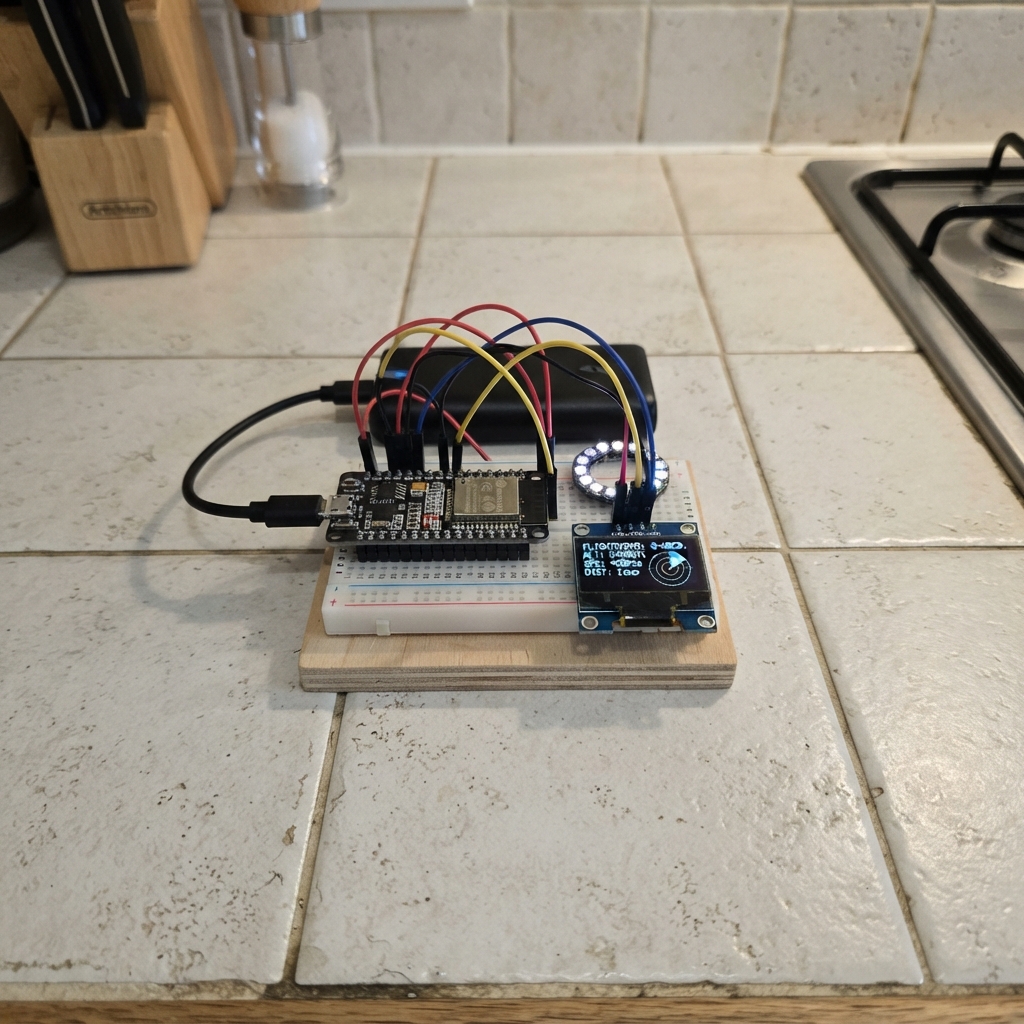
This ESP32 plane radar displays real-time aircraft positions on a built-in screen by fetching ADS-B data from public aviation feeds. The project uses a LilyGo T-Display board with an ST7789V display to render a radar view, and includes optional audio and alarm outputs for proximity alerts when aircraft enter a configurable detection zone.
The guide provides a complete wiring diagram, parts list, and step-by-step assembly instructions. Builders will configure WiFi credentials through an access point, program the ESP32 with the provided firmware, and connect the external alarm header for sound and visual notifications. The radar updates continuously and displays aircraft distance, altitude, and heading information.
Wiring diagram

Gather all the parts
Assemble it in 3 steps
1. Use the built-in screen
Use the LilyGo T-Display as it is. Its screen, two buttons and battery-measurement parts are already connected on the board, so do not add jumper wires to GPIO14 or GPIO34.
- The battery reading uses the board’s factory voltage divider, which lowers the battery voltage before it reaches the ESP32.
- Do not connect the battery directly to GPIO34 — direct battery voltage can damage the ESP32 input.
2. Connect the alarm header
Connect the 5-pin alarm/audio header only if you are using the optional alarm outputs: GPIO13, GPIO32, GPIO33 and GPIO25 are 3.3 V signals; connect the module ground to a GND pin on the T-Display.
- Use a transistor or MOSFET driver for any lamp, relay, siren, motor, or other higher-power load.
- Do not power a speaker, relay, motor, or siren straight from a GPIO pin — it can overload and damage the board.
3. Power and program the board
Plug the LilyGo T-Display into USB. This powers the board and lets Schematik load the program.
- The battery indicator appears at the top-left after startup; it is intended for one Li-Ion/Li-Po cell connected through the board’s own battery connector.
- Make sure the battery connector polarity matches the board marking before connecting a battery — reversed battery wiring can damage the board.
Review all connections
1. Connections between "alarm_header" and "ESP32"
Deploy the firmware
/* LilyGo T-Display Plane Radar — built-in ST7789V 135x240
 * Inspired by MatixYo's ESP32-Plane-Radar:
 * https://github.com/MatixYo/ESP32-Plane-Radar
 */
#include <Arduino.h>
#include <WiFi.h>
#include <WebServer.h>
#include <Preferences.h>
#include <HTTPClient.h>
#include <WiFiClientSecure.h>
#include <ArduinoJson.h>
#include <LovyanGFX.hpp>
#include <math.h>

// LilyGo T-Display (ESP32-D0WD) factory display wiring.
#define TFT_MOSI 19
#define TFT_SCLK 18
#define TFT_CS 5
#define TFT_DC 16
#define TFT_RST 23
#define TFT_BL 4
#define BTN_NEXT_PIN 0
#define BTN_ACTION_PIN 35
// External 3.3 V logic outputs. Use a transistor/driver module for loads.
#define ALARM_DIGITAL_PIN 13
#define ALARM_LEVEL_PWM_PIN 32
#define ALARM_TONE_PWM_PIN 33
#define ALERT_DISTANCE_KM 10.0f
#define ALERT_LEVEL_CHANNEL 0
#define ALERT_TONE_CHANNEL 1
#define ALERT_LEVEL_HZ 5000
#define ALERT_TONE_HZ 2000
// Factory battery monitor on the LilyGo T-Display: GPIO14 enables its divider; GPIO34 reads it.
#define BATTERY_ENABLE_PIN 14
#define BATTERY_ADC_PIN 34
#define HOLD_CONFIG_MS 3000UL
#define AP_SSID "PlaneRadar-Setup"
#define NVS_NAMESPACE "planeradar"
#define SCREEN_W 240
#define SCREEN_H 135
#define RADAR_CX 120
#define RADAR_CY 70
#define RADAR_RADIUS 55

class RadarDisplay : public lgfx::LGFX_Device {
  lgfx::Bus_SPI bus;
  lgfx::Panel_ST7789 panel;
public:
  RadarDisplay() {
    auto bc = bus.config();
    bc.spi_host = SPI2_HOST; bc.freq_write = 40000000;
    bc.pin_sclk = TFT_SCLK; bc.pin_mosi = TFT_MOSI;
    bc.pin_miso = -1; bc.pin_dc = TFT_DC; bus.config(bc);
    panel.setBus(&bus);
    auto pc = panel.config();
    pc.pin_cs = TFT_CS; pc.pin_rst = TFT_RST;
    pc.panel_width = 135; pc.panel_height = 240;
    // The 135×240 area is only the visible window. The ST7789V has a 240×320
    // address space; declaring it as 135×240 clips a rotated landscape image.
    pc.memory_width = 240; pc.memory_height = 320;
    // LilyGo T-Display's visible window in the ST7789V address space.
    pc.offset_x = 52; pc.offset_y = 40; pc.invert = true; pc.rgb_order = false;
    panel.config(pc); setPanel(&panel);
  }
};
RadarDisplay display;
Preferences prefs;
WebServer configServer(80);
static const float RANGE_OPTIONS[] = {0.5f, 1.0f, 2.0f, 3.0f, 5.0f, 7.5f, 10.0f, 15.0f, 20.0f, 25.0f, 30.0f, 40.0f, 50.0f, 60.0f, 75.0f, 100.0f, 125.0f, 150.0f, 175.0f, 200.0f};
static const uint32_t UPDATE_OPTIONS_MS[] = {3000UL, 5000UL, 10000UL, 15000UL, 20000UL, 30000UL, 45000UL, 60000UL, 90000UL, 120000UL, 180000UL, 240000UL, 300000UL};
static const size_t RANGE_OPTION_COUNT = sizeof(RANGE_OPTIONS) / sizeof(RANGE_OPTIONS[0]);
static const size_t UPDATE_OPTION_COUNT = sizeof(UPDATE_OPTIONS_MS) / sizeof(UPDATE_OPTIONS_MS[0]);
size_t rangeOptionIndex = 12;  // 50 km
size_t updateOptionIndex = 1;  // 5 seconds
float radarRangeKm = RANGE_OPTIONS[rangeOptionIndex];
double radarLat = 0.0, radarLon = 0.0;
bool configMode = false;
volatile bool nextReleasePending = false, actionReleasePending = false;
volatile unsigned long actionPressedAt = 0;
String radarStatus = "Starting...";
unsigned long lastFetchMs = 0, lastDataMs = 0;
int lastShownAircraft = 0;
bool updateInProgress = false;
bool lastUpdateSucceeded = false;
bool alarmWasActive = false;
struct PlanePoint { float bearing; float distance; String label; };
PlanePoint displayedPoints[80];
int displayedPointCount = 0;
float batteryVoltage = 0.0f;
int batteryPercent = 0;
unsigned long lastBatteryReadMs = 0;
static const unsigned long BATTERY_REFRESH_MS = 10000UL;
// ESP32 ADCs are not precision voltage references. This corrects the typical
// ~2–3% high reading of the T-Display's GPIO34 battery-divider path.
static const float BATTERY_CALIBRATION = 0.977f;
static const double DEG2RAD = M_PI / 180.0;

static const char CONFIG_HTML[] PROGMEM = R"HTML(<!doctype html><html><head><meta name="viewport" content="width=device-width,initial-scale=1"><title>Plane Radar setup</title><style>body{font-family:sans-serif;max-width:380px;margin:32px auto;padding:0 16px}input,button{box-sizing:border-box;width:100%;padding:10px;margin:5px 0 14px;font-size:16px}button{background:#087f23;color:white;border:0}</style></head><body><h2>Plane Radar setup</h2><p>Enter Wi-Fi and the latitude/longitude of the radar centre.</p><form method="post" action="/save"><label>Wi-Fi name</label><input name="ssid" required><label>Wi-Fi password</label><input name="pass" type="password"><label>Latitude</label><input name="lat" placeholder="52.3676" required><label>Longitude</label><input name="lon" placeholder="4.9041" required><button>Save and connect</button></form></body></html>)HTML";

void showMessage(const char* a, const char* b = nullptr) {
  display.fillScreen(TFT_BLACK); display.setTextSize(1); display.setTextColor(TFT_WHITE, TFT_BLACK);
  display.drawCentreString(a, SCREEN_W / 2, 55, 2);
  if (b) display.drawCentreString(b, SCREEN_W / 2, 78, 2);
}
double haversineKm(double a, double o, double b, double p) {
  double dlat=(b-a)*DEG2RAD, dlon=(p-o)*DEG2RAD;
  double x=sin(dlat/2)*sin(dlat/2)+cos(a*DEG2RAD)*cos(b*DEG2RAD)*sin(dlon/2)*sin(dlon/2);
  return 6371.0*2.0*atan2(sqrt(x),sqrt(1.0-x));
}
double bearingDeg(double a,double o,double b,double p) {
  double dlon=(p-o)*DEG2RAD;
  double y=sin(dlon)*cos(b*DEG2RAD);
  double x=cos(a*DEG2RAD)*sin(b*DEG2RAD)-sin(a*DEG2RAD)*cos(b*DEG2RAD)*cos(dlon);
  return fmod(atan2(y,x)/DEG2RAD+360.0,360.0);
}
void updateAlertOutputs(float nearestKm) {
  bool nearby = nearestKm <= ALERT_DISTANCE_KM;
  digitalWrite(ALARM_DIGITAL_PIN, nearby ? HIGH : LOW);
  uint8_t proximityDuty = 0;
  if (nearby) {
    // 0 at the 10 km boundary and 255 for an aircraft at the radar centre.
    proximityDuty = (uint8_t)constrain((int)((ALERT_DISTANCE_KM - nearestKm) * 255.0f / ALERT_DISTANCE_KM), 1, 255);
  }
  ledcWrite(ALARM_LEVEL_PWM_PIN, proximityDuty);
  // GPIO27 is a fixed 2 kHz PWM signal while the alarm is active.
  ledcWrite(ALARM_TONE_PWM_PIN, nearby ? 128 : 0);
  alarmWasActive = nearby;
}

String updatePeriodText() {
  uint32_t seconds = UPDATE_OPTIONS_MS[updateOptionIndex] / 1000UL;
  return seconds < 60 ? String(seconds) + "s" : String(seconds / 60) + "m";
}

int batteryPercentFromVoltage(float v) {
  // Typical resting single-cell Li-Ion/Li-Po voltage curve. It is deliberately
  // non-linear: a linear 3.2–4.2 V conversion makes the middle range misleading.
  if (v >= 4.20f) return 100;
  if (v >= 4.10f) return 90 + (int)((v - 4.10f) * 100.0f);
  if (v >= 4.00f) return 75 + (int)((v - 4.00f) * 150.0f);
  if (v >= 3.90f) return 55 + (int)((v - 3.90f) * 200.0f);
  if (v >= 3.80f) return 35 + (int)((v - 3.80f) * 200.0f);
  if (v >= 3.70f) return 15 + (int)((v - 3.70f) * 200.0f);
  if (v >= 3.50f) return 5 + (int)((v - 3.50f) * 50.0f);
  if (v >= 3.30f) return (int)((v - 3.30f) * 25.0f);
  return 0;
}

void readBattery() {
  // The board already contains the safe 2:1 resistor divider; never connect a battery directly to GPIO34.
  uint32_t total = 0;
  for (int i = 0; i < 16; ++i) { total += analogRead(BATTERY_ADC_PIN); delay(2); }
  float adcVoltage = (total / 16.0f) * 3.3f / 4095.0f;
  batteryVoltage = adcVoltage * 2.0f * BATTERY_CALIBRATION;
  // A one-cell Li-Ion/Li-Po pack must not be displayed above its 4.20 V full-charge limit.
  batteryVoltage = constrain(batteryVoltage, 0.0f, 4.20f);
  batteryPercent = constrain(batteryPercentFromVoltage(batteryVoltage), 0, 100);
}

void drawDataInfo() {
  // Only the lower-right indicator is redrawn during a download; aircraft remain visible.
  // Reserve the very bottom-right corner solely for the transfer marker.
  display.fillRect(190, 122, 48, 12, TFT_BLACK);
  display.setTextSize(1);
  if (updateInProgress) {
    display.setTextColor(TFT_YELLOW, TFT_BLACK);
    display.drawRightString("upd...", 236, 126);
  } else if (lastUpdateSucceeded) {
    display.setTextColor(TFT_GREEN, TFT_BLACK);
    display.drawRightString("OK", 236, 126);
  }
}
void drawRadarShell() {
  display.fillScreen(TFT_BLACK); display.drawRect(0,0,SCREEN_W,SCREEN_H,TFT_DARKGREEN);
  display.drawCircle(RADAR_CX,RADAR_CY,RADAR_RADIUS,TFT_GREEN);
  display.drawCircle(RADAR_CX,RADAR_CY,37,TFT_DARKGREEN); display.drawCircle(RADAR_CX,RADAR_CY,18,TFT_DARKGREEN);
  display.drawLine(RADAR_CX-RADAR_RADIUS,RADAR_CY,RADAR_CX+RADAR_RADIUS,RADAR_CY,TFT_DARKGREEN);
  display.drawLine(RADAR_CX,RADAR_CY-RADAR_RADIUS,RADAR_CX,RADAR_CY+RADAR_RADIUS,TFT_DARKGREEN);
  display.setTextSize(1); display.setTextColor(TFT_WHITE,TFT_BLACK);
  display.drawString("N",116,9); display.drawString("S",116,122); display.drawString("W",58,65); display.drawString("E",176,65);
  char range[12];
  if (radarRangeKm < 10.0f && floorf(radarRangeKm) != radarRangeKm) snprintf(range, sizeof(range), "%.1f km", radarRangeKm);
  else snprintf(range, sizeof(range), "%.0f km", radarRangeKm);
  // Top left: range and update interval. Top right: battery only, aligned to the frame.
  display.setTextColor(TFT_YELLOW,TFT_BLACK); display.drawString(range, 4, 4);
  display.setTextColor(TFT_CYAN,TFT_BLACK); display.drawString(updatePeriodText(), 4, 16);
  char batteryText[18];
  snprintf(batteryText, sizeof(batteryText), "%.2fV %d%%", batteryVoltage, batteryPercent);
  display.setTextColor(TFT_CYAN, TFT_BLACK); display.drawRightString(batteryText, 236, 4);
  // Status is kept low in the bottom-left corner, separate from the transfer marker.
  display.setTextColor(TFT_CYAN, TFT_BLACK);
  display.drawString(radarStatus, 4, 121);
  drawDataInfo();
}
void drawAircraft(float bearing,float distance,const char* label) {
  if(distance>radarRangeKm) return;
  float a=(bearing-90.0f)*DEG_TO_RAD, r=distance*RADAR_RADIUS/radarRangeKm;
  int x=RADAR_CX+(int)(cosf(a)*r), y=RADAR_CY+(int)(sinf(a)*r);
  display.fillTriangle(x,y-4,x-3,y+3,x+3,y+3,TFT_RED);
  String s(label); s.trim(); if(s.length()>7) s=s.substring(0,7);
  display.setTextColor(TFT_WHITE,TFT_BLACK); display.drawString(s,constrain(x+4,0,195),constrain(y-8,15,120));
}
void redrawRadar() {
  drawRadarShell();
  for (int i = 0; i < displayedPointCount; ++i) {
    drawAircraft(displayedPoints[i].bearing, displayedPoints[i].distance, displayedPoints[i].label.c_str());
  }
  drawDataInfo();
}
void startConfigPortal() {
  configMode=true; WiFi.mode(WIFI_AP); WiFi.softAP(AP_SSID);
  configServer.on("/",HTTP_GET,[](){configServer.send(200,"text/html",CONFIG_HTML);});
  configServer.on("/save",HTTP_POST,[](){
    prefs.begin(NVS_NAMESPACE,false); prefs.putString("ssid",configServer.arg("ssid")); prefs.putString("pass",configServer.arg("pass"));
    prefs.putDouble("lat",configServer.arg("lat").toDouble()); prefs.putDouble("lon",configServer.arg("lon").toDouble()); prefs.end();
    configServer.send(200,"text/html","<h2>Saved. The radar is restarting.</h2>"); delay(800); ESP.restart();
  });
  configServer.begin(); showMessage("Join PlaneRadar-Setup","then open 192.168.4.1");
}
void fetchAircraft() {
  if(WiFi.status()!=WL_CONNECTED) {
    radarStatus = "Wi-Fi disconnected";
    drawRadarShell();
    return;
  }
  // Do not clear the radar while HTTP is in progress: the last complete data set remains on screen.
  updateInProgress = true;
  drawDataInfo();
  WiFiClientSecure client; client.setInsecure();
  String url="https://opendata.adsb.fi/api/v3/lat/"+String(radarLat,5)+"/lon/"+String(radarLon,5)+"/dist/"+String(radarRangeKm/1.852f,1);
  HTTPClient http;
  http.useHTTP10(true);  // receive one complete JSON document instead of a chunked stream
  http.begin(client, url);
  // A short timeout means a slow or unavailable server cannot hold up the
  // button handler for ten seconds. The last valid radar frame stays visible.
  http.setTimeout(2500);
  http.addHeader("Accept", "application/json");
  http.setUserAgent("ESP32-Plane-Radar/1.0");
  int status=http.GET();
  if(status==HTTP_CODE_OK) {
    String payload = http.getString();
    JsonDocument doc;
    DeserializationError jsonError = deserializeJson(doc, payload);
    if(!jsonError) {
      int received = 0, shown = 0;
      float nearestKm = 999999.0f;
      // A response is fully parsed before anything is redrawn, preventing an empty radar during updates.
      for(JsonObject plane:doc["ac"].as<JsonArray>()) {
        if(!plane["lat"].is<double>()||!plane["lon"].is<double>()) continue;
        received++;
        double lat=plane["lat"].as<double>(),lon=plane["lon"].as<double>(),d=haversineKm(radarLat,radarLon,lat,lon);
        if(d > radarRangeKm) continue;
        if (d < nearestKm) nearestKm = (float)d;
        if(shown < 80) {
          displayedPoints[shown].bearing=(float)bearingDeg(radarLat,radarLon,lat,lon);
          displayedPoints[shown].distance=(float)d;
          displayedPoints[shown].label=plane["flight"]|plane["hex"]|"AC";
          shown++;
        }
      }
      displayedPointCount = shown;
      lastShownAircraft = shown;
      updateAlertOutputs(nearestKm);
      lastDataMs = millis();
      updateInProgress = false;
      lastUpdateSucceeded = true;
      radarStatus = String("ADS-B: ") + shown + "/" + received;
      redrawRadar();
      Serial.println(radarStatus);
    } else {
        updateInProgress = false;
      lastUpdateSucceeded = false;
      radarStatus = "ADS-B data unreadable";
      // Preserve the last valid radar image on an unsuccessful update.
      drawDataInfo();
      Serial.printf("JSON error: %s\n", jsonError.c_str());
    }
  } else {
    updateInProgress = false;
    lastUpdateSucceeded = false;
    radarStatus = String("ADS-B HTTP error ") + status;
    // Preserve the last valid radar image on an unsuccessful update.
    drawDataInfo();
    Serial.printf("ADS-B HTTP error: %d\n", status);
  }
  http.end();
}
void IRAM_ATTR onNextButtonEdge() {
  static bool wasLow = false;
  bool isLow = digitalRead(BTN_NEXT_PIN) == LOW;
  if (!isLow && wasLow) nextReleasePending = true;
  wasLow = isLow;
}
void IRAM_ATTR onActionButtonEdge() {
  static bool wasLow = false;
  bool isLow = digitalRead(BTN_ACTION_PIN) == LOW;
  if (isLow && !wasLow) actionPressedAt = millis();
  if (!isLow && wasLow) actionReleasePending = true;
  wasLow = isLow;
}
void setup() {
  Serial.begin(115200);
  pinMode(TFT_BL, OUTPUT); digitalWrite(TFT_BL, HIGH);
  pinMode(BTN_NEXT_PIN, INPUT_PULLUP);
  // GPIO35 is input-only; the T-Display button circuit supplies its pull-up.
  pinMode(BTN_ACTION_PIN, INPUT);
  attachInterrupt(digitalPinToInterrupt(BTN_NEXT_PIN), onNextButtonEdge, CHANGE);
  attachInterrupt(digitalPinToInterrupt(BTN_ACTION_PIN), onActionButtonEdge, CHANGE);
  pinMode(ALARM_DIGITAL_PIN, OUTPUT); digitalWrite(ALARM_DIGITAL_PIN, LOW);
  pinMode(BATTERY_ENABLE_PIN, OUTPUT); digitalWrite(BATTERY_ENABLE_PIN, HIGH);
  analogReadResolution(12);
  // GPIO34 receives up to about 2.1 V from the battery divider. The default
  // narrow ADC range clips this value and falsely reports a full battery.
  analogSetPinAttenuation(BATTERY_ADC_PIN, ADC_11db);
  readBattery();
  ledcAttach(ALARM_LEVEL_PWM_PIN, ALERT_LEVEL_HZ, 8);
  ledcAttach(ALARM_TONE_PWM_PIN, ALERT_TONE_HZ, 8);
  updateAlertOutputs(999999.0f);
  display.init(); display.setRotation(1); drawRadarShell();
  prefs.begin(NVS_NAMESPACE,true); String ssid=prefs.getString("ssid",""),pass=prefs.getString("pass","");
  radarLat=prefs.getDouble("lat",0.0); radarLon=prefs.getDouble("lon",0.0);
  rangeOptionIndex = min((size_t)prefs.getUInt("rangeIdx", rangeOptionIndex), RANGE_OPTION_COUNT - 1);
  updateOptionIndex = min((size_t)prefs.getUInt("updateIdx", updateOptionIndex), UPDATE_OPTION_COUNT - 1);
  radarRangeKm = RANGE_OPTIONS[rangeOptionIndex]; prefs.end();
  if(ssid.isEmpty()) { startConfigPortal(); return; }
  showMessage("Connecting to Wi-Fi...",ssid.c_str()); WiFi.mode(WIFI_STA); WiFi.begin(ssid.c_str(),pass.c_str());
  unsigned long started=millis(); while(WiFi.status()!=WL_CONNECTED&&millis()-started<15000) delay(250);
  if(WiFi.status()!=WL_CONNECTED) startConfigPortal(); else drawRadarShell();
}
void loop() {
  if(configMode) { configServer.handleClient(); return; }

  // Button-edge interrupts register presses even while the HTTPS request is waiting for a reply.
  if (nextReleasePending) {
    noInterrupts(); nextReleasePending = false; interrupts();
    rangeOptionIndex = (rangeOptionIndex + 1) % RANGE_OPTION_COUNT;
    radarRangeKm = RANGE_OPTIONS[rangeOptionIndex];
    prefs.begin(NVS_NAMESPACE, false); prefs.putUInt("rangeIdx", rangeOptionIndex); prefs.end();
    // Changing the view must never start a network request: redraw the last
    // valid aircraft data immediately, then wait for the normal refresh time.
    radarStatus = "Range changed";
    redrawRadar();
  }
  if (actionReleasePending) {
    noInterrupts(); actionReleasePending = false; unsigned long pressedAt = actionPressedAt; interrupts();
    if (millis() - pressedAt >= HOLD_CONFIG_MS) {
      startConfigPortal();
    } else {
      updateOptionIndex = (updateOptionIndex + 1) % UPDATE_OPTION_COUNT;
      prefs.begin(NVS_NAMESPACE, false); prefs.putUInt("updateIdx", updateOptionIndex); prefs.end();
      radarStatus = "Update every " + updatePeriodText();
      redrawRadar();
      lastFetchMs = millis();
    }
  }
  // Refresh the factory battery divider every 10 seconds without delaying the radar.
  if (millis() - lastBatteryReadMs >= BATTERY_REFRESH_MS) {
    lastBatteryReadMs = millis();
    readBattery();
    redrawRadar();
  }
  if(millis()-lastFetchMs>=UPDATE_OPTIONS_MS[updateOptionIndex]) { lastFetchMs=millis(); fetchAircraft(); }
}
Remix this project
Make it yours in one click
Open a full copy of this project in your own Schematik workspace — diagram, code, parts, and assembly steps included. Swap the sensor, add features, or redesign the whole thing with AI. The author's original stays untouched.