Community project
Frederick Weather Advisor
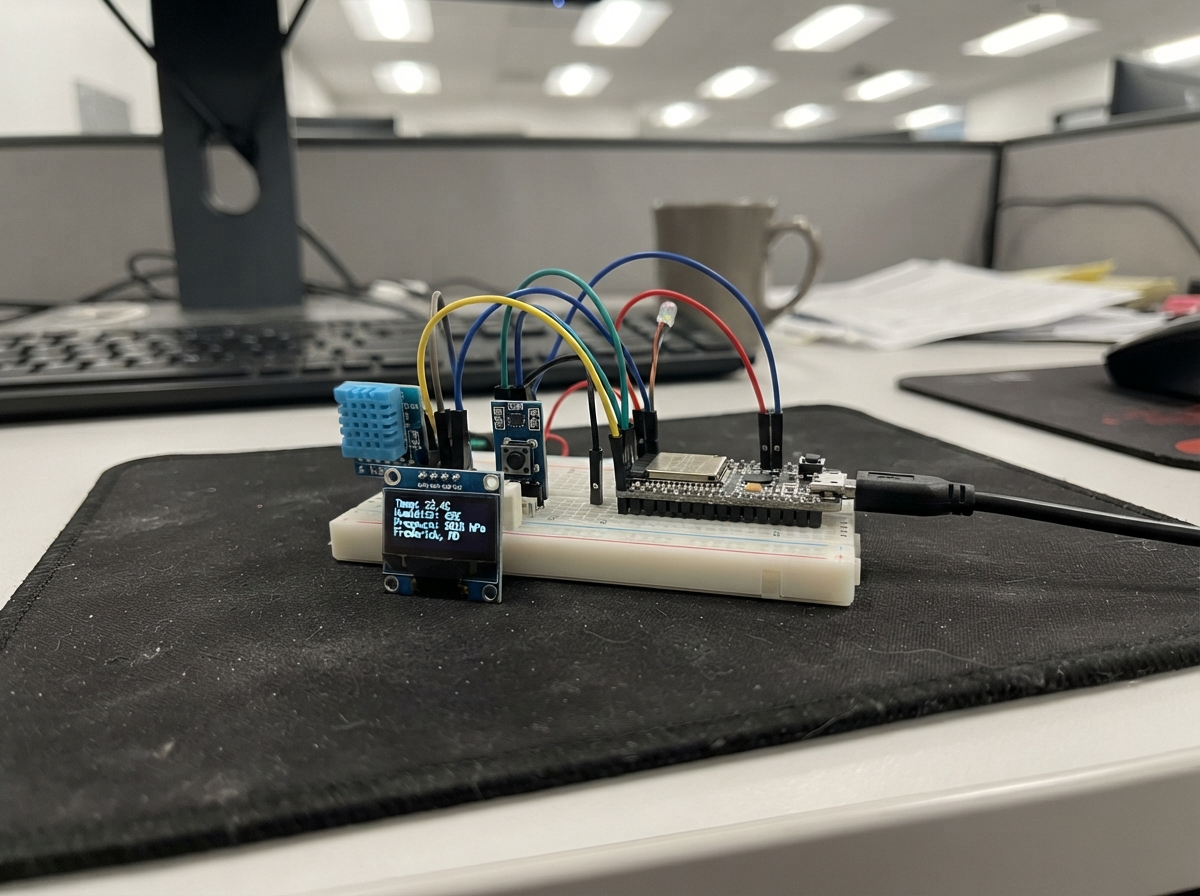
The Frederick Weather Advisor is a compact weather station built on an ESP32-C6 microcontroller with an integrated 1.47-inch display. It connects to WiFi, fetches real-time weather data for Frederick, Maryland from Open-Meteo, and displays current temperature, wind speed, precipitation chance, and clothing recommendations on the onboard ST7789 screen.
This guide provides a wiring diagram, complete parts list, and step-by-step assembly instructions. The firmware is pre-configured for the Waveshare/LAFVIN ESP32-C6-LCD board and handles WiFi connection, API requests, and display rendering. Simply connect the USB data cable, verify the built-in screen activates, and deploy the weather station to start monitoring local conditions.
Wiring diagram
Assemble it in 4 steps
1. Use the screen already on the board
This ESP32-C6 board already has its 1.47-inch color screen attached. Do not connect the earlier external screen or any display jumper wires; the built-in screen uses fixed internal connections.
- Connecting another display to the board can make the built-in screen fail to start.
2. Connect the USB data cable
Plug a USB data cable into the ESP32-C6 board and your computer. This cable supplies power and carries the program to the board.
- Use a cable that transfers data, not a charge-only cable.
3. Check the built-in screen
Leave the built-in screen in place and keep its small connector area clear. The screen has no separate wires to connect because it is already joined to the board.
- The weather screen uses a black background with pink headings, lines, and advice text.
4. Deploy the weather station
In Schematik, press Deploy. The built-in screen should first show a connection message, then Frederick, Maryland temperature, rain chance, wind, and clothing advice.
Deploy the firmware
// Frederick, Maryland weather station — Waveshare/LAFVIN ESP32-C6-LCD-1.47, 4 MB.
// Built for the ESP32-C6-DevKitM-1 4 MB image target. Onboard display: 172x320 ST7789 IPS panel.
#include <Arduino.h>
#include <WiFi.h>
#include <WiFiClientSecure.h>
#include <HTTPClient.h>
#include <ArduinoJson.h>
#include <Arduino_GFX_Library.h>
#define TFT_MOSI 6
#define TFT_SCK 7
#define TFT_CS 14
#define TFT_DC 15
#define TFT_RST 21
#define TFT_BL 22
#define SCREEN_W 172
#define SCREEN_H 320
struct WeatherData { float temperature = 0, windKph = 0; int weatherCode = 0, rainChance = 0; bool valid = false; } weather;
// A short, user-visible explanation of the last failed connection step.
String weatherErrorDetail = "WAITING TO TRY";
// Forward declarations
String weatherName(int c);
String clothingAdvice();
void center(const String &s, int y, uint8_t size, uint16_t color);
void header(const String &s,uint16_t c);
void status(const String &s,uint16_t c);
void waiting(const String &s);
void errorScreen(const String &s);
void weatherScreen();
bool connectWiFi();
bool fetchWeather();
const char *ssid = "iot-devices";
const char *password = "PrettyFly4aWifi";
const char *weatherURL = "https://api.open-meteo.com/v1/forecast?latitude=39.4143&longitude=-77.4105¤t=temperature_2m,weather_code,wind_speed_10m&hourly=precipitation_probability&forecast_days=1&temperature_unit=fahrenheit&wind_speed_unit=kmh&timezone=America%2FNew_York";
// This 172x320 panel uses the ST7789's 34-column portrait offset and IPS mode.
// Use a conservative 40 MHz SPI clock; the vendor initializes this display over SPI.
Arduino_DataBus *bus = new Arduino_ESP32SPI(TFT_DC, TFT_CS, TFT_SCK, TFT_MOSI);
Arduino_GFX *tft = new Arduino_ST7789(bus, TFT_RST, 0, true, SCREEN_W, SCREEN_H, 34, 0, 34, 0);
unsigned long lastUpdate = 0;
unsigned long lastAttempt = 0;
const unsigned long UPDATE_INTERVAL_MS = 600000UL;
const unsigned long RETRY_INTERVAL_MS = 60000UL;
// Soft pink "fluffy" palette: blush background, plum lettering, and candy-pink accents.
// RGB565 palette: rose-pink background, candy-pink cards, and berry-pink accents.
const uint16_t BLUSH=0xFD5C, CARD_PINK=0xFCF9, BABY_PINK=0xFE7D, HOT_PINK=0xFA74;
const uint16_t PLUM=0x4809, DARK_PLUM=0x2805, ROSE=0xFBB6, WHITE=0xFFFF, RED=0xF800;
String weatherName(int c) { if(c==0)return "CLEAR"; if(c<=3)return "PART CLOUDY"; if(c<=48)return "FOG"; if(c<=57)return "DRIZZLE"; if(c<=67)return "RAIN"; if(c<=77)return "SNOW"; if(c<=82)return "SHOWERS"; if(c<=86)return "SNOW"; return "STORM"; }
String clothingAdvice() { if(weather.rainChance>=45 || (weather.weatherCode>=51 && weather.weatherCode<=82))return "TAKE UMBRELLA"; if(weather.temperature<=37)return "COAT + GLOVES"; if(weather.temperature<=50)return "WEAR A COAT"; if(weather.temperature<=63 || weather.windKph>=35)return "BRING JACKET"; if(weather.temperature>=80)return "LIGHT CLOTHES"; if(weather.temperature>=68 && weather.weatherCode<=3)return "T-SHIRT + SHADES"; return "LIGHT LAYERS"; }
void center(const String &s, int y, uint8_t size, uint16_t color) { tft->setTextSize(size); tft->setTextColor(color,BLUSH); int16_t x1,y1; uint16_t w,h; tft->getTextBounds(s,0,y,&x1,&y1,&w,&h); tft->setCursor((SCREEN_W-w)/2,y); tft->print(s); }
void header(const String &s,uint16_t c) { tft->fillRoundRect(6,5,160,27,8,CARD_PINK); tft->fillCircle(14,9,3,HOT_PINK); tft->fillCircle(158,28,3,HOT_PINK); center(s,13,1,c); }
void status(const String &s,uint16_t c) { tft->fillRoundRect(8,294,156,20,7,CARD_PINK); center(s,300,1,c); }
void waiting(const String &s) { tft->fillScreen(BLUSH); header("FREDERICK, MD",DARK_PLUM); tft->fillRoundRect(14,82,144,132,18,CARD_PINK); tft->fillCircle(31,99,6,HOT_PINK); tft->fillCircle(141,99,6,HOT_PINK); center("WEATHER",112,3,DARK_PLUM); center("STATION",146,3,HOT_PINK); tft->drawFastHLine(36,185,100,ROSE); center(s,198,1,PLUM); }
void errorScreen(const String &s) { tft->fillScreen(BLUSH); header("FREDERICK, MD",DARK_PLUM); tft->fillRoundRect(10,94,152,103,16,CARD_PINK); center("NO WEATHER",109,2,RED); center(s,137,1,PLUM); center(weatherErrorDetail,158,1,DARK_PLUM); center(WiFi.status()==WL_CONNECTED ? "WIFI CONNECTED" : "WIFI NOT CONNECTED",178,1,PLUM); status("RETRIES IN ONE MINUTE",RED); }
void weatherScreen() { tft->fillScreen(BLUSH); header("FREDERICK, MD",DARK_PLUM); tft->fillRoundRect(10,41,152,84,18,CARD_PINK); tft->fillCircle(25,57,5,HOT_PINK); tft->fillCircle(147,109,5,HOT_PINK); center(String((int)round(weather.temperature))+" F",53,5,DARK_PLUM); center(weatherName(weather.weatherCode),101,2,HOT_PINK); tft->fillRoundRect(10,133,152,45,12,BABY_PINK); center("WIND "+String((int)round(weather.windKph))+" KM/H",141,1,PLUM); center("RAIN "+String(weather.rainChance)+"%",159,1,PLUM); center("WHAT TO WEAR",193,1,HOT_PINK); tft->fillRoundRect(10,211,152,58,14,CARD_PINK); tft->drawRoundRect(10,211,152,58,14,HOT_PINK); center(clothingAdvice(),233,2,DARK_PLUM); status("UPDATES EVERY 10 MIN",PLUM); }
const char *wifiStatusName(wl_status_t state) { switch(state) { case WL_IDLE_STATUS: return "IDLE"; case WL_NO_SSID_AVAIL: return "SSID NOT FOUND"; case WL_SCAN_COMPLETED: return "SCAN COMPLETE"; case WL_CONNECTED: return "CONNECTED"; case WL_CONNECT_FAILED: return "CONNECT FAILED"; case WL_CONNECTION_LOST: return "CONNECTION LOST"; case WL_DISCONNECTED: return "DISCONNECTED"; default: return "UNKNOWN"; } }
bool connectWiFi() { WiFi.mode(WIFI_STA); WiFi.disconnect(); delay(200); Serial.printf("Wi-Fi: joining SSID '%s' (MAC %s)\n", ssid, WiFi.macAddress().c_str()); WiFi.begin(ssid,password); unsigned long start=millis(); wl_status_t previous=(wl_status_t)255; while(WiFi.status()!=WL_CONNECTED && millis()-start<20000UL) { wl_status_t now=WiFi.status(); if(now!=previous) { Serial.printf("Wi-Fi: %s (%d), waited %lu ms\n", wifiStatusName(now), now, millis()-start); previous=now; } delay(250); } wl_status_t finalState=WiFi.status(); if(finalState!=WL_CONNECTED) { Serial.printf("Wi-Fi: failed after %lu ms: %s (%d)\n", millis()-start, wifiStatusName(finalState), finalState); return false; } Serial.printf("Wi-Fi: connected. IP %s, gateway %s, DNS %s, RSSI %d dBm\n", WiFi.localIP().toString().c_str(), WiFi.gatewayIP().toString().c_str(), WiFi.dnsIP().toString().c_str(), WiFi.RSSI()); return true; }
bool fetchWeather() { if(WiFi.status()!=WL_CONNECTED) { weatherErrorDetail="WIFI STATE "+String((int)WiFi.status()); Serial.printf("Weather: skipped; Wi-Fi is %s (%d)\n", wifiStatusName(WiFi.status()), WiFi.status()); return false; } Serial.println("Weather: resolving and requesting api.open-meteo.com over HTTPS"); WiFiClientSecure client; client.setInsecure(); HTTPClient http; http.setTimeout(15000); if(!http.begin(client, weatherURL)) { weatherErrorDetail="HTTP SETUP FAILED"; Serial.println("Weather: HTTP client could not start"); return false; } int r=http.GET(); if(r!=HTTP_CODE_OK){ weatherErrorDetail = r > 0 ? "HTTP STATUS "+String(r) : "HTTPS ERROR "+String(r); Serial.printf("Weather: HTTP GET failed: %d (%s)\n",r,http.errorToString(r).c_str());http.end();return false;} Serial.printf("Weather: HTTP 200; announced length %d; content type '%s'\n", http.getSize(), http.header("Content-Type").c_str()); String body=http.getString(); http.end(); Serial.printf("Weather: received %u response bytes\n", body.length()); String preview=body.substring(0, min((size_t)300, body.length())); Serial.printf("Weather: response start: %s\n", preview.c_str()); JsonDocument d; DeserializationError e=deserializeJson(d,body); if(e){ String parseReason=e.c_str(); if(parseReason=="EmptyInput") weatherErrorDetail="JSON RESPONSE EMPTY"; else if(parseReason=="IncompleteInput") weatherErrorDetail="JSON INCOMPLETE"; else if(parseReason=="NoMemory") weatherErrorDetail="JSON TOO LARGE"; else weatherErrorDetail="JSON INVALID"; Serial.printf("Weather: JSON parse failed: %s; received %u bytes\n",e.c_str(),body.length());return false;} JsonObject cur=d["current"], hourly=d["hourly"]; if(cur.isNull()||hourly.isNull()) { weatherErrorDetail="RESPONSE DATA MISSING"; Serial.println("Weather: response is missing current or hourly data"); return false; } const char *now=cur["time"]|""; JsonArray times=hourly["time"].as<JsonArray>(), rain=hourly["precipitation_probability"].as<JsonArray>(); int ix=-1; for(size_t i=0;i<times.size();i++)if(strcmp(times[i]|"",now)==0){ix=i;break;} if(ix<0||(size_t)ix>=rain.size()) { weatherErrorDetail="HOURLY RAIN MISSING"; Serial.printf("Weather: no hourly rain value for current time '%s' (times %u, rain values %u)\n", now, times.size(), rain.size()); return false; } weather.temperature=cur["temperature_2m"]|0.0f; weather.windKph=cur["wind_speed_10m"]|0.0f; weather.weatherCode=cur["weather_code"]|0; weather.rainChance=rain[ix]|0; weather.valid=true; weatherErrorDetail=""; Serial.printf("Weather: success: %.1f F, wind %.1f km/h, code %d, rain %d%%\n",weather.temperature,weather.windKph,weather.weatherCode,weather.rainChance); return true; }
void setup() {
Serial.begin(115200);
// Native USB serial needs a moment to enumerate after reset so a terminal can receive boot diagnostics.
unsigned long serialWaitStart = millis();
while (!Serial && millis() - serialWaitStart < 2500UL) {
delay(10);
}
Serial.println();
Serial.println("=== Frederick Weather Station boot ===");
Serial.printf("Serial ready after %lu ms\n", millis() - serialWaitStart);
Serial.println("Starting LAFVIN 1.47 LCD");
// Keep the light off until the LCD controller has received its setup commands.
pinMode(TFT_BL, OUTPUT);
digitalWrite(TFT_BL, LOW);
if (!tft->begin(40000000)) {
Serial.println("LCD begin failed");
return;
}
// IPS mode was selected in the ST7789 constructor. Do not invert a second time:
// a second inversion makes the intended RGB565 pink palette display incorrectly.
tft->fillScreen(BLUSH);
digitalWrite(TFT_BL, HIGH);
Serial.println("LCD initialized");
waiting("CONNECTING TO WIFI...");
if(!connectWiFi()){weatherErrorDetail="JOIN FAILED";Serial.println("Startup stopped: Wi-Fi did not connect");errorScreen("WIFI NOT CONNECTED");return;}
Serial.println("Wi-Fi ready; starting weather download");
waiting("GETTING FORECAST...");
lastAttempt=millis();
if(fetchWeather()){lastUpdate=millis();weatherScreen();}else errorScreen("OPEN-METEO UNAVAILABLE");
}
void loop() { if(WiFi.status()!=WL_CONNECTED){Serial.printf("Wi-Fi dropped: %s (%d); reconnecting\n", wifiStatusName(WiFi.status()), WiFi.status());status("RECONNECTING WIFI...",RED);WiFi.reconnect();delay(1000);return;} bool dueForUpdate = weather.valid ? (millis()-lastUpdate>=UPDATE_INTERVAL_MS) : (millis()-lastAttempt>=RETRY_INTERVAL_MS); if(dueForUpdate){status("UPDATING WEATHER...",HOT_PINK);lastAttempt=millis();if(fetchWeather()){lastUpdate=millis();weatherScreen();}else if(weather.valid){weatherScreen();status("USING LAST WEATHER",RED);}else errorScreen("OPEN-METEO UNAVAILABLE");} delay(250); }Remix this project
Make it yours in one click
Open a full copy of this project in your own Schematik workspace — diagram, code, parts, and assembly steps included. Swap the sensor, add features, or redesign the whole thing with AI. The author's original stays untouched.