Community project
Mache Mir Einen Kleinen Desktop Comapnion Ixch H
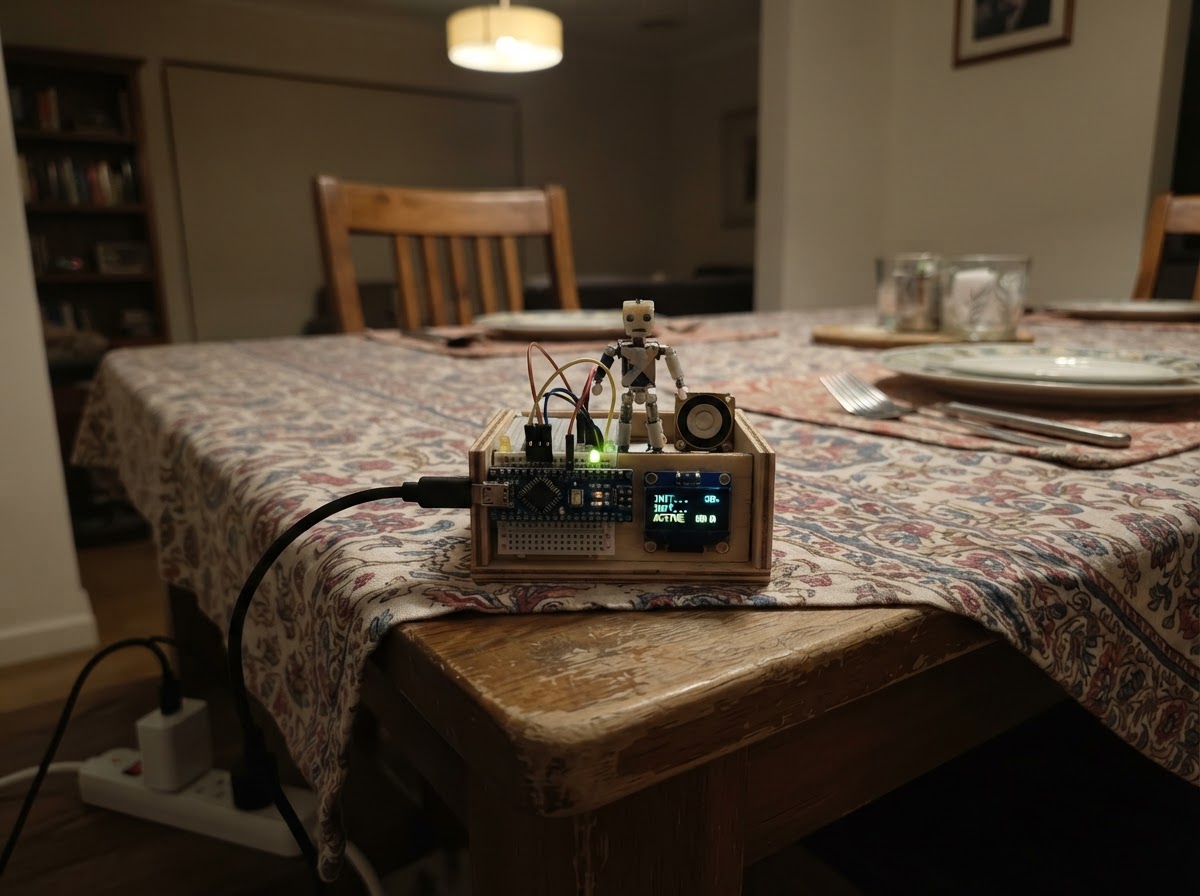
Build a desktop companion powered by an ESP32 microcontroller with a vibrant display and WiFi connectivity. This project combines a compact form factor with a colorful screen interface, making it perfect for adding an interactive element to any workspace.
This guide provides everything needed to assemble and configure the companion, including a wiring diagram for connecting the display and USB power, a complete parts list, and step-by-step assembly instructions. After setup, the device connects to WiFi and activates hand gesture recognition through AI, allowing touchless interaction right from the desktop.
Wiring diagram
Gather all the parts
Assemble it in 4 steps
1. Companion aufstellen
Stelle das LilyGO T-Display-S3 mit dem Bildschirm nach vorn auf deinen Tisch. Du kannst es an einen kleinen Ständer lehnen oder in ein selbst gebautes Gehäuse setzen, damit es wie ein kleiner Charakter vor dir steht.
- Lass die Oberseite mit der kleinen Antenne möglichst frei, damit das WLAN besser funktioniert.
- Lege keine Metallteile direkt auf das Board — sie können Kontakte kurzschließen und das Board beschädigen.
2. Strom anschließen
Stecke das USB-C-Datenkabel in den USB-C-Anschluss des LilyGO und die andere Seite in einen USB-Anschluss deines Computers oder ein normales USB-Netzteil. Das Kabel liefert Strom und wird später auch zum Aufspielen der Firmware benutzt.
- Nach dem Einschalten sollte auf dem eingebauten Bildschirm ein QR-Code erscheinen.
- Benutze nur eine normale USB-Stromquelle. Beschädigte Kabel oder ein wackeliger Stecker können zu Neustarts führen.
3. Mit dem ersten WLAN verbinden
Scanne den QR-Code auf dem Bildschirm mit deinem Handy. Verbinde dich mit dem WLAN Companion-Setup und dem Passwort sweetbuddy. Öffne danach 192.168.4.1 im Browser deines Handys.
- Das Handy darf beim ersten Einrichten melden, dass dieses WLAN kein Internet hat — das ist normal, denn das WLAN kommt direkt vom kleinen Companion.
- Ändere das Passwort nur, wenn du es später sicher wieder weißt — ohne Verbindung kannst du die Kamera- und Handfunktionen nicht nutzen.
4. Hand-KI aktivieren
Gib auf der Webseite den Namen deines Heim-WLANs und sein Passwort ein und drücke WLAN verbinden. Warte kurz, wechsle dann mit dem Handy zurück in dein Heim-WLAN und öffne http://companion.local. Stelle das Handy quer hinter den Companion und drücke Kamera & Hand-KI starten. Erlaube dem Browser den Kamerazugriff.
- Halte deine Hand gut beleuchtet vor die Handy-Kamera. Eine offene Hand winkt, ein Daumen hoch lobt ihn, ein V-Zeichen feiert, die I-love-you-Geste macht ihn besonders glücklich.
- Das Kamerabild bleibt auf dem Handy; der Companion erhält nur erkannte Gesten und eine Blickrichtung.
- Achte darauf, dass niemand unbeabsichtigt im Kamerabild steht. Die Kamera bleibt aktiv, bis du die Webseite schließt oder die Kameraberechtigung wieder entziehst.
Review all connections
1. Connections between "usb_c_cable" and "ESP32"
Deploy the firmware
#include <Arduino.h>
#include <WiFi.h>
#include <WebServer.h>
#include <Preferences.h>
#include <ESPmDNS.h>
#include <WiFiClientSecure.h>
#include <HTTPClient.h>
#include <ArduinoJson.h>
#include <qrcode.h>
#define LGFX_USE_V1
#include <LovyanGFX.hpp>

#define TFT_POWER_PIN 15
#define TFT_BACKLIGHT_PIN 38
#define TFT_RST_PIN 5
#define TFT_CS_PIN 6
#define TFT_DC_PIN 7
#define TFT_WR_PIN 8
#define TFT_RD_PIN 9
#define TFT_D0_PIN 39
#define TFT_D1_PIN 40
#define TFT_D2_PIN 41
#define TFT_D3_PIN 42
#define TFT_D4_PIN 45
#define TFT_D5_PIN 46
#define TFT_D6_PIN 47
#define TFT_D7_PIN 48

class Display : public lgfx::LGFX_Device {
  lgfx::Panel_ST7789 panel; lgfx::Bus_Parallel8 bus; lgfx::Light_PWM light;
 public: Display() {
  auto b=bus.config(); b.port=0; b.freq_write=20000000; b.pin_wr=TFT_WR_PIN; b.pin_rd=TFT_RD_PIN; b.pin_rs=TFT_DC_PIN; b.pin_d0=TFT_D0_PIN; b.pin_d1=TFT_D1_PIN; b.pin_d2=TFT_D2_PIN; b.pin_d3=TFT_D3_PIN; b.pin_d4=TFT_D4_PIN; b.pin_d5=TFT_D5_PIN; b.pin_d6=TFT_D6_PIN; b.pin_d7=TFT_D7_PIN; bus.config(b); panel.setBus(&bus);
  auto p=panel.config(); p.pin_cs=TFT_CS_PIN; p.pin_rst=TFT_RST_PIN; p.pin_busy=-1; p.panel_width=170; p.panel_height=320; p.offset_x=35; p.offset_y=0; p.offset_rotation=1; p.invert=true; panel.config(p);
  auto l=light.config(); l.pin_bl=TFT_BACKLIGHT_PIN; l.freq=44100; l.pwm_channel=7; light.config(l); panel.setLight(&light); setPanel(&panel);
 }};

// Forward declarations
String esc(String s);
void save();
String json(String reply);
void qr();
void eyes();
String gemini(String user);
void rememberBirthday(String t);
String talk(String t);

Display lcd; WebServer server(80); Preferences prefs;
String name="Mochi", mood="NEUGIERIG", activity="schaut sich neugierig um", memory="wartet darauf, dich kennenzulernen", birthday="", apiKey="";
int affection=50, trust=50, energy=70, boredom=0, targetX=0, targetY=0;
float eyeX=0, eyeY=0; bool setupScreen=true, mdns=false; unsigned long lastTalk=0,lastDraw=0,lastAuto=0;

const char PAGE[] PROGMEM=R"HTML(<!doctype html><html lang="de"><head><meta name="viewport" content="width=device-width,initial-scale=1"><title>Companion</title><style>body{margin:0;background:#fff0f7;color:#40233d;font:16px system-ui}main{max-width:720px;margin:auto;padding:14px}.c{background:#fff;border-radius:20px;padding:15px;margin:12px 0;box-shadow:0 6px 20px #9e5b8525}input,button{padding:10px;border-radius:11px;border:1px solid #dfa0bf;font:inherit;margin:3px}input{max-width:100%}button{background:#e84f91;color:white;font-weight:bold}button.alt{background:#7061b9}video{width:100%;max-height:310px;object-fit:cover;background:#222;border-radius:14px;transform:scaleX(-1)}.pill{display:inline-block;background:#ffe1ed;border-radius:99px;padding:7px 11px}.small{color:#765c6c;font-size:.88em}#reply{background:#fff0f6;border-radius:12px;padding:11px;min-height:30px}</style></head><body><main><h1>🌸 <span id="n">Companion</span></h1><div class="c"><b id="m">Verbinde …</b><p id="a" class="pill">…</p><p>❤️ Nähe <span id="af">0</span>% · ⚡ Energie <span id="en">0</span>%</p><p id="mem">…</p></div><div class="c"><h2>Mit mir reden</h2><input id="say" style="width:62%" placeholder="Erzähl mir etwas …"><button onclick="talk()">Senden</button><button class="alt" onclick="listen()">🎙️ Sprechen</button><p id="reply">Ich höre zu.</p><p class="small">Die Antwort kommt von Gemini, wenn du unten einen eigenen Schlüssel gespeichert hast. Der Companion gibt seiner Antwort eine eigene Stimmung und seine Erinnerungen mit.</p></div><div class="c"><h2>Sehen und Gesten</h2><button id="camBtn" onclick="camera()">📷 Kamera einschalten</button><button class="alt" onclick="wake()">☀️ Aufwecken</button><video id="cam" autoplay playsinline muted></video><p id="vision">Die Kamera ist aus.</p><p class="small">Erkennt Gesicht/Blickrichtung und Handzeichen lokal im Handy. Das Videobild wird nicht an das Board geschickt.</p></div><div class="c"><h2>Einrichten</h2><input id="nm" placeholder="Name"><button onclick="setName()">Name speichern</button><br><input id="ssid" placeholder="Heim-WLAN"><input id="pass" type="password" placeholder="WLAN-Passwort"><button onclick="wifi()">WLAN verbinden</button><br><input id="key" type="password" style="width:70%" placeholder="Neuer Gemini API-Schlüssel"><button onclick="saveKey()">KI-Schlüssel speichern</button><p id="net" class="small">…</p></div></main><script type="module">const $=x=>document.getElementById(x);let running=false,lastLook=0,hand;async function api(p,d){let r=await fetch(p,{method:d?'POST':'GET',headers:{'Content-Type':'application/x-www-form-urlencoded'},body:d?new URLSearchParams(d):undefined});return r.json()}function show(d){n.textContent=d.name;m.textContent='Jetzt: '+d.mood;a.textContent=d.activity;af.textContent=d.affection;en.textContent=d.energy;mem.textContent='Erinnert sich: '+d.memory;net.textContent=d.wifi}async function refresh(){try{show(await api('/api/status'))}catch(e){}}window.talk=async()=>{let t=say.value.trim();if(!t)return;reply.textContent='Ich denke nach …';let d=await api('/api/talk',{text:t});show(d);reply.textContent=d.reply;say.value='';if(speechSynthesis){speechSynthesis.cancel();let u=new SpeechSynthesisUtterance(d.reply);u.lang='de-DE';speechSynthesis.speak(u)}};window.listen=()=>{let R=window.SpeechRecognition||window.webkitSpeechRecognition;if(!R){reply.textContent='Tippe deine Nachricht ein – dieser Browser bietet hier keine Spracheingabe.';return}let r=new R();r.lang='de-DE';r.onresult=e=>{say.value=e.results[0][0].transcript;talk()};r.start()};window.setName=async()=>show(await api('/api/name',{name:nm.value}));window.wifi=async()=>{let d=await api('/api/wifi',{ssid:ssid.value,pass:pass.value});net.textContent=d.message;pass.value=''};window.saveKey=async()=>{if(!key.value)return;let d=await api('/api/key',{key:key.value});net.textContent=d.message;key.value=''};window.wake=async()=>show(await api('/api/wake',{}));async function loadHands(){try{let v=await import('https://cdn.jsdelivr.net/npm/@mediapipe/tasks-vision@0.10.22');let f=await v.FilesetResolver.forVisionTasks('https://cdn.jsdelivr.net/npm/@mediapipe/tasks-vision@0.10.22/wasm');hand=await v.GestureRecognizer.createFromOptions(f,{baseOptions:{modelAssetPath:'https://storage.googleapis.com/mediapipe-models/gesture_recognizer/gesture_recognizer/float16/1/gesture_recognizer.task'},runningMode:'VIDEO',numHands:1});return true}catch(e){vision.textContent='Handerkennung konnte nicht geladen werden. Das Handy braucht Internet für das Modell.';return false}}window.camera=async()=>{try{vision.textContent='Bitte erlaube die Kamera im nächsten Browser-Fenster.';cam.srcObject=await navigator.mediaDevices.getUserMedia({video:{facingMode:'user'},audio:false});await loadHands();running=true;camBtn.disabled=true;camBtn.textContent='Kamera läuft';requestAnimationFrame(track)}catch(e){vision.textContent='Kamera nicht freigegeben. Öffne die Seite über die angezeigte IP-Adresse in Safari/Chrome und erlaube dort Kamera.'}};let lastGesture='';async function track(t){if(!running)return;if(cam.readyState>2){let g='';try{let r=hand&&hand.recognizeForVideo(cam,t);if(r&&r.gestures.length)g=r.gestures[0][0].categoryName}catch(e){}let map={Open_Palm:'WAVE',Thumb_Up:'THUMB',Victory:'VICTORY',ILoveYou:'LOVE',Closed_Fist:'FIST',Pointing_Up:'POINT'};if(map[g]&&g!==lastGesture){lastGesture=g;api('/api/gesture',{g:map[g]})}if(Date.now()-lastLook>160){lastLook=Date.now();api('/api/look',{x:.5,y:.5})}vision.textContent=g?'Handzeichen: '+g+' – ich habe es verstanden.':'Ich schaue in deine Richtung. Zeig mir eine offene Hand, Daumen hoch oder ein V.'}requestAnimationFrame(track)}refresh();setInterval(refresh,3000);</script></body></html>)HTML";

String esc(String s){s.replace("\\"," ");s.replace("\"","'");s.replace("\n"," ");s.replace("\r"," ");return s;}
void save(){prefs.putString("name",name);prefs.putString("memory",memory);prefs.putString("birthday",birthday);prefs.putString("key",apiKey);prefs.putInt("aff",affection);prefs.putInt("trust",trust);prefs.putInt("energy",energy);prefs.putInt("boredom",boredom);}
String json(String reply=""){String net=WiFi.status()==WL_CONNECTED?"Heim-WLAN: http://companion.local – falls das nicht geht: http://"+WiFi.localIP().toString():"Setup-WLAN: Companion-Setup, dann http://192.168.4.1";String s="{\"name\":\""+esc(name)+"\",\"mood\":\""+esc(mood)+"\",\"activity\":\""+esc(activity)+"\",\"memory\":\""+esc(memory)+"\",\"affection\":"+String(affection)+",\"energy\":"+String(energy)+",\"wifi\":\""+esc(net)+"\"";if(reply.length())s+=",\"reply\":\""+esc(reply)+"\"";return s+"}";}
void qr(){uint8_t b[qrcode_getBufferSize(4)];QRCode q;qrcode_initText(&q,b,4,ECC_LOW,"WIFI:T:WPA;S:Companion-Setup;P:sweetbuddy;;");lcd.fillScreen(0xFDF7);lcd.setTextColor(TFT_BLACK);lcd.setTextSize(1);lcd.setCursor(12,8);lcd.print("Verbinde dich mit mir");int z=3,x=(lcd.width()-q.size*z)/2;for(int y=0;y<q.size;y++)for(int i=0;i<q.size;i++)if(qrcode_getModule(&q,i,y))lcd.fillRect(x+i*z,25+y*z,z,z,TFT_BLACK);lcd.setCursor(12,132);lcd.print("WLAN: Companion-Setup");lcd.setCursor(12,146);lcd.print("Passwort: sweetbuddy");}
void eyes(){lcd.fillScreen(0x2805);eyeX+=(targetX-eyeX)*.14;eyeY+=(targetY-eyeY)*.14;bool sleep=mood=="SCHLAFEND", blink=sleep||((millis()/170)%34==0);int y=85+(mood=="MUDE"?8:0)+(int)eyeY;int x1=42,x2=128;if(blink){lcd.fillRoundRect(x1-29,y-3,58,7,4,0xFDF7);lcd.fillRoundRect(x2-29,y-3,58,7,4,0xFDF7);return;}int h=(mood=="GELANGWEILT"||mood=="MUDE")?26:38;lcd.fillRoundRect(x1-30,y-h,60,h*2,29,TFT_WHITE);lcd.fillRoundRect(x2-30,y-h,60,h*2,29,TFT_WHITE);int px=(int)(eyeX*.6),py=(int)(eyeY*.6);uint16_t iris=mood=="GLUECKLICH"?0xE817:(mood=="TRAURIG"?0x001F:0x4038);lcd.fillCircle(x1+px,y+py,16,iris);lcd.fillCircle(x2+px,y+py,16,iris);lcd.fillCircle(x1+px+5,y+py-6,5,TFT_WHITE);lcd.fillCircle(x2+px+5,y+py-6,5,TFT_WHITE);if(mood=="GLUECKLICH"){lcd.fillCircle(x1-25,y+24,6,0xF9B6);lcd.fillCircle(x2+25,y+24,6,0xF9B6);}}
String gemini(String user){if(apiKey.length()<20)return "Ich bin bereit für echte Gespräche, aber mein Gemini-Schlüssel fehlt noch. Speichere einen neuen Schlüssel unten auf meiner Einrichtungsseite.";if(WiFi.status()!=WL_CONNECTED)return "Für meine große Gesprächs-KI brauche ich gerade das Heim-WLAN. Meine kleinen Gefühle und Erinnerungen habe ich trotzdem bei mir.";DynamicJsonDocument d(3072);String prompt="Du bist "+name+", ein süßer, kleiner Desktop-Companion mit eigener wachsender Persönlichkeit. Antworte auf Deutsch, warm, verspielt und kurz (maximal 3 Sätze). Nutze diese dauerhaften Werte: Nähe "+String(affection)+"/100, Vertrauen "+String(trust)+"/100, Energie "+String(energy)+"/100, Langeweile "+String(boredom)+"/100. Dein letzter wichtiger Gedanke: "+memory+". Der Mensch sagt: "+user;JsonArray c=d["contents"].to<JsonArray>();JsonObject o=c.createNestedObject();JsonArray p=o["parts"].to<JsonArray>();p.createNestedObject()["text"]=prompt;String body;serializeJson(d,body);WiFiClientSecure client;client.setInsecure();HTTPClient http;String url="https://generativelanguage.googleapis.com/v1beta/models/gemini-2.0-flash:generateContent?key="+apiKey;if(!http.begin(client,url))return "Mein Gedankenfunkeln konnte gerade keine Verbindung aufbauen.";http.addHeader("Content-Type","application/json");int code=http.POST(body);String out=http.getString();http.end();if(code!=200){return "Mein KI-Dienst antwortet gerade nicht. Prüfe bitte den neuen Schlüssel und das kostenlose Kontingent.";}DynamicJsonDocument r(6144);if(deserializeJson(r,out))return "Ich habe einen kleinen Knoten in meinen Gedanken bekommen. Versuch es bitte noch einmal.";String answer=r["candidates"][0]["content"]["parts"][0]["text"]|"Ich höre dir zu.";return answer;}
void rememberBirthday(String t){String l=t;l.toLowerCase();if(l.indexOf("geburtstag")<0)return;const char* months[]={"januar","februar","märz","april","mai","juni","juli","august","september","oktober","november","dezember"};int day=0,mon=0;for(int i=1;i<32;i++)if(l.indexOf(String(i)+".")>=0)day=i;for(int i=0;i<12;i++)if(l.indexOf(months[i])>=0)mon=i+1;if(day&&mon){birthday=String(day)+"/"+String(mon);memory="dein Geburtstag ist am "+String(day)+". "+months[mon-1];}}
String talk(String t){rememberBirthday(t);String low=t;low.toLowerCase();if(low.indexOf("danke")>=0||low.indexOf("lieb")>=0||low.indexOf("mag dich")>=0){affection=min(100,affection+4);trust=min(100,trust+2);mood="GLUECKLICH";}else if(low.indexOf("hasse")>=0||low.indexOf("doof")>=0){affection=max(0,affection-4);trust=max(0,trust-3);mood="TRAURIG";}else mood="NEUGIERIG";activity="hört dir ganz aufmerksam zu";lastTalk=millis();boredom=0;String r=gemini(t);memory="Letztes Gespräch: "+esc(t.substring(0,min(70,(int)t.length())));save();return r;}
void setup(){pinMode(TFT_POWER_PIN,OUTPUT);digitalWrite(TFT_POWER_PIN,HIGH);lcd.begin();prefs.begin("buddy",false);name=prefs.getString("name","Mochi");memory=prefs.getString("memory","wartet darauf, dich kennenzulernen");birthday=prefs.getString("birthday","");apiKey=prefs.getString("key","");affection=prefs.getInt("aff",50);trust=prefs.getInt("trust",50);energy=prefs.getInt("energy",70);boredom=prefs.getInt("boredom",0);WiFi.mode(WIFI_AP_STA);WiFi.softAP("Companion-Setup","sweetbuddy");String ssid=prefs.getString("ssid","");if(ssid.length())WiFi.begin(ssid.c_str(),prefs.getString("pass","").c_str());qr();lastTalk=millis();server.on("/",HTTP_GET,[](){setupScreen=false;server.send_P(200,"text/html",PAGE);});server.on("/api/status",HTTP_GET,[](){server.send(200,"application/json",json());});server.on("/api/name",HTTP_POST,[](){if(server.arg("name").length())name=esc(server.arg("name").substring(0,18));save();server.send(200,"application/json",json());});server.on("/api/key",HTTP_POST,[](){String k=server.arg("key");if(k.length()>20){apiKey=k;save();server.send(200,"application/json","{\"message\":\"KI-Schlüssel lokal gespeichert. Dein Companion kann jetzt freie Antworten erzeugen.\"}");}else server.send(400,"application/json","{\"message\":\"Der Schlüssel sieht zu kurz aus.\"}");});server.on("/api/talk",HTTP_POST,[](){String r=talk(server.arg("text"));server.send(200,"application/json",json(r));});server.on("/api/wifi",HTTP_POST,[](){String s=server.arg("ssid");prefs.putString("ssid",s);prefs.putString("pass",server.arg("pass"));WiFi.begin(s.c_str(),server.arg("pass").c_str());server.send(200,"application/json","{\"message\":\"WLAN wird verbunden. Danach die angezeigte IP-Adresse verwenden, falls companion.local nicht geht.\"}");});server.on("/api/look",HTTP_POST,[](){targetX=constrain((int)((server.arg("x").toFloat()-.5)*22),-10,10);targetY=constrain((int)((server.arg("y").toFloat()-.5)*14),-7,7);if(mood!="SCHLAFEND"){mood="NEUGIERIG";activity="schaut dich an";}server.send(200,"application/json",json());});server.on("/api/gesture",HTTP_POST,[](){String g=server.arg("g");if(g=="LOVE"){affection=min(100,affection+7);mood="GLUECKLICH";activity="macht ganz verliebte Augen";}else if(g=="WAVE"){mood="GLUECKLICH";activity="winkt dir zurück";}else {mood="NEUGIERIG";activity="versteht dein Handzeichen";}lastTalk=millis();save();server.send(200,"application/json",json());});server.on("/api/wake",HTTP_POST,[](){mood="MUDE";activity="blinzelt verschlafen";energy=max(30,energy);lastTalk=millis();server.send(200,"application/json",json());});server.begin();}
void loop(){server.handleClient();if(WiFi.status()==WL_CONNECTED&&!mdns){mdns=MDNS.begin("companion");if(mdns)MDNS.addService("http","tcp",80);}unsigned long now=millis();if(now-lastAuto>5000){lastAuto=now;unsigned long idle=now-lastTalk;if(idle>420000){mood="SCHLAFEND";activity="träumt von kleinen Abenteuern";energy=min(100,energy+1);}else if(idle>100000){mood="GELANGWEILT";boredom=min(100,boredom+1);const char* acts[]={"sortiert unsichtbare Sterne","übt ein heimliches Winken","schaut aus dem Fenster","summt leise vor sich hin"};activity=acts[(now/5000)%4];}}if(!setupScreen&&now-lastDraw>50){lastDraw=now;eyes();}}
Remix this project
Make it yours in one click
Open a full copy of this project in your own Schematik workspace — diagram, code, parts, and assembly steps included. Swap the sensor, add features, or redesign the whole thing with AI. The author's original stays untouched.