Community project
Motion-Triggered Telegram Camera
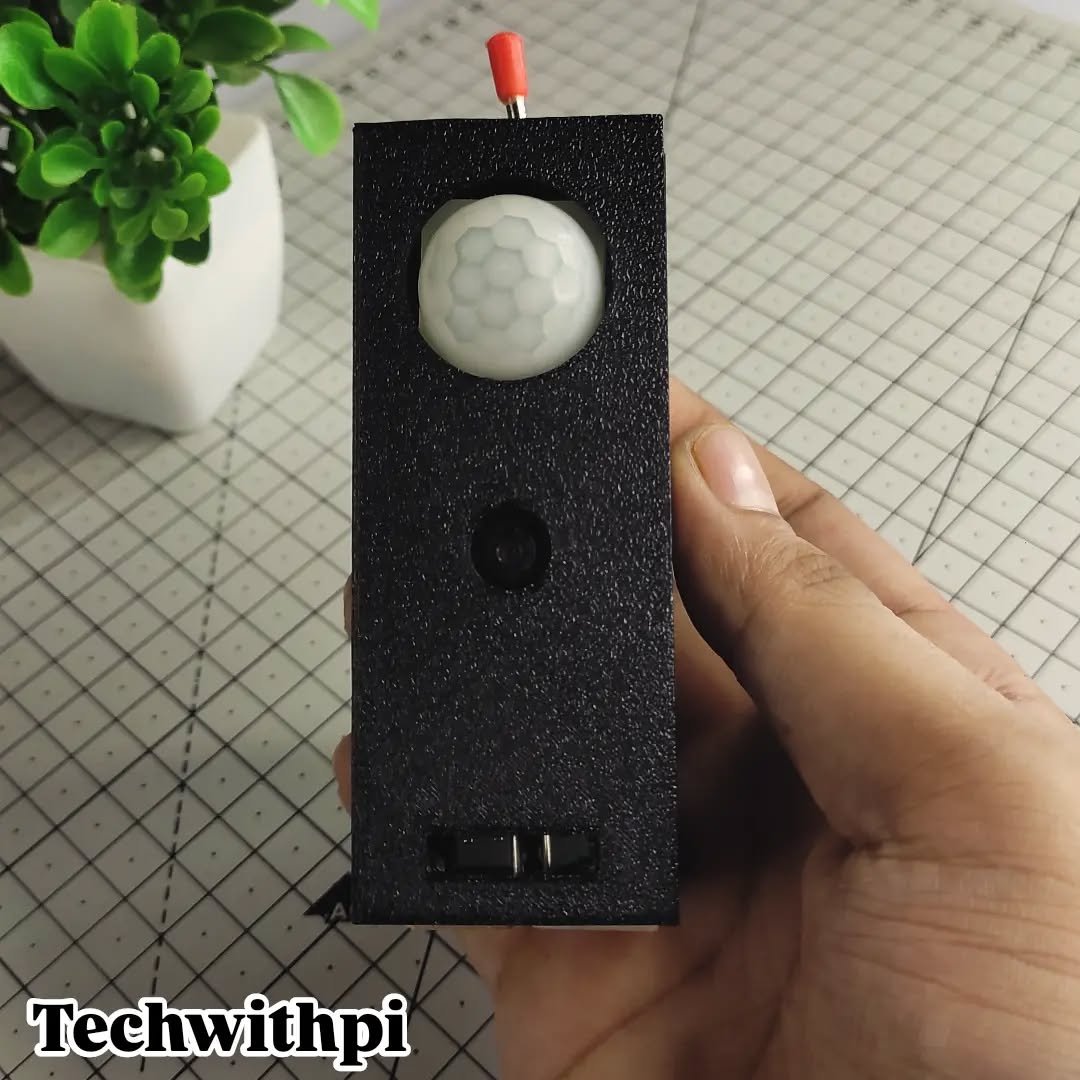
This project turns an ESP32 into a motion-activated security camera that sends photos to Telegram whenever movement is detected. The system combines an OV3660 camera module with an AM312 PIR motion sensor to capture and instantly deliver images to a Telegram chat, making it ideal for monitoring entry points, workshops, or other spaces where quick alerts matter.
The guide includes a complete wiring diagram showing how to connect the PIR sensor to the ESP32, a full parts list, and ready-to-deploy firmware with built-in WiFi and Telegram integration. Assembly is straightforward—the camera wiring stays intact, the PIR sensor connects to a single GPIO pin, and after powering up and configuring your WiFi and Telegram credentials, the system is ready to detect motion and send alerts.
Wiring diagram

Gather all the parts
Assemble it in 3 steps
1. Leave the camera wiring untouched
The OV3660 camera is already wired on the ESP32-S3-CAM board. Do not attach the PIR to any of the camera pins listed in the camera mapping.
- GPIO1 is free in the supplied camera mapping and is reserved for the PIR output in this project.
- Do not use GPIO0, GPIO3, GPIO43, GPIO44, GPIO45, or GPIO46.
2. Wire the 3.3 V PIR sensor
With USB power disconnected, connect the AM312-style PIR VCC pin to the ESP32-S3-CAM 3V3 pin, GND to GND, and OUT to GPIO1.
- Check labels on the sensor board; its physical pin order can differ by vendor.
- The PIR output is 3.3 V and can connect directly to GPIO1.
- This wiring is for a 3.3 V-output AM312-style PIR. Do not substitute a 5 V-output sensor without adding a level shifter.
3. Power and test
Power the ESP32-S3-CAM through USB. After deploying the firmware with Schematik’s Deploy button, let the PIR settle for at least 60 seconds, then move across its field of view. A motion event sends one photo, with a 15-second pause before another can be sent.
- Enter your Wi-Fi name, Wi-Fi password, Telegram bot token, and chat ID in the four firmware constants before deploying.
- Use a stable USB supply because camera capture and Wi-Fi transmission draw short current peaks.
- The device cannot send its online message or motion photos until valid Wi-Fi and Telegram credentials replace the placeholders.
Review all connections
1. Connections between "pir_1" and "ESP32"
Deploy the firmware
#include <Arduino.h>
#include <WiFi.h>
#include <WiFiClientSecure.h>
#include "esp_camera.h"

// Replace these placeholders before deploying. PIR OUT is wired directly to GPIO1 (verified free and separate from the built-in OV3660 camera pin map).

// Forward declarations
bool secretsConfigured();
String urlEncode(const String &text);
bool readHttpStatus(WiFiClientSecure &client, const char *operation);
bool telegramMessage(const String &message);
bool telegramPhoto(camera_fb_t *frame);
bool connectWiFi();
bool startCamera();
void captureAndSendMotionPhoto();

const char *WIFI_SSID = "YOUR_WIFI_NAME";
const char *WIFI_PASSWORD = "YOUR_WIFI_PASSWORD";
const char *TELEGRAM_BOT_TOKEN = "123456789:REPLACE_WITH_YOUR_BOT_TOKEN";
const char *TELEGRAM_CHAT_ID = "REPLACE_WITH_YOUR_CHAT_ID";

constexpr int PIR_PIN = 1;
constexpr unsigned long PIR_WARMUP_MS = 60000UL;
constexpr unsigned long PHOTO_COOLDOWN_MS = 15000UL;
constexpr unsigned long WIFI_TIMEOUT_MS = 20000UL;

// OV3660 DVP wiring supplied for this generic ESP32-S3-CAM board.
constexpr int CAM_PIN_PWDN = -1;
constexpr int CAM_PIN_RESET = -1;
constexpr int CAM_PIN_XCLK = 15;
constexpr int CAM_PIN_SIOD = 4;
constexpr int CAM_PIN_SIOC = 5;
constexpr int CAM_PIN_D7 = 16;  // Y9
constexpr int CAM_PIN_D6 = 17;  // Y8
constexpr int CAM_PIN_D5 = 18;  // Y7
constexpr int CAM_PIN_D4 = 12;  // Y6
constexpr int CAM_PIN_D3 = 10;  // Y5
constexpr int CAM_PIN_D2 = 8;   // Y4
constexpr int CAM_PIN_D1 = 9;   // Y3
constexpr int CAM_PIN_D0 = 11;  // Y2
constexpr int CAM_PIN_VSYNC = 6;
constexpr int CAM_PIN_HREF = 7;
constexpr int CAM_PIN_PCLK = 13;

bool pirWasHigh = false;
bool monitoringArmed = false;
unsigned long bootMillis = 0;
unsigned long lastPhotoMillis = 0;

bool secretsConfigured() {
  return String(WIFI_SSID) != "YOUR_WIFI_NAME" &&
         String(WIFI_PASSWORD) != "YOUR_WIFI_PASSWORD" &&
         String(TELEGRAM_BOT_TOKEN).indexOf("REPLACE") == -1 &&
         String(TELEGRAM_CHAT_ID).indexOf("REPLACE") == -1;
}

String urlEncode(const String &text) {
  const char *hex = "0123456789ABCDEF";
  String encoded;
  encoded.reserve(text.length() * 3);
  for (size_t i = 0; i < text.length(); ++i) {
    const uint8_t c = static_cast<uint8_t>(text[i]);
    if ((c >= 'a' && c <= 'z') || (c >= 'A' && c <= 'Z') ||
        (c >= '0' && c <= '9') || c == '-' || c == '_' || c == '.' || c == '~') {
      encoded += static_cast<char>(c);
    } else {
      encoded += '%';
      encoded += hex[c >> 4];
      encoded += hex[c & 0x0F];
    }
  }
  return encoded;
}

bool readHttpStatus(WiFiClientSecure &client, const char *operation) {
  const unsigned long start = millis();
  while (!client.available() && millis() - start < 10000UL) {
    delay(10);
  }
  if (!client.available()) {
    Serial.printf("Telegram %s: no HTTP response\n", operation);
    return false;
  }

  const String statusLine = client.readStringUntil('\n');
  Serial.printf("Telegram %s: %s\n", operation, statusLine.c_str());
  while (client.available()) {
    client.read();
  }
  return statusLine.indexOf(" 200 ") >= 0;
}

bool telegramMessage(const String &message) {
  WiFiClientSecure client;
  client.setInsecure();  // TLS encryption without a pinned certificate; suitable for Telegram API access.
  if (!client.connect("api.telegram.org", 443)) {
    Serial.println("Telegram message: connection failed");
    return false;
  }

  const String path = "/bot" + String(TELEGRAM_BOT_TOKEN) +
                      "/sendMessage?chat_id=" + urlEncode(TELEGRAM_CHAT_ID) +
                      "&text=" + urlEncode(message);
  client.print("GET " + path + " HTTP/1.1\r\nHost: api.telegram.org\r\nConnection: close\r\n\r\n");
  const bool ok = readHttpStatus(client, "message");
  client.stop();
  return ok;
}

bool telegramPhoto(camera_fb_t *frame) {
  WiFiClientSecure client;
  client.setInsecure();
  if (!client.connect("api.telegram.org", 443)) {
    Serial.println("Telegram photo: connection failed");
    return false;
  }

  const String boundary = "----ESP32S3CamBoundary";
  const String preamble = "--" + boundary + "\r\n"
      "Content-Disposition: form-data; name=\"chat_id\"\r\n\r\n" +
      String(TELEGRAM_CHAT_ID) + "\r\n--" + boundary + "\r\n"
      "Content-Disposition: form-data; name=\"caption\"\r\n\r\nMotion detected\r\n" +
      "--" + boundary + "\r\n"
      "Content-Disposition: form-data; name=\"photo\"; filename=\"motion.jpg\"\r\n"
      "Content-Type: image/jpeg\r\n\r\n";
  const String ending = "\r\n--" + boundary + "--\r\n";
  const size_t contentLength = preamble.length() + frame->len + ending.length();
  const String path = "/bot" + String(TELEGRAM_BOT_TOKEN) + "/sendPhoto";

  client.print("POST " + path + " HTTP/1.1\r\n");
  client.print("Host: api.telegram.org\r\n");
  client.print("Connection: close\r\n");
  client.print("Content-Type: multipart/form-data; boundary=" + boundary + "\r\n");
  client.print("Content-Length: " + String(contentLength) + "\r\n\r\n");
  client.print(preamble);
  client.write(frame->buf, frame->len);
  client.print(ending);

  const bool ok = readHttpStatus(client, "photo");
  client.stop();
  return ok;
}

bool connectWiFi() {
  if (WiFi.status() == WL_CONNECTED) {
    return true;
  }

  Serial.printf("Connecting to Wi-Fi: %s\n", WIFI_SSID);
  WiFi.mode(WIFI_STA);
  WiFi.begin(WIFI_SSID, WIFI_PASSWORD);
  const unsigned long started = millis();
  while (WiFi.status() != WL_CONNECTED && millis() - started < WIFI_TIMEOUT_MS) {
    delay(250);
  }

  if (WiFi.status() == WL_CONNECTED) {
    Serial.print("Wi-Fi connected, IP: ");
    Serial.println(WiFi.localIP());
    return true;
  }
  Serial.println("Wi-Fi connection timed out");
  return false;
}

bool startCamera() {
  camera_config_t config = {};
  config.ledc_channel = LEDC_CHANNEL_0;
  config.ledc_timer = LEDC_TIMER_0;
  config.pin_d0 = CAM_PIN_D0;
  config.pin_d1 = CAM_PIN_D1;
  config.pin_d2 = CAM_PIN_D2;
  config.pin_d3 = CAM_PIN_D3;
  config.pin_d4 = CAM_PIN_D4;
  config.pin_d5 = CAM_PIN_D5;
  config.pin_d6 = CAM_PIN_D6;
  config.pin_d7 = CAM_PIN_D7;
  config.pin_xclk = CAM_PIN_XCLK;
  config.pin_pclk = CAM_PIN_PCLK;
  config.pin_vsync = CAM_PIN_VSYNC;
  config.pin_href = CAM_PIN_HREF;
  config.pin_sccb_sda = CAM_PIN_SIOD;
  config.pin_sccb_scl = CAM_PIN_SIOC;
  config.pin_pwdn = CAM_PIN_PWDN;
  config.pin_reset = CAM_PIN_RESET;
  config.xclk_freq_hz = 20000000;
  config.pixel_format = PIXFORMAT_JPEG;
  // QVGA and one frame buffer keep this compatible with boards lacking PSRAM.
  config.frame_size = FRAMESIZE_QVGA;
  config.jpeg_quality = 12;
  config.fb_count = 1;
  config.grab_mode = CAMERA_GRAB_WHEN_EMPTY;
  config.fb_location = CAMERA_FB_IN_DRAM;

  const esp_err_t result = esp_camera_init(&config);
  if (result != ESP_OK) {
    Serial.printf("Camera initialization failed: 0x%lx\n", static_cast<unsigned long>(result));
    return false;
  }
  return true;
}

void captureAndSendMotionPhoto() {
  if (!connectWiFi()) {
    Serial.println("Motion seen, but Wi-Fi is unavailable; photo was not sent.");
    return;
  }

  Serial.println("Motion confirmed: capturing photo.");
  camera_fb_t *frame = esp_camera_fb_get();
  if (frame == nullptr) {
    Serial.println("Camera capture failed");
    telegramMessage("Motion detected, but the camera capture failed.");
    return;
  }

  const bool sent = telegramPhoto(frame);
  esp_camera_fb_return(frame);
  if (!sent) {
    Serial.println("Photo delivery failed");
  }
}

void setup() {
  Serial.begin(115200);
  delay(300);
  pinMode(PIR_PIN, INPUT);
  bootMillis = millis();
  pirWasHigh = digitalRead(PIR_PIN) == HIGH;

  if (!startCamera()) {
    Serial.println("Camera unavailable; the device will not send photos.");
  }

  if (!secretsConfigured()) {
    Serial.println("Enter Wi-Fi and Telegram credentials in the four constants before deploying.");
    return;
  }

  if (connectWiFi()) {
    telegramMessage("ESP32-S3-CAM is online.");
  }
  Serial.println("PIR warm-up started; motion monitoring will arm in 60 seconds.");
}

void loop() {
  if (!secretsConfigured()) {
    delay(1000);
    return;
  }

  const bool pirHigh = digitalRead(PIR_PIN) == HIGH;
  if (!monitoringArmed && millis() - bootMillis >= PIR_WARMUP_MS) {
    monitoringArmed = true;
    pirWasHigh = pirHigh;
    Serial.println("PIR monitoring armed.");
  }

  if (monitoringArmed && pirHigh && !pirWasHigh && millis() - lastPhotoMillis >= PHOTO_COOLDOWN_MS) {
    lastPhotoMillis = millis();
    captureAndSendMotionPhoto();
  }
  pirWasHigh = pirHigh;
  delay(20);
}
Download project files
Remix this project
Make it yours in one click
Open a full copy of this project in your own Schematik workspace — diagram, code, parts, and assembly steps included. Swap the sensor, add features, or redesign the whole thing with AI. The author's original stays untouched.