Community project
Ocean Swell Forecast Display
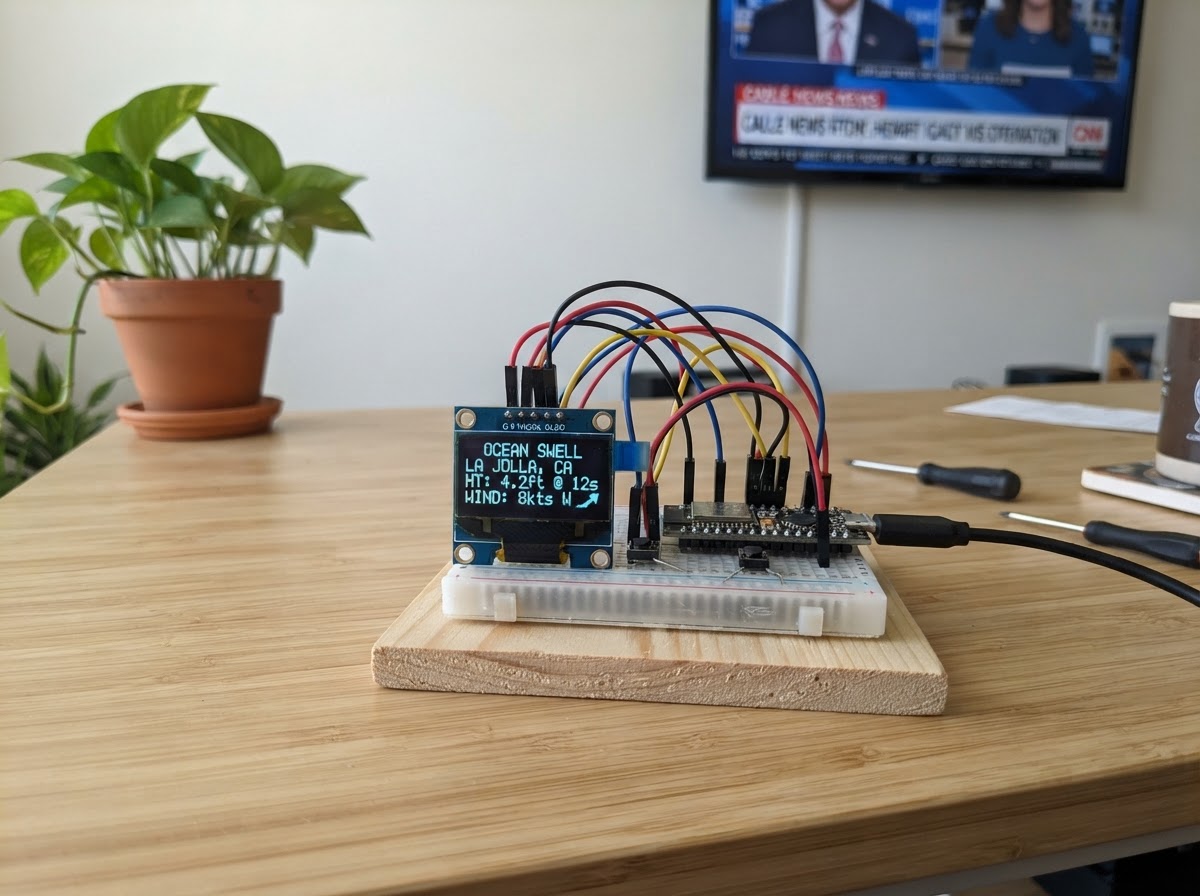
This project builds a real-time ocean swell forecast display that connects to the Open-Meteo Marine API and shows wave height, period, and direction on a compact OLED screen. Perfect for surfers and coastal enthusiasts who want to monitor conditions at their favorite break without reaching for a phone.
The guide includes a complete wiring diagram, parts list, and ready-to-deploy firmware for the ESP32. Assembly takes just a few minutes—wire the SSD1306 OLED to the ESP32 via I2C, configure your WiFi credentials and surf spot coordinates in the code, and the display will refresh every 15 minutes with the latest swell forecast.
Wiring diagram

Gather all the parts
Assemble it in 9 steps
1. Gather your parts
You need: an ESP32 DevKit V1 board, a 0.96" SSD1306 I2C OLED module (4-pin: VCC / GND / SDA / SCL), a USB-A to Micro-USB cable for power, and a small breadboard with jumper wires.
- Make sure your OLED module has only 4 pins and is labelled I2C (not SPI). I2C modules have VCC, GND, SCL, SDA.
2. Place the ESP32 on the breadboard
Seat the ESP32 DevKit V1 across the centre spine of a full-size breadboard so both rows of pins are accessible.
- Leave at least one column of free holes on each side so you can insert jumper wires.
3. Wire OLED VCC → ESP32 3.3 V
Connect the OLED VCC pin to the ESP32 3.3 V pin (labelled '3V3' on the board) using a red jumper wire.
- Use 3.3 V — NOT 5 V. The SSD1306 OLED is a 3.3 V device. Connecting it to 5 V will damage it.
4. Wire OLED GND → ESP32 GND
Connect the OLED GND pin to any GND pin on the ESP32 using a black jumper wire.
5. Wire OLED SDA → ESP32 GPIO 21
Connect the OLED SDA pin to GPIO 21 on the ESP32 (the default I2C data line). Use a yellow or green jumper wire.
6. Wire OLED SCL → ESP32 GPIO 22
Connect the OLED SCL pin to GPIO 22 on the ESP32 (the default I2C clock line). Use a blue jumper wire.
7. Double-check your wiring
Verify all four connections before powering on: • OLED VCC → ESP32 3V3 • OLED GND → ESP32 GND • OLED SDA → ESP32 GPIO 21 • OLED SCL → ESP32 GPIO 22
- A wiring mistake on the I2C lines will not damage anything — the OLED simply won't appear. Swapping SDA and SCL is the most common mistake.
8. Edit your WiFi credentials and surf spot
In the firmware, find the three lines at the top: WIFI_SSID — enter your WiFi network name. WIFI_PASSWORD — enter your WiFi password. SPOT_LAT / SPOT_LON — enter the latitude and longitude of your surf break (decimal degrees, e.g. 33.8688, 151.2093 for Sydney). Update SPOT_NAME to a short label.
- Google Maps: right-click any ocean location and click the coordinates to copy them.
- Positive longitude = East (Pacific/Atlantic), negative = West.
9. Deploy the firmware
Connect the ESP32 to your computer via USB, then click the Deploy button in Schematik. Libraries install automatically. The OLED will show 'Connecting WiFi…' then 'Fetching swell…' before the first forecast appears.
- If the display stays blank after 30 seconds, open the serial monitor in Schematik to see debug messages.
- Data refreshes every 15 minutes automatically.
Review all connections
1. Connections between "oled" and "ESP32"
Deploy the firmware
#include <Arduino.h>
/*
 * Ocean Swell Forecast Display
 * ESP32 DevKit V1 + SSD1306 128×64 OLED
 * Data: Open-Meteo Marine API (free, no API key)
 *
 * ── CONFIGURE THESE ──────────────────────────────────────────────────────── */
#define WIFI_SSID       "YOUR_WIFI_SSID"
#define WIFI_PASSWORD   "YOUR_WIFI_PASSWORD"

// Surf spot coordinates — change to your favourite break
#define SPOT_LAT        34.0195    // Pipeline, Oahu as default
#define SPOT_LON       -118.4912   // (replace with your coordinates)
#define SPOT_NAME       "Your Spot"

// How often to refresh data (milliseconds) — 15 minutes
#define REFRESH_INTERVAL_MS  (15UL * 60UL * 1000UL)
/* ─────────────────────────────────────────────────────────────────────────── */

#include <Wire.h>
#include <Adafruit_GFX.h>
#include <Adafruit_SSD1306.h>
#include <WiFi.h>
#include <HTTPClient.h>
#include <ArduinoJson.h>

#define SCREEN_WIDTH 128
#define SCREEN_HEIGHT 64
#define OLED_RESET   -1
#define I2C_ADDR     0x3C

#define SDA_PIN 21
#define SCL_PIN 22


// Hoisted type definitions
struct SwellSlot {
  int    hour;          // hour of day (0-23)
  float  swellHeight;   // m
  float  swellPeriod;   // s
  int    swellDir;      // degrees
};


// Forward declarations
const char* bearingLabel(int deg);
void drawConnecting(const char* msg);
void drawError(const char* msg);
bool fetchForecast();
void drawSummary();
void drawBarChart();
void drawDetailScroll();

Adafruit_SSD1306 display(SCREEN_WIDTH, SCREEN_HEIGHT, &Wire, OLED_RESET);

// ── Forecast data for up to 8 hourly slots ───────────────────────────────────
static const int MAX_SLOTS = 8;

SwellSlot slots[MAX_SLOTS];
int  validSlots   = 0;
bool dataFresh    = false;
unsigned long lastFetch = 0;

// ── Helpers ───────────────────────────────────────────────────────────────────
const char* bearingLabel(int deg) {
  // 8-point compass from degrees
  static const char* labels[] = {"N","NE","E","SE","S","SW","W","NW"};
  int idx = ((deg + 22) % 360) / 45;
  return labels[idx];
}

void drawConnecting(const char* msg) {
  display.clearDisplay();
  display.setTextSize(1);
  display.setTextColor(SSD1306_WHITE);
  display.setCursor(0, 24);
  display.println(msg);
  display.display();
}

void drawError(const char* msg) {
  display.clearDisplay();
  display.setTextSize(1);
  display.setTextColor(SSD1306_WHITE);
  display.setCursor(0, 0);
  display.println(F("! Fetch failed"));
  display.setCursor(0, 16);
  display.println(msg);
  display.display();
}

// ── Fetch & parse ─────────────────────────────────────────────────────────────
bool fetchForecast() {
  char url[320];
  snprintf(url, sizeof(url),
    "https://marine-api.open-meteo.com/v1/marine"
    "?latitude=%.4f&longitude=%.4f"
    "&hourly=swell_wave_height,swell_wave_period,swell_wave_direction"
    "&forecast_days=2"
    "&timezone=auto",
    (double)SPOT_LAT, (double)SPOT_LON);

  HTTPClient http;
  http.begin(url);
  http.setTimeout(10000);
  int code = http.GET();

  if (code != HTTP_CODE_OK) {
    Serial.printf("[HTTP] GET failed, code=%d\n", code);
    http.end();
    return false;
  }

  // Stream-parse with ArduinoJson filter to save RAM
  JsonDocument filter;
  filter["hourly"]["time"]                  = true;
  filter["hourly"]["swell_wave_height"]     = true;
  filter["hourly"]["swell_wave_period"]     = true;
  filter["hourly"]["swell_wave_direction"]  = true;

  JsonDocument doc;
  DeserializationError err = deserializeJson(doc, http.getStream(),
                               DeserializationOption::Filter(filter));
  http.end();

  if (err) {
    Serial.print(F("[JSON] parse error: "));
    Serial.println(err.c_str());
    return false;
  }

  JsonArray times  = doc["hourly"]["time"].as<JsonArray>();
  JsonArray heights= doc["hourly"]["swell_wave_height"].as<JsonArray>();
  JsonArray periods= doc["hourly"]["swell_wave_period"].as<JsonArray>();
  JsonArray dirs   = doc["hourly"]["swell_wave_direction"].as<JsonArray>();

  if (!times || !heights) {
    Serial.println(F("[JSON] missing arrays"));
    return false;
  }

  // Find next MAX_SLOTS hours starting NOW (skip past hours, take daytime)
  validSlots = 0;
  for (int i = 0; i < (int)times.size() && validSlots < MAX_SLOTS; i++) {
    // time string: "2026-07-19T06:00"
    const char* t = times[i].as<const char*>();
    if (!t) continue;
    // Extract hour from position 11-12
    int h = (t[11]-'0')*10 + (t[12]-'0');
    slots[validSlots].hour        = h;
    slots[validSlots].swellHeight = heights[i].as<float>();
    slots[validSlots].swellPeriod = periods[i].as<float>();
    slots[validSlots].swellDir    = dirs[i].as<int>();
    validSlots++;
  }

  Serial.printf("[FETCH] got %d slots\n", validSlots);
  return validSlots > 0;
}

// ── Display pages ─────────────────────────────────────────────────────────────
static int  currentPage = 0;
static const int PAGES  = 3;    // 0=summary, 1=bar chart, 2=detail scroll
static unsigned long lastPageFlip = 0;
static const unsigned long PAGE_DWELL_MS = 5000;

// Page 0: Summary — next 3 slots in one glance
void drawSummary() {
  display.clearDisplay();

  // Header
  display.setTextSize(1);
  display.setTextColor(SSD1306_WHITE);
  display.setCursor(0, 0);
  display.print(F(SPOT_NAME));
  display.setCursor(90, 0);
  display.print(F("SWELL"));

  // Divider
  display.drawFastHLine(0, 9, 128, SSD1306_WHITE);

  int show = min(validSlots, 3);
  for (int i = 0; i < show; i++) {
    int y = 13 + i * 17;
    char buf[32];
    // Time column
    display.setCursor(0, y);
    snprintf(buf, sizeof(buf), "%02d:00", slots[i].hour);
    display.print(buf);

    // Height
    display.setCursor(42, y);
    snprintf(buf, sizeof(buf), "%.1fm", slots[i].swellHeight);
    display.print(buf);

    // Period
    display.setCursor(78, y);
    snprintf(buf, sizeof(buf), "%.0fs", slots[i].swellPeriod);
    display.print(buf);

    // Direction
    display.setCursor(105, y);
    display.print(bearingLabel(slots[i].swellDir));
  }
  display.display();
}

// Page 1: Bar chart of swell heights for all slots
void drawBarChart() {
  display.clearDisplay();
  display.setTextSize(1);
  display.setTextColor(SSD1306_WHITE);
  display.setCursor(0, 0);
  display.print(F("Swell Height (m)"));
  display.drawFastHLine(0, 9, 128, SSD1306_WHITE);

  if (validSlots == 0) {
    display.setCursor(20, 30);
    display.print(F("No data"));
    display.display();
    return;
  }

  // Find max for scaling
  float maxH = 0.1f;
  for (int i = 0; i < validSlots; i++)
    if (slots[i].swellHeight > maxH) maxH = slots[i].swellHeight;

  const int chartTop    = 11;
  const int chartBottom = 62;
  const int chartHeight = chartBottom - chartTop; // 51 px

  int barWidth  = (128 / validSlots) - 1;
  if (barWidth < 2) barWidth = 2;

  for (int i = 0; i < validSlots; i++) {
    int barH = (int)((slots[i].swellHeight / maxH) * chartHeight);
    if (barH < 1) barH = 1;
    int x = i * (barWidth + 1);
    int y = chartBottom - barH;
    display.fillRect(x, y, barWidth, barH, SSD1306_WHITE);
  }

  // Y-axis label max
  char maxBuf[8];
  snprintf(maxBuf, sizeof(maxBuf), "%.1f", maxH);
  display.setCursor(108, 11);
  display.print(maxBuf);
  display.print('m');

  display.display();
}

// Page 2: Detailed text scroll through all slots
void drawDetailScroll() {
  display.clearDisplay();
  display.setTextSize(1);
  display.setTextColor(SSD1306_WHITE);
  display.setCursor(0, 0);
  display.print(F("Detail"));
  display.drawFastHLine(0, 9, 128, SSD1306_WHITE);

  // Show 3 slots per page, cycle through them
  static int detailOffset = 0;
  static unsigned long lastScroll = 0;
  if (millis() - lastScroll > PAGE_DWELL_MS) {
    detailOffset = (detailOffset + 3) % (validSlots > 0 ? validSlots : 1);
    lastScroll = millis();
  }

  int show = min(validSlots - detailOffset, 3);
  for (int i = 0; i < show; i++) {
    int idx = detailOffset + i;
    int y = 13 + i * 17;
    char buf[32];
    display.setCursor(0, y);
    snprintf(buf, sizeof(buf), "%02d:00 %.1fm %.0fs %s",
      slots[idx].hour,
      slots[idx].swellHeight,
      slots[idx].swellPeriod,
      bearingLabel(slots[idx].swellDir));
    display.print(buf);
  }
  display.display();
}

// ── Setup & loop ──────────────────────────────────────────────────────────────
void setup() {
  Serial.begin(115200);

  Wire.begin(SDA_PIN, SCL_PIN);
  if (!display.begin(SSD1306_SWITCHCAPVCC, I2C_ADDR)) {
    Serial.println(F("[OLED] init failed"));
    for (;;) {}
  }
  display.clearDisplay();
  display.setTextColor(SSD1306_WHITE);

  // ── Connect WiFi ──────────────────────────────────────────────────────────
  drawConnecting("Connecting WiFi...");
  WiFi.mode(WIFI_STA);
  WiFi.begin(WIFI_SSID, WIFI_PASSWORD);

  unsigned long wStart = millis();
  while (WiFi.status() != WL_CONNECTED) {
    if (millis() - wStart > 20000) {
      drawError("WiFi timeout");
      // retry every 30 s
      delay(30000);
      ESP.restart();
    }
    delay(500);
    Serial.print('.');
  }
  Serial.println();
  Serial.print(F("[WiFi] connected, IP: "));
  Serial.println(WiFi.localIP());

  drawConnecting("Fetching swell...");
  dataFresh = fetchForecast();
  lastFetch = millis();

  if (!dataFresh) drawError("Fetch failed");

  lastPageFlip = millis();
}

void loop() {
  unsigned long now = millis();

  // ── Periodic refresh ─────────────────────────────────────────────────────
  if (now - lastFetch >= REFRESH_INTERVAL_MS) {
    dataFresh = fetchForecast();
    lastFetch = now;
    if (!dataFresh) {
      drawError("Refresh failed");
      return;
    }
  }

  if (!dataFresh) return;

  // ── Page flip ────────────────────────────────────────────────────────────
  if (now - lastPageFlip >= PAGE_DWELL_MS) {
    currentPage = (currentPage + 1) % PAGES;
    lastPageFlip = now;

    switch (currentPage) {
      case 0: drawSummary();     break;
      case 1: drawBarChart();    break;
      case 2: drawDetailScroll(); break;
    }
  }
}
Remix this project
Make it yours in one click
Open a full copy of this project in your own Schematik workspace — diagram, code, parts, and assembly steps included. Swap the sensor, add features, or redesign the whole thing with AI. The author's original stays untouched.