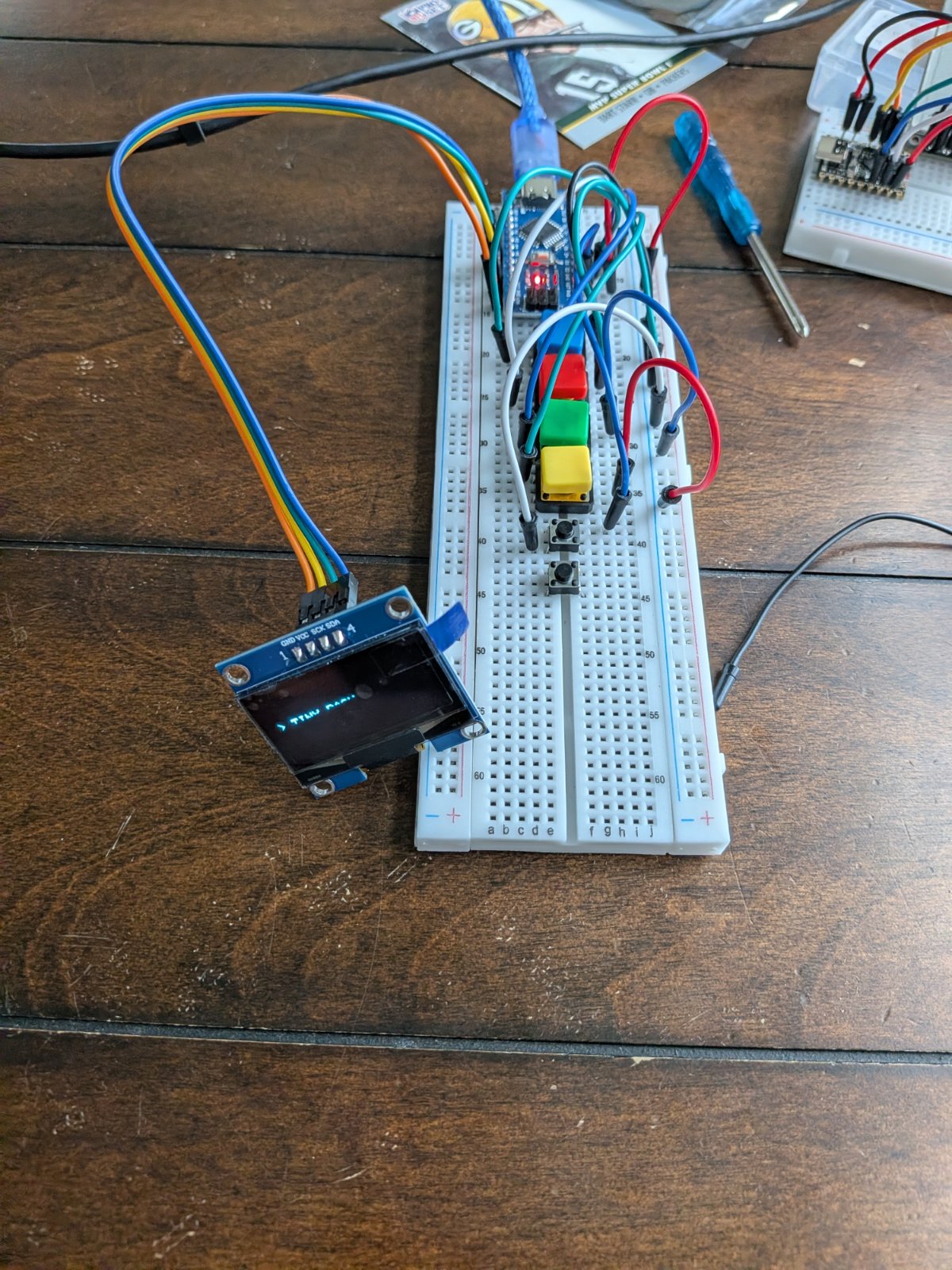
This project builds a portable game console using an Arduino Uno, a small OLED display, and five push buttons. The device runs multiple classic games including Tetris, Snake, Flappy Bird, Pong, Asteroids, and Dash, all playable on a 128x64 pixel screen with simple button controls.
This guide provides a complete parts list, wiring diagram showing how to connect the SH1106 OLED display and five buttons to the Arduino, and the full firmware needed to run the game menu and all included games. Assembly takes just a few minutes of wiring, and once powered up, the device displays a welcome screen and menu system for selecting and playing games.
Wiring diagram

Gather all the parts
Assemble it in 4 steps
1. Place the Nano and screen
Put the Arduino Nano and the 1.3-inch OLED where you can read the screen easily. Keep the Nano unplugged while you add wires so a loose wire cannot short the board.
- The OLED pins are usually printed along one edge: VCC, GND, SDA, and SCK.
- Make sure VCC and GND are not swapped — swapped power can damage the screen.
2. Wire the OLED screen
Connect OLED VCC to Nano 5V (power), OLED GND to Nano GND (ground), OLED SDA to Nano A4 (data), and OLED SCK to Nano A5 (clock). Your screen may label the clock pin SCK instead of SCL; they are the same job here.
- Use four different wire colors if possible so the screen connections are easy to trace.
- Do not connect the OLED clock pin to the Nano 5V power pin; it belongs on A5.
3. Wire the five buttons
For each push button, put its two used legs on opposite sides of the button's center gap. Connect one side of every button to Nano GND (ground). Connect the other side of the OK button to D2 (select on the menu and return-to-menu during games), Up to D3 (signal), Down to D4 (signal), Left to D5 (signal), and Right to D6 (signal).
- All five buttons can share one GND row on the breadboard.
- No extra resistor is needed because the Nano uses its built-in button pull-up resistors.
- If a button acts as if it is held down, rotate it 90 degrees or make sure its legs do not share the same breadboard rows.
4. Power up and see the welcome screen
Check every wire once more, then plug the Nano into USB. The OLED first shows “Welcome to the Game Deck!” with a loading bar, then opens the game menu. Use Up and Down to choose a game and OK to open it.
- If the menu does not appear after the loading bar, press the Nano's small reset button once.
- Only use the USB cable for power in this version; do not reconnect the removed battery circuit.
Review all connections
1. Connections between "oled_1" and "Arduino"
2. Connections between "button_1" and "Arduino"
3. Connections between "up_button" and "Arduino"
4. Connections between "down_button" and "Arduino"
5. Connections between "left_button" and "Arduino"
6. Connections between "right_button" and "Arduino"
Deploy the firmware
#include <Arduino.h>
#include <Wire.h>
#include <Adafruit_GFX.h>
#include <Adafruit_SH110X.h>


enum Btn { OK, UP, DOWN, LEFT, RIGHT };

enum Game { MENU, DASH, TETRIS, FLAPPY, SNAKE, PONG_DIFFICULTY, PONG, ASTEROIDS };


// Forward declarations

// Forward declarations
void resetPongBall(int8_t direction);

bool pressed(Btn b);
void title(const __FlashStringHelper*s);
void showBootAnimation();
void home();
const __FlashStringHelper* name(uint8_t n);
void drawMenu();
void beginDash();
void newDashObstacle();
void drawDash();
void runDash();
bool blockAt(uint8_t p,uint8_t r,uint8_t x,uint8_t y);
bool fits(int8_t nx,int8_t ny,uint8_t nr);
void spawnTet();
void beginTetris();
void lockTet();
void drawTetris();
void runTetris();
void beginFlappy();
void drawFlappy();
void runFlappy();
void beginSnake();
void drawSnake();
void runSnake();
void beginPongDifficulty();
void drawPongDifficulty();
void runPongDifficulty();
void beginPong();
void drawPong();
void runPong();
void beginAsteroids();
void drawAsteroids();
void runAsteroids();

const uint8_t pins[]={2,3,4,5,6};


Adafruit_SH1106G display(128,64,&Wire,-1);
bool lastRead[5],stable[5]; uint32_t changed[5],lastFrame;
Game game=MENU; uint8_t choice=0; bool over=false; uint16_t score=0;

bool pressed(Btn b){uint8_t i=b;bool r=digitalRead(pins[i]);if(r!=lastRead[i])changed[i]=millis();bool hit=false;if(millis()-changed[i]>25&&r!=stable[i]){stable[i]=r;hit=(r==LOW);}lastRead[i]=r;return hit;}
void title(const __FlashStringHelper*s){display.setTextSize(1);display.setTextColor(SH110X_WHITE);display.setCursor(1,1);display.print(s);}
void showBootAnimation(){
  // Startup screen: static text is redrawn only as the loading bar advances.
  for(uint8_t fill=0;fill<=100;fill+=5){
    display.clearDisplay();
    display.setTextColor(SH110X_WHITE);
    display.setTextSize(1);
    display.setCursor(14,9);
    display.print(F("Welcome to the"));
    display.setTextSize(2);
    display.setCursor(17,22);
    display.print(F("GAME DECK"));
    display.drawRect(14,51,100,8,SH110X_WHITE);
    uint8_t barWidth=(uint16_t)96*fill/100;
    display.fillRect(16,53,barWidth,4,SH110X_WHITE);
    display.setTextSize(1);
    display.setCursor(51,41);
    display.print(F("LOADING"));
    display.display();
    delay(55);
  }
  delay(250);
}
void home(){game=MENU;lastFrame=millis();}
const __FlashStringHelper* name(uint8_t n){switch(n){case 0:return F("TINY DASH");case 1:return F("TETRIS");case 2:return F("FLAPPY DOT");case 3:return F("SNAKE");case 4:return F("PONG");default:return F("ASTEROIDS");}}
void drawMenu(){display.clearDisplay();display.setTextSize(2);display.setCursor(14,1);display.print(F("GAME DECK"));uint8_t first=(choice/3)*3;display.setTextSize(1);for(uint8_t r=0;r<3;r++){uint8_t n=first+r;if(n>=6)break;display.setCursor(3,27+r*12);display.print(n==choice?F("> "):F("  "));display.print(name(n));}display.display();}

// Tiny Dash: endless 10-point levels. Obstacle styles repeat, while every level runs a little faster.
int16_t dashY,dashV,dashX;uint8_t dashH,dashW;uint16_t level;
void beginDash(){game=DASH;dashY=47;dashV=0;dashX=132;dashH=8;dashW=6;level=1;score=0;over=false;lastFrame=millis();}
void newDashObstacle(){level=score/10+1;uint8_t style=(level-1)%5+1;dashX=128+random(10,28);dashW=(style==2?10:6);dashH=(style==3?14:(style==4?6:random(7,13)));}
void drawDash(){display.clearDisplay();title(F("DASH"));display.setCursor(38,1);display.print(F("L"));display.print(level);display.setCursor(84,1);display.print(score);display.drawFastHLine(0,55,128,SH110X_WHITE);display.fillRect(18,dashY,8,8,SH110X_WHITE);display.fillRect(dashX,55-dashH,dashW,dashH,SH110X_WHITE);if(((level-1)%5+1)==4&&dashX<70)display.drawPixel(dashX+2,42,SH110X_WHITE);if(over){display.setCursor(32,28);display.print(F("CRASH - UP"));}display.display();}
void runDash(){if(pressed(OK)){home();drawMenu();return;}if(over){if(pressed(UP))beginDash();return;}if(pressed(UP)&&dashY==47)dashV=-9;uint8_t frameDelay=60-min((uint16_t)(level-1),(uint16_t)35);if(millis()-lastFrame<frameDelay)return;lastFrame=millis();dashY+=dashV;dashV++;if(dashY>=47){dashY=47;dashV=0;}dashX-=3;if(dashX<-dashW){score++;newDashObstacle();}if(26>dashX&&18<dashX+dashW&&dashY+8>55-dashH)over=true;drawDash();}

// Tetris: seven-wide well, Up rotates, directions move/drop.
const int8_t shapes[7][4][4]={{{0,1,0,0},{1,1,1,0},{0,0,0,0},{0,0,0,0}},{{1,1,0,0},{0,1,1,0},{0,0,0,0},{0,0,0,0}},{{0,1,1,0},{1,1,0,0},{0,0,0,0},{0,0,0,0}},{{1,0,0,0},{1,1,1,0},{0,0,0,0},{0,0,0,0}},{{0,0,1,0},{1,1,1,0},{0,0,0,0},{0,1,0,0}},{{1,1,0,0},{1,1,0,0},{0,0,0,0},{0,0,0,0}},{{1,1,1,1},{0,0,0,0},{0,0,0,0},{0,0,0,0}}};
uint8_t board[10][7],piece,rot;int8_t tx,ty;
bool blockAt(uint8_t p,uint8_t r,uint8_t x,uint8_t y){uint8_t sx=x,sy=y;for(uint8_t i=0;i<r;i++){uint8_t t=sx;sx=3-sy;sy=t;}return shapes[p][sy][sx];}
bool fits(int8_t nx,int8_t ny,uint8_t nr){for(uint8_t y=0;y<4;y++)for(uint8_t x=0;x<4;x++)if(blockAt(piece,nr,x,y)&&(nx+x<0||nx+x>=7||ny+y>=10||(ny+y>=0&&board[ny+y][nx+x])))return false;return true;}
void spawnTet(){piece=random(0,7);rot=0;tx=2;ty=-1;if(!fits(tx,ty,rot))over=true;}
void beginTetris(){game=TETRIS;memset(board,0,sizeof(board));score=0;over=false;spawnTet();lastFrame=millis();}
void lockTet(){for(uint8_t y=0;y<4;y++)for(uint8_t x=0;x<4;x++)if(blockAt(piece,rot,x,y)&&ty+y>=0)board[ty+y][tx+x]=1;for(int8_t y=9;y>=0;y--){bool full=true;for(uint8_t x=0;x<7;x++)if(!board[y][x])full=false;if(full){for(int8_t yy=y;yy>0;yy--)memcpy(board[yy],board[yy-1],7);memset(board[0],0,7);score+=10;y++;}}spawnTet();}
void drawTetris(){display.clearDisplay();title(F("TETRIS"));display.setCursor(67,1);display.print(score);for(uint8_t y=0;y<10;y++)for(uint8_t x=0;x<7;x++)if(board[y][x])display.fillRect(36+x*6,12+y*5,5,4,SH110X_WHITE);for(uint8_t y=0;y<4;y++)for(uint8_t x=0;x<4;x++)if(blockAt(piece,rot,x,y)&&ty+y>=0)display.fillRect(36+(tx+x)*6,12+(ty+y)*5,5,4,SH110X_WHITE);display.drawRect(35,11,44,52,SH110X_WHITE);if(over){display.setCursor(83,29);display.print(F("OVER"));display.setCursor(82,38);display.print(F("UP"));}display.display();}
void runTetris(){if(pressed(OK)){home();drawMenu();return;}if(over){if(pressed(UP))beginTetris();return;}if(pressed(LEFT)&&fits(tx-1,ty,rot))tx--;if(pressed(RIGHT)&&fits(tx+1,ty,rot))tx++;if(pressed(UP)&&fits(tx,ty,(rot+1)%4))rot=(rot+1)%4;if(pressed(DOWN)&&fits(tx,ty+1,rot))ty++;if(millis()-lastFrame<450)return;lastFrame=millis();if(fits(tx,ty+1,rot))ty++;else lockTet();drawTetris();}

int16_t py,vy,ox,oy,px;int8_t sx[32],sy[32],slen,dx,dy,foodX,foodY;int16_t ballX; int8_t ballY,ballVX,ballVY,leftY,rightY;int16_t shipX,shipY,rockX,rockY,shotX,shotY;int8_t rockVX,rockVY;bool shot;
void beginFlappy(){game=FLAPPY;py=30;vy=0;ox=128;oy=random(14,37);score=0;over=false;lastFrame=millis();}
void drawFlappy(){display.clearDisplay();title(F("FLAPPY"));display.setCursor(70,1);display.print(score);display.fillCircle(25,py,4,SH110X_WHITE);display.fillRect(ox,12,6,oy-12,SH110X_WHITE);display.fillRect(ox,oy+23,6,64-oy-23,SH110X_WHITE);if(over){display.setCursor(31,30);display.print(F("BONK - UP"));}display.display();}
void runFlappy(){if(pressed(OK)){home();drawMenu();return;}if(over){if(pressed(UP))beginFlappy();return;}if(pressed(UP))vy=-5;if(millis()-lastFrame<50)return;lastFrame=millis();py+=vy;vy++;ox-=3;if(ox<-6){ox=128;oy=random(14,33);score++;}if(py<12||py>59||(29>ox&&21<ox+6&&(py-4<oy||py+4>oy+23)))over=true;drawFlappy();}
void beginSnake(){game=SNAKE;slen=4;dx=1;dy=0;for(int i=0;i<slen;i++){sx[i]=8-i;sy[i]=4;}foodX=random(1,15);foodY=random(2,7);score=0;over=false;lastFrame=millis();}
void drawSnake(){display.clearDisplay();title(F("SNAKE"));display.setCursor(70,1);display.print(score);for(int i=0;i<slen;i++)display.fillRect(sx[i]*8,sy[i]*8,6,6,SH110X_WHITE);display.drawRect(foodX*8,foodY*8,6,6,SH110X_WHITE);if(over){display.setCursor(33,30);display.print(F("HIT - UP"));}display.display();}
void runSnake(){if(pressed(OK)){home();drawMenu();return;}if(over){if(pressed(UP))beginSnake();return;}if(pressed(UP)&&dy==0){dx=0;dy=-1;}if(pressed(DOWN)&&dy==0){dx=0;dy=1;}if(pressed(LEFT)&&dx==0){dx=-1;dy=0;}if(pressed(RIGHT)&&dx==0){dx=1;dy=0;}if(millis()-lastFrame<180)return;lastFrame=millis();for(int i=slen-1;i>0;i--){sx[i]=sx[i-1];sy[i]=sy[i-1];}sx[0]+=dx;sy[0]+=dy;if(sx[0]<0||sx[0]>15||sy[0]<2||sy[0]>7)over=true;for(int i=1;i<slen;i++)if(sx[0]==sx[i]&&sy[0]==sy[i])over=true;if(sx[0]==foodX&&sy[0]==foodY){score++;if(slen<32)slen++;foodX=random(1,15);foodY=random(2,7);}drawSnake();}
uint8_t pongDifficulty=5,playerPoints=0,cpuPoints=0,pongAiTick=0;
void beginPongDifficulty(){game=PONG_DIFFICULTY;lastFrame=millis();}
void drawPongDifficulty(){display.clearDisplay();title(F("PONG"));display.setCursor(42,19);display.print(F("LEVEL"));display.setTextSize(2);display.setCursor(59,32);display.print(pongDifficulty);display.setTextSize(1);display.setCursor(20,53);display.print(F("UP/DOWN  OK START"));display.display();}
void runPongDifficulty(){if(pressed(OK)){beginPong();return;}if(pressed(UP)||pressed(RIGHT)){if(pongDifficulty<10)pongDifficulty++;drawPongDifficulty();}if(pressed(DOWN)||pressed(LEFT)){if(pongDifficulty>1)pongDifficulty--;drawPongDifficulty();}}
void resetPongBall(int8_t direction){ballX=64;ballY=32;uint8_t ballSpeed=1+(pongDifficulty-1)/3;ballVX=direction*ballSpeed;ballVY=random(0,2)?1:-1;}
void beginPong(){game=PONG;leftY=27;rightY=27;playerPoints=0;cpuPoints=0;pongAiTick=0;score=0;over=false;resetPongBall(random(0,2)?1:-1);lastFrame=millis();}
void drawPong(){display.clearDisplay();title(F("PONG"));display.setCursor(55,1);display.print(playerPoints);display.print(F(" - "));display.print(cpuPoints);display.fillRect(3,leftY,3,15,SH110X_WHITE);display.fillRect(122,rightY,3,15,SH110X_WHITE);display.fillCircle(ballX,ballY,2,SH110X_WHITE);if(over){display.setCursor(28,27);display.print(playerPoints>=7?F("YOU WIN!"):F("CPU WINS"));display.setCursor(34,39);display.print(F("UP REMATCH"));}display.display();}
void runPong(){if(pressed(OK)){home();drawMenu();return;}if(over){if(pressed(UP))beginPong();return;}if(pressed(UP)&&leftY>11)leftY-=4;if(pressed(DOWN)&&leftY<49)leftY+=4;if(millis()-lastFrame<45)return;lastFrame=millis();ballX+=ballVX;ballY+=ballVY;if(ballY<12||ballY>61)ballVY=-ballVY;const uint8_t aiPeriod=5;if(++pongAiTick>=aiPeriod){pongAiTick=0;int8_t target=ballY;if(target>rightY+8&&rightY<49)rightY+=2;if(target<rightY+7&&rightY>11)rightY-=2;}if(ballX<8&&ballY>=leftY-2&&ballY<=leftY+17){ballVX=abs(ballVX);ballVY+=random(-1,2);ballVY=constrain(ballVY,-2,2);if(ballVY==0)ballVY=1;}if(ballX>119&&ballY>=rightY-2&&ballY<=rightY+17){ballVX=-abs(ballVX);ballVY+=random(-1,2);ballVY=constrain(ballVY,-2,2);if(ballVY==0)ballVY=1;}if(ballX<0){cpuPoints++;if(cpuPoints>=7)over=true;else resetPongBall(1);}if(ballX>127){playerPoints++;if(playerPoints>=7)over=true;else resetPongBall(-1);}drawPong();}
void beginAsteroids(){game=ASTEROIDS;shipX=64;shipY=45;rockX=20;rockY=18;rockVX=1;rockVY=1;shot=false;score=0;over=false;lastFrame=millis();}
void drawAsteroids(){display.clearDisplay();title(F("ASTEROIDS"));display.setCursor(80,1);display.print(score);display.drawTriangle(shipX,shipY-5,shipX-5,shipY+5,shipX+5,shipY+5,SH110X_WHITE);display.drawCircle(rockX,rockY,5,SH110X_WHITE);if(shot)display.drawPixel(shotX,shotY,SH110X_WHITE);if(over){display.setCursor(34,30);display.print(F("BOOM - UP"));}display.display();}
void runAsteroids(){if(pressed(OK)){home();drawMenu();return;}if(over){if(pressed(UP))beginAsteroids();return;}if(pressed(LEFT)&&shipX>7)shipX-=4;if(pressed(RIGHT)&&shipX<120)shipX+=4;if(pressed(UP)&&shipY>15)shipY-=3;if(pressed(DOWN)&&shipY<58)shipY+=3;if(millis()-lastFrame<55)return;lastFrame=millis();if(!shot){shot=true;shotX=shipX;shotY=shipY-6;}rockX+=rockVX;rockY+=rockVY;if(rockX<5||rockX>123)rockVX=-rockVX;if(rockY<14||rockY>59)rockVY=-rockVY;if(shot){shotY-=5;if(shotY<10)shot=false;if(abs(shotX-rockX)<7&&abs(shotY-rockY)<7){score++;shot=false;rockX=random(10,118);rockY=15;}}if(abs(shipX-rockX)<8&&abs(shipY-rockY)<8)over=true;drawAsteroids();}
void setup(){for(uint8_t i=0;i<5;i++){pinMode(pins[i],INPUT_PULLUP);lastRead[i]=stable[i]=digitalRead(pins[i]);changed[i]=0;}Wire.begin();display.begin(0x3C,true);randomSeed(micros());showBootAnimation();drawMenu();}
void loop(){if(game==MENU){if(pressed(UP)||pressed(LEFT)){choice=(choice+5)%6;drawMenu();}if(pressed(DOWN)||pressed(RIGHT)){choice=(choice+1)%6;drawMenu();}if(pressed(OK)){switch(choice){case 0:beginDash();break;case 1:beginTetris();break;case 2:beginFlappy();break;case 3:beginSnake();break;case 4:beginPongDifficulty();drawPongDifficulty();break;default:beginAsteroids();}}return;}if(game==DASH)runDash();else if(game==TETRIS)runTetris();else if(game==FLAPPY)runFlappy();else if(game==SNAKE)runSnake();else if(game==PONG_DIFFICULTY)runPongDifficulty();else if(game==PONG)runPong();else runAsteroids();}
Remix this project
Make it yours in one click
Open a full copy of this project in your own Schematik workspace, diagram, code, parts, and assembly steps included. Swap the sensor, add features, or redesign the whole thing with AI. The author's original stays untouched.