Community project
Portable RF Testing Box
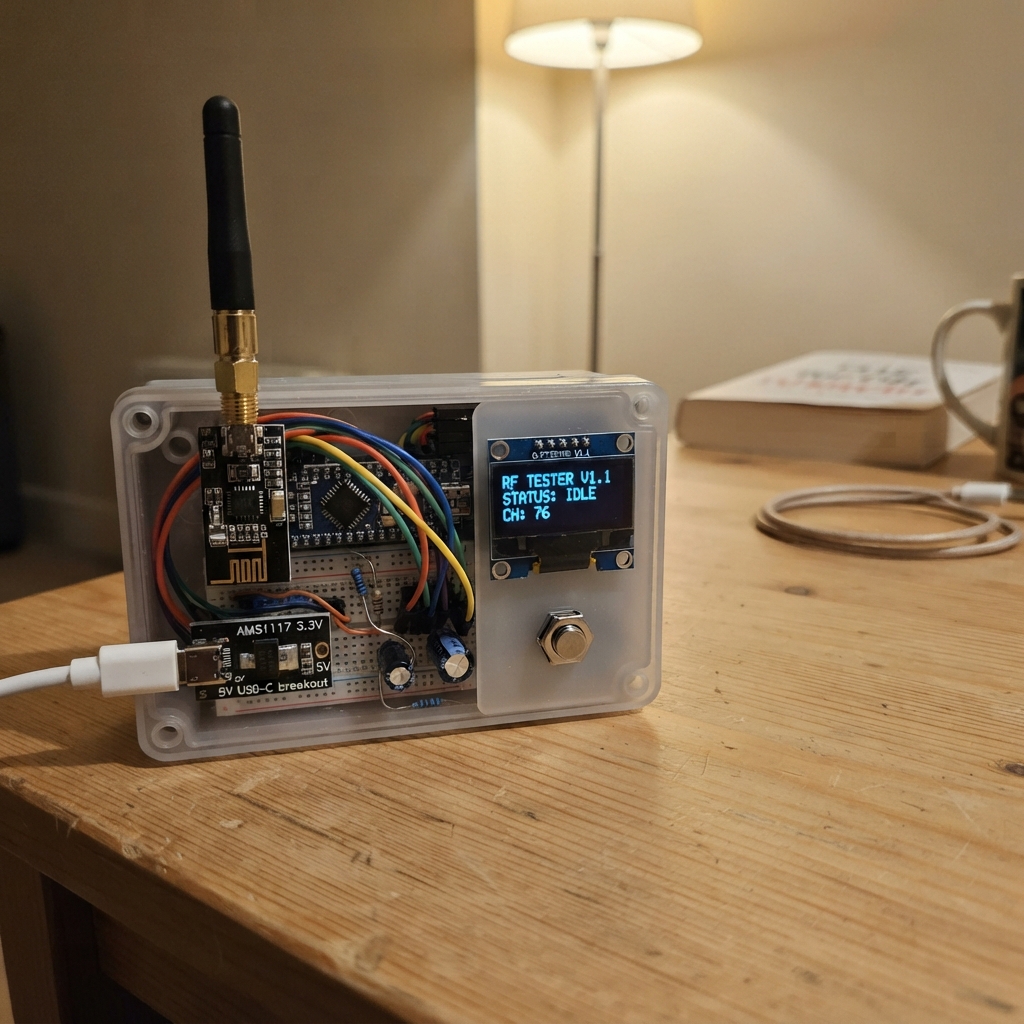
This portable RF testing box scans the 2.4 GHz spectrum across 126 channels using three nRF24L01+ modules with external antennas, displaying real-time activity on a small OLED screen. It's powered by an Arduino Uno and controlled with four push buttons, making it a compact tool for detecting wireless signals, diagnosing RF interference, and testing radio communication in the field.
The guide provides a complete wiring diagram, parts list, and step-by-step assembly instructions to build the device from scratch. You'll learn how to wire multiple RF modules to a single microcontroller, set up the 3.3V power rail with proper capacitor filtering, integrate the I2C display, and upload the scanning firmware that monitors all channels simultaneously.
Wiring diagram

Gather all the parts
Assemble it in 7 steps
1. Lay out the parts
Place the 3.3 V Pro Mini in the middle of the perfboard, put oled_1 where you can see it, and place radio_1, radio_2, and radio_3 along the top edge with room for their antenna connectors. Keep the three radio modules several centimetres apart so the antennas do not crowd each other.
- Do not solder the antennas to the board; screw each antenna onto its own radio module after mounting.
- Do not power any nRF24 radio from 5 V — 5 V on its VCC pin can permanently damage it.
2. Make the 3.3 V power rail
Connect usb_5v_input VBUS to regulator_3v3 VIN (power). Connect usb_5v_input GND and regulator_3v3 GND to the shared GND rail (ground). Connect regulator_3v3 VOUT to the 3V3 rail (power), then connect that rail to the Pro Mini VCC pin, not its RAW pin.
- Use a short, thicker wire for the 3V3 and GND rails because all three radios share them.
- Fit one 10 µF capacitor across the regulator input and ground, and the other across its 3V3 output and ground.
- The long lead of each electrolytic capacitor is positive and the striped lead is negative; reversing it can make the capacitor fail.
3. Power the screen and radios
Connect oled_1 VCC to 3V3 (power) and GND to GND (ground). For radio_1, radio_2, and radio_3, connect every VCC pin to 3V3 (power) and every GND pin to GND (ground). Put one 47 µF capacitor beside each radio: its long positive lead goes to that radio VCC pin and its striped negative lead goes to GND.
- Keep each 47 µF capacitor physically close to its radio module; this prevents the screen or scanner from resetting when the radio draws a short burst of current.
- Make sure VCC and GND are not swapped on the OLED or radios — swapped power can damage them.
4. Wire the screen
Connect oled_1 SDA to Pro Mini A4 (data), and oled_1 SCL to Pro Mini A5 (clock). The OLED header order varies by seller, so follow the labels printed on your own module rather than its left-to-right position.
- The screen should be a 128×64 I2C SSD1306 module at address 0x3C.
5. Wire the shared radio data lines
Connect SCK from radio_1, radio_2, and radio_3 together to Pro Mini D13 (clock). Connect all three MOSI pins together to D11 (data from the Pro Mini), and all three MISO pins together to D12 (data back to the Pro Mini). Then connect radio_1 CE to D7 and CSN to D10; radio_2 CE to D6 and CSN to D9; radio_3 CE to D3 and CSN to D8 (radio-select signals). Leave every IRQ pin unconnected.
- The three SCK wires, three MOSI wires, and three MISO wires are shared; each radio still needs its own separate CE and CSN wire.
- Do not join the three CSN wires together — each radio needs its own select wire or the scanner cannot tell them apart.
6. Add the four controls
For button_up, connect one leg to D2 and the other leg to GND (signal and ground). For button_down use D4 and GND; for button_select use D5 and GND; for button_back use A0 and GND. The code uses the Pro Mini’s built-in pull-up resistors, so no separate button resistors are needed.
- On a four-leg tactile switch, use two legs on opposite sides of the switch; the two legs on the same side are already joined inside.
- Up and Down change the displayed channel range, Select clears the graph, and Back pauses or resumes scanning.
- Avoid connecting a button to the Pro Mini’s D0 or D1 pins because those pins are needed for its USB-to-serial programming adapter.
7. Inspect before powering it
Before connecting USB power, check that every radio VCC pin reaches only the 3V3 rail and every GND pin reaches ground. Then screw the antennas onto radio_1, radio_2, and radio_3, and place the board in a non-metal enclosure with openings for the screen, buttons, USB socket, and antennas.
- A plastic enclosure is best; a metal box weakens the radio signal.
- This design only watches received 2.4 GHz energy and does not transmit test packets.
- Do not connect power with a radio antenna removed if you later change the firmware to transmit; transmitting without an antenna can damage a PA/LNA radio.
Review all connections
1. Connections between "usb_5v_input" and "Arduino"
2. Connections between "regulator_3v3" and "Arduino"
3. Connections between "radio_capacitors" and "Arduino"
4. Connections between "radio_1" and "Arduino"
5. Connections between "radio_2" and "Arduino"
6. Connections between "radio_3" and "Arduino"
7. Connections between "oled_1" and "Arduino"
8. Connections between "button_up" and "Arduino"
9. Connections between "button_down" and "Arduino"
10. Connections between "button_select" and "Arduino"
11. Connections between "button_back" and "Arduino"
12. Connections between "regulator_capacitors" and "Arduino"
Deploy the firmware
#include <SPI.h>
#include <Wire.h>
#include <RF24.h>
#include <Adafruit_GFX.h>
#include <Adafruit_SSD1306.h>

#define RADIO1_CE 7
#define RADIO1_CSN 10
#define RADIO2_CE 6
#define RADIO2_CSN 9
#define RADIO3_CE 3
#define RADIO3_CSN 8
#define BUTTON_UP 2
#define BUTTON_DOWN 4
#define BUTTON_SELECT 5
#define BUTTON_BACK 14

const uint8_t OLED_ADDRESS = 0x3C;
const uint8_t SCREEN_WIDTH = 128;
const uint8_t SCREEN_HEIGHT = 64;
const uint8_t CHANNEL_COUNT = 126;
const uint16_t BUTTON_DEBOUNCE_MS = 35;

Adafruit_SSD1306 display(SCREEN_WIDTH, SCREEN_HEIGHT, &Wire, -1);
RF24 radio1(RADIO1_CE, RADIO1_CSN);
RF24 radio2(RADIO2_CE, RADIO2_CSN);
RF24 radio3(RADIO3_CE, RADIO3_CSN);
RF24* radios[] = {&radio1, &radio2, &radio3};

uint8_t activity[CHANNEL_COUNT];
uint8_t scanChannel = 0;
uint8_t selectedBand = 0;
bool paused = false;
bool radioReady[3] = {false, false, false};
uint32_t lastButtonMs = 0;

bool pressed(uint8_t pin) {
  if (digitalRead(pin) != LOW) {
    return false;
  }
  uint32_t now = millis();
  if (now - lastButtonMs < BUTTON_DEBOUNCE_MS) {
    return false;
  }
  lastButtonMs = now;
  return true;
}

void configureRadio(RF24 &radio, uint8_t index) {
  radioReady[index] = radio.begin();
  if (!radioReady[index]) {
    return;
  }
  radio.setAutoAck(false);
  radio.setRetries(0, 0);
  radio.setDataRate(RF24_1MBPS);
  radio.setPALevel(RF24_PA_MIN);
  radio.setCRCLength(RF24_CRC_DISABLED);
  radio.openReadingPipe(1, 0xE7E7E7E7E7LL);
  radio.stopListening();
}

bool channelBusy(RF24 &radio, uint8_t channel) {
  radio.stopListening();
  radio.setChannel(channel);
  radio.startListening();
  delayMicroseconds(140);
  bool busy = radio.testRPD();
  radio.stopListening();
  return busy;
}

void drawScreen() {
  display.clearDisplay();
  display.setTextColor(SSD1306_WHITE);
  display.setTextSize(1);
  display.setCursor(0, 0);
  display.print(F("2.4GHz monitor "));
  display.print(paused ? F("PAUSE") : F("SCAN"));

  const uint8_t start = selectedBand * 42;
  const uint8_t end = start + 42;
  for (uint8_t i = start; i < end; ++i) {
    uint8_t x = (uint8_t)((i - start) * 3);
    uint8_t height = activity[i] * 13;
    if (height > 39) height = 39;
    display.drawFastVLine(x, 55 - height, height, SSD1306_WHITE);
  }

  display.setCursor(0, 57);
  display.print(F("Ch "));
  display.print(start);
  display.print(F("-"));
  display.print(end - 1);
  display.print(F("  R:"));
  display.print(radioReady[0] + radioReady[1] + radioReady[2]);
  display.print(F("/3"));
  display.display();
}

void handleButtons() {
  if (pressed(BUTTON_UP)) {
    selectedBand = (selectedBand + 2) % 3;
    drawScreen();
  } else if (pressed(BUTTON_DOWN)) {
    selectedBand = (selectedBand + 1) % 3;
    drawScreen();
  } else if (pressed(BUTTON_SELECT)) {
    for (uint8_t i = 0; i < CHANNEL_COUNT; ++i) activity[i] = 0;
    drawScreen();
  } else if (pressed(BUTTON_BACK)) {
    paused = !paused;
    drawScreen();
  }
}

void setup() {
  pinMode(BUTTON_UP, INPUT_PULLUP);
  pinMode(BUTTON_DOWN, INPUT_PULLUP);
  pinMode(BUTTON_SELECT, INPUT_PULLUP);
  pinMode(BUTTON_BACK, INPUT_PULLUP);

  Wire.begin();
  display.begin(SSD1306_SWITCHCAPVCC, OLED_ADDRESS);
  display.clearDisplay();
  display.setTextColor(SSD1306_WHITE);
  display.setTextSize(1);
  display.setCursor(0, 0);
  display.println(F("Receive-only"));
  display.println(F("2.4 GHz monitor"));
  display.display();

  SPI.begin();
  configureRadio(radio1, 0);
  configureRadio(radio2, 1);
  configureRadio(radio3, 2);
  delay(500);
  drawScreen();
}

void loop() {
  handleButtons();
  if (!paused) {
    uint8_t hits = 0;
    for (uint8_t i = 0; i < 3; ++i) {
      if (radioReady[i] && channelBusy(*radios[i], scanChannel)) {
        ++hits;
      }
    }
    activity[scanChannel] = hits;
    ++scanChannel;
    if (scanChannel >= CHANNEL_COUNT) {
      scanChannel = 0;
      drawScreen();
    }
  }
  delay(1);
}
Remix this project
Make it yours in one click
Open a full copy of this project in your own Schematik workspace — diagram, code, parts, and assembly steps included. Swap the sensor, add features, or redesign the whole thing with AI. The author's original stays untouched.
Related projects
VW T1 RPM LED Strip
Arduino · October 20, 2026Christoph Brinkmann
Solar Clap-Controlled Follow-Me Home
Arduino · October 19, 2026Jella Mae Lhyzelle Rodillo
Solar Light Tracker
Arduino · October 19, 2026kelleyriverarodriguez1969