Community project
局部刷新贪食蛇
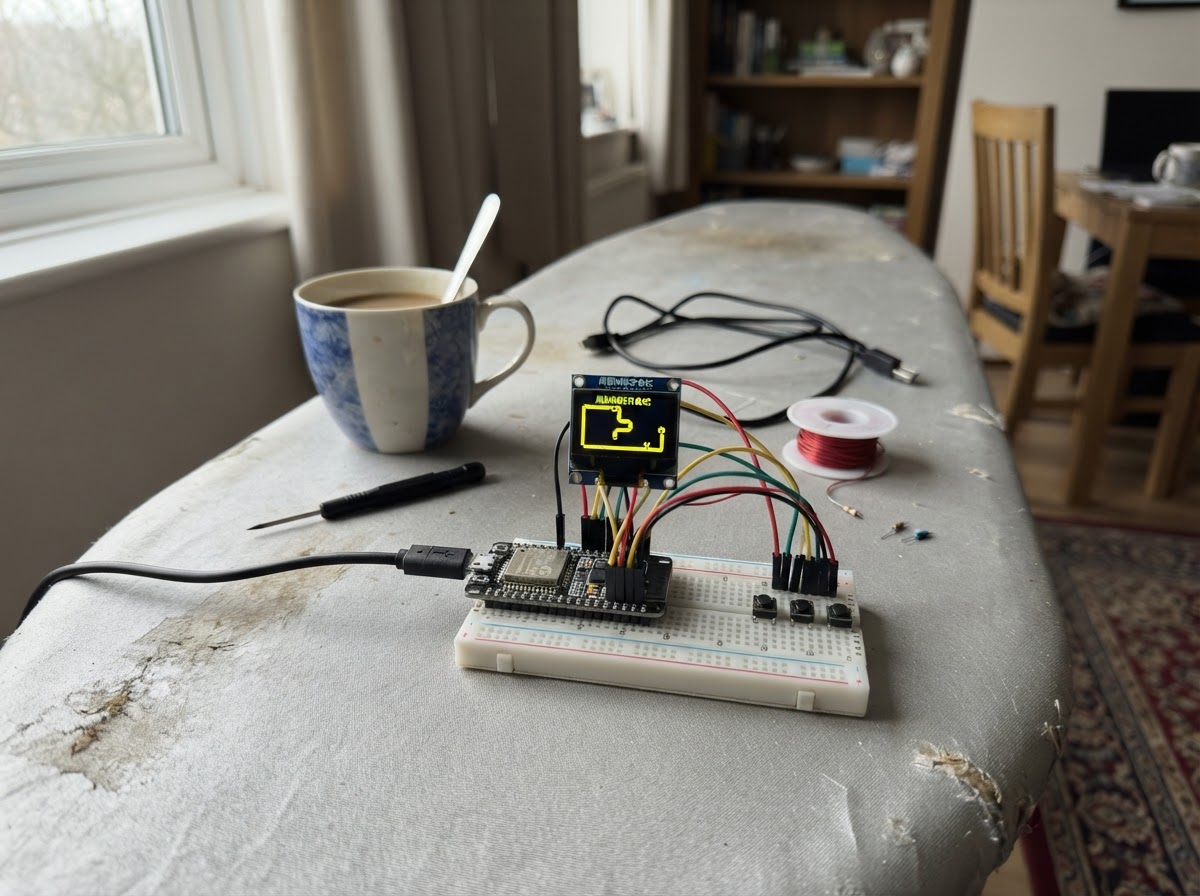
This project brings the classic Snake game to life on an ESP32 microcontroller with a K10 display module. Players navigate a growing snake around a grid, collecting food while avoiding collisions, with real-time score tracking and audio feedback for each game event.
The guide provides a complete parts list, wiring diagram for connecting the ESP32 to the K10 display and power supply, and ready-to-flash firmware featuring partial screen refresh optimization, FreeRTOS-based audio task handling, and responsive touch controls. Assembly takes just minutes: prepare the board, connect power and programming cables, and start playing.
Wiring diagram
Assemble it in 3 steps
1. 准备板子
将 UNIHIKER K10 平放在桌面上,确保屏幕可见且 A、B 两个板载按键可按到。本项目完全使用板载屏幕和按键,不连接任何外部模块。
- 取下会遮挡屏幕或按键的保护物。
- 游戏通过板子自带的 USB-C 供电与下载。
- 请勿把导线接到 GPIO12;它是板载 LCD 的 SPI 时钟。
2. 连接供电与下载线
使用数据 USB-C 线将 K10 接到电脑。项目使用 USB 供电,不需要电池或额外电源。
- 屏幕朝上放置,便于部署后立即测试。
- 仅使用状况良好的 USB 数据线;不要同时从不明外部电源给扩展引脚供电。
3. 开始游戏
在 Schematik 中使用 Deploy 部署。画面显示 SCORE 和控制提示后,A 键让蛇向左转,B 键让蛇向右转;撞墙或撞到自己后,按 A 或 B 重新开始。
- 短按按键即可转向。
- 游戏区域中的绿色格子是蛇,红色格子是食物。
- 无。
Deploy the firmware
#include <Arduino.h>
#include "unihiker_k10.h"
#include <lvgl.h>
#include <freertos/FreeRTOS.h>
#include <freertos/queue.h>

// Note frequencies (Hz)
#define NOTE_A5  880
#define NOTE_C6  1047
#define NOTE_E6  1319
#define NOTE_G6  1568
#define NOTE_B6  1976
#define NOTE_C7  2093

#define TONE_SHORT  ((uint16_t)2600)
#define TONE_MED    ((uint16_t)4200)

enum Direction : uint8_t { UP, RIGHT, DOWN, LEFT };

struct Cell {
  int8_t x;
  int8_t y;
};

enum AudioEvent : uint8_t { AUDIO_TURN, AUDIO_FOOD, AUDIO_GAME_OVER };

// Forward declarations
static void playK10Note(uint16_t note, uint16_t length);
uint32_t nextRandom();
void setCellPosition(lv_obj_t *object, Cell cell);
bool occupiesSnake(int8_t x, int8_t y);
void updateScore();
void placeFood();
void hideUnusedSegments();
void startGame();
void finishGame();
void playTurnSound();
void playFoodSound();
void playGameOverSound();
void audioTask(void *parameter);
void turnLeft();
void turnRight();
void readControls();
void moveSnake();

UNIHIKER_K10 k10;
Music music;

QueueHandle_t audioQueue = nullptr;

constexpr uint8_t COLS = 20;
constexpr uint8_t ROWS = 20;
constexpr uint8_t CELL = 12;
constexpr uint16_t BOARD_Y = 54;
constexpr uint16_t MAX_SNAKE = (uint16_t)COLS * (uint16_t)ROWS;
constexpr uint32_t STEP_MS = 180;

Cell snake[MAX_SNAKE];
lv_obj_t *segmentObj[MAX_SNAKE];
lv_obj_t *foodObj;
lv_obj_t *scoreLabel;
lv_obj_t *messageLabel;

uint16_t snakeLength = 0;
uint16_t score = 0;
Direction direction = RIGHT;
bool gameOver = false;
bool lastA = false;
bool lastB = false;
uint32_t lastStep = 0;
uint32_t randomState = 0x4B103A71;

uint32_t nextRandom() {
  randomState = randomState * 1664525UL + 1013904223UL;
  return randomState;
}

void setCellPosition(lv_obj_t *object, Cell cell) {
  lv_obj_set_pos(object, cell.x * CELL, BOARD_Y + cell.y * CELL);
}

bool occupiesSnake(int8_t x, int8_t y) {
  for (uint16_t i = 0; i < snakeLength; ++i) {
    if (snake[i].x == x && snake[i].y == y) return true;
  }
  return false;
}

void updateScore() {
  char text[18];
  snprintf(text, sizeof(text), "SCORE: %u", score);
  lv_label_set_text(scoreLabel, text);
}

void placeFood() {
  Cell food;
  do {
    food.x = nextRandom() % COLS;
    food.y = nextRandom() % ROWS;
  } while (occupiesSnake(food.x, food.y));
  setCellPosition(foodObj, food);
}

void hideUnusedSegments() {
  for (uint16_t i = snakeLength; i < MAX_SNAKE; ++i) {
    lv_obj_add_flag(segmentObj[i], LV_OBJ_FLAG_HIDDEN);
  }
}

void startGame() {
  snakeLength = 4;
  score = 0;
  direction = RIGHT;
  gameOver = false;
  randomState ^= millis() + 0x9E3779B9UL;

  const int8_t startX = COLS / 2;
  const int8_t startY = ROWS / 2;
  for (uint16_t i = 0; i < snakeLength; ++i) {
    snake[i] = { static_cast<int8_t>(startX - i), startY };
    lv_obj_clear_flag(segmentObj[i], LV_OBJ_FLAG_HIDDEN);
    setCellPosition(segmentObj[i], snake[i]);
  }
  hideUnusedSegments();
  updateScore();
  lv_label_set_text(messageLabel, "A=LEFT   B=RIGHT");
  placeFood();
  lastStep = millis();
}

void finishGame() {
  gameOver = true;
  lv_label_set_text(messageLabel, "GAME OVER - PRESS A OR B");
  playGameOverSound();
}

static void playK10Note(uint16_t note, uint16_t length) {
  music.playTone(note, length);
}

void audioTask(void *parameter) {
  AudioEvent event;
  for (;;) {
    if (xQueueReceive(audioQueue, &event, portMAX_DELAY) == pdTRUE) {
      if (event == AUDIO_TURN) {
        playK10Note((uint16_t)NOTE_A5, TONE_SHORT);
      } else if (event == AUDIO_FOOD) {
        playK10Note((uint16_t)NOTE_E6, TONE_SHORT);
        playK10Note((uint16_t)NOTE_C7, TONE_SHORT);
      } else {
        playK10Note((uint16_t)NOTE_C6, TONE_SHORT);
        playK10Note((uint16_t)NOTE_G6, TONE_SHORT);
        playK10Note((uint16_t)NOTE_C7, TONE_MED);
      }
    }
  }
}

void playTurnSound() {
  const AudioEvent event = AUDIO_TURN;
  if (audioQueue != nullptr) xQueueSend(audioQueue, &event, 0);
}

void playFoodSound() {
  const AudioEvent event = AUDIO_FOOD;
  if (audioQueue != nullptr) xQueueSend(audioQueue, &event, 0);
}

void playGameOverSound() {
  const AudioEvent event = AUDIO_GAME_OVER;
  if (audioQueue != nullptr) xQueueSendToFront(audioQueue, &event, 0);
}

void turnLeft() {
  direction = static_cast<Direction>((direction + 3) % 4);
  playTurnSound();
}

void turnRight() {
  direction = static_cast<Direction>((direction + 1) % 4);
  playTurnSound();
}

void readControls() {
  const bool aPressed = k10.buttonA->isPressed();
  const bool bPressed = k10.buttonB->isPressed();

  if (gameOver) {
    if ((aPressed && !lastA) || (bPressed && !lastB)) startGame();
  } else {
    if (aPressed && !lastA) turnLeft();
    if (bPressed && !lastB) turnRight();
  }
  lastA = aPressed;
  lastB = bPressed;
}

void moveSnake() {
  Cell next = snake[0];
  if (direction == UP) --next.y;
  else if (direction == RIGHT) ++next.x;
  else if (direction == DOWN) ++next.y;
  else --next.x;

  if (next.x < 0 || next.x >= COLS || next.y < 0 || next.y >= ROWS || occupiesSnake(next.x, next.y)) {
    finishGame();
    return;
  }

  const int16_t foodX = lv_obj_get_x(foodObj) / CELL;
  const int16_t foodY = (lv_obj_get_y(foodObj) - BOARD_Y) / CELL;
  const bool ateFood = (next.x == foodX && next.y == foodY);

  if (ateFood && snakeLength < MAX_SNAKE) {
    ++snakeLength;
    ++score;
    lv_obj_clear_flag(segmentObj[snakeLength - 1], LV_OBJ_FLAG_HIDDEN);
  }

  for (int16_t i = snakeLength - 1; i > 0; --i) {
    snake[i] = snake[i - 1];
    setCellPosition(segmentObj[i], snake[i]);
  }
  snake[0] = next;
  setCellPosition(segmentObj[0], snake[0]);

  if (ateFood) {
    updateScore();
    placeFood();
    playFoodSound();
  }
}

lv_obj_t *makeCell(lv_color_t color) {
  lv_obj_t *object = lv_obj_create(lv_scr_act());
  lv_obj_set_size(object, CELL - 2, CELL - 2);
  lv_obj_set_style_bg_color(object, color, 0);
  lv_obj_set_style_bg_opa(object, LV_OPA_COVER, 0);
  lv_obj_set_style_border_width(object, 0, 0);
  lv_obj_set_style_radius(object, 2, 0);
  lv_obj_clear_flag(object, LV_OBJ_FLAG_SCROLLABLE);
  return object;
}

void setup() {
  k10.begin();
  audioQueue = xQueueCreate(4, sizeof(AudioEvent));
  k10.initScreen(2);
  if (audioQueue != nullptr) {
    xTaskCreatePinnedToCore(audioTask, "k10Audio", 4096, nullptr, 1, nullptr, 0);
  }

  lv_obj_t *screen = lv_scr_act();
  lv_obj_set_style_bg_color(screen, lv_color_hex(0x101820), 0);
  lv_obj_set_style_bg_opa(screen, LV_OPA_COVER, 0);

  scoreLabel = lv_label_create(screen);
  lv_obj_set_pos(scoreLabel, 6, 6);
  lv_obj_set_style_text_color(scoreLabel, lv_color_hex(0xE8F1F2), 0);
  lv_obj_set_style_text_font(scoreLabel, &lv_font_montserrat_14, 0);

  messageLabel = lv_label_create(screen);
  lv_obj_set_pos(messageLabel, 6, 29);
  lv_obj_set_style_text_color(messageLabel, lv_color_hex(0x9FB3C8), 0);
  lv_obj_set_style_text_font(messageLabel, &lv_font_montserrat_14, 0);

  lv_obj_t *border = lv_obj_create(screen);
  lv_obj_set_pos(border, 0, BOARD_Y);
  lv_obj_set_size(border, COLS * CELL, ROWS * CELL);
  lv_obj_set_style_bg_opa(border, LV_OPA_TRANSP, 0);
  lv_obj_set_style_border_color(border, lv_color_hex(0x486581), 0);
  lv_obj_set_style_border_width(border, 1, 0);
  lv_obj_set_style_radius(border, 0, 0);
  lv_obj_clear_flag(border, LV_OBJ_FLAG_SCROLLABLE);

  for (uint16_t i = 0; i < MAX_SNAKE; ++i) {
    segmentObj[i] = makeCell(i == 0 ? lv_color_hex(0x7CFC00) : lv_color_hex(0x36B37E));
    lv_obj_add_flag(segmentObj[i], LV_OBJ_FLAG_HIDDEN);
  }
  foodObj = makeCell(lv_color_hex(0xFF5A5F));

  startGame();
}

void loop() {
  lv_timer_handler();
  readControls();

  const uint32_t now = millis();
  if (!gameOver && now - lastStep >= STEP_MS) {
    lastStep = now;
    moveSnake();
  }
  delay(2);
}
Remix this project
Make it yours in one click
Open a full copy of this project in your own Schematik workspace — diagram, code, parts, and assembly steps included. Swap the sensor, add features, or redesign the whole thing with AI. The author's original stays untouched.