Community project
RFID Classroom Alert Console
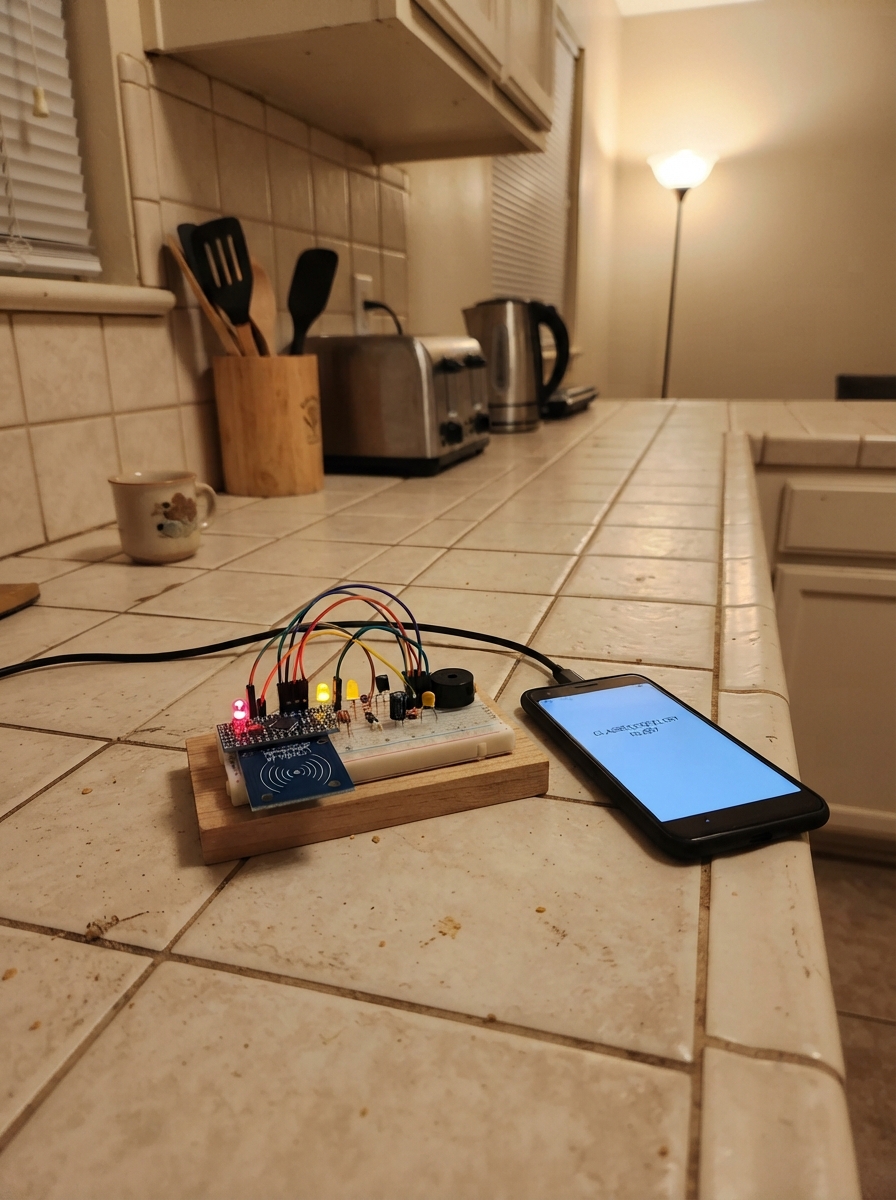
This RFID classroom alert console reads identification cards and broadcasts alerts across a network of ESP32 devices using ESP-NOW. When a recognized card is scanned, the console triggers a visual indicator via LED and an audible alert through a buzzer, while simultaneously sending the alert pattern to other networked units. Built around an ESP32 microcontroller, MFRC522 RFID reader, and simple transistor-driven buzzer circuit, the system provides reliable card detection with duplicate-suppression logic to prevent alert spam.
This guide includes a complete wiring diagram, full parts list with component specifications, and step-by-step assembly instructions covering power rail preparation, RFID module integration, indicator circuit construction, and buzzer driver protection. The provided firmware handles SPI communication with the RFID reader, card UID matching, ESP-NOW broadcast messaging, and synchronized LED and buzzer timing—ready to customize with your own card UIDs and alert patterns.
Wiring diagram
Gather all the parts
Assemble it in 7 steps
1. Prepare the two power rails
Place the ESP32-C3 SuperMini beside the breadboard. Connect its 3V3 pin to a red 3.3 V rail and one GND pin to a blue ground rail. Connect its 5V/VBUS pin to a separate red 5 V rail and keep that rail separate from the 3.3 V rail. The board receives its power from its USB-C socket; the 5 V rail is only for the buzzer.
- Use different wire colours for 3.3 V and 5 V so they cannot be confused.
- All ground connections share the same ground rail.
- Do not join the 5 V rail to the 3.3 V rail — 5 V on an ESP32-C3 signal or 3.3 V pin can damage the board.
2. Add the RFID power filters
Put C1, the 10 µF electrolytic capacitor, across the 3.3 V and ground rails close to where the RC522 will sit: its long positive lead goes to 3.3 V and its striped negative lead goes to GND. Put C2, the 100 nF ceramic capacitor, across the same 3.3 V and GND rails beside it; either ceramic lead can go to either rail.
- Keep both capacitors physically close to the RC522 power wires; this helps the reader stay stable while it scans.
- Make sure C1's striped negative side goes to GND — reversing an electrolytic capacitor can make it fail.
3. Wire the RC522 reader
Connect RC522 VCC to the 3V3 rail (power) and RC522 GND to the ground rail (ground). Connect RC522 SCK to GPIO4 (clock), MOSI to GPIO6 (data to the reader), MISO to GPIO5 (data from the reader), SDA/SS to GPIO7 (reader select), and RST to GPIO10 (reset control).
- On this module, the pin marked SDA is the SPI select pin, not an I2C SDA wire.
- Keep the six signal wires short and do not route them through the 5 V buzzer rail.
- Connect the RC522 only to 3.3 V — applying 5 V to its VCC or SPI signal pins can damage it.
4. Build the light indicator
Place D1 so its long leg, the anode, is in a different breadboard row from its short flat-side leg, the cathode. Connect GPIO1 to one end of R1, the 330 Ω resistor (current limiting). Connect R1's other end to the long LED leg. Connect the short LED leg to GND (ground).
- The resistor can face either way.
- The LED should remain off until a recognized card is read.
- Do not connect the LED directly to GPIO1 — the resistor is what prevents too much current from damaging the LED or GPIO.
5. Build the buzzer switch
First identify the BASE, COLLECTOR, and EMITTER legs from the datasheet for the exact Q1 part in hand; 2N2222A and S8050 parts do not all have the same lead order. Connect Q1 emitter to GND (ground). Connect the buzzer's positive marked lead to the 5 V rail (power) and its negative lead to Q1 collector (switched return). Connect GPIO3 to one end of R2, the 1 kΩ resistor (base-current limit), and connect R2's other end to Q1 base. Connect one end of R3, the 10 kΩ resistor, to that same Q1 base/R2 junction, and its other end to GND (holds the buzzer off at startup).
- A buzzer usually marks its positive lead with a + sign or a longer lead.
- The GPIO3 wire only reaches the transistor through R2; it never connects directly to the 5 V buzzer lead.
- Make sure Q1's collector and emitter are not swapped — a swapped transistor can stop the buzzer or damage the GPIO.
- Keep the ESP32 ground connected to the buzzer-switch ground, otherwise GPIO3 cannot control the transistor.
6. Add the buzzer protection diode
Place D2 directly across the buzzer connections. Connect its banded cathode end to the buzzer positive/5 V connection (protection), and connect its unbanded anode end to the buzzer negative/Q1 collector connection (protection).
- The painted or printed band on the 1N4148 is the cathode end.
- This diode normally does nothing; it safely catches a voltage spike when the buzzer turns off.
- Do not reverse D2 — a reversed diode directly across the 5 V rail can create a short when the buzzer is switched on.
7. Inspect before powering
With USB unplugged, check that every RC522 power connection goes only to 3.3 V, while only the buzzer positive lead and D2 banded end go to 5 V. Confirm the LED resistor is in series, Q1 emitter is on GND, and all grounds are common. Then plug the SuperMini into USB-C.
- Look for accidental breadboard rows that join adjacent leads before applying USB power.
- The serial log prints an unrecognized card UID in hexadecimal so the three UID entries in the firmware can be configured to match the physical cards.
- If any part becomes hot or the board repeatedly disconnects, unplug USB immediately and recheck 5 V, 3.3 V, transistor lead order, and D2 direction.
Review all connections
1. Connections between "rc522_1" and "ESP32"
2. Connections between "r1" and "ESP32"
3. Connections between "d1" and "ESP32"
4. Connections between "bz1" and "ESP32"
5. Connections between "q1" and "ESP32"
6. Connections between "r2" and "ESP32"
7. Connections between "r3" and "ESP32"
8. Connections between "d2" and "ESP32"
9. Connections between "c1" and "ESP32"
10. Connections between "c2" and "ESP32"
Deploy the firmware
#include <Arduino.h>
#include <SPI.h>
#include <WiFi.h>
#include <esp_now.h>
#include <esp_wifi.h>
#include <MFRC522.h>

constexpr uint8_t RFID_SS_PIN = 7;
constexpr uint8_t RFID_SCK_PIN = 4;
constexpr uint8_t RFID_MOSI_PIN = 6;
constexpr uint8_t RFID_MISO_PIN = 5;
constexpr uint8_t RFID_RST_PIN = 10;
constexpr uint8_t LED_PIN = 1;
constexpr uint8_t BUZZER_PIN = 3;

constexpr uint8_t ESPNOW_CHANNEL = 1;
constexpr uint32_t LED_PULSE_MS = 150;
constexpr uint32_t BUZZER_PULSE_MS = 80;
constexpr uint32_t DUPLICATE_SUPPRESSION_MS = 1500;
constexpr uint32_t RFID_POLL_INTERVAL_MS = 25;

const uint8_t BROADCAST_MAC[6] = {0xFF, 0xFF, 0xFF, 0xFF, 0xFF, 0xFF};

struct CardMapping {
  const uint8_t *uid;
  uint8_t uidLength;
  uint8_t patternId;
};

// Replace these example UIDs with the UID printed by this console for each
// classroom picture card. Keep the UID length and every byte exact.
const uint8_t CARD_01_UID[] = {0x04, 0xA1, 0xB2, 0xC3};
const uint8_t CARD_02_UID[] = {0x04, 0xD4, 0xE5, 0xF6};
const uint8_t CARD_03_UID[] = {0x04, 0x12, 0x34, 0x56};

const CardMapping CARD_MAP[] = {
  {CARD_01_UID, sizeof(CARD_01_UID), 0x01},
  {CARD_02_UID, sizeof(CARD_02_UID), 0x02},
  {CARD_03_UID, sizeof(CARD_03_UID), 0x03},
};
constexpr size_t CARD_MAP_COUNT = sizeof(CARD_MAP) / sizeof(CARD_MAP[0]);

MFRC522 rfid(RFID_SS_PIN, RFID_RST_PIN);

uint8_t lastSentUid[10] = {};
uint8_t lastSentUidLength = 0;
uint32_t lastSentAtMs = 0;
uint32_t lastPollAtMs = 0;
uint32_t ledOffAtMs = 0;
uint32_t buzzerOffAtMs = 0;

bool timeReached(uint32_t now, uint32_t deadline) {
  return static_cast<int32_t>(now - deadline) >= 0;
}

bool uidMatches(const MFRC522::Uid &uid, const uint8_t *expected, uint8_t expectedLength) {
  if (uid.size != expectedLength) {
    return false;
  }
  return memcmp(uid.uidByte, expected, expectedLength) == 0;
}

bool sameAsLastSent(const MFRC522::Uid &uid) {
  return uid.size == lastSentUidLength &&
         memcmp(uid.uidByte, lastSentUid, uid.size) == 0;
}

int findPatternId(const MFRC522::Uid &uid) {
  for (size_t i = 0; i < CARD_MAP_COUNT; ++i) {
    if (uidMatches(uid, CARD_MAP[i].uid, CARD_MAP[i].uidLength)) {
      return CARD_MAP[i].patternId;
    }
  }
  return -1;
}

void printUid(const MFRC522::Uid &uid) {
  Serial.print("Unmapped UID:");
  for (byte i = 0; i < uid.size; ++i) {
    Serial.printf(" %02X", uid.uidByte[i]);
  }
  Serial.println();
}

void startConfirmationPulse() {
  const uint32_t now = millis();
  digitalWrite(LED_PIN, HIGH);
  digitalWrite(BUZZER_PIN, HIGH);
  ledOffAtMs = now + LED_PULSE_MS;
  buzzerOffAtMs = now + BUZZER_PULSE_MS;
}

void updateOutputs() {
  const uint32_t now = millis();
  if (ledOffAtMs != 0 && timeReached(now, ledOffAtMs)) {
    digitalWrite(LED_PIN, LOW);
    ledOffAtMs = 0;
  }
  if (buzzerOffAtMs != 0 && timeReached(now, buzzerOffAtMs)) {
    digitalWrite(BUZZER_PIN, LOW);
    buzzerOffAtMs = 0;
  }
}

bool sendPattern(uint8_t patternId) {
  const esp_err_t result = esp_now_send(BROADCAST_MAC, &patternId, sizeof(patternId));
  if (result != ESP_OK) {
    Serial.printf("ESP-NOW send failed: %d\n", static_cast<int>(result));
    return false;
  }
  Serial.printf("Broadcast pattern ID: 0x%02X\n", patternId);
  return true;
}

void configureEspNow() {
  WiFi.mode(WIFI_STA);
  WiFi.disconnect(false, true);

  esp_err_t result = esp_wifi_set_channel(ESPNOW_CHANNEL, WIFI_SECOND_CHAN_NONE);
  if (result != ESP_OK) {
    Serial.printf("Wi-Fi channel setup failed: %d\n", static_cast<int>(result));
  }

  result = esp_now_init();
  if (result != ESP_OK) {
    Serial.printf("ESP-NOW init failed: %d\n", static_cast<int>(result));
    while (true) {
      delay(1000);
    }
  }

  esp_now_peer_info_t peerInfo = {};
  memcpy(peerInfo.peer_addr, BROADCAST_MAC, sizeof(BROADCAST_MAC));
  peerInfo.channel = ESPNOW_CHANNEL;
  peerInfo.encrypt = false;
  peerInfo.ifidx = WIFI_IF_STA;

  result = esp_now_add_peer(&peerInfo);
  if (result != ESP_OK && result != ESP_ERR_ESPNOW_EXIST) {
    Serial.printf("ESP-NOW broadcast peer setup failed: %d\n", static_cast<int>(result));
    while (true) {
      delay(1000);
    }
  }
}

void checkForCard() {
  const uint32_t now = millis();
  if (now - lastPollAtMs < RFID_POLL_INTERVAL_MS) {
    return;
  }
  lastPollAtMs = now;

  if (!rfid.PICC_IsNewCardPresent() || !rfid.PICC_ReadCardSerial()) {
    return;
  }

  const MFRC522::Uid &uid = rfid.uid;
  const int patternId = findPatternId(uid);
  if (patternId < 0) {
    printUid(uid);
    rfid.PICC_HaltA();
    rfid.PCD_StopCrypto1();
    return;
  }

  const bool duplicateWithinWindow = sameAsLastSent(uid) &&
                                     (now - lastSentAtMs < DUPLICATE_SUPPRESSION_MS);
  if (!duplicateWithinWindow) {
    if (sendPattern(static_cast<uint8_t>(patternId))) {
      memcpy(lastSentUid, uid.uidByte, uid.size);
      lastSentUidLength = uid.size;
      lastSentAtMs = now;
      startConfirmationPulse();
    }
  }

  rfid.PICC_HaltA();
  rfid.PCD_StopCrypto1();
}

void setup() {
  pinMode(LED_PIN, OUTPUT);
  pinMode(BUZZER_PIN, OUTPUT);
  digitalWrite(LED_PIN, LOW);
  digitalWrite(BUZZER_PIN, LOW);

  Serial.begin(115200);
  delay(100);
  Serial.println("Scanner Console starting");

  SPI.begin(RFID_SCK_PIN, RFID_MISO_PIN, RFID_MOSI_PIN, RFID_SS_PIN);
  rfid.PCD_Init();
  configureEspNow();
  Serial.println("Ready: ESP-NOW broadcast channel 1");
}

void loop() {
  updateOutputs();
  checkForCard();
  delay(1);
}
Remix this project
Make it yours in one click
Open a full copy of this project in your own Schematik workspace — diagram, code, parts, and assembly steps included. Swap the sensor, add features, or redesign the whole thing with AI. The author's original stays untouched.