Community project
Smart Greenhouse Controller
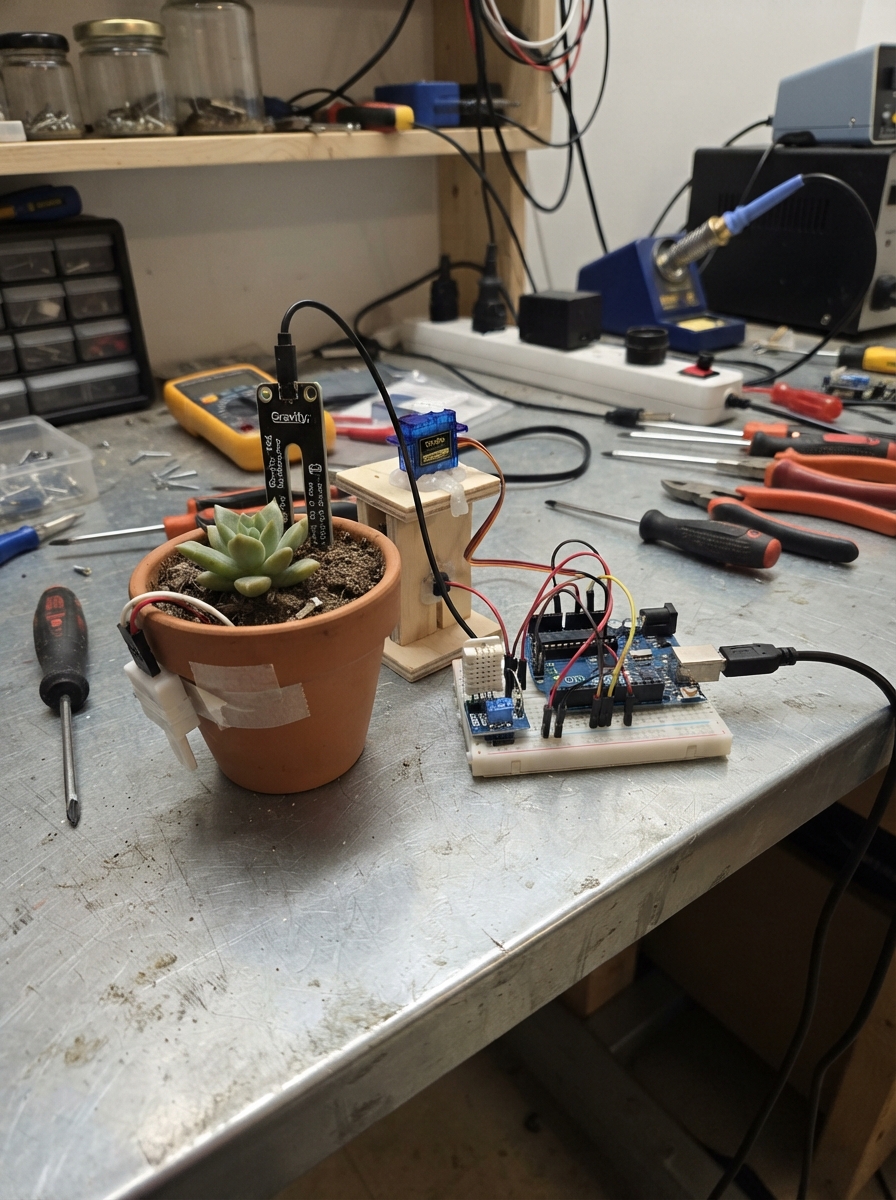
This smart greenhouse controller automates watering and ventilation for indoor plant beds using an ESP32 microcontroller. It monitors soil moisture with a capacitive sensor, tracks water tank levels with a float switch, and measures temperature and humidity with a DHT22 sensor. Two servo motors control a water valve for irrigation and a hatch for passive cooling.
The guide provides a complete parts list, wiring diagram, and step-by-step assembly instructions to get the system running. Customizable firmware thresholds let makers adjust watering schedules, temperature setpoints, and valve timing to suit different plants and growing conditions.
Wiring diagram
Gather all the parts
Assemble it in 8 steps
1. Place the controller safely
Put the ESP32 board high inside the greenhouse, away from drips and wet soil. Leave its USB socket accessible. Keep all sensor and servo cables away from the water tank and sprinkler outlet.
- Use a plastic enclosure with cable holes if the greenhouse is humid.
- Water on the ESP32 can short it and permanently damage the board.
2. Put the soil sensor in the plant bed
Push the flat sensing end of soil_sensor into the root area, but do not bury its small electronics board. Connect VCC to the ESP32 3V3 pin (power), GND to an ESP32 GND pin (ground), and AOUT to GPIO34 (soil-moisture signal).
- Place it halfway between the plant stem and the edge of the pot so it measures typical soil, not standing water.
- Do not connect the soil sensor VCC to 5 V; the ESP32 input must never receive more than 3.3 V.
3. Fit the tank-level float
Mount tank_float at the lowest water level that should still allow watering. Put its floating body inside the tank and route its two wires above the water line. Connect one float wire to GND (ground) and the other to GPIO33 (tank-level signal).
- Before fastening it permanently, move the float by hand and watch its position; turn the float upside down if its on/off sense is reversed.
- Make sure the tank cannot leak onto the electronics; water and exposed wiring can cause a short circuit.
4. Wire the temperature and humidity sensor
Place climate_sensor where air can flow around it, away from direct sun, the sprinkler spray, and the hatch opening. Connect VCC to 3V3 (power), GND to GND (ground), and DATA to GPIO27 (temperature and humidity signal).
- If your DHT22 is the bare four-pin sensor rather than a small module, add a 10 kΩ resistor between VCC and DATA so the data wire has a stable resting level.
- Make sure VCC and GND are not swapped — swapped power can damage the sensor.
5. Attach the water-valve servo
Mechanically link water_valve_servo to a small tap or valve that moves freely between fully closed and fully open. Connect its red VCC wire to the separate 5 V rail (power), brown or black GND wire to the shared GND rail (ground), and orange or yellow SIGNAL wire to GPIO25 (valve-control signal). Start with the valve closed before fitting the servo horn.
- A servo can pull a large burst of current while moving, so do not power it from the ESP32 3V3 pin.
- Turn power off before adjusting the servo horn; a moving valve can spill water.
6. Attach the hatch servo
Mechanically link hatch_servo to the vent or hatch so it can move without binding. Connect its red VCC wire to the separate 5 V rail (power), brown or black GND wire to the shared GND rail (ground), and orange or yellow SIGNAL wire to GPIO26 (hatch-control signal). Start with the hatch closed before tightening the servo horn screw.
- Make sure the hatch has physical stops and moves freely; an SG90 is suitable only for a light hatch.
- Do not force a stalled servo against a heavy hatch; it can overheat and damage the servo or power supply.
7. Connect the 5 V supply
Use power_adapter as the regulated 5 V source. Join its +5 V output to both servo red wires and to the ESP32 VIN/5V input (power). Join its GND output to both servo brown or black wires and to an ESP32 GND pin (shared ground). The ESP32 can still use its USB socket for programming.
- Use a proper 5 V power splitter or screw-terminal distribution block so the supply wires cannot pull loose.
- Do not connect a supply above 5 V to the servos or the ESP32 VIN/5V input; excess voltage can damage them. Never omit the shared ground, because the servos will not receive reliable control signals.
8. Set the two starting adjustments
With power still off, make sure the sprinkler valve is closed and the hatch is closed. After deployment, the serial messages show raw soil readings; change SOIL_DRY_READING and SOIL_WET_READING in the firmware later if your dry and fully watered soil give very different values.
- The initial program waters for 8 seconds only when soil is below 35%, then waits at least one hour before another automatic watering.
- Stay near the greenhouse for the first automated watering cycle so you can immediately disconnect power if the valve direction is wrong.
Review all connections
1. Connections between "soil_sensor" and "ESP32"
2. Connections between "tank_float" and "ESP32"
3. Connections between "climate_sensor" and "ESP32"
4. Connections between "water_valve_servo" and "ESP32"
5. Connections between "hatch_servo" and "ESP32"
6. Connections between "power_adapter" and "ESP32"
Deploy the firmware
#include <Arduino.h>
#include <DHT.h>
#include <ESP32Servo.h>

constexpr uint8_t SOIL_PIN = 34;
constexpr uint8_t TANK_FLOAT_PIN = 33;
constexpr uint8_t DHT_PIN = 27;
constexpr uint8_t VALVE_SERVO_PIN = 25;
constexpr uint8_t HATCH_SERVO_PIN = 26;

constexpr uint8_t DHT_TYPE = DHT22;
constexpr int SOIL_DRY_READING = 3000;
constexpr int SOIL_WET_READING = 1300;
constexpr int WATER_WHEN_BELOW_PERCENT = 35;
constexpr bool TANK_OK_WHEN_SWITCH_CLOSED = true;
constexpr float HATCH_OPEN_TEMP_C = 28.0f;
constexpr float HATCH_CLOSE_TEMP_C = 26.0f;
constexpr int VALVE_CLOSED_ANGLE = 0;
constexpr int VALVE_OPEN_ANGLE = 90;
constexpr int HATCH_CLOSED_ANGLE = 0;
constexpr int HATCH_OPEN_ANGLE = 90;
constexpr unsigned long SENSOR_INTERVAL_MS = 2000;
constexpr unsigned long WATERING_TIME_MS = 8000;
constexpr unsigned long MIN_TIME_BETWEEN_WATERING_MS = 3600000;

DHT dht(DHT_PIN, DHT_TYPE);
Servo valveServo;
Servo hatchServo;

bool hatchIsOpen = false;
bool valveIsOpen = false;
unsigned long wateringStartedAt = 0;
unsigned long lastWateringFinishedAt = 0;
unsigned long lastSensorReadAt = 0;

int soilPercentFromReading(int rawReading) {
  long percent = map(rawReading, SOIL_DRY_READING, SOIL_WET_READING, 0, 100);
  return constrain(percent, 0, 100);
}

bool tankHasWater() {
  bool switchClosed = digitalRead(TANK_FLOAT_PIN) == LOW;
  return TANK_OK_WHEN_SWITCH_CLOSED ? switchClosed : !switchClosed;
}

void closeValve() {
  valveServo.write(VALVE_CLOSED_ANGLE);
  valveIsOpen = false;
  lastWateringFinishedAt = millis();
  Serial.println("Water valve closed.");
}

void startWatering() {
  valveServo.write(VALVE_OPEN_ANGLE);
  valveIsOpen = true;
  wateringStartedAt = millis();
  Serial.println("Soil is dry and the tank is ready: water valve opened.");
}

void updateHatch(float temperatureC) {
  if (!hatchIsOpen && temperatureC >= HATCH_OPEN_TEMP_C) {
    hatchServo.write(HATCH_OPEN_ANGLE);
    hatchIsOpen = true;
    Serial.println("Greenhouse is warm: hatch opened.");
  } else if (hatchIsOpen && temperatureC <= HATCH_CLOSE_TEMP_C) {
    hatchServo.write(HATCH_CLOSED_ANGLE);
    hatchIsOpen = false;
    Serial.println("Greenhouse has cooled: hatch closed.");
  }
}

void readAndControl() {
  int soilRaw = analogRead(SOIL_PIN);
  int soilPercent = soilPercentFromReading(soilRaw);
  bool waterAvailable = tankHasWater();
  float humidity = dht.readHumidity();
  float temperatureC = dht.readTemperature();

  Serial.print("Soil: ");
  Serial.print(soilPercent);
  Serial.print("% (raw ");
  Serial.print(soilRaw);
  Serial.print(") | Tank: ");
  Serial.print(waterAvailable ? "water available" : "low/empty");

  if (isnan(temperatureC) || isnan(humidity)) {
    Serial.println(" | DHT22 reading failed; hatch position unchanged.");
  } else {
    Serial.print(" | Temperature: ");
    Serial.print(temperatureC, 1);
    Serial.print(" C | Humidity: ");
    Serial.print(humidity, 0);
    Serial.println("%");
    updateHatch(temperatureC);
  }

  bool wateringCooldownOver = (millis() - lastWateringFinishedAt) >= MIN_TIME_BETWEEN_WATERING_MS;
  if (!valveIsOpen && soilPercent < WATER_WHEN_BELOW_PERCENT && waterAvailable && wateringCooldownOver) {
    startWatering();
  }
}

void setup() {
  Serial.begin(115200);
  pinMode(TANK_FLOAT_PIN, INPUT_PULLUP);
  analogReadResolution(12);
  analogSetPinAttenuation(SOIL_PIN, ADC_11db);

  dht.begin();
  valveServo.setPeriodHertz(50);
  hatchServo.setPeriodHertz(50);
  valveServo.attach(VALVE_SERVO_PIN, 500, 2400);
  hatchServo.attach(HATCH_SERVO_PIN, 500, 2400);
  valveServo.write(VALVE_CLOSED_ANGLE);
  hatchServo.write(HATCH_CLOSED_ANGLE);

  Serial.println("Smart greenhouse controller started.");
}

void loop() {
  unsigned long now = millis();

  if (valveIsOpen && now - wateringStartedAt >= WATERING_TIME_MS) {
    closeValve();
  }

  if (now - lastSensorReadAt >= SENSOR_INTERVAL_MS) {
    lastSensorReadAt = now;
    readAndControl();
  }

  delay(20);
}
Remix this project
Make it yours in one click
Open a full copy of this project in your own Schematik workspace — diagram, code, parts, and assembly steps included. Swap the sensor, add features, or redesign the whole thing with AI. The author's original stays untouched.