Community project
Smart Plant Dashboard
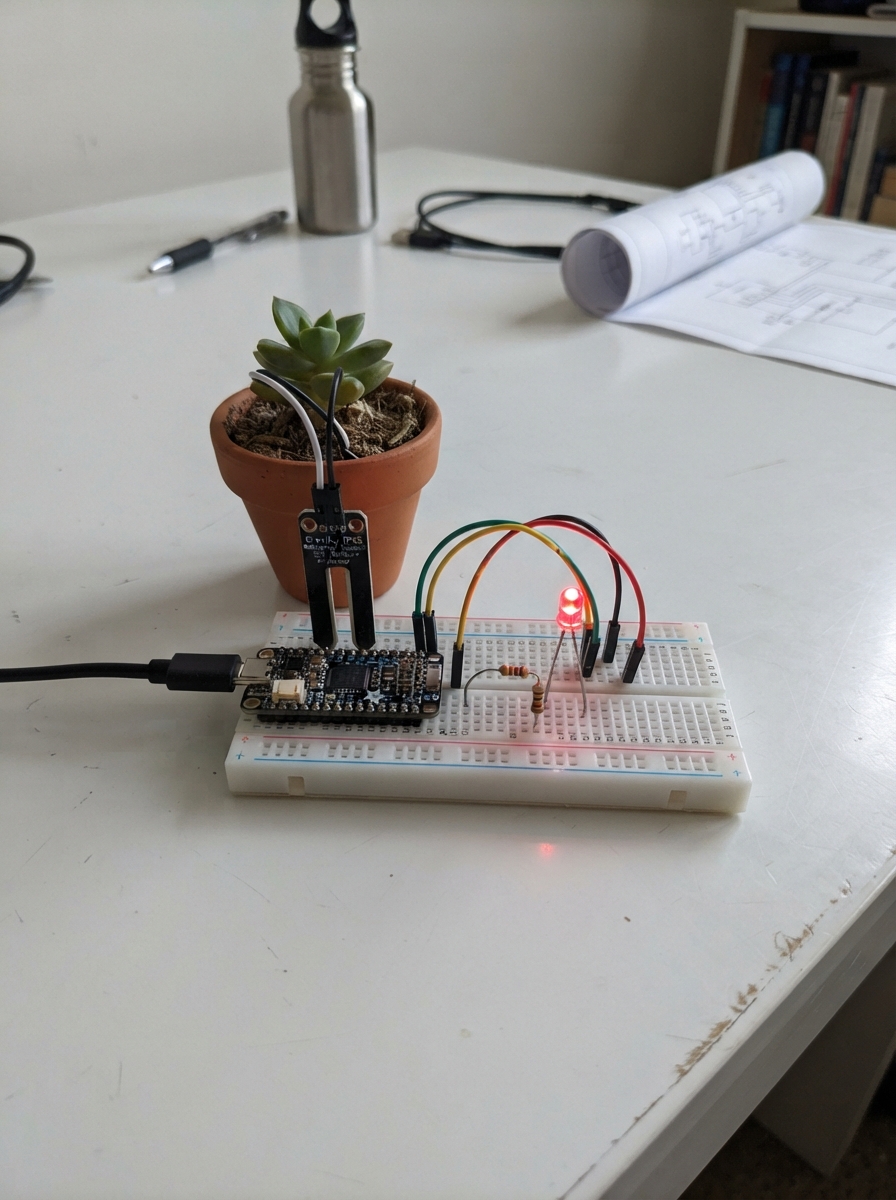
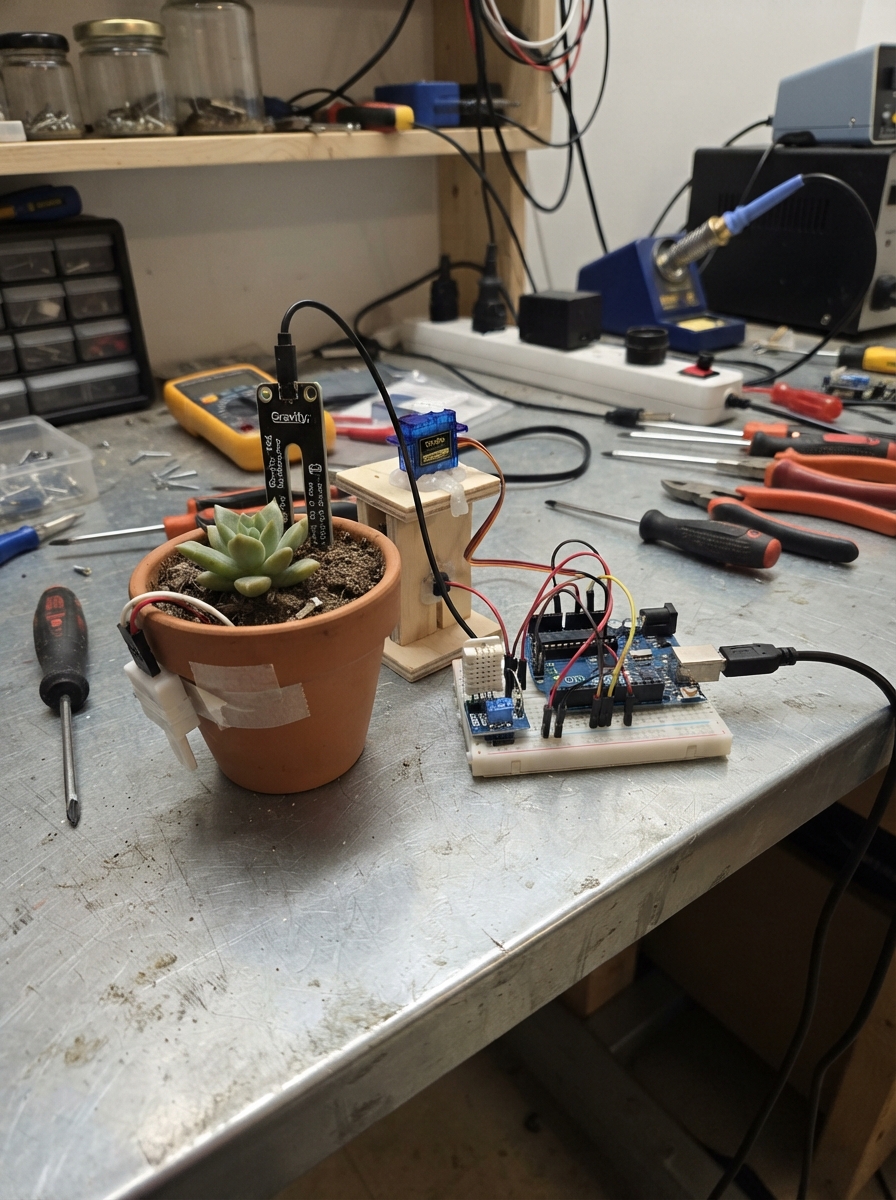
Smart Plant Dashboard is a WiFi-enabled plant monitoring system built around an ESP32 microcontroller. It uses a Gravity IP65 capacitive soil moisture sensor to track soil conditions and displays real-time data on a web dashboard accessible from any device on the network. An LED provides visual feedback about plant watering status.
This guide includes a complete wiring diagram, parts list, and step-by-step assembly instructions. The included firmware sets up a web server with calibration controls, allowing users to adjust moisture thresholds for their specific plants and soil type. Simply wire the sensor and LED to the ESP32, power it up, and connect to the Plant-Guardian WiFi network to start monitoring.
Wiring diagram

Gather all the parts
Assemble it in 4 steps
1. Place the board and sensor
Place the ESP32 Dev Module and the soil sensor where you can read the labels. Keep the sensor probe away from water while you connect the wires.
- Look for the sensor labels VCC, GND, and AOUT or AO.
- Do not connect the sensor to the ESP32 while the board is powered from USB.
2. Wire the soil sensor
Connect the soil sensor VCC pin to the ESP32 3V3 pin (power). Connect the sensor GND pin to an ESP32 GND pin (ground). Connect the sensor AOUT or AO pin to ESP32 GPIO34, often marked D34 (soil-reading signal).
- Use 3V3, not the 5V/VIN pin, because GPIO34 accepts only a 3.3 V signal.
- Make sure VCC and GND are not swapped — swapped power can damage the sensor.
3. Wire the LED
Connect ESP32 GPIO26 to one end of the 220 Ω resistor (brightness-control signal). Connect the resistor's other end to the LED long leg. Connect the LED short leg to an ESP32 GND pin (ground).
- The long LED leg is the positive leg; the short leg is the negative leg.
- Do not connect the LED directly to GPIO26 without the 220 Ω resistor, because too much current can damage the LED or board pin.
4. Power and calibrate
Check every wire once, then plug the ESP32 into USB. After deploying the program, connect your phone or computer to Plant-Guardian and open 192.168.4.1. Save a dry reading with the probe dry, then save a wet reading with the probe in wet soil.
- The sensor is powered continuously from the ESP32 3V3 pin, so the first reading is ready shortly after startup.
- Do not leave the probe in a cup of water for long; use wet soil for normal calibration.
Review all connections
1. Connections between "soil_sensor_1" and "ESP32"
2. Connections between "plant_led_1" and "ESP32"
3. Connections between "led_resistor_1" and "ESP32"
Deploy the firmware
#include <WiFi.h>
#include <WebServer.h>
#include <Preferences.h>
#include <HTTPClient.h>
#include <WiFiClientSecure.h>
// Wiring matches the Schematik diagram.
#define SOIL_PIN 34
#define LED_PIN 26
// These starting values are replaced when you use the calibration buttons on the web page.
// Calibration measured with this sensor: dry = 2289, very wet = 900.
const int DEFAULT_DRY_RAW = 2289;
const int DEFAULT_WET_RAW = 900;
const int DRY_THRESHOLD = 70;
int dryRaw = DEFAULT_DRY_RAW;
int wetRaw = DEFAULT_WET_RAW;
const char *AP_NAME = "Plant-Guardian";
const char *AP_PASSWORD = "1234plant"; // ESP32 Wi-Fi passwords must contain at least 8 characters.
const int PWM_CHANNEL = 0;
const int PWM_FREQUENCY = 5000;
const int PWM_RESOLUTION = 8;
WebServer server(80);
Preferences preferences;
const char PAGE[] PROGMEM = R"HTML(
<!DOCTYPE html>
<html lang="en">
<head>
<meta charset="UTF-8">
<meta name="viewport" content="width=device-width, initial-scale=1">
<title>Plant Guardian 🌱</title>
<style>
*{box-sizing:border-box}body{margin:0;font-family:Arial,sans-serif;background:#f1f7f1;color:#20352a}header{background:linear-gradient(135deg,#12452f,#328354);color:white;padding:24px}header h1{margin:0;font-size:28px}header p{margin:8px 0 0}main{max-width:1000px;margin:auto;padding:16px}.grid{display:grid;grid-template-columns:repeat(2,minmax(0,1fr));gap:16px}.card{background:white;border-radius:18px;padding:20px;box-shadow:0 4px 15px #123d2b12}h2{font-size:19px;margin:0 0 16px}.temp{font-size:42px;font-weight:bold}.weather{display:flex;justify-content:space-between;align-items:center}.weather-icon{font-size:46px}.metrics{display:grid;grid-template-columns:1fr 1fr;gap:10px;margin-top:18px}.metric{padding:12px;border-radius:12px;background:#f0f6f0}.metric small{display:block;color:#647568}.metric strong{display:block;font-size:20px;margin-top:5px}.moisture{font-size:46px;font-weight:bold;color:#237447}.progress{height:12px;background:#e1eae1;border-radius:20px;overflow:hidden;margin:12px 0}.bar{height:100%;width:0;background:#25834e;transition:width .3s}.status{padding:13px;border-radius:12px;background:#e6f5e8;font-weight:bold;line-height:1.5}.dry{background:#fff0e9;color:#a8321d}.offline{background:#fff5d9;color:#765b0b}button,select,input{font:inherit;padding:11px;border-radius:9px}button{border:0;background:#247348;color:white;font-weight:bold;cursor:pointer}.secondary{background:#e5f2e7;color:#184d32}.full{width:100%;margin-top:10px}input,select{border:1px solid #ccd9ce;max-width:100%}label{font-size:14px}.row{display:flex;justify-content:space-between;align-items:center;gap:10px;margin:12px 0}.muted{font-size:12px;color:#6c7d70;line-height:1.5}ul{padding-left:20px;line-height:1.8;overflow-wrap:anywhere}footer{text-align:center;padding:25px;color:#718073;font-size:12px}@media(max-width:650px){.grid{grid-template-columns:1fr}main{padding:12px}.card{padding:17px}}
</style>
</head>
<body>
<header><h1>🌱 Plant Guardian</h1><p>Your smart plant-care dashboard</p></header>
<main><div class="grid">
<section class="card"><h2>🌤️ Pune Weather</h2><div class="weather"><div><div class="temp" id="temp">--°C</div><div id="condition">Loading weather...</div><div class="muted" id="updated">Connecting to weather service</div></div><div class="weather-icon" id="icon">🌤️</div></div><div class="metrics"><div class="metric"><small>💧 Air humidity</small><strong id="humidity">--%</strong></div><div class="metric"><small>🌧️ Rain probability</small><strong id="rain">--%</strong></div><div class="metric"><small>💨 Wind speed</small><strong id="wind">-- km/h</strong></div><div class="metric"><small>☁️ Cloud cover</small><strong id="clouds">--%</strong></div></div><p class="muted" id="weatherNote">Live weather requires internet.</p><button class="secondary full" id="refresh">Refresh weather</button></section>
<section class="card"><h2>🪴 My Plant</h2><label for="plant">Plant name</label><input id="plant" class="full" value="My Tulsi Plant"><div class="row"><label for="species">Plant type</label><select id="species"><option>Tulsi</option><option>Rose</option><option>Money Plant</option><option>Aloe Vera</option><option>Snake Plant</option><option>Mint</option><option>Tomato</option><option>Other</option></select></div><h2 style="margin-top:22px">🌱 Soil Moisture</h2><div class="moisture" id="moisture">--%</div><div class="progress"><div class="bar" id="bar"></div></div><p class="muted" id="sensorText">Waiting for ESP32 sensor...</p><div class="row"><label for="threshold">Dry-soil threshold</label><strong><span id="thresholdText">70</span>%</strong></div><input id="threshold" class="full" type="range" min="20" max="90" value="70"><div class="status offline" id="alert">Connecting to ESP32...</div><p class="muted">The external LED becomes brighter as the soil becomes drier.</p></section>
<section class="card"><h2>🕒 Watering Tracker</h2><div class="row"><span>Last watered</span><strong id="lastWatered">Not recorded</strong></div><button class="full" id="water">✓ I watered my plant</button><h2 style="margin-top:22px">📅 Watering History</h2><ul id="history"><li>No watering recorded yet.</li></ul><button class="secondary full" id="clear">Clear history</button></section>
<section class="card"><h2>📡 ESP32 Connection</h2><div class="row"><span>Sensor connection</span><strong id="connection">Disconnected</strong></div><div class="row"><span>LED brightness</span><strong id="led">Unknown</strong></div><label for="host">ESP32 address</label><input id="host" class="full" value="192.168.4.1"><button class="full" id="connect">Connect to ESP32</button><p class="muted">Connect your phone or laptop to Plant-Guardian, then open 192.168.4.1.</p></section>
<section class="card"><h2>📏 Calibrate the soil sensor</h2><p class="muted">Take the probe out and keep it dry, then save the dry reading. Next put it in very wet soil or water, then save the wet reading. Do not leave the metal part in water for long.</p><div class="row"><span>Dry reading</span><strong id="dryRaw">--</strong></div><button class="secondary full" id="saveDry">Save dry reading</button><div class="row"><span>Wet reading</span><strong id="wetRaw">--</strong></div><button class="secondary full" id="saveWet">Save wet reading</button><p class="muted" id="calNote">Connect to the ESP32 before calibrating.</p><h2 style="margin-top:22px">📶 Home Wi-Fi</h2><label for="wifiName">Wi-Fi name</label><input id="wifiName" class="full" placeholder="Your home Wi-Fi name"><label for="wifiPassword">Wi-Fi password</label><input id="wifiPassword" class="full" type="password" placeholder="Your Wi-Fi password"><button class="full" id="saveWifi">Join home Wi-Fi</button><p class="muted" id="wifiNote">Plant-Guardian stays available at 192.168.4.1. After joining, the ESP32 will also receive a home-network address.</p></section>
</div></main><footer>Plant Guardian • Live weather by Open-Meteo</footer>
<script>
const $=id=>document.getElementById(id);const LAT=18.5204,LON=73.8567;let moisture=null,connected=false;let history=JSON.parse(localStorage.getItem('plantHistory')||'[]');
function updateAlert(){const limit=Number($('threshold').value);$('thresholdText').textContent=limit;const box=$('alert');if(!connected||moisture===null){box.className='status offline';box.textContent='ESP32 disconnected — moisture reading unavailable.';$('led').textContent='Unknown';}else if(moisture<limit){box.className='status dry';box.textContent='🚨 GO WATER YOUR PLANT! Soil moisture is low.';}else{box.className='status';box.textContent='✅ Soil moisture is above your threshold.';}}
async function connectESP32(){const host=$('host').value.trim().replace(/^https?:\/\//,'').replace(/\/+$/,'');if(!host)return;try{const r=await fetch('http://'+host+'/status',{cache:'no-store'});if(!r.ok)throw Error();const d=await r.json();if(typeof d.moisture!=='number')throw Error();connected=true;moisture=Math.max(0,Math.min(100,d.moisture));$('moisture').textContent=Math.round(moisture)+'%';$('bar').style.width=moisture+'%';$('sensorText').textContent='Live sensor reading received (raw value: '+d.raw+')';$('connection').textContent='Connected';$('led').textContent=d.led+'%';$('dryRaw').textContent=d.dryRaw;$('wetRaw').textContent=d.wetRaw;$('wifiNote').textContent=d.staConnected?'Connected to home Wi-Fi at '+d.staIp+'. Plant-Guardian also stays at 192.168.4.1.':'Plant-Guardian stays available at 192.168.4.1. Add your home Wi-Fi details below if you want it on your normal network.';updateAlert();}catch(e){connected=false;$('connection').textContent='Disconnected';$('sensorText').textContent='Cannot reach ESP32. Check Wi-Fi and wiring.';updateAlert();}}
function describe(c){if(c===0)return['Clear sky','☀️'];if(c===1||c===2)return['Partly cloudy','🌤️'];if(c===3)return['Overcast','☁️'];if([45,48].includes(c))return['Foggy','🌫️'];if([51,53,55,61,63,65,80,81,82].includes(c))return['Rain or drizzle','🌧️'];if([95,96,99].includes(c))return['Thunderstorm','⛈️'];return['Current conditions','🌤️'];}
async function loadWeather(){$('condition').textContent='Fetching Pune weather...';try{const r=await fetch('/weather',{cache:'no-store'});if(!r.ok)throw Error();const d=await r.json(),c=d.current,[text,emoji]=describe(c.weather_code);$('temp').textContent=Math.round(c.temperature_2m)+'°C';$('humidity').textContent=c.relative_humidity_2m+'%';$('wind').textContent=Math.round(c.wind_speed_10m)+' km/h';$('clouds').textContent=c.cloud_cover+'%';$('condition').textContent=text;$('icon').textContent=emoji;let i=d.hourly.time.indexOf(c.time);if(i<0)i=0;$('rain').textContent=d.hourly.precipitation_probability[i]+'%';$('updated').textContent='Updated '+new Date().toLocaleTimeString();$('weatherNote').textContent='Live Pune forecast. Air humidity is not soil moisture.';}catch(e){$('condition').textContent='Weather unavailable offline';$('icon').textContent='📡';$('updated').textContent='No internet connection';$('weatherNote').textContent='Connect this device to the internet for live weather.';}}
function renderHistory(){$('lastWatered').textContent=history.length?new Date(history[0]).toLocaleString():'Not recorded';const list=$('history');list.replaceChildren();if(!history.length){const li=document.createElement('li');li.textContent='No watering recorded yet.';list.appendChild(li);}else history.forEach(t=>{const li=document.createElement('li');li.textContent=new Date(t).toLocaleString();list.appendChild(li);});}
async function calibrate(point){const host=$('host').value.trim().replace(/^https?:\/\//,'').replace(/\/+$/,'');try{const r=await fetch('http://'+host+'/calibrate?point='+point,{method:'POST'});const d=await r.json();if(!r.ok)throw Error();$('dryRaw').textContent=d.dryRaw;$('wetRaw').textContent=d.wetRaw;$('calNote').textContent='Saved the '+point+' reading. The percentage now uses your calibration.';connectESP32();}catch(e){$('calNote').textContent='Could not save the reading. Connect to the ESP32 first.';}}async function saveWifi(){const host=$('host').value.trim().replace(/^https?:\/\//,'').replace(/\/+$/,'');const ssid=$('wifiName').value.trim(),password=$('wifiPassword').value;if(!ssid){$('wifiNote').textContent='Type your home Wi-Fi name first.';return;}try{const r=await fetch('http://'+host+'/wifi',{method:'POST',headers:{'Content-Type':'application/x-www-form-urlencoded'},body:'ssid='+encodeURIComponent(ssid)+'&password='+encodeURIComponent(password)});if(!r.ok)throw Error();$('wifiNote').textContent='The ESP32 is trying to join '+ssid+'. Keep using Plant-Guardian while it connects.';}catch(e){$('wifiNote').textContent='Could not send the Wi-Fi details. Connect to Plant-Guardian first.';}}$('water').onclick=()=>{history.unshift(Date.now());history=history.slice(0,10);localStorage.setItem('plantHistory',JSON.stringify(history));renderHistory();};$('clear').onclick=()=>{if(confirm('Clear watering history?')){history=[];localStorage.removeItem('plantHistory');renderHistory();}};$('threshold').oninput=updateAlert;$('connect').onclick=connectESP32;$('refresh').onclick=loadWeather;$('saveDry').onclick=()=>calibrate('dry');$('saveWet').onclick=()=>calibrate('wet');$('saveWifi').onclick=saveWifi;['plant','species','threshold','host'].forEach(id=>{const saved=localStorage.getItem('plant_'+id);if(saved!==null)$(id).value=saved;$(id).onchange=()=>localStorage.setItem('plant_'+id,$(id).value);});loadWeather();connectESP32();setInterval(loadWeather,600000);setInterval(connectESP32,3000);renderHistory();
</script></body></html>
)HTML";
int readSoilRaw() {
long total = 0;
for (int i = 0; i < 16; i++) {
total += analogRead(SOIL_PIN);
delay(2);
}
return total / 16;
}
int rawToPercent(int raw) {
if (dryRaw == wetRaw) return 0;
long percent = map(raw, dryRaw, wetRaw, 0, 100);
return constrain(percent, 0, 100);
}
void sendCalibrationJson() {
String json = "{\"dryRaw\":" + String(dryRaw) + ",\"wetRaw\":" + String(wetRaw) + "}";
server.send(200, "application/json", json);
}
void handleCalibrate() {
String point = server.arg("point");
int raw = readSoilRaw();
if (point == "dry") {
dryRaw = raw;
preferences.putInt("dryRaw", dryRaw);
} else if (point == "wet") {
wetRaw = raw;
preferences.putInt("wetRaw", wetRaw);
} else {
server.send(400, "application/json", "{\"error\":\"Choose dry or wet\"}");
return;
}
sendCalibrationJson();
}
void handleWifi() {
String ssid = server.arg("ssid");
String password = server.arg("password");
if (ssid.length() == 0) {
server.send(400, "application/json", "{\"error\":\"Wi-Fi name is required\"}");
return;
}
preferences.putString("wifiSsid", ssid);
preferences.putString("wifiPass", password);
WiFi.disconnect(false, false);
WiFi.begin(ssid.c_str(), password.c_str());
server.send(200, "application/json", "{\"ok\":true}");
}
void handleWeather() {
if (WiFi.status() != WL_CONNECTED) {
server.send(503, "application/json", "{\"error\":\"Connect the ESP32 to home Wi-Fi first\"}");
return;
}
WiFiClientSecure weatherClient;
weatherClient.setInsecure();
HTTPClient http;
const char *url = "https://api.open-meteo.com/v1/forecast?latitude=18.5204&longitude=73.8567¤t=temperature_2m,relative_humidity_2m,weather_code,cloud_cover,wind_speed_10m&hourly=precipitation_probability&timezone=Asia%2FKolkata&forecast_days=1";
if (!http.begin(weatherClient, url)) {
server.send(502, "application/json", "{\"error\":\"Could not start weather request\"}");
return;
}
int result = http.GET();
if (result != HTTP_CODE_OK) {
http.end();
server.send(502, "application/json", "{\"error\":\"Pune weather service is unavailable\"}");
return;
}
String forecast = http.getString();
http.end();
server.sendHeader("Cache-Control", "no-store");
server.send(200, "application/json", forecast);
}
void handleStatus() {
int raw = readSoilRaw();
int moisture = rawToPercent(raw);
int ledDuty = moisture < DRY_THRESHOLD ? map(moisture, 0, DRY_THRESHOLD, 255, 25) : 0;
ledDuty = constrain(ledDuty, 0, 255);
ledcWrite(LED_PIN, ledDuty);
String json = "{\"moisture\":" + String(moisture) +
",\"raw\":" + String(raw) +
",\"led\":" + String((ledDuty * 100) / 255) +
",\"dryRaw\":" + String(dryRaw) +
",\"wetRaw\":" + String(wetRaw) +
",\"staConnected\":" + String(WiFi.status() == WL_CONNECTED ? "true" : "false") +
",\"staIp\":\"" + WiFi.localIP().toString() + "\"}";
server.sendHeader("Cache-Control", "no-store");
server.send(200, "application/json", json);
}
void setup() {
Serial.begin(115200);
delay(100); // Let the sensor settle after the board is powered.
pinMode(SOIL_PIN, INPUT);
analogReadResolution(12);
// GPIO34 is an ADC1 input, which remains usable while Wi-Fi is active.
analogSetAttenuation(ADC_11db);
ledcAttach(LED_PIN, PWM_FREQUENCY, PWM_RESOLUTION);
ledcWrite(LED_PIN, 0);
preferences.begin("plant", false);
dryRaw = preferences.getInt("dryRaw", DEFAULT_DRY_RAW);
wetRaw = preferences.getInt("wetRaw", DEFAULT_WET_RAW);
WiFi.mode(WIFI_AP_STA);
WiFi.softAP(AP_NAME, AP_PASSWORD);
String savedSsid = preferences.getString("wifiSsid", "");
String savedPassword = preferences.getString("wifiPass", "");
if (savedSsid.length() > 0) WiFi.begin(savedSsid.c_str(), savedPassword.c_str());
server.on("/", HTTP_GET, []() { server.send_P(200, "text/html; charset=utf-8", PAGE); });
server.on("/status", HTTP_GET, handleStatus);
server.on("/weather", HTTP_GET, handleWeather);
server.on("/calibrate", HTTP_POST, handleCalibrate);
server.on("/wifi", HTTP_POST, handleWifi);
server.onNotFound([]() { server.sendHeader("Location", "http://192.168.4.1/", true); server.send(302, "text/plain", ""); });
server.begin();
}
void loop() {
server.handleClient();
delay(2);
}Remix this project
Make it yours in one click
Open a full copy of this project in your own Schematik workspace — diagram, code, parts, and assembly steps included. Swap the sensor, add features, or redesign the whole thing with AI. The author's original stays untouched.