Community project
RFID Fire-Safe Vault
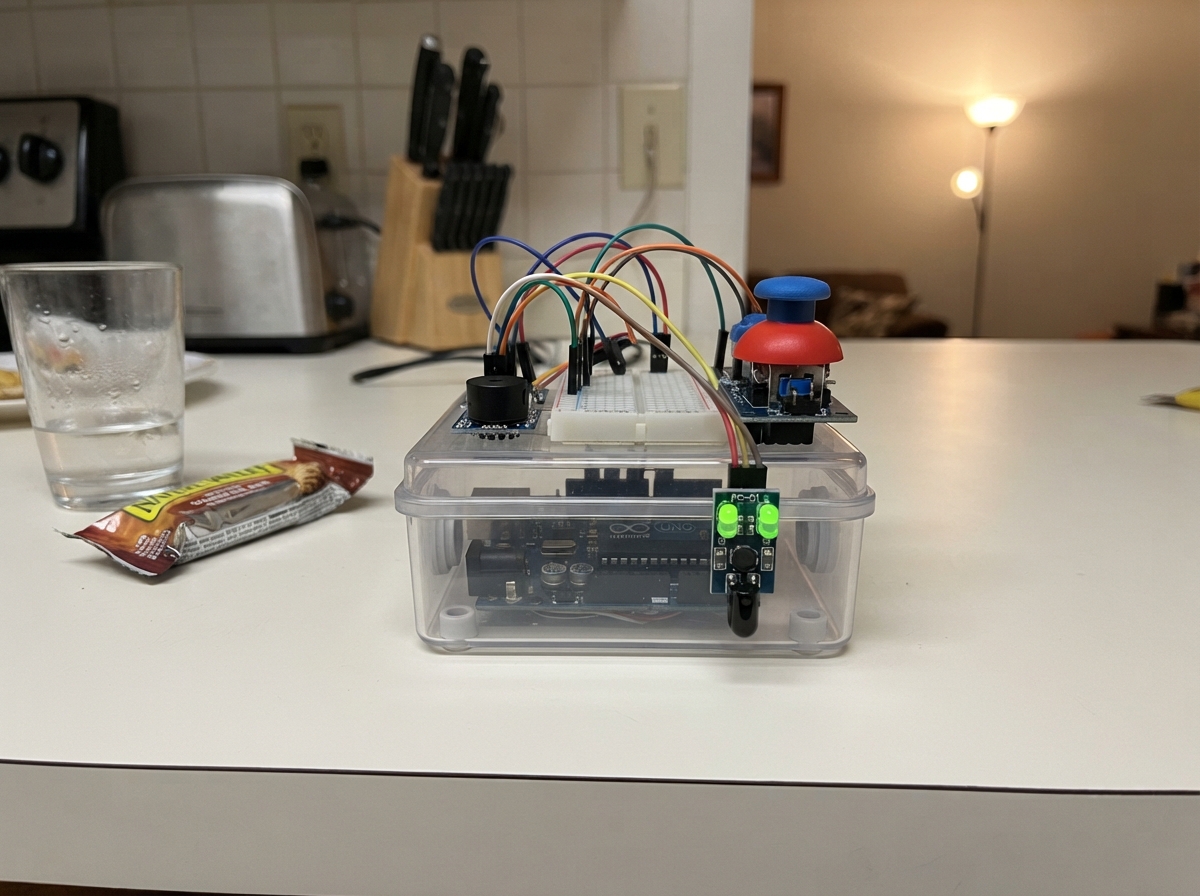
The RFID Fire-Safe Vault is an Arduino-based access control system that combines infrared sensing with joystick input and audio feedback to create a secure, interactive vault interface. Built around an Arduino Uno, the project uses an FC-51 IR obstacle sensor as a touchless trigger, a PS2 joystick module for control input, and a piezo buzzer for confirmation tones.
This guide provides a complete wiring diagram, parts list, and step-by-step assembly instructions to get the vault operational. The included firmware handles IR detection, joystick mapping, WiFi connectivity, and visual feedback through an LED matrix display. Builders will learn how to integrate multiple input sensors, manage state transitions with audio-visual cues, and create a responsive user interface suitable for security applications.
Wiring diagram

Gather all the parts
Assemble it in 7 steps
1. Prepare the removable instrument
Unplug USB. Remove any flame sensor, separate button and slide switch leads. Leave the servo, RFID, ESP32, Bluetooth, converters and external power supply disconnected. Place the UNO on a nonconductive surface with USB accessible.
2. Connect shared power rails
Feed a continuous breadboard rail section from UNO 5V and another from GND. Connect joystick +5V and IR VCC to the 5V rail; connect both GND pins to the ground rail. Use printed labels, never assumed pin order. Use detachable female-to-male leads and existing stripped solid wire for rail feeds if needed. Keep bare ends short and isolated.
- Unplug USB before moving wires. Do not use the breadboard power module or external supply.
3. Connect the musical controls
Connect joystick VRX to A0, VRY to A1 and SW to D2. Connect IR OUT to D3. Connect a small passive piezo buzzer SIG (or +) to D8 and its other lead to GND. Leave A2, D4 and D5 disconnected. Use only a passive piezo, not an unknown active or magnetic buzzer. The complete IR comparator module includes its own resistors. The joystick click uses the internal pull-up. The onboard matrix needs no external wiring.
4. Position the touchless trigger
Aim the IR module upward toward the hand playing area. Keep it still and adjust its onboard sensitivity screw gently until the indicator switches when your hand enters and leaves the detection zone. Do not use flame or lasers. Strong sunlight can disrupt detection.
5. Inspect before USB power
Check every printed label and destination, rail continuity sections, and exposed wire ends. Leave the joystick centered and its click released. Check USB access and strain relief. No part is soldered or glued to the UNO.
6. Disconnect safely
Turn computer sound down, close the browser audio tab and disconnect from ECHO-Beats Wi-Fi, unplug USB and wait for board lights to extinguish. Remove leads by their connectors, then remove modules and rail wires. The UNO remains unchanged and reusable.
7. Join ECHO Wi-Fi and enable audio
Deploy, wait 10-15 seconds, then join ECHO-Beats with password 12345678 on your phone or computer. Stay connected despite the no-internet warning. Open http://192.168.4.1 and tap Enable sound. Start at low volume. Keep the page visible. Wave past the IR sensor to record; joystick horizontal selects voice, vertical changes tempo, short click toggles recording, medium click (0.4-1 second) cycles voice/tempo, filter/volume and pan/delay modes, and hold click at least one second then release clears. USB powers the UNO; drum music comes from your browser device; the wired piezo provides short control beeps. No separate ESP32 or internet required. New default shortcuts (all modes) — press and hold the centred joystick click, then tilt left to pause/resume, right repeatedly (release between taps) to set tempo from two taps 0.25–1.5 seconds apart, or up (lower VRY reading) to toggle IR drum-roll mode. One action per click; shortcut releases do not clear or toggle recording. Roll starts off; when enabled, keep your hand over IR for repeated selected-drum hits, and remove it to stop. Rolls also overdub when recording. Browser sound still requires Enable sound. Control buzz starts enabled and gives short speaker feedback for taps, sensor hits, joystick clicks and changes of direction; holding the stick still stays quiet. Uncheck Control buzz on the page to disable it. A passive piezo on D8 beeps for sensor taps, joystick clicks and direction changes even without the website. The website Control buzz checkbox controls browser feedback only. Holding the stick still does not repeat the beep.
Review all connections
1. Connections between "stick" and "Arduino"
2. Connections between "dock_sensor" and "Arduino"
3. Connections between "feedback_buzzer" and "Arduino"
Deploy the firmware
#include <Arduino.h>
#include <Arduino_LED_Matrix.h>
#include <WiFiS3.h>
#include "web_page.h"
ArduinoLEDMatrix matrix;
constexpr int IR=3, SW=2, BUZZER=8;
void controlBeep(){tone(BUZZER, 3000, 25);}
uint8_t notes[12]={}, previous[8][12]={};
int controlMode=0, joyX=512, joyY=512;
bool transport=true, rollEnabled=false, shortcutUsed=false;
unsigned long tapAt=0;
bool first=true, recording=true, pressed=false, rawButton=false;
bool irRaw=false, irStable=false, running=false;
unsigned long irAt=0, buttonAt=0, pressAt=0, lastHit=0, nextStep=0, nextStatus=0;
int stepIndex=0, voice=0, bpm=120, centerY=512;
WiFiServer server(80);
WiFiClient webClient;
bool wifiReady=false;
String request;
unsigned long requestAt=0;
struct Event { uint32_t id; uint8_t voice; };
Event events[64]={};
uint32_t eventId=0, feedbackId=0;
unsigned long visualHitAt=0;
bool visualHit=false;
// Short confirmations override the ambient display without blocking music.
enum MatrixCue { NONE, PLAY, PAUSE, TAP, ROLL_ON, ROLL_OFF, RECORD_ON, RECORD_OFF, MODE, CLEAR };
MatrixCue cue=NONE;
unsigned long cueAt=0;
void showCue(MatrixCue c){cue=c;cueAt=millis();}
void drawMatrix(unsigned long now){
 uint8_t frame[8][12]={};
 auto pixel=[&](int x,int y){if(x>=0&&x<12&&y>=0&&y<8)frame[y][x]=1;};
 unsigned long age=now-cueAt;
 if(cue!=NONE&&age<800){
  int tick=age/90;
  if(cue==PLAY){
   int offset=min(tick,2);
   for(int x=0;x<5;x++)for(int y=x;y<8-x;y++)pixel(x+3+offset,y);
  }else if(cue==PAUSE){
   for(int y=1;y<7;y++){pixel(3,y);pixel(4,y);pixel(7,y);pixel(8,y);}
   if(tick%2==0){pixel(0,3);pixel(11,4);}
  }else if(cue==TAP){
   int radius=(tick%4)+1;
   for(int x=0;x<12;x++)for(int y=0;y<8;y++)
    if(abs(x-5)+abs(y-3)==radius)pixel(x,y);
  }else if(cue==ROLL_ON||cue==ROLL_OFF){
   for(int x=2;x<10;x++){pixel(x,2);pixel(x,6);}
   for(int y=3;y<6;y++){pixel(1,y);pixel(10,y);}
   if(cue==ROLL_ON){int x=2+tick%8;pixel(x,0);pixel(x+1,1);pixel(11-x,4);}
   else for(int x=2;x<10;x++)pixel(x,7-x*6/10);
  }else if(cue==MODE){
   for(int i=0;i<=controlMode;i++)for(int y=2;y<6;y++){pixel(2+i*4,y);pixel(3+i*4,y);}
  }else if(cue==CLEAR){
   for(int x=tick;x<12;x++)for(int y=1;y<7;y++)if((x+y)%2==0)pixel(x,y);
  }else{
   for(int x=2;x<10;x++)for(int y=1;y<7;y++){
    int d=(x-5)*(x-5)+(y-3)*(y-3);
    if(cue==RECORD_ON?d<=8:(d>=5&&d<=10))pixel(x,y);
   }
  }
 }else if(!transport){
  // Paused state remains obvious after the confirmation animation.
  for(int y=1;y<6;y++){pixel(4,y);pixel(7,y);}
 }else if(visualHit&&now-visualHitAt<180){
  int spread=(now-visualHitAt)/45;
  for(int x=2;x<10;x++){pixel(x,3);pixel(x,6);}
  for(int y=4;y<6;y++){pixel(1,y);pixel(10,y);}
  for(int x=3;x<9;x+=2)pixel(x,4+(x+voice)%2);
  pixel(4-spread,2-min(spread,2));pixel(7+spread,2-min(spread,2));
 }else if(rollEnabled&&irStable){
  // Rotating spokes show an actively held touchless roll.
  const int8_t dx[8]={0,1,2,1,0,-1,-2,-1};
  const int8_t dy[8]={-2,-1,0,1,2,1,0,-1};
  int phase=(now/70)%8;
  for(int i=0;i<4;i++){int k=(phase+i*2)%8;pixel(5+dx[k],3+dy[k]);pixel(6+dx[k],3+dy[k]);}
  pixel(5,3);pixel(6,3);
 }else if(recording){
  // Pulsing record core surrounded by an orbiting satellite.
  int radius=now%900<550?5:2;
  for(int x=3;x<9;x++)for(int y=1;y<6;y++)if((x-5)*(x-5)+(y-3)*(y-3)<=radius)pixel(x,y);
  const uint8_t orbitX[12]={2,4,6,8,9,10,9,8,6,4,2,1};
  const uint8_t orbitY[12]={0,0,0,0,1,3,5,6,6,6,5,3};
  int phase=(now/100)%12;pixel(orbitX[phase],orbitY[phase]);
 }else{
  const uint8_t wave[12]={3,2,1,2,3,4,5,6,5,4,3,3};
  for(int x=0;x<12;x++){int y=wave[(x+now/90)%12];pixel(x,y);if(x%3==now/180%3)pixel(x,y-1);}
 }
 // Persistent status rail: timeline, record indicator, roll indicator.
 pixel(stepIndex,7);
 if(recording&&now%800<550)pixel(11,0);
 if(rollEnabled)pixel(0,0);
 if(first||memcmp(previous,frame,sizeof frame)){
  matrix.renderBitmap(frame,8,12);memcpy(previous,frame,sizeof frame);first=false;
 }
}
void sound(int v){visualHitAt=millis();visualHit=true;++eventId;events[eventId%64]={eventId,(uint8_t)v};}
void serveWeb(){
 if(!wifiReady)return;
 if(!webClient){webClient=server.available();if(webClient){request="";requestAt=millis();}}
 if(!webClient)return;
 int budget=512;
 while(budget-- && webClient.available()){
  char c=webClient.read();request+=c;
  if(request.endsWith("\r\n\r\n")){
   bool data=request.startsWith("GET /events?after=");
   bool command=request.startsWith("GET /cmd?");
   if(command){
    auto arg=[&](const char *key)->int{String k=String(key)+"=";int pos=request.indexOf(k);return pos<0?0:request.substring(pos+k.length()).toInt();};
    int op=arg("op"),a=arg("a"),b=arg("b");
    if(op==1)bpm=constrain(a,40,240);
    if(op==2){recording=a!=0;showCue(recording?RECORD_ON:RECORD_OFF);}
    if(op==3){transport=a!=0;showCue(transport?PLAY:PAUSE);}
    if(op==4){memset(notes,0,sizeof notes);showCue(CLEAR);}
    if(op==5&&a>=0&&a<12)notes[a]=b&63;
    if(op==7)controlMode=constrain(a,0,2);
    if(op==8)sound(constrain(a,0,5));
    if(op==9){stepIndex=0;nextStep=millis()+15000UL/bpm;}
   }
   bool page=request.startsWith("GET / ")||request.startsWith("GET /index.html ");
   String body;
   if(data){
    uint32_t after=strtoul(request.c_str()+18,nullptr,10);
    if(after>eventId)after=eventId;
    if(eventId-after>64)after=eventId-64;
    body="{\"id\":"+String(eventId)+",\"bpm\":"+String(bpm)+",\"voice\":"+String(voice)+",\"rec\":"+String(recording?1:0)+",\"events\":[";
    bool comma=false;
    for(uint32_t id=after+1;id<=eventId;id++){
     Event &e=events[id%64];if(comma)body+=',';comma=true;
     body+='[';body+=String(e.id);body+=',';body+=String(e.voice);body+=']';
    }
    body+=String("] ,\"feedback\":")+String(feedbackId)+",\"roll\":"+String(rollEnabled?1:0)+",\"step\":"+String(stepIndex)+",\"mode\":"+String(controlMode)+",\"x\":"+String(joyX)+",\"y\":"+String(joyY)+",\"run\":"+String(transport?1:0)+",\"notes\":[";
    for(int i=0;i<12;i++){if(i)body+=',';body+=String(notes[i]);}body+="]}";
   }
   webClient.println(page||data||command?"HTTP/1.1 200 OK":"HTTP/1.1 404 Not Found");
   webClient.println(data||command?"Content-Type: application/json":"Content-Type: text/html; charset=utf-8");
   webClient.println("Cache-Control: no-store");webClient.println("Connection: close");
   size_t length=page?strlen(PAGE):(data?body.length():0);
   webClient.print("Content-Length: ");webClient.println(length);webClient.println();
   const char *payload=page?PAGE:body.c_str();
   for(size_t pos=0;pos<length;){size_t n=webClient.write((const uint8_t*)payload+pos,min((size_t)512,length-pos));if(!n)break;pos+=n;}
   webClient.stop();return;
  }
  if(request.length()>2048){webClient.stop();return;}
 }
 if(millis()-requestAt>1000){webClient.stop();}
}
void hit(unsigned long now){
 if(now-lastHit<100)return;
 lastHit=now;++feedbackId;controlBeep();
 if(recording)notes[stepIndex]|=(1<<voice);
 sound(voice);
}
void setup(){
 pinMode(BUZZER,OUTPUT);digitalWrite(BUZZER,LOW);
 Serial.begin(115200);pinMode(IR,INPUT_PULLUP);pinMode(SW,INPUT_PULLUP);
 analogReadResolution(10);matrix.begin();
 long sum=0;for(int i=0;i<50;i++){sum+=analogRead(A1);delay(10);}centerY=sum/50;
 irRaw=irStable=digitalRead(IR)==LOW; // A covered sensor at boot is not a hit.
 if(WiFi.status()!=WL_NO_MODULE){
  WiFi.config(IPAddress(192,168,4,1));
  int status=WiFi.beginAP("ECHO-Beats","12345678");
  if(status==WL_AP_LISTENING){delay(10000);server.begin();wifiReady=true;}
 }
 Serial.println(wifiReady?"ECHO ready: http://192.168.4.1":"Wi-Fi failed: check UNO connectivity firmware");
 nextStep=millis()+125;
}
void loop(){
 serveWeb();
 unsigned long now=millis();
 // Six drum voices across the joystick horizontal travel.
 joyX=analogRead(A0);joyY=analogRead(A1);
 // Hysteresis prevents centre noise or a held stick from buzzing continuously.
 static int zoneX=0,zoneY=0;
 auto zone=[](int value,int old)->int {if(value<282)return -1;if(value>742)return 1;if(value>352&&value<672)return 0;return old;};
 int zx=zone(joyX,zoneX),zy=zone(joyY,zoneY);
 if(zx!=zoneX||zy!=zoneY){if(zx||zy){++feedbackId;controlBeep();}zoneX=zx;zoneY=zy;}
 bool clickDown=digitalRead(SW)==LOW;
 if(controlMode==0&&!clickDown)voice=constrain(joyX*6/1024,0,5);
 // Vertical deflection changes tempo gradually; centre holds it.
 static unsigned long tempoAt=0;
 int dy=joyY-centerY;
 if(now-tempoAt>=100){tempoAt=now;if(controlMode==0&&!clickDown&&abs(dy)>180)bpm=constrain(bpm+(dy>0?1:-1),40,240);}
 bool r=digitalRead(IR)==LOW;
 if(r!=irRaw){irRaw=r;irAt=now;}
 if(now-irAt>=20 && r!=irStable){irStable=r;if(r)hit(now);}
 bool b=digitalRead(SW)==LOW;
 if(b!=rawButton){rawButton=b;buttonAt=now;}
 if(now-buttonAt>=30 && b!=pressed){
  pressed=b;
  if(b){pressAt=now;shortcutUsed=false;++feedbackId;controlBeep();}
  else if(shortcutUsed){} // A shortcut never also records, changes mode or clears.
  else if(now-pressAt>=1000){memset(notes,0,sizeof notes);recording=true;stepIndex=0;nextStep=now+15000UL/bpm;Serial.println("CLEARED");showCue(CLEAR);}
  else if(now-pressAt>=400){controlMode=(controlMode+1)%3;showCue(MODE);}
  else {recording=!recording;showCue(recording?RECORD_ON:RECORD_OFF);}
 }
 // One shortcut per click: press centred, then tilt; release to re-arm.
 if(pressed&&b&&!shortcutUsed){
  if(joyX<180){transport=!transport;showCue(transport?PLAY:PAUSE);if(transport)nextStep=now+15000UL/bpm;shortcutUsed=true;}
  else if(joyX>843){
   if(tapAt){unsigned long interval=now-tapAt;if(interval>=250&&interval<=1500)bpm=constrain((int)(60000UL/interval),40,240);}
   tapAt=now;showCue(TAP);shortcutUsed=true;
  }
  else if(dy < -300){rollEnabled=!rollEnabled;showCue(rollEnabled?ROLL_ON:ROLL_OFF);shortcutUsed=true;}
 }
 if(rollEnabled&&irStable&&now-lastHit>=max(100UL,15000UL/bpm))hit(now);
 if(transport && (long)(now-nextStep)>=0){
  nextStep=now+15000UL/bpm; // Twelve sixteenth notes: a repeating three-beat phrase.
  if(running)stepIndex=(stepIndex+1)%12;else running=true;
  for(int v=0;v<6;v++)if(notes[stepIndex]&(1<<v))sound(v);
 }
 if(now>=nextStatus){nextStatus=now+250;Serial.print("STATE ");Serial.print(bpm);Serial.print(' ');Serial.print(voice);Serial.print(' ');Serial.println(recording?1:0);}
 drawMatrix(now);
}
Remix this project
Make it yours in one click
Open a full copy of this project in your own Schematik workspace — diagram, code, parts, and assembly steps included. Swap the sensor, add features, or redesign the whole thing with AI. The author's original stays untouched.