Community project
App-Controlled Wall-E Robot
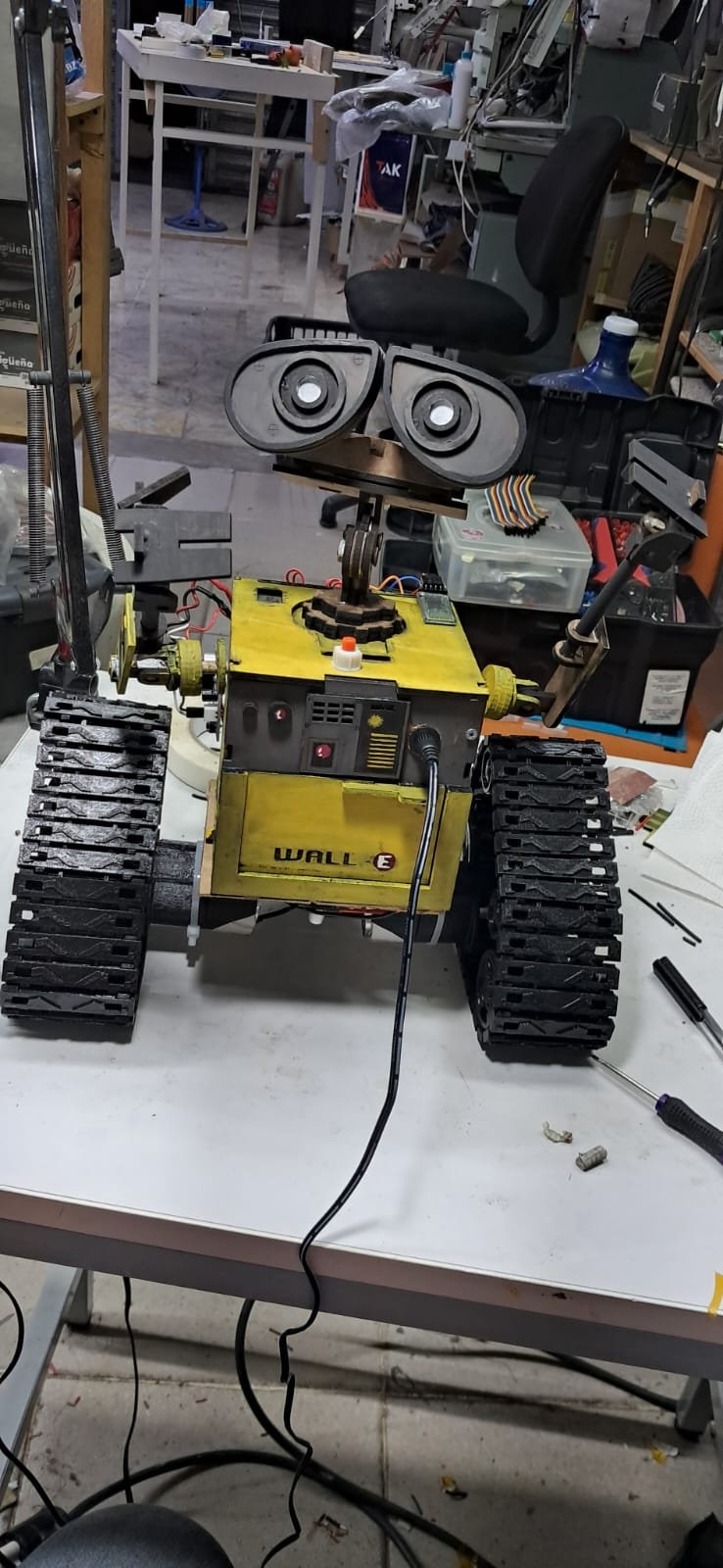
Build a Wall-E inspired robot that responds to commands from a smartphone via Bluetooth. This tracked robot features articulated hands and head controlled by servo motors, blue LED eyes, and sound playback capabilities, all powered by a rechargeable lithium battery pack and coordinated by an Arduino Uno microcontroller.
This guide provides a complete parts list, wiring diagram showing connections between the motor driver, servo controller, Bluetooth module, and audio playback circuit, step-by-step assembly instructions, and Arduino firmware with Bluetooth command handling. Builders will learn how to integrate multiple motor types, manage power distribution from a 24V buck converter, and create interactive robot behaviors through serial communication.
Wiring diagram

Gather all the parts
Assemble it in 7 steps
1. Prepara el paquete de batería protegido
Monta las tres pilas 18650 idénticas en serie dentro de un portapilas o paquete con aislamiento. Conecta PACK− a B−, la primera unión de pilas a B1, la segunda unión a B2 y PACK+ a B+ del BMS. Desde este momento, usa solamente P+ y P− del BMS como salida del paquete.
- Comprueba con un multímetro que el paquete mide aproximadamente 9 a 12.6 V entre P+ y P− antes de conectar otros módulos.
- No inviertas B−, B1, B2 y B+: una conexión equivocada en el BMS puede dañar las pilas o la placa.
- No unas pilas con distinta carga, marca o estado; una pila dañada o caliente debe retirarse.
2. Conecta carga y los reguladores
Conecta el positivo del cargador de 12.6 V a P+ del BMS y su negativo a P−. Lleva también P+ y P− a la entrada del LM2596 y a la entrada del regulador de 5 V de al menos 5 A. Antes de enchufar el Arduino, ajusta el LM2596 con multímetro a 9.0 V y conecta su salida positiva a VIN del Uno y su salida negativa a GND. Ajusta el segundo regulador a 5.0 V.
- Ajusta cada regulador sin cargas conectadas y vuelve a medir su salida.
- La salida de 5 V alimenta los servos, el PCA9685, el HC-05, el ISD1820 y el pin 5V del L298N.
- Nunca conectes 9 V o el paquete de batería directamente al pin 5V: puede quemar los módulos.
- No conectes la salida de 5 V de un regulador a la salida de 5 V del otro regulador; comparten solo GND.
3. Cablea las orugas y el controlador de motores
Conecta P+ del BMS a VS del L298N (potencia de motores) y P− a GND (tierra). Conecta el regulador de 5 V al pin 5V del L298N (alimentación de control). Conecta OUT1 y OUT2 al motor izquierdo, y OUT3 y OUT4 al motor derecho. Lleva ENA a D3 (velocidad), IN1 a D4, IN2 a D5, IN3 a D6, IN4 a D7 y ENB a D11 (velocidad) del Arduino.
- Si una oruga gira al revés, intercambia solamente sus dos cables en OUT1/OUT2 o OUT3/OUT4.
- Retira los pequeños puentes ENA y ENB del L298N para que D3 y D11 puedan controlar la velocidad.
- El L298N puede calentarse al mover el robot; detén el robot si no puedes tocar el disipador durante más de un instante.
- Mantén los cables de motor gruesos y lejos de los cables de señal para reducir reinicios.
4. Conecta los servos de manos y cabeza
Conecta el PCA9685 al Arduino: VCC a 5 V (alimentación), GND a GND (tierra), SDA a A4 (datos) y SCL a A5 (reloj). Conecta V+ del PCA9685 al regulador de 5 V y su GND al mismo GND. Enchufa señal, rojo y marrón/negro del servo de mano izquierda en canal 0; mano derecha en canal 1; cabeza en canal 2. Los cables rojos van al lado V+ y los oscuros al lado GND.
- Monta primero los brazos y la cabeza centrados mecánicamente antes de atornillar los brazos del servo.
- El programa inicia los tres servos en el centro y limita su recorrido entre 45° y 135°.
- No alimentes estos servos desde el pin 5V del Arduino; se reiniciaría o se podría dañar.
- Asegúrate de que V+ y GND no estén intercambiados — alimentar un servo al revés puede dañarlo.
5. Conecta Bluetooth y el sonido
Conecta VCC del HC-05 a 5 V y GND a GND. Conecta TX del HC-05 a D8 (datos que llegan al Arduino). Para proteger RX del HC-05, conecta D9 a una resistencia de 1 kΩ; une su otro extremo con una resistencia de 2 kΩ y con RX del HC-05; conecta el extremo libre de la resistencia de 2 kΩ a GND. Conecta VCC y GND del ISD1820 a 5 V y GND, PLAYE a D10, y SP+ y SP− a los dos terminales de la bocina de 8 Ω.
- Para grabar, mantén pulsado REC del propio ISD1820 mientras hablas cerca de su micrófono; suelta REC al terminar.
- Empareja el teléfono con el HC-05 y configura tu app para enviar caracteres por Bluetooth a 9600 baudios.
- No uses la bocina de 4 Ω con el ISD1820; una bocina de 8 Ω evita sobrecargar su salida.
- El divisor de resistencias es importante: evita que los 5 V de D9 lleguen directamente al pin RX del HC-05.
6. Monta los dos ojos azules
Para el ojo izquierdo, conecta la pata larga del LED a una resistencia de 220 Ω y el otro extremo de esa resistencia a D12 (luz). Conecta la pata corta del LED a GND (tierra). Para el ojo derecho, conecta su pata larga a otra resistencia de 220 Ω y el otro extremo a D13 (luz); conecta su pata corta a GND (tierra). Al encender el robot, los dos ojos quedan iluminados.
- En un LED normal, la pata larga es el positivo; la pata corta y el lado plano son el negativo.
- Puedes fijar los LED detrás de los huecos de los ojos con una gota de silicona caliente, sin cubrir sus patas ni dejar que se toquen.
- Cada LED necesita su propia resistencia de 220 Ω; conectarlo directo al Arduino puede quemar el LED o dañar el pin.
- Desconecta la batería antes de conectar los ojos y evita que las patas desnudas se toquen.
7. Prueba y controla el robot
Con el robot levantado para que las orugas no toquen la mesa, enciende la batería y verifica que no haya cables calientes. Los ojos azules deben iluminarse. Después de cargar el programa, usa tu app Bluetooth para enviar F adelante, B atrás, L izquierda, R derecha y S parar. Usa A/Z para mano izquierda, D/C para mano derecha, H/N para cabeza y P para iniciar el audio manualmente.
- El programa inicia y repite automáticamente el audio aproximadamente cada 11 segundos; ajusta ese tiempo luego si tu grabación dura más.
- Cada orden de mano o cabeza cambia 5° y nunca permite superar 45° desde el centro.
- Prueba sin personas, mascotas ni objetos cerca de las orugas: el robot puede arrancar al recibir una orden Bluetooth.
- Desconecta la batería antes de mover cables o cambiar conexiones.
Review all connections
1. Connections between "battery_3s" and "Arduino"
2. Connections between "bms_3s_40a" and "Arduino"
3. Connections between "charger_12v6" and "Arduino"
4. Connections between "power_distribution_12v" and "Arduino"
5. Connections between "lm2596_5v" and "Arduino"
6. Connections between "servo_buck_5v5a" and "Arduino"
7. Connections between "l298n_1" and "Arduino"
8. Connections between "pca9685_1" and "Arduino"
9. Connections between "servo_hand_left" and "Arduino"
10. Connections between "servo_hand_right" and "Arduino"
11. Connections between "servo_head" and "Arduino"
12. Connections between "hc05_1" and "Arduino"
13. Connections between "hc05_rx_resistor_top" and "Arduino"
14. Connections between "hc05_rx_resistor_bottom" and "Arduino"
15. Connections between "isd1820_1" and "Arduino"
16. Connections between "eye_led_left" and "Arduino"
17. Connections between "eye_led_left_resistor" and "Arduino"
18. Connections between "eye_led_right" and "Arduino"
19. Connections between "eye_led_right_resistor" and "Arduino"
Deploy the firmware
#include <Wire.h>
#include <SoftwareSerial.h>
#include <Adafruit_PWMServoDriver.h>

const uint8_t MOTOR_ENA_PIN = 3;
const uint8_t MOTOR_IN1_PIN = 4;
const uint8_t MOTOR_IN2_PIN = 5;
const uint8_t MOTOR_IN3_PIN = 6;
const uint8_t MOTOR_IN4_PIN = 7;
const uint8_t BT_RX_PIN = 8;
const uint8_t BT_TX_PIN = 9;
const uint8_t ISD_PLAYE_PIN = 10;
const uint8_t MOTOR_ENB_PIN = 11;
const uint8_t PCA9685_SDA_PIN = A4;
const uint8_t PCA9685_SCL_PIN = A5;
const uint8_t LEFT_EYE_LED_PIN = 12;
const uint8_t RIGHT_EYE_LED_PIN = 13;

const uint8_t LEFT_HAND_CHANNEL = 0;
const uint8_t RIGHT_HAND_CHANNEL = 1;
const uint8_t HEAD_CHANNEL = 2;
const int CENTER_ANGLE = 90;
const int MIN_ANGLE = 45;
const int MAX_ANGLE = 135;
const int SERVO_STEP = 5;
const uint8_t MOTOR_SPEED = 210;
const unsigned long SERVO_ANIMATION_MS = 40UL;
const unsigned long AUDIO_REPEAT_MS = 11000UL;
const unsigned long PLAY_PULSE_MS = 80UL;

Adafruit_PWMServoDriver pwm = Adafruit_PWMServoDriver(0x40);
SoftwareSerial bluetooth(BT_RX_PIN, BT_TX_PIN);

int leftHandAngle = CENTER_ANGLE;
int rightHandAngle = CENTER_ANGLE;
int headAngle = CENTER_ANGLE;
unsigned long lastAudioStart = 0;
unsigned long playPulseStart = 0;
bool playPulseActive = false;
bool automaticServoMotion = true;
unsigned long lastServoAnimation = 0;
int handMotionDirection = 1;
int headMotionDirection = 1;

uint16_t angleToPulse(int angle) {
  return map(angle, 0, 180, 150, 600);
}

void setServoAngle(uint8_t channel, int angle) {
  angle = constrain(angle, MIN_ANGLE, MAX_ANGLE);
  pwm.setPWM(channel, 0, angleToPulse(angle));
}

void updateAutomaticServos() {
  unsigned long now = millis();
  if (!automaticServoMotion || now - lastServoAnimation < SERVO_ANIMATION_MS) {
    return;
  }
  lastServoAnimation = now;

  leftHandAngle += handMotionDirection;
  rightHandAngle -= handMotionDirection;
  if (leftHandAngle >= MAX_ANGLE || leftHandAngle <= MIN_ANGLE) {
    leftHandAngle = constrain(leftHandAngle, MIN_ANGLE, MAX_ANGLE);
    rightHandAngle = constrain(rightHandAngle, MIN_ANGLE, MAX_ANGLE);
    handMotionDirection = -handMotionDirection;
  }

  headAngle += headMotionDirection;
  if (headAngle >= 120 || headAngle <= 60) {
    headAngle = constrain(headAngle, 60, 120);
    headMotionDirection = -headMotionDirection;
  }

  setServoAngle(LEFT_HAND_CHANNEL, leftHandAngle);
  setServoAngle(RIGHT_HAND_CHANNEL, rightHandAngle);
  setServoAngle(HEAD_CHANNEL, headAngle);
}

void stopTracks() {
  analogWrite(MOTOR_ENA_PIN, 0);
  analogWrite(MOTOR_ENB_PIN, 0);
  digitalWrite(MOTOR_IN1_PIN, LOW);
  digitalWrite(MOTOR_IN2_PIN, LOW);
  digitalWrite(MOTOR_IN3_PIN, LOW);
  digitalWrite(MOTOR_IN4_PIN, LOW);
}

void driveTracks(bool leftForward, bool rightForward) {
  // El motor izquierdo está montado con el giro eléctrico invertido.
  digitalWrite(MOTOR_IN1_PIN, leftForward ? LOW : HIGH);
  digitalWrite(MOTOR_IN2_PIN, leftForward ? HIGH : LOW);
  digitalWrite(MOTOR_IN3_PIN, rightForward ? HIGH : LOW);
  digitalWrite(MOTOR_IN4_PIN, rightForward ? LOW : HIGH);
  analogWrite(MOTOR_ENA_PIN, MOTOR_SPEED);
  analogWrite(MOTOR_ENB_PIN, MOTOR_SPEED);
}

void startAudioPlayback() {
  digitalWrite(ISD_PLAYE_PIN, HIGH);
  playPulseStart = millis();
  playPulseActive = true;
  lastAudioStart = playPulseStart;
}

void updateAudioLoop() {
  unsigned long now = millis();
  if (playPulseActive && now - playPulseStart >= PLAY_PULSE_MS) {
    digitalWrite(ISD_PLAYE_PIN, LOW);
    playPulseActive = false;
  }
  if (!playPulseActive && now - lastAudioStart >= AUDIO_REPEAT_MS) {
    startAudioPlayback();
  }
}

void handleCommand(char command) {
  switch (command) {
    case 'F': case 'f': driveTracks(true, true); break;
    case 'B': case 'b': driveTracks(false, false); break;
    case 'L': case 'l': driveTracks(false, true); break;
    case 'R': case 'r': driveTracks(true, false); break;
    case 'S': case 's': stopTracks(); break;
    case 'A': automaticServoMotion = false; leftHandAngle = constrain(leftHandAngle + SERVO_STEP, MIN_ANGLE, MAX_ANGLE); setServoAngle(LEFT_HAND_CHANNEL, leftHandAngle); break;
    case 'Z': automaticServoMotion = false; leftHandAngle = constrain(leftHandAngle - SERVO_STEP, MIN_ANGLE, MAX_ANGLE); setServoAngle(LEFT_HAND_CHANNEL, leftHandAngle); break;
    case 'D': automaticServoMotion = false; rightHandAngle = constrain(rightHandAngle + SERVO_STEP, MIN_ANGLE, MAX_ANGLE); setServoAngle(RIGHT_HAND_CHANNEL, rightHandAngle); break;
    case 'C': automaticServoMotion = false; rightHandAngle = constrain(rightHandAngle - SERVO_STEP, MIN_ANGLE, MAX_ANGLE); setServoAngle(RIGHT_HAND_CHANNEL, rightHandAngle); break;
    case 'H': automaticServoMotion = false; headAngle = constrain(headAngle + SERVO_STEP, MIN_ANGLE, MAX_ANGLE); setServoAngle(HEAD_CHANNEL, headAngle); break;
    case 'N': automaticServoMotion = false; headAngle = constrain(headAngle - SERVO_STEP, MIN_ANGLE, MAX_ANGLE); setServoAngle(HEAD_CHANNEL, headAngle); break;
    case 'M': case 'm': automaticServoMotion = !automaticServoMotion; break;
    case 'P': case 'p': startAudioPlayback(); break;
    default: break;
  }
}

void setup() {
  pinMode(MOTOR_ENA_PIN, OUTPUT);
  pinMode(MOTOR_ENB_PIN, OUTPUT);
  pinMode(MOTOR_IN1_PIN, OUTPUT);
  pinMode(MOTOR_IN2_PIN, OUTPUT);
  pinMode(MOTOR_IN3_PIN, OUTPUT);
  pinMode(MOTOR_IN4_PIN, OUTPUT);
  pinMode(ISD_PLAYE_PIN, OUTPUT);
  pinMode(LEFT_EYE_LED_PIN, OUTPUT);
  pinMode(RIGHT_EYE_LED_PIN, OUTPUT);
  digitalWrite(ISD_PLAYE_PIN, LOW);
  digitalWrite(LEFT_EYE_LED_PIN, HIGH);
  digitalWrite(RIGHT_EYE_LED_PIN, HIGH);
  stopTracks();
  Wire.begin();
  pwm.begin();
  pwm.setPWMFreq(50);
  setServoAngle(LEFT_HAND_CHANNEL, leftHandAngle);
  setServoAngle(RIGHT_HAND_CHANNEL, rightHandAngle);
  setServoAngle(HEAD_CHANNEL, headAngle);
  bluetooth.begin(9600);
  startAudioPlayback();
}

void loop() {
  while (bluetooth.available() > 0) {
    handleCommand((char)bluetooth.read());
  }
  updateAudioLoop();
  updateAutomaticServos();
  delay(1);
}
Remix this project
Make it yours in one click
Open a full copy of this project in your own Schematik workspace — diagram, code, parts, and assembly steps included. Swap the sensor, add features, or redesign the whole thing with AI. The author's original stays untouched.