Community project
Wearable Haptic Alert Receiver
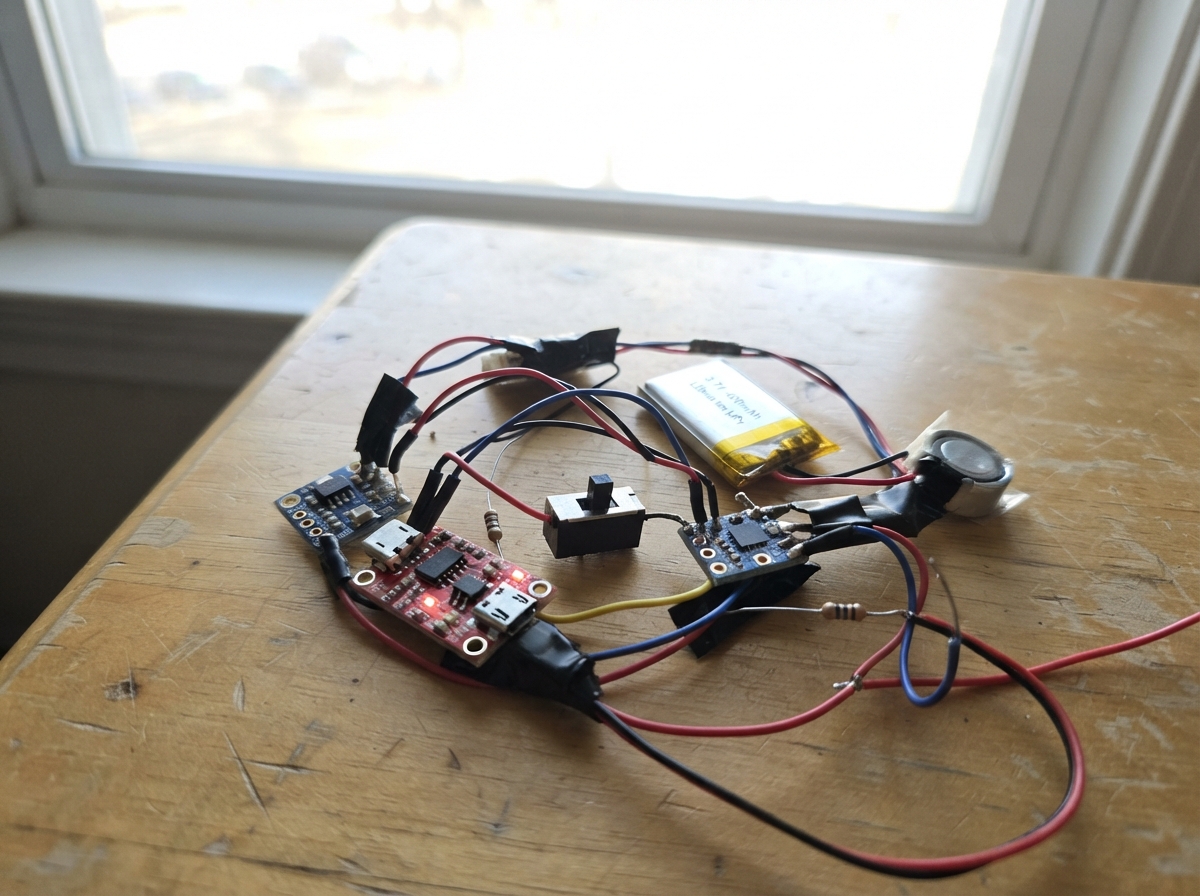
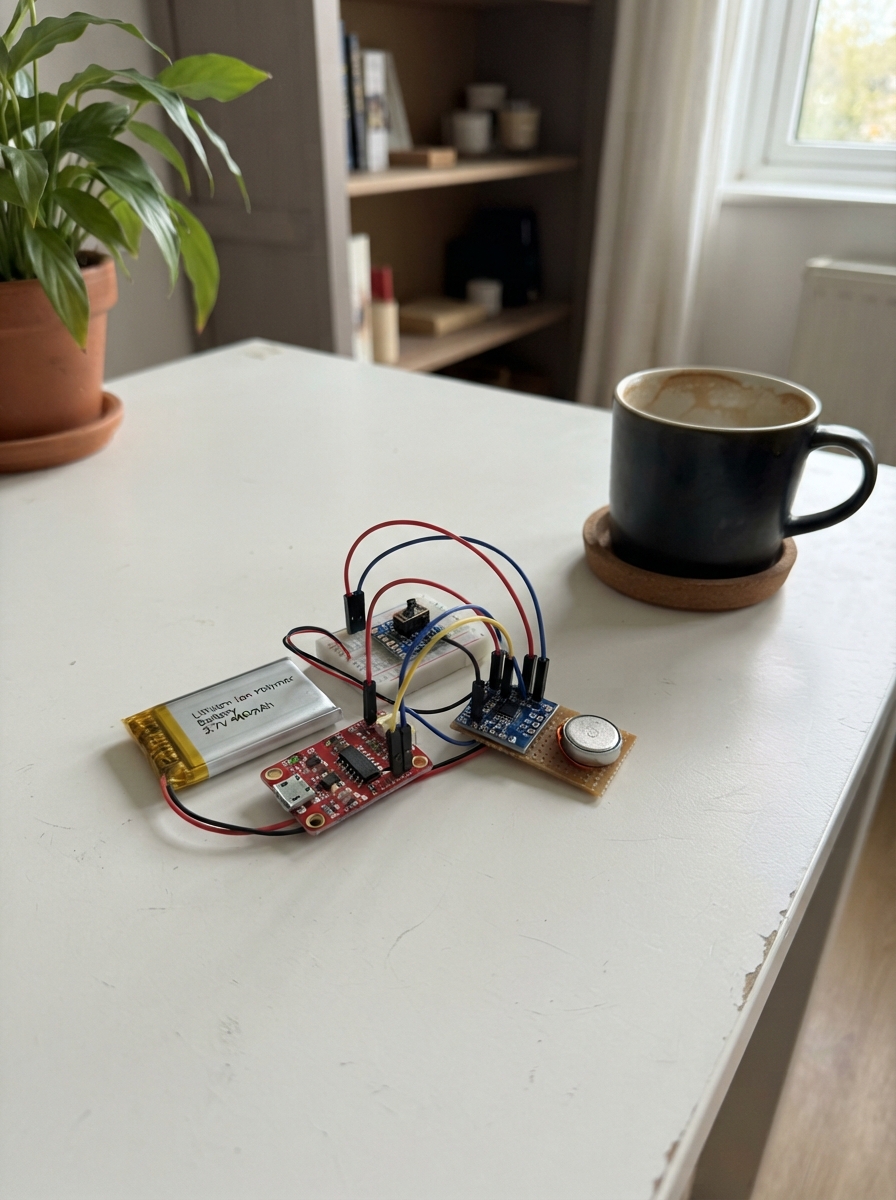
This wearable haptic alert receiver uses an ESP32 to receive wireless notifications and deliver distinct vibration patterns to the wearer via a coin linear resonant actuator. Built around a compact 400 mAh LiPo battery with charging and fuel gauge monitoring, the device provides multiple haptic tactons (attention, action, confirm, urgent) that communicate different alert types through touch feedback rather than sound or light.
The guide includes a complete wiring diagram, full parts list, and step-by-step assembly instructions covering battery integration, power regulation, I2C sensor configuration, and haptic driver setup. Firmware based on ESP-NOW wireless protocol and the DRV2605 haptic library is provided, along with battery monitoring that triggers low-power alerts. Builders will learn to create a silent notification system suitable for discrete wearable applications.
Wiring diagram
Gather all the parts
Assemble it in 7 steps
1. Prepare the charging board safely
With the LiPo unplugged and no USB cable connected, modify the TP4056 module’s R_PROG position to 3 kΩ as specified. Place the charger so its USB-C socket will remain reachable after the wristband is enclosed.
- Use a meter to confirm the fitted resistor is close to 3 kΩ before connecting the cell.
- Only use this charge setting if the particular 400 mAh LiPo is rated to accept about 370 mA; a cell with a lower permitted charge current can overheat or be damaged.
2. Connect the battery and battery monitor
Connect BT1’s red BAT+ lead to the TP4056 B+ pad and also to the MAX17048 BAT input. Connect BT1’s black BAT− lead to the TP4056 B− pad. Connect the MAX17048 GND pin to the common ground rail that starts at TP4056 OUT−. This lets the gauge measure the cell while all electronics share a ground reference.
- Keep the battery leads short and strain-relieved; a JST lead can pull loose inside a wearable.
- Do not reverse the LiPo leads — reversed battery power can permanently damage the charger, gauge, and battery.
3. Build the switched 5 V supply
Wire TP4056 OUT+ to switch SW1 terminal A. Wire SW1 COM to boost5v_1 VIN. Wire boost5v_1 GND to the ground rail, and wire boost5v_1 VOUT to a 5 V rail that goes to the SuperMini 5V pin. Leave SW1 terminal B unconnected; sliding toward A turns the unit on. Put C3 (22 µF) and C4 (100 nF) in parallel from the 5 V rail to ground, physically close to the ESP32: C3 + to 5 V and C3 − to ground; either C4 lead may go to either rail.
- Before installing the ESP32, turn on the switch and measure the boost output; it should be approximately 5 V relative to ground.
- Never connect the LiPo’s raw 3.7–4.2 V output directly to the SuperMini 5V pin — it is too low for reliable regulation. Make sure the 22 µF capacitor’s marked negative side goes to ground; reversing a polarized capacitor can make it fail.
4. Power the ESP32 and both I²C boards
Connect the ESP32-C3 SuperMini 5V pin to the switched 5 V rail and its GND pin to the ground rail. Connect MAX17048 VIN to the ESP32 3V3 pin and MAX17048 GND to ground. Connect DRV2605L VIN to 3V3 and DRV2605L GND to ground. The 3.3 V rail keeps the I²C signal voltage safe for the ESP32.
- Use a common ground rail for the charger output, boost regulator, ESP32, gauge, and haptic driver.
- Do not power the MAX17048 or DRV2605L logic pins from 5 V in this design — 5 V I²C pull-ups could damage the ESP32 GPIO pins.
5. Wire the shared data lines
Connect GPIO6 on the SuperMini to MAX17048 SDA and DRV2605L SDA. Connect GPIO7 to MAX17048 SCL and DRV2605L SCL. Connect MAX17048 INT/ALRT to GPIO3. Add R_SDA, a 4.7 kΩ resistor, from 3V3 to the SDA line, and add R_SCL, another 4.7 kΩ resistor, from 3V3 to the SCL line.
- Treat each shared data line as one joined row on the breadboard: GPIO6, both SDA pins, and one resistor end share one row; repeat for GPIO7 and SCL.
- Make sure the SDA and SCL rows do not touch each other. A short between them prevents both boards from communicating.
6. Attach the vibration actuator
Connect the LRA’s two leads only to DRV2605L OUT+ and OUT−. Fasten the coin actuator against the inside of the wristband so its moving face can transfer vibration to the wearer, and add strain relief to its fine wires.
- If the coin LRA has unmarked leads, either lead may go to OUT+ or OUT− because the DRV2605L drives it with alternating voltage.
- Do not connect the LRA directly to 3.3 V, 5 V, or an ESP32 GPIO pin — it needs the DRV2605L driver.
7. Inspect before first power-up
With the switch off, inspect every connection against the wiring table: 5 V only reaches the SuperMini 5V pin after the boost module; 3V3 feeds both breakout VIN pins and pull-ups; all grounds join; and GPIO6/GPIO7/GPIO3 go only to their stated signals. Then connect the LiPo, turn on the switch, and use the board’s USB connection only for flashing through Schematik.
- If anything becomes warm immediately, turn the switch off and recheck the power wiring before proceeding.
- Do not charge the battery through the TP4056 while the wristband is being worn or left unattended.
Review all connections
1. Connections between "bt1" and "ESP32"
2. Connections between "tp4056_1" and "ESP32"
3. Connections between "sw1" and "ESP32"
4. Connections between "boost5v_1" and "ESP32"
5. Connections between "c3" and "ESP32"
6. Connections between "c4" and "ESP32"
7. Connections between "max17048_1" and "ESP32"
8. Connections between "drv2605l_1" and "ESP32"
9. Connections between "r_sda" and "ESP32"
10. Connections between "r_scl" and "ESP32"
Deploy the firmware
#include <Arduino.h>
#include <Wire.h>
#include <WiFi.h>
#include <esp_now.h>
#include <esp_idf_version.h>
#include <Adafruit_DRV2605.h>
#include <Adafruit_MAX1704X.h>

constexpr uint8_t I2C_SDA_PIN = 6;
constexpr uint8_t I2C_SCL_PIN = 7;
constexpr uint8_t MAX17048_ALERT_PIN = 3;
constexpr uint8_t MAX17048_ADDRESS = 0x36;
constexpr uint8_t LOW_BATTERY_PERCENT = 20;
constexpr uint32_t BATTERY_POLL_MS = 1000;

enum TactonId : uint8_t {
  TACTON_ATTENTION = 1,
  TACTON_ACTION = 2,
  TACTON_CONFIRM = 3,
  TACTON_URGENT = 4,
  TACTON_LOW_BATTERY = 0xF0
};

Adafruit_DRV2605 drv;
Adafruit_MAX17048 max17048;
QueueHandle_t tactonQueue;
volatile bool maxAlertPending = false;
bool lowBatteryLatched = false;
uint32_t lastBatteryPollMs = 0;

void playWaveformSequence(const uint8_t *effects, size_t count) {
  drv.stop();
  for (uint8_t slot = 0; slot < 8; ++slot) {
    drv.setWaveform(slot, slot < count ? effects[slot] : 0);
  }
  drv.go();
}

void playTacton(uint8_t tacton) {
  static const uint8_t attention[] = {1, 0};
  static const uint8_t action[] = {47, 47, 0};
  static const uint8_t confirm[] = {7, 0};
  static const uint8_t urgent[] = {14, 14, 14, 0};
  static const uint8_t fallback[] = {4, 0};

  if (tacton == TACTON_LOW_BATTERY) {
    static const uint8_t buzz[] = {47, 0};
    playWaveformSequence(buzz, 2);
    vTaskDelay(pdMS_TO_TICKS(180));
    playWaveformSequence(buzz, 2);
    return;
  }

  switch (tacton) {
    case TACTON_ATTENTION: playWaveformSequence(attention, 2); break;
    case TACTON_ACTION:    playWaveformSequence(action, 3); break;
    case TACTON_CONFIRM:   playWaveformSequence(confirm, 2); break;
    case TACTON_URGENT:    playWaveformSequence(urgent, 4); break;
    default:               playWaveformSequence(fallback, 2); break;
  }
}

void hapticTask(void *) {
  uint8_t tacton;
  for (;;) {
    if (xQueueReceive(tactonQueue, &tacton, portMAX_DELAY) == pdTRUE) {
      playTacton(tacton);
    }
  }
}

void queueTacton(uint8_t tacton) {
  xQueueOverwrite(tactonQueue, &tacton);
}

#if ESP_IDF_VERSION_MAJOR >= 5
void onEspNowReceive(const esp_now_recv_info_t *, const uint8_t *data, int len) {
#else
void onEspNowReceive(const uint8_t *, const uint8_t *data, int len) {
#endif
  if (len >= 1 && data != nullptr) queueTacton(data[0]);
}

void IRAM_ATTR onMax17048Alert() {
  maxAlertPending = true;
}

bool configureLowSocAlert(uint8_t percent) {
  Wire.beginTransmission(MAX17048_ADDRESS);
  Wire.write(0x0C);
  if (Wire.endTransmission(false) != 0) return false;
  if (Wire.requestFrom(MAX17048_ADDRESS, (uint8_t)2) != 2) return false;

  uint8_t msb = Wire.read();
  uint8_t lsb = Wire.read();
  lsb = (lsb & 0xE0) | (percent & 0x1F);

  Wire.beginTransmission(MAX17048_ADDRESS);
  Wire.write(0x0C);
  Wire.write(msb);
  Wire.write(lsb);
  return Wire.endTransmission() == 0;
}

void serviceBatteryAlert() {
  const uint32_t now = millis();
  if (!maxAlertPending && (now - lastBatteryPollMs < BATTERY_POLL_MS)) return;
  lastBatteryPollMs = now;
  maxAlertPending = false;

  const float percent = max17048.cellPercent();
  (void)max17048.cellVoltage();

  if (percent < LOW_BATTERY_PERCENT && !lowBatteryLatched) {
    lowBatteryLatched = true;
    queueTacton(TACTON_LOW_BATTERY);
  } else if (percent >= (LOW_BATTERY_PERCENT + 2)) {
    lowBatteryLatched = false;
  }

  if (max17048.isActiveAlert()) {
    const uint8_t flags = max17048.getAlertStatus();
    if (flags & MAX1704X_ALERTFLAG_SOC_LOW) {
      max17048.clearAlertFlag(MAX1704X_ALERTFLAG_SOC_LOW);
    }
  }
}

void setup() {
  Wire.begin(I2C_SDA_PIN, I2C_SCL_PIN);
  Wire.setClock(400000);

  tactonQueue = xQueueCreate(1, sizeof(uint8_t));
  configASSERT(tactonQueue != nullptr);
  xTaskCreate(hapticTask, "haptic", 3072, nullptr, 2, nullptr);

  if (!drv.begin(&Wire)) {
    while (true) delay(1000);
  }
  drv.selectLibrary(6);
  drv.useLRA();
  drv.setMode(DRV2605_MODE_INTTRIG);

  if (!max17048.begin(&Wire)) {
    while (true) delay(1000);
  }
  configureLowSocAlert(LOW_BATTERY_PERCENT);
  pinMode(MAX17048_ALERT_PIN, INPUT_PULLUP);
  attachInterrupt(digitalPinToInterrupt(MAX17048_ALERT_PIN), onMax17048Alert, FALLING);

  WiFi.mode(WIFI_STA);
  if (esp_now_init() != ESP_OK) {
    while (true) delay(1000);
  }
  esp_now_register_recv_cb(onEspNowReceive);
}

void loop() {
  serviceBatteryAlert();
  delay(10);
}
Remix this project
Make it yours in one click
Open a full copy of this project in your own Schematik workspace — diagram, code, parts, and assembly steps included. Swap the sensor, add features, or redesign the whole thing with AI. The author's original stays untouched.