Community project
UNIHIKER Sensor Dashboard
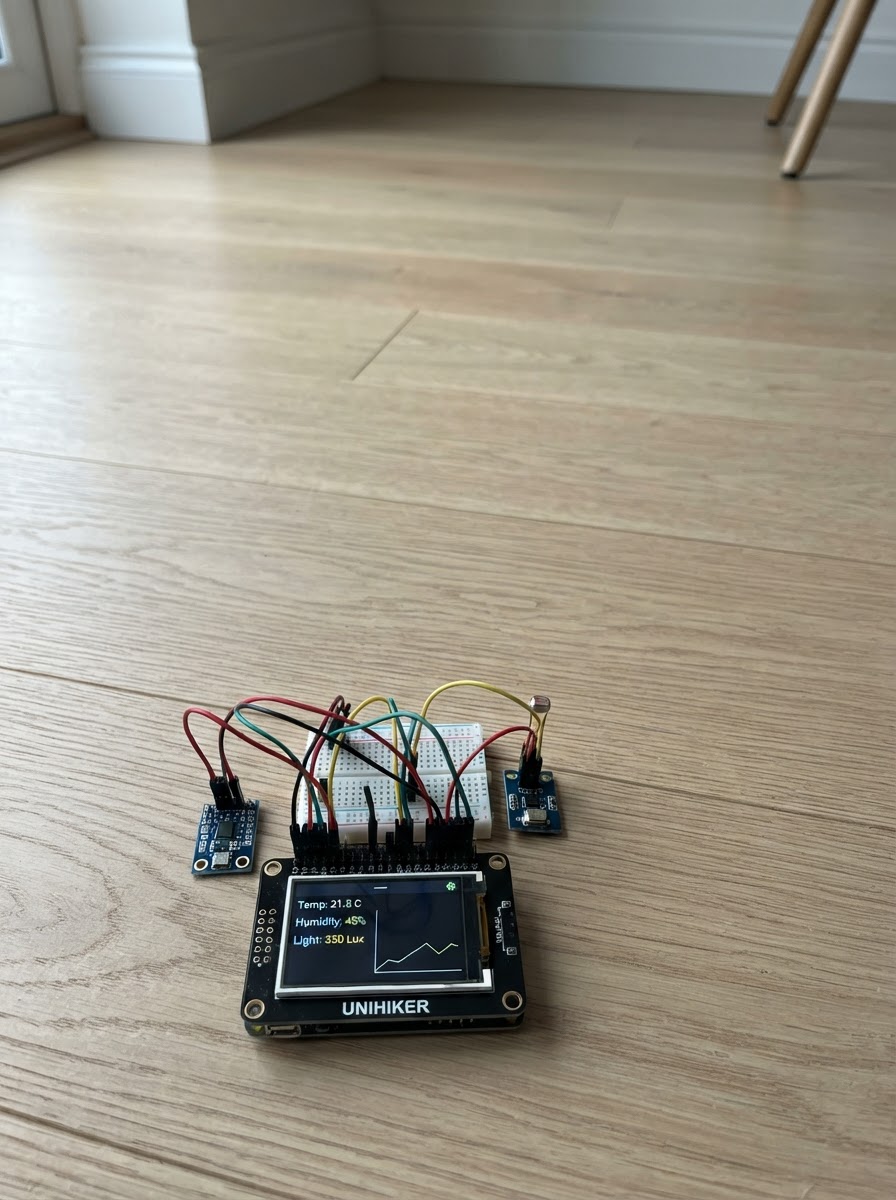
Build an interactive companion pet on the UNIHIKER K10 that responds to real-world sensor data. The K10 displays an animated character whose mood, energy, and bond level change based on temperature, humidity, and light readings from onboard sensors. The pet reacts with visual expressions, LED color changes, and sound cues that reflect environmental conditions.
This guide provides a complete wiring diagram, parts list, and step-by-step assembly instructions to get the sensor dashboard running. The included firmware uses LVGL graphics and the AHT20 temperature/humidity sensor to create a living display that brings data to life through an engaging interactive interface.
Wiring diagram
Assemble it in 2 steps
1. 准备 K10
将 UNIHIKER K10 放在平稳、干燥的位置,并使用 USB 线连接电脑或可靠的 5 V USB 电源。此电子宠物只使用 K10 板载显示屏、温湿度、环境光、三轴加速度、麦克风、RGB 灯和扬声器,不需要外接传感器或跳线。
- 初次体验时,让板子处于正常室内光线和舒适室温,便于观察环境变化。
- LED 与扬声器均为板载执行器。
- 避免让液体、金属物或手指接触通电的电路板。
- 不要用过大的音量长时间靠近耳朵。
2. 与 Lumi 互动
刷写后,观察屏幕上的心情、能量、友情和房间读数。对着板载麦克风轻声说话,Lumi 会通过短提示音、LED 颜色和友情数值回应;轻轻摇动 K10 可触发玩耍。把它放到较暗处,它会逐渐进入休息状态;改变室内光照、温度或湿度可观察它的环境感受。
- 一次互动后等待约 2 至 4 秒再重复,程序设有冷却时间,避免连续触发声音。
- 屏幕底部的 Tip 会说明当前行为关联的是哪一种传感器。
- 轻摇即可;不要摔落、剧烈甩动或用力敲击 K10。
- 温湿度与光照变化应来自正常环境,勿使用高温热源或强光直射近距离照射板子。
Deploy the firmware
#include <Arduino.h>
#include <math.h>
#include <stdio.h>
#include <string.h>
#include <lvgl.h>
#include "unihiker_k10.h"

// K10 companion pet: every displayed reaction is tied to a board sensor.

// Forward declarations
static uint32_t toK10Rgb888(lv_color_t color);
static void k10LvglFlush(lv_disp_drv_t *displayDriver, const lv_area_t *area, lv_color_t *colorPixels);
static void setTextIfChanged(lv_obj_t *label, char *cache, size_t cacheSize, const char *text);
static void createPetScreen();
static void setPetLed(uint32_t color, uint8_t brightness);
static void playCue(int frequency);
static void constrainStats();
static void updatePet();

static constexpr int16_t SCREEN_W = 240;
static constexpr int16_t SCREEN_H = 320;
static constexpr uint16_t DRAW_LINES = 20;
static constexpr uint32_t SAMPLE_INTERVAL_MS = 600;
static constexpr uint32_t PLAY_COOLDOWN_MS = 3500;
static constexpr uint32_t VOICE_COOLDOWN_MS = 2500;

UNIHIKER_K10 k10;
AHT20 aht20;
Music music;

static lv_color_t drawBuffer[SCREEN_W * DRAW_LINES];
static lv_disp_draw_buf_t lvDrawBuffer;
static lv_disp_drv_t lvDisplayDriver;

static lv_obj_t *faceLabel;
static lv_obj_t *stateLabel;
static lv_obj_t *moodLabel;
static lv_obj_t *energyLabel;
static lv_obj_t *bondLabel;
static lv_obj_t *environmentLabel;
static lv_obj_t *sensorLabel;
static lv_obj_t *tipLabel;

static char faceCache[32] = "";
static char stateCache[48] = "";
static char moodCache[32] = "";
static char energyCache[32] = "";
static char bondCache[32] = "";
static char environmentCache[64] = "";
static char sensorCache[96] = "";
static char tipCache[96] = "";

static int mood = 70;
static int energy = 76;
static int bond = 54;
static float micNoiseFloor = -1.0f;
static uint32_t lastSampleMs = 0;
static uint32_t lastLvTickMs = 0;
static uint32_t lastPlayMs = 0;
static uint32_t lastVoiceMs = 0;
static uint32_t lastSlowChangeMs = 0;
static uint32_t lastLedColor = 0xFFFFFFFF;
static uint8_t lastLedBrightness = 255;

static uint32_t toK10Rgb888(lv_color_t color) {
  lv_color32_t rgb;
  rgb.full = lv_color_to32(color);
  return ((uint32_t)rgb.ch.red << 16) |
         ((uint32_t)rgb.ch.green << 8) |
         (uint32_t)rgb.ch.blue;
}

static void k10LvglFlush(lv_disp_drv_t *displayDriver,
                         const lv_area_t *area,
                         lv_color_t *colorPixels) {
  const int16_t width = area->x2 - area->x1 + 1;
  const int16_t height = area->y2 - area->y1 + 1;
  for (int16_t row = 0; row < height; ++row) {
    for (int16_t column = 0; column < width; ++column) {
      k10.canvas->canvasPoint(area->x1 + column, area->y1 + row,
                               toK10Rgb888(colorPixels[row * width + column]));
    }
  }
  k10.canvas->updateCanvas();
  lv_disp_flush_ready(displayDriver);
}

static void setTextIfChanged(lv_obj_t *label, char *cache, size_t cacheSize,
                             const char *text) {
  if (strncmp(cache, text, cacheSize) != 0) {
    strncpy(cache, text, cacheSize - 1);
    cache[cacheSize - 1] = '\0';
    lv_label_set_text(label, cache);
  }
}

static lv_obj_t *makeLabel(lv_obj_t *parent, int16_t y, uint32_t color,
                           const lv_font_t *font = &lv_font_montserrat_14) {
  lv_obj_t *label = lv_label_create(parent);
  lv_obj_set_width(label, 228);
  lv_obj_set_pos(label, 6, y);
  lv_label_set_long_mode(label, LV_LABEL_LONG_CLIP);
  lv_obj_set_style_text_font(label, font, LV_PART_MAIN);
  lv_obj_set_style_text_color(label, lv_color_hex(color), LV_PART_MAIN);
  return label;
}

static void createPetScreen() {
  lv_obj_t *screen = lv_scr_act();
  lv_obj_set_style_bg_color(screen, lv_color_hex(0x161227), LV_PART_MAIN);
  lv_obj_set_style_bg_opa(screen, LV_OPA_COVER, LV_PART_MAIN);

  lv_obj_t *title = makeLabel(screen, 5, 0xFFD6E8);
  lv_label_set_text(title, "LUMI  |  companion pet");

  faceLabel = makeLabel(screen, 31, 0xFFB5D4);
  lv_obj_set_style_text_font(faceLabel, &lv_font_montserrat_14, LV_PART_MAIN);
  stateLabel = makeLabel(screen, 57, 0xFFF1A6);

  moodLabel = makeLabel(screen, 88, 0xFFB5D4);
  energyLabel = makeLabel(screen, 111, 0x9DDCFF);
  bondLabel = makeLabel(screen, 134, 0xA9F6C5);

  environmentLabel = makeLabel(screen, 168, 0xFFFFFF);
  sensorLabel = makeLabel(screen, 193, 0xCFC8FF);
  tipLabel = makeLabel(screen, 244, 0xFFE49B);

  lv_label_set_text(faceLabel, "(^_^)");
  lv_label_set_text(stateLabel, "Waking up...");
  lv_label_set_text(moodLabel, "Mood: --");
  lv_label_set_text(energyLabel, "Energy: --");
  lv_label_set_text(bondLabel, "Bond: --");
  lv_label_set_text(environmentLabel, "Environment: reading sensors...");
  lv_label_set_text(sensorLabel, "Sensors: --");
  lv_label_set_text(tipLabel, "Try talking or gently shaking K10.");
}

static void setPetLed(uint32_t color, uint8_t brightness) {
  if (color == lastLedColor && brightness == lastLedBrightness) return;
  lastLedColor = color;
  lastLedBrightness = brightness;
  k10.rgb->brightness(brightness);
  k10.rgb->write(-1, (uint8_t)(color >> 16), (uint8_t)(color >> 8),
                 (uint8_t)color);
}

static void playCue(int frequency) {
  music.stopPlayTone();
  music.playTone(frequency, 900);
}

static void constrainStats() {
  mood = constrain(mood, 0, 100);
  energy = constrain(energy, 0, 100);
  bond = constrain(bond, 0, 100);
}

static void updatePet() {
  const uint32_t now = millis();
  const float temperatureC = aht20.getData(AHT20::eAHT20TempC);
  const float humidityRH = aht20.getData(AHT20::eAHT20HumiRH);
  const uint16_t ambientLight = k10.readALS();
  const float accelX = k10.getAccelerometerX();
  const float accelY = k10.getAccelerometerY();
  const float accelZ = k10.getAccelerometerZ();
  const float acceleration = sqrtf(accelX * accelX + accelY * accelY + accelZ * accelZ);
  const int32_t micRaw = k10.readMICData();
  const float micLevel = fabsf((float)micRaw);

  // Quiet readings establish a moving sound baseline for the current room.
  if (micNoiseFloor < 0.0f) micNoiseFloor = micLevel;
  const bool voiceHeard = micLevel > (micNoiseFloor + 140.0f);
  if (!voiceHeard) micNoiseFloor = micNoiseFloor * 0.92f + micLevel * 0.08f;

  const bool temperatureComfortable = temperatureC >= 18.0f && temperatureC <= 28.0f;
  const bool humidityComfortable = humidityRH >= 35.0f && humidityRH <= 70.0f;
  const bool dark = ambientLight < 45;
  const bool veryBright = ambientLight > 1400;
  const bool comfortable = temperatureComfortable && humidityComfortable;
  const bool playfulShake = acceleration > 1.55f;

  if (playfulShake && now - lastPlayMs >= PLAY_COOLDOWN_MS) {
    lastPlayMs = now;
    mood += 5;
    bond += 4;
    energy -= 3;
    playCue(784);
  }
  if (voiceHeard && now - lastVoiceMs >= VOICE_COOLDOWN_MS) {
    lastVoiceMs = now;
    mood += 3;
    bond += 3;
    playCue(659);
  }

  // Slow changes make care visible without punishing the player quickly.
  if (now - lastSlowChangeMs >= 10000) {
    lastSlowChangeMs = now;
    if (comfortable) mood += 1;
    else mood -= 2;
    if (dark) energy += 2;
    else energy -= 1;
    if (veryBright) mood -= 1;
    if (mood < 35) bond -= 1;
  }
  constrainStats();

  const char *face = "(^_^)";
  const char *emotion = "calm and curious";
  const char *tip = "Tip: light sensor tells Lumi day or night.";
  uint32_t ledColor = 0x54A8FF;
  uint8_t ledBrightness = 2;

  if (dark && energy < 70) {
    face = "(-_-) zZ";
    emotion = "sleepy - keep me company quietly";
    tip = "Darkness means rest time. Light sensor -> sleep mode.";
    ledColor = 0x3B58C8;
    ledBrightness = 1;
  } else if (mood < 35) {
    face = "(T_T)";
    emotion = "a little uncomfortable";
    tip = "Check temperature/humidity, then talk or play gently.";
    ledColor = 0xFF5B69;
    ledBrightness = 3;
  } else if (mood >= 76 && bond >= 65) {
    face = "(^o^)";
    emotion = "happy to be with you!";
    tip = "Voice sensor: your sound helped our friendship grow.";
    ledColor = 0xFF77C8;
    ledBrightness = 3;
  } else if (energy < 30) {
    face = "(u_u)";
    emotion = "tired - a darker, quiet place helps";
    tip = "Energy rises in dim light: a simple sensor rule.";
    ledColor = 0x7896FF;
    ledBrightness = 1;
  }
  setPetLed(ledColor, ledBrightness);

  char text[96];
  setTextIfChanged(faceLabel, faceCache, sizeof(faceCache), face);
  snprintf(text, sizeof(text), "Lumi feels %s", emotion);
  setTextIfChanged(stateLabel, stateCache, sizeof(stateCache), text);
  snprintf(text, sizeof(text), "Mood: %3d / 100", mood);
  setTextIfChanged(moodLabel, moodCache, sizeof(moodCache), text);
  snprintf(text, sizeof(text), "Energy: %3d / 100", energy);
  setTextIfChanged(energyLabel, energyCache, sizeof(energyCache), text);
  snprintf(text, sizeof(text), "Friendship: %3d / 100", bond);
  setTextIfChanged(bondLabel, bondCache, sizeof(bondCache), text);

  snprintf(text, sizeof(text), "Room: %.1f C | %.0f %% | light %u", temperatureC,
           humidityRH, ambientLight);
  setTextIfChanged(environmentLabel, environmentCache, sizeof(environmentCache), text);
  snprintf(text, sizeof(text), "Move %.2f g | sound %.0f", acceleration, micLevel);
  setTextIfChanged(sensorLabel, sensorCache, sizeof(sensorCache), text);
  setTextIfChanged(tipLabel, tipCache, sizeof(tipCache), tip);
}

void setup() {
  k10.begin();
  k10.initScreen(2);
  k10.creatCanvas();
  k10.rgb->brightness(0);
  k10.rgb->write(-1, 0, 0, 0);

  lv_init();
  lv_disp_draw_buf_init(&lvDrawBuffer, drawBuffer, nullptr, SCREEN_W * DRAW_LINES);
  lv_disp_drv_init(&lvDisplayDriver);
  lvDisplayDriver.hor_res = SCREEN_W;
  lvDisplayDriver.ver_res = SCREEN_H;
  lvDisplayDriver.draw_buf = &lvDrawBuffer;
  lvDisplayDriver.flush_cb = k10LvglFlush;
  lv_disp_drv_register(&lvDisplayDriver);

  createPetScreen();
  lastLvTickMs = millis();
  lastSlowChangeMs = lastLvTickMs;
  updatePet();
}

void loop() {
  const uint32_t now = millis();
  const uint32_t elapsed = now - lastLvTickMs;
  lastLvTickMs = now;
  lv_tick_inc(elapsed);
  lv_timer_handler();

  if (now - lastSampleMs >= SAMPLE_INTERVAL_MS) {
    lastSampleMs = now;
    updatePet();
  }
  delay(5);
}
Remix this project
Make it yours in one click
Open a full copy of this project in your own Schematik workspace — diagram, code, parts, and assembly steps included. Swap the sensor, add features, or redesign the whole thing with AI. The author's original stays untouched.