Community project
WiFi Weather Forecast Display
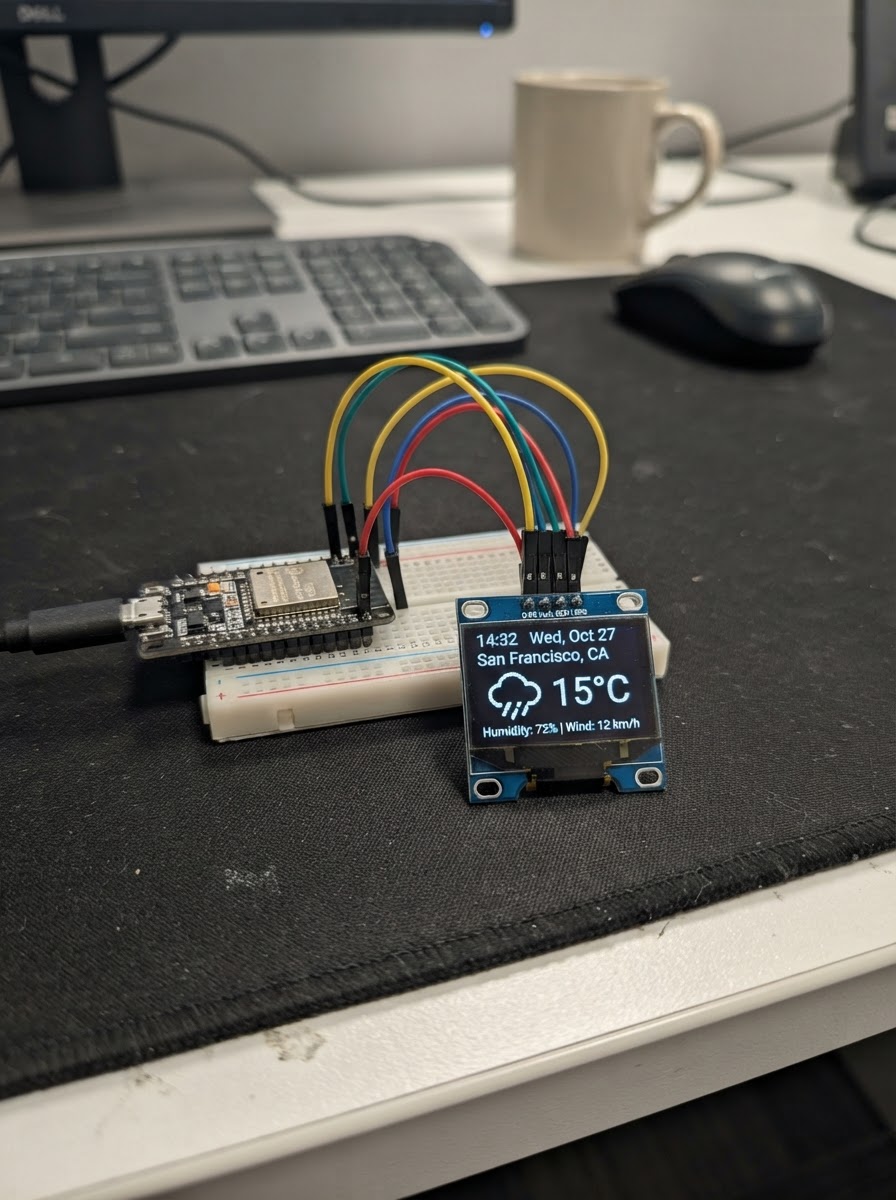
This project builds a compact weather display that fetches forecasts from the internet and shows them on a small OLED screen. The ESP32 microcontroller connects to WiFi, retrieves weather data, and cycles through multiple display pages showing current conditions, daily forecasts, and weekly trends—all powered by a 128x64 SSD1306 display.
The guide includes a complete wiring diagram for connecting the OLED via I²C, a full parts list, ready-to-use firmware with WiFi and JSON parsing, and step-by-step assembly instructions. Builders will learn how to set up secure HTTPS requests, parse weather APIs, manage display pages, and configure WiFi credentials on the ESP32.
Wiring diagram

Gather all the parts
Assemble it in 4 steps
1. Keep the ESP32 unpowered while wiring
Place the ESP32 DevKit v1 and the oled_1 module where their four labelled pins can be reached. Do not connect USB power until every jumper is checked.
- The firmware assumes the common 0.96-inch, 128×64 SSD1306 I²C module at address 0x3C.
- Use only the ESP32 3V3 pin for this OLED. ESP32 GPIO signals are 3.3 V and are not 5 V tolerant.
2. Wire OLED power
Connect oled_1 VCC to the ESP32 3V3 pin. Connect oled_1 GND to any ESP32 GND pin.
- Power and ground must both be connected before the I²C data lines can work.
- Do not reverse VCC and GND; this can damage the OLED module.
3. Wire the I²C bus
Connect oled_1 SDA to ESP32 GPIO21 and oled_1 SCL to ESP32 GPIO22. These are the standard I²C data and clock pins used by the firmware.
- Keep these two jumpers short and check the printed labels carefully: SDA is data, SCL is clock.
- Most 0.96-inch I²C OLED modules already include I²C pull-up resistors; no extra resistors are needed.
- Do not connect SDA or SCL to 5 V.
4. Power and verify
Connect the ESP32 to USB power. The OLED should briefly show “NOTHING / WX”, then connect to the configured Wi‑Fi and retrieve approximate network location, time, and weather.
- The display automatically changes view every 8 seconds. Weather updates every 15 minutes.
- Use Schematik’s Deploy button to compile and flash the firmware.
- IP-based location is approximate and can be wrong when using a VPN, corporate network, or cellular hotspot.
Review all connections
1. Connections between "oled_1" and "ESP32"
Deploy the firmware
#include <Arduino.h>
#include <WiFi.h>
#include <HTTPClient.h>
#include <WiFiClientSecure.h>
#include <Wire.h>
#include <Adafruit_GFX.h>
#include <Adafruit_SSD1306.h>
#include <ArduinoJson.h>
#include <Preferences.h>
#include <time.h>
#define OLED_SDA 21
#define OLED_SCL 22
#define OLED_ADDRESS 0x3C
#define SCREEN_WIDTH 128
#define SCREEN_HEIGHT 64
struct ForecastDay {
String date;
int code;
int high;
int low;
};
// Forward declarations
String shortCondition(int code);
String dayLabel(uint8_t index);
String clockText();
void printNetworkDetails();
void drawWifiBars();
void drawHeader();
void drawDots(uint8_t active);
void drawCurrentPage();
void drawDailyPage();
void drawWeeklyPage();
void drawStatusPage();
void drawScreen();
bool loadSavedLocation();
void saveLocation();
bool getJson(const String &url, JsonDocument &doc, const char *label);
bool locateFromNetwork();
bool fetchWeather();
void startWifi(const char *reason);
const char *WIFI_SSID = "DLink";
const char *WIFI_PASSWORD = "fafafa2019";
const char *NTP_SERVER_1 = "pool.ntp.org";
const char *NTP_SERVER_2 = "time.nist.gov";
const unsigned long WEATHER_INTERVAL_MS = 15UL * 60UL * 1000UL;
const unsigned long RETRY_INTERVAL_MS = 60UL * 1000UL;
const unsigned long WIFI_RETRY_MS = 15UL * 1000UL;
const unsigned long SCREEN_INTERVAL_MS = 8000UL;
Adafruit_SSD1306 display(SCREEN_WIDTH, SCREEN_HEIGHT, &Wire, -1);
Preferences preferences;
String city = "LOCAL";
String fetchStatus = "STARTING";
float latitude = 0.0f;
float longitude = 0.0f;
long utcOffsetSeconds = 0;
int currentTemp = 0;
int feelsTemp = 0;
int currentCode = -1;
ForecastDay forecast[7];
bool hasLocation = false;
bool hasWeather = false;
uint8_t page = 0;
unsigned long lastWeatherAttempt = 0;
unsigned long lastLocationAttempt = 0;
unsigned long lastWifiAttempt = 0;
unsigned long lastPageChange = 0;
unsigned long lastDraw = 0;
wl_status_t lastWifiStatus = WL_IDLE_STATUS;
String shortCondition(int code) {
if (code == 0) return "CLEAR";
if (code == 1) return "FAIR";
if (code == 2) return "CLOUDY";
if (code == 3) return "OVERCAST";
if (code == 45 || code == 48) return "FOG";
if (code >= 51 && code <= 57) return "DRIZZLE";
if (code >= 61 && code <= 67) return "RAIN";
if (code >= 71 && code <= 77) return "SNOW";
if (code >= 80 && code <= 82) return "SHOWERS";
if (code >= 85 && code <= 86) return "SNOW";
if (code >= 95) return "STORM";
return "UNKNOWN";
}
String dayLabel(uint8_t index) {
if (index == 0) return "TODAY";
if (index == 1) return "TOMORROW";
if (forecast[index].date.length() >= 10) return forecast[index].date.substring(5, 10);
return "DAY";
}
String clockText() {
struct tm timeInfo;
if (!getLocalTime(&timeInfo, 10)) return "--:--";
char buffer[6];
strftime(buffer, sizeof(buffer), "%H:%M", &timeInfo);
return String(buffer);
}
const char *wifiStateName(wl_status_t status) {
switch (status) {
case WL_NO_SHIELD: return "NO SHIELD";
case WL_IDLE_STATUS: return "IDLE";
case WL_NO_SSID_AVAIL: return "SSID NOT FOUND";
case WL_SCAN_COMPLETED: return "SCAN COMPLETE";
case WL_CONNECTED: return "CONNECTED";
case WL_CONNECT_FAILED: return "AUTH FAILED";
case WL_CONNECTION_LOST: return "CONNECTION LOST";
case WL_DISCONNECTED: return "DISCONNECTED";
default: return "UNKNOWN";
}
}
void printNetworkDetails() {
Serial.printf("WiFi: SSID=%s RSSI=%d dBm\n", WiFi.SSID().c_str(), WiFi.RSSI());
Serial.printf("WiFi: IP=%s gateway=%s DNS=%s\n", WiFi.localIP().toString().c_str(),
WiFi.gatewayIP().toString().c_str(), WiFi.dnsIP().toString().c_str());
}
void drawWifiBars() {
int bars = 0;
if (WiFi.status() == WL_CONNECTED) {
int rssi = WiFi.RSSI();
if (rssi >= -55) bars = 4;
else if (rssi >= -67) bars = 3;
else if (rssi >= -75) bars = 2;
else bars = 1;
}
for (int i = 0; i < 4; i++) {
int height = i + 1;
int x = 91 + i * 2;
int y = 10 - height;
if (i < bars) display.fillRect(x, y, 1, height, SSD1306_WHITE);
else display.drawPixel(x, y + height - 1, SSD1306_WHITE);
}
}
void drawHeader() {
// Header has three fixed zones: city (0-83), Wi-Fi (88-95), clock (98-127).
display.setTextColor(SSD1306_WHITE);
display.setTextSize(1);
display.setCursor(3, 2);
String label = city;
label.toUpperCase();
if (label.length() > 13) label = label.substring(0, 13);
display.print(label);
drawWifiBars();
display.setCursor(98, 2);
display.print(clockText());
display.drawFastHLine(0, 12, 128, SSD1306_WHITE);
}
void drawDots(uint8_t active) {
for (uint8_t i = 0; i < 3; i++) {
int x = 57 + i * 7;
if (i == active) display.fillCircle(x, 60, 2, SSD1306_WHITE);
else display.drawCircle(x, 60, 1, SSD1306_WHITE);
}
}
void drawCurrentPage() {
// One spacious card: condition, large temperature, then a short feels-like label.
display.drawRoundRect(3, 16, 122, 39, 5, SSD1306_WHITE);
display.setTextSize(1);
display.setCursor(10, 21);
String condition = shortCondition(currentCode);
if (condition.length() > 10) condition = condition.substring(0, 10);
display.print(condition);
display.setTextSize(2);
display.setCursor(10, 34);
display.print(currentTemp);
display.print("C");
display.setTextSize(1);
display.setCursor(72, 43);
display.print("FEELS ");
display.print(feelsTemp);
display.print("C");
}
void drawDailyPage() {
// Three fixed cards. H/L labels make the values readable without crowding.
const char *labels[3] = {"TODAY", "TMRW", "DAY 3"};
for (uint8_t i = 0; i < 3; i++) {
int x = 3 + i * 42;
display.drawRoundRect(x, 16, 39, 39, 5, SSD1306_WHITE);
display.setTextSize(1);
display.setCursor(x + 4, 21);
display.print(labels[i]);
display.setCursor(x + 6, 34);
display.print("H ");
display.print(forecast[i].high);
display.setCursor(x + 6, 45);
display.print("L ");
display.print(forecast[i].low);
}
}
void drawWeeklyPage() {
// Three rows only: fixed day, high, and low columns cannot collide.
display.setTextSize(1);
display.setCursor(5, 16);
display.print("DAY");
display.setCursor(76, 16);
display.print("HIGH");
display.setCursor(105, 16);
display.print("LOW");
display.drawFastHLine(4, 25, 120, SSD1306_WHITE);
for (uint8_t i = 0; i < 3; i++) {
int y = 30 + i * 9;
display.setCursor(5, y);
String label = dayLabel(i);
if (label.length() > 8) label = label.substring(0, 8);
display.print(label);
display.setCursor(78, y);
display.print(forecast[i].high);
display.setCursor(108, y);
display.print(forecast[i].low);
}
}
void drawStatusPage() {
display.drawRoundRect(4, 19, 120, 31, 5, SSD1306_WHITE);
display.setTextSize(1);
display.setCursor(12, 25);
if (WiFi.status() != WL_CONNECTED) {
display.print("WIFI: ");
display.print(wifiStateName(WiFi.status()));
display.setCursor(12, 38);
display.print("RETRYING / CHECK SSID");
} else {
display.print(fetchStatus);
display.setCursor(12, 38);
display.print("SEE SERIAL FOR DETAILS");
}
}
void drawScreen() {
display.clearDisplay();
drawHeader();
if (!hasWeather) drawStatusPage();
else if (page == 0) drawCurrentPage();
else if (page == 1) drawDailyPage();
else drawWeeklyPage();
drawDots(page);
display.display();
}
bool loadSavedLocation() {
preferences.begin("weather", true);
bool saved = preferences.getBool("valid", false);
if (saved) {
city = preferences.getString("city", "LOCAL");
latitude = preferences.getFloat("lat", 0.0f);
longitude = preferences.getFloat("lon", 0.0f);
utcOffsetSeconds = preferences.getLong("offset", 0);
}
preferences.end();
Serial.printf("Location cache: %s\n", saved ? "loaded" : "empty");
return saved;
}
void saveLocation() {
preferences.begin("weather", false);
preferences.putBool("valid", true);
preferences.putString("city", city);
preferences.putFloat("lat", latitude);
preferences.putFloat("lon", longitude);
preferences.putLong("offset", utcOffsetSeconds);
preferences.end();
}
bool getJson(const String &url, JsonDocument &doc, const char *label) {
WiFiClientSecure client;
client.setInsecure();
client.setHandshakeTimeout(20);
HTTPClient request;
request.setConnectTimeout(15000);
request.setTimeout(20000);
request.setReuse(false);
request.setUserAgent("ESP32-NothingWeather/2.0");
Serial.printf("%s: starting HTTPS request\n", label);
Serial.printf("%s: URL %s\n", label, url.c_str());
if (!request.begin(client, url)) {
Serial.printf("%s: HTTP client setup failed\n", label);
return false;
}
int httpCode = request.GET();
if (httpCode != HTTP_CODE_OK) {
Serial.printf("%s: HTTPS/HTTP failed, code=%d, error=%s\n", label, httpCode,
request.errorToString(httpCode).c_str());
request.end();
return false;
}
String payload = request.getString();
request.end();
Serial.printf("%s: HTTP 200, payload=%u bytes\n", label, (unsigned int)payload.length());
if (payload.length() == 0) {
Serial.printf("%s: empty payload; JSON parsing skipped\n", label);
return false;
}
DeserializationError error = deserializeJson(doc, payload);
if (error) {
Serial.printf("%s: JSON error: %s\n", label, error.c_str());
return false;
}
return true;
}
bool locateFromNetwork() {
JsonDocument doc;
if (!getJson("https://ipwho.is/?fields=success,city,latitude,longitude,timezone", doc, "Location")) return false;
if (!(doc["success"] | false)) {
Serial.println("Location: API reported failure");
return false;
}
city = String(doc["city"] | "LOCAL");
latitude = doc["latitude"] | 0.0f;
longitude = doc["longitude"] | 0.0f;
utcOffsetSeconds = doc["timezone"]["offset"] | 0L;
if (latitude == 0.0f && longitude == 0.0f) {
Serial.println("Location: no coordinates returned");
return false;
}
saveLocation();
return true;
}
bool fetchWeather() {
if (!hasLocation) return false;
String url = "https://api.open-meteo.com/v1/forecast?latitude=" + String(latitude, 4) +
"&longitude=" + String(longitude, 4) +
"¤t=temperature_2m,apparent_temperature,weather_code"
"&daily=weather_code,temperature_2m_max,temperature_2m_min"
"&timezone=auto&forecast_days=7";
JsonDocument doc;
if (!getJson(url, doc, "Weather")) return false;
JsonArray dates = doc["daily"]["time"].as<JsonArray>();
JsonArray codes = doc["daily"]["weather_code"].as<JsonArray>();
JsonArray highs = doc["daily"]["temperature_2m_max"].as<JsonArray>();
JsonArray lows = doc["daily"]["temperature_2m_min"].as<JsonArray>();
if (doc["current"].isNull() || dates.size() < 7 || codes.size() < 7 || highs.size() < 7 || lows.size() < 7) {
Serial.printf("Weather: incomplete API data (days=%u/%u/%u/%u)\n", (unsigned int)dates.size(),
(unsigned int)codes.size(), (unsigned int)highs.size(), (unsigned int)lows.size());
return false;
}
currentTemp = (int)round(doc["current"]["temperature_2m"] | 0.0f);
feelsTemp = (int)round(doc["current"]["apparent_temperature"] | 0.0f);
currentCode = doc["current"]["weather_code"] | -1;
for (uint8_t i = 0; i < 7; i++) {
forecast[i].date = String(dates[i] | "");
forecast[i].code = codes[i] | -1;
forecast[i].high = (int)round(highs[i] | 0.0f);
forecast[i].low = (int)round(lows[i] | 0.0f);
}
hasWeather = true;
fetchStatus = "WEATHER READY";
Serial.printf("Weather: updated for %s, now %dC feels %dC\n", city.c_str(), currentTemp, feelsTemp);
return true;
}
void startWifi(const char *reason) {
Serial.printf("WiFi: starting connection (%s)\n", reason);
Serial.printf("WiFi: requested SSID='%s', password length=%u\n", WIFI_SSID, (unsigned int)strlen(WIFI_PASSWORD));
WiFi.disconnect(false, false);
delay(100);
WiFi.mode(WIFI_STA);
WiFi.setAutoReconnect(true);
WiFi.begin(WIFI_SSID, WIFI_PASSWORD);
lastWifiAttempt = millis();
}
void setup() {
Serial.begin(115200);
delay(300);
Serial.println("\n--- NOTHING WEATHER BOOT ---");
Serial.printf("Chip: ESP32, free heap: %u bytes\n", ESP.getFreeHeap());
Wire.begin(OLED_SDA, OLED_SCL);
if (!display.begin(SSD1306_SWITCHCAPVCC, OLED_ADDRESS)) {
Serial.println("OLED: SSD1306 not found at 0x3C");
while (true) delay(1000);
}
display.setTextColor(SSD1306_WHITE);
hasLocation = loadSavedLocation();
configTime(utcOffsetSeconds, 0, NTP_SERVER_1, NTP_SERVER_2);
startWifi("boot");
lastPageChange = millis();
}
void loop() {
unsigned long now = millis();
wl_status_t wifiStatus = WiFi.status();
if (wifiStatus != lastWifiStatus) {
Serial.printf("WiFi: state changed to %s (%d)\n", wifiStateName(wifiStatus), (int)wifiStatus);
if (wifiStatus == WL_CONNECTED) printNetworkDetails();
lastWifiStatus = wifiStatus;
lastDraw = 0;
}
if (wifiStatus != WL_CONNECTED) {
if (now - lastWifiAttempt >= WIFI_RETRY_MS) startWifi("retry timeout");
} else {
if (!hasLocation && (lastLocationAttempt == 0 || now - lastLocationAttempt >= RETRY_INTERVAL_MS)) {
lastLocationAttempt = now;
fetchStatus = "LOCATING";
Serial.println("Location: lookup requested");
hasLocation = locateFromNetwork();
if (hasLocation) {
Serial.printf("Location: %s (%.4f, %.4f), UTC offset %ld\n", city.c_str(), latitude, longitude, utcOffsetSeconds);
configTime(utcOffsetSeconds, 0, NTP_SERVER_1, NTP_SERVER_2);
} else {
fetchStatus = "LOCATION FAILED";
}
lastDraw = 0;
}
unsigned long weatherDelay = hasWeather ? WEATHER_INTERVAL_MS : RETRY_INTERVAL_MS;
if (hasLocation && (lastWeatherAttempt == 0 || now - lastWeatherAttempt >= weatherDelay)) {
lastWeatherAttempt = now;
fetchStatus = "FETCHING WEATHER";
Serial.println("Weather: update requested");
if (!fetchWeather()) fetchStatus = "WEATHER FAILED";
lastDraw = 0;
}
}
if (hasWeather && now - lastPageChange >= SCREEN_INTERVAL_MS) {
page = (page + 1) % 3;
lastPageChange = now;
lastDraw = 0;
}
if (lastDraw == 0 || now - lastDraw >= 1000UL) {
drawScreen();
lastDraw = now;
}
delay(20);
}Remix this project
Make it yours in one click
Open a full copy of this project in your own Schematik workspace — diagram, code, parts, and assembly steps included. Swap the sensor, add features, or redesign the whole thing with AI. The author's original stays untouched.