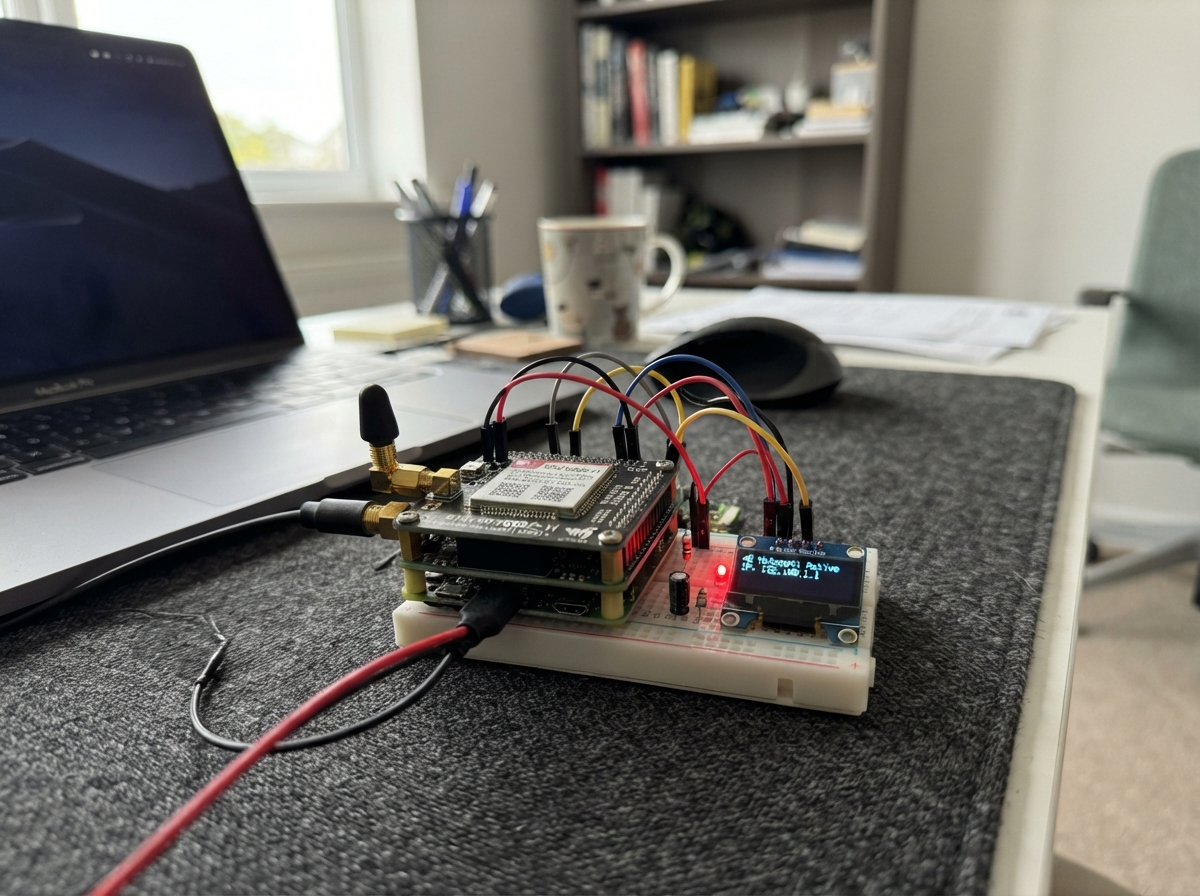
This project turns an ESP32 microcontroller into a portable 4G LTE Wi-Fi hotspot using a Waveshare SIM7600G-H modem. The device bridges cellular connectivity to Wi-Fi, allowing nearby devices to connect to the internet through a 4G connection. An OLED display shows connection status and signal strength, while an LED provides visual feedback on network availability.
The guide provides a complete wiring diagram, parts list, and step-by-step assembly instructions for connecting the modem HAT, display, and status indicator to the ESP32. Firmware code handles modem initialization, PPP connection management, Wi-Fi access point creation, and network address translation to route traffic between cellular and Wi-Fi networks.
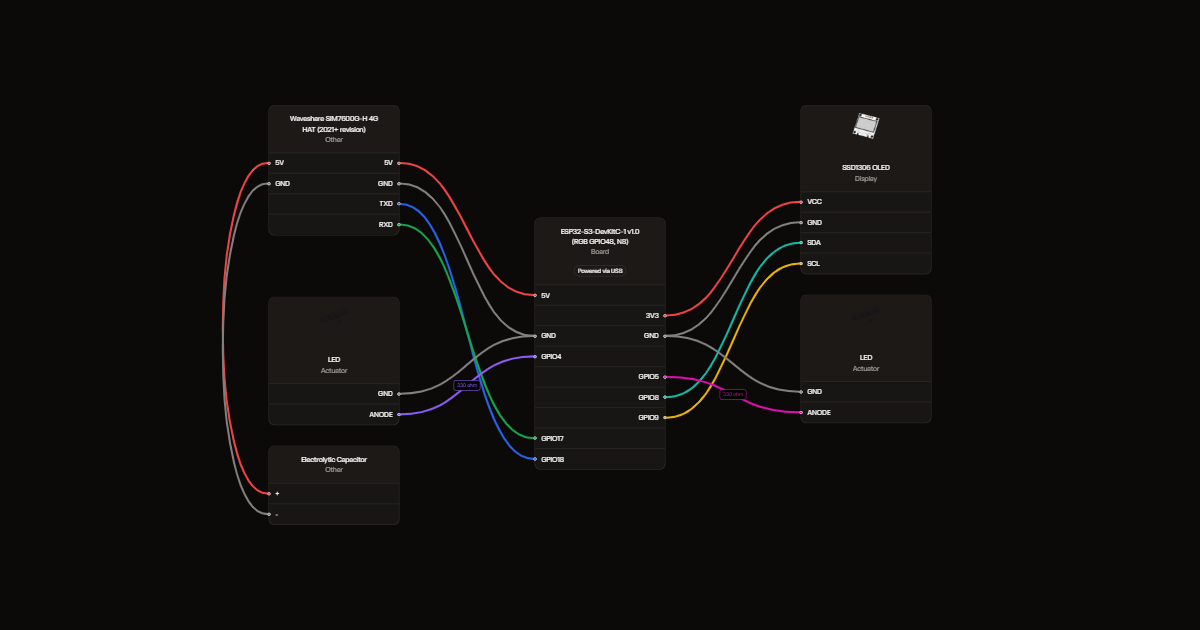
Wiring diagram
Gather all the parts
Assemble it in 6 steps
1. Prepare the modem without power
Use the current Waveshare HAT with SPX29302. Leave PWR-3V3 fitted, Flight disconnected and VCCIO at 3.3V. Set UART selector to B (modem UART to host). Fit the Nano-SIM in its standard-size adapter and attach the supplied MAIN and AUX cellular antennas.
- Global bands do not guarantee carrier approval or coverage in every country. Use an activated data SIM supporting this modem; disable its SIM PIN first.
2. Provide separate USB power branches
Use a regulated 5V USB supply or power bank capable of at least 3A total. Feed the HAT 5V control-header pin and GND with a short, adequately thick USB power lead. Feed the ESP32 through its USB connector separately. Join grounds. Do not feed the HAT through the ESP32 board or a breadboard power rail.
- Never connect this modem 5V branch to the ESP32 5V pin while USB is connected. A computer USB port alone is not a suitable modem power source.
3. Add the capacitor close to the HAT
Connect the 1000uF 10V capacitor positive lead to HAT 5V, negative striped lead to GND. Insulate the leads.
- Reversing this capacitor can make it rupture. It does not replace a strong supply.
4. Connect serial data
HAT TXD goes to GPIO18 (ESP32 receives). HAT RXD goes to GPIO17 (ESP32 sends). Keep wires short. Use the labelled control header, not raw 1.8V modem signals. Leave both HAT USB serial connectors unplugged.
5. Connect the display
OLED VCC to 3V3, GND to GND, SDA to GPIO8 (data), SCL to GPIO9 (clock). Use a 128x64 SSD1306 I2C display at address 0x3C.
6. Add status lights
GPIO4 to a 330-ohm resistor then the green LED long leg. GPIO5 to the other resistor then the blue LED long leg. Both short LED legs go to GND. Green means PPP has an address, not a verified internet connectivity test; blue means Wi-Fi is active.
Review all connections
1. Connections between "modem" and "ESP32"
2. Connections between "bulk" and "ESP32"
3. Connections between "oled" and "ESP32"
4. Connections between "rg" and "ESP32"
5. Connections between "green" and "ESP32"
6. Connections between "rb" and "ESP32"
7. Connections between "blue" and "ESP32"
Deploy the firmware
#include <stdio.h>
#include <string.h>
#include "freertos/FreeRTOS.h"
#include "freertos/task.h"
#include "driver/gpio.h"
#include "driver/i2c.h"
#include "driver/uart.h"
#include "dhcpserver/dhcpserver.h"
#include "esp_event.h"
#include "esp_wifi.h"
#include "esp_netif.h"
#include "esp_netif_ppp.h"
#include "nvs_flash.h"
#include "esp_modem_api.h"
#include "esp_modem_config.h"
#include "lwip/lwip_napt.h"
#include "lwip/ip4_addr.h"
#include "config.h"
static esp_netif_t *ap,*ppp;
static volatile bool online;
static bool sim;
static int csq=99;
static uint8_t fb[1024];
// Compact 5x7 glyphs used by the status screen.
static const char chars[]=" ABCDEFGHIJKLMNOPQRSTUVWXYZ0123456789:-/?";
static const uint8_t glyph[][5]={
{0,0,0,0,0},{126,17,17,17,126},{127,73,73,73,54},{62,65,65,65,34},{127,65,65,34,28},{127,73,73,73,65},{127,9,9,9,1},{62,65,73,73,122},{127,8,8,8,127},{0,65,127,65,0},{32,64,65,63,1},{127,8,20,34,65},{127,64,64,64,64},{127,2,12,2,127},{127,4,8,16,127},{62,65,65,65,62},{127,9,9,9,6},{62,65,81,33,94},{127,9,25,41,70},{70,73,73,73,49},{1,1,127,1,1},{63,64,64,64,63},{31,32,64,32,31},{63,64,56,64,63},{99,20,8,20,99},{7,8,112,8,7},{97,81,73,69,67},
{62,81,73,69,62},{0,66,127,64,0},{66,97,81,73,70},{33,65,69,75,49},{24,20,18,127,16},{39,69,69,69,57},{60,74,73,73,48},{1,113,9,5,3},{54,73,73,73,54},{6,73,73,41,30},{0,54,54,0,0},{8,8,8,8,8},{32,16,8,4,2},{2,1,81,9,6}};
static void oled_send(uint8_t ctrl,const uint8_t *b,int n){uint8_t out[129];out[0]=ctrl;memcpy(out+1,b,n);i2c_master_write_to_device(I2C_NUM_0,0x3c,out,n+1,pdMS_TO_TICKS(50));}
static void text(int row,const char *s){for(int x=0;*s&&x<122;s++,x+=6){const char *p=strchr(chars,*s);if(p)memcpy(fb+row*128+x,glyph[p-chars],5);}}
static void draw(void){static char old[160];wifi_sta_list_t clients={0};esp_wifi_ap_get_sta_list(&clients);char state[160];snprintf(state,sizeof state,"%d %d %d %d",online,sim,csq,clients.num);if(!strcmp(old,state))return;strcpy(old,state);memset(fb,0,sizeof fb);char line[24];text(0,"CELLULAR HOTSPOT");text(2,online?"PPP: ONLINE":"PPP: CONNECTING");text(3,sim?"SIM: READY":"SIM: CHECK/PIN");snprintf(line,sizeof line,"SIGNAL: %d",csq);text(4,line);snprintf(line,sizeof line,"CLIENTS: %d",clients.num);text(5,line);text(6,"WIFI: OPEN ACTIVE");text(7,"CSQ LAST SAMPLE");uint8_t c[]={0x21,0,127,0x22,0,7};oled_send(0,c,sizeof c);for(int i=0;i<8;i++)oled_send(0x40,fb+128*i,128);}
static void ip_event(void *arg,esp_event_base_t base,int32_t id,void *data){if(id==IP_EVENT_PPP_GOT_IP){esp_netif_set_default_netif(ppp);ip_event_got_ip_t *e=data;printf("PPP address: " IPSTR "\n",IP2STR(&e->ip_info.ip));ip_napt_enable(ESP_IP4TOADDR(192,168,4,1),1);online=true;}else if(id==IP_EVENT_PPP_LOST_IP){online=false;ip_napt_enable(ESP_IP4TOADDR(192,168,4,1),0);}}
void app_main(void){esp_err_t err=nvs_flash_init();if(err==ESP_ERR_NVS_NO_FREE_PAGES||err==ESP_ERR_NVS_NEW_VERSION_FOUND){ESP_ERROR_CHECK(nvs_flash_erase());ESP_ERROR_CHECK(nvs_flash_init());}
ESP_ERROR_CHECK(esp_netif_init());ESP_ERROR_CHECK(esp_event_loop_create_default());ap=esp_netif_create_default_wifi_ap();wifi_init_config_t wc=WIFI_INIT_CONFIG_DEFAULT();ESP_ERROR_CHECK(esp_wifi_init(&wc));wifi_config_t cfg={.ap={.ssid="FREE QUATUM INTERNET 1.0",.ssid_len=23,.channel=1,.max_connection=8,.authmode=WIFI_AUTH_OPEN}};cfg.ap.ssid_len=strlen((char*)cfg.ap.ssid);ESP_ERROR_CHECK(esp_wifi_set_mode(WIFI_MODE_AP));ESP_ERROR_CHECK(esp_wifi_set_config(WIFI_IF_AP,&cfg));ESP_ERROR_CHECK(esp_wifi_start());
esp_netif_dhcps_stop(ap);esp_netif_dns_info_t dns={.ip.type=ESP_IPADDR_TYPE_V4};dns.ip.u_addr.ip4.addr=ESP_IP4TOADDR(1,1,1,1);esp_netif_set_dns_info(ap,ESP_NETIF_DNS_MAIN,&dns);dhcps_offer_t offer=OFFER_DNS;esp_netif_dhcps_option(ap,ESP_NETIF_OP_SET,ESP_NETIF_DOMAIN_NAME_SERVER,&offer,sizeof offer);esp_netif_dhcps_start(ap);
gpio_set_direction(4,GPIO_MODE_OUTPUT);gpio_set_direction(5,GPIO_MODE_OUTPUT);gpio_set_level(5,1);
i2c_config_t ic={.mode=I2C_MODE_MASTER,.sda_io_num=8,.scl_io_num=9,.sda_pullup_en=true,.scl_pullup_en=true,.master.clk_speed=400000};i2c_param_config(I2C_NUM_0,&ic);i2c_driver_install(I2C_NUM_0,ic.mode,0,0,0);uint8_t init[]={0xae,0xd5,0x80,0xa8,0x3f,0xd3,0,0x40,0x8d,0x14,0x20,0,0xa1,0xc8,0xda,0x12,0x81,0x7f,0xd9,0xf1,0xdb,0x40,0xa4,0xa6,0xaf};oled_send(0,init,sizeof init);draw();
esp_netif_config_t pc=ESP_NETIF_DEFAULT_PPP();ppp=esp_netif_new(&pc);ESP_ERROR_CHECK(esp_event_handler_register(IP_EVENT,ESP_EVENT_ANY_ID,ip_event,NULL));
esp_modem_dte_config_t dt=ESP_MODEM_DTE_DEFAULT_CONFIG();dt.uart_config.tx_io_num=17;dt.uart_config.rx_io_num=18;dt.uart_config.baud_rate=115200;dt.uart_config.rx_buffer_size=16384;dt.uart_config.tx_buffer_size=2048;dt.task_priority=10;dt.dte_buffer_size=4096;
esp_modem_dce_config_t dc=ESP_MODEM_DCE_DEFAULT_CONFIG(CELLULAR_APN);esp_modem_dce_t *d=esp_modem_new_dev(ESP_MODEM_DCE_SIM7600,&dt,&dc,ppp);if(!d){printf("Modem creation failed\n");return;}
bool fast=false;
while(1){while(esp_modem_sync(d)!=ESP_OK){fast=!fast;uart_set_baudrate(UART_NUM_1,fast?921600:115200);draw();vTaskDelay(pdMS_TO_TICKS(2000));}esp_modem_set_echo(d,false);if(!fast && esp_modem_set_baud(d,921600)==ESP_OK){uart_set_baudrate(UART_NUM_1,921600);fast=true;vTaskDelay(pdMS_TO_TICKS(200));}sim=false;esp_modem_read_pin(d,&sim);int ber;esp_modem_get_signal_quality(d,&csq,&ber);draw();if(!sim){vTaskDelay(pdMS_TO_TICKS(5000));continue;}
if(esp_modem_set_mode(d,ESP_MODEM_MODE_DATA)==ESP_OK){int wait=0;while(!online&&wait++<60){draw();vTaskDelay(pdMS_TO_TICKS(1000));}while(online){gpio_set_level(4,1);draw();vTaskDelay(pdMS_TO_TICKS(1000));}}
gpio_set_level(4,0);esp_modem_set_mode(d,ESP_MODEM_MODE_COMMAND);vTaskDelay(pdMS_TO_TICKS(5000));}}
Remix this project
Make it yours in one click
Open a full copy of this project in your own Schematik workspace, diagram, code, parts, and assembly steps included. Swap the sensor, add features, or redesign the whole thing with AI. The author's original stays untouched.