Community project
AguaGuard Monitor de Calidad
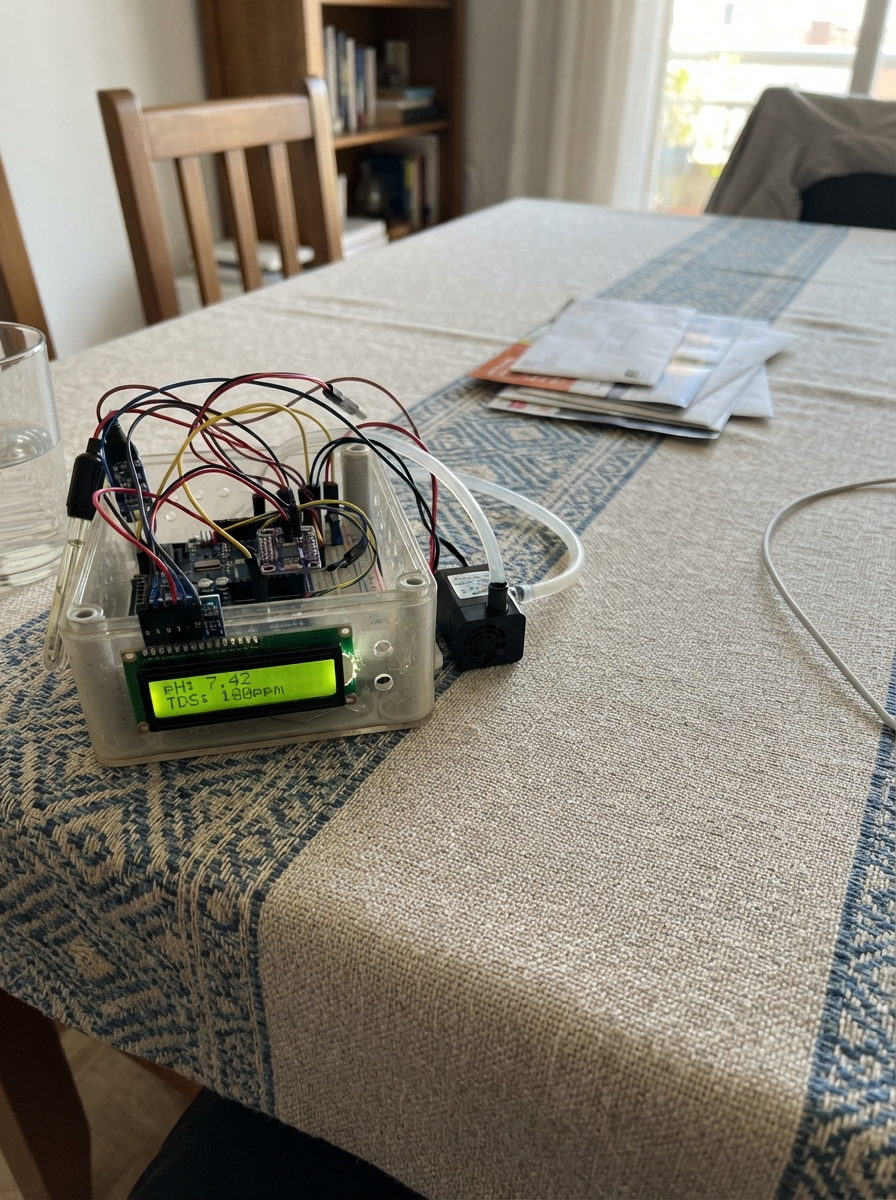
AguaGuard is a comprehensive water quality monitoring system that measures pH, total dissolved solids (TDS), turbidity, and temperature in real time. Built around an Arduino Uno, it combines multiple analog sensors with a submersible pump, precision real-time clock, and LCD display to create a complete water analysis station.
This guide provides a complete parts list, wiring diagram, assembly steps, and Arduino firmware to get the monitor operational. Builders will learn how to interface multiple analog sensors, control a submersible pump with MOSFET switching, calibrate pH readings, and display time-stamped measurements on an I2C LCD screen.
Wiring diagram

Gather all the parts
Assemble it in 7 steps
1. Prepara los rieles de alimentación
Con la fuente desconectada, lleva VOUT+ de supply_5v_3a al riel rojo de la protoboard y VOUT− al riel azul. Une el pin 5V del Arduino Uno al riel rojo y uno de sus pines GND al riel azul; todos los módulos deben compartir esta misma tierra.
- Usa rojo para 5 V y negro o azul para tierra, y verifica que los rieles partidos de la protoboard estén puenteados si los vas a usar.
- No conectes todavía la fuente: un cable de 5 V en un riel de tierra puede dañar el Arduino y los sensores.
2. Conecta las sondas de agua
Conecta ph_sensor: VCC → 5V (power), GND → GND (ground), PO → A0 (signal). Conecta turbidity_sensor: VCC → 5V (power), GND → GND (ground), AO → A2 (signal). Para ntc_10k, conecta un cable de la sonda a A3 (signal) y el otro a GND (ground); conecta ntc_fixed_resistor entre 5V y ese mismo punto de A3 para formar el divisor.
- Mantén el cable del electrodo de pH corto y su módulo seco, lejos de los cables de la bomba.
- Solo las puntas de las sondas y la bomba pueden tocar la muestra; el módulo de pH, la protoboard y la pantalla deben mantenerse secos.
3. Monta el interruptor del sensor TDS
Coloca tds_switch_pnp con su patillaje identificado en la hoja de datos o en la cara plana del transistor. Conecta emisor → 5V (power), colector → VCC de tds_sensor (power), y GND del TDS → GND (ground); conecta AO del TDS → A1 (signal). Conecta pnp_base_resistor de D8 a la base y pnp_pullup_resistor entre 5V y esa misma base.
- El 2N3906 no tiene el mismo orden de patas que todos los transistores; confirmar emisor, base y colector antes de energizar evita quemarlo o dejar el TDS siempre encendido.
4. Conecta la bomba y su protección
Conecta pump: PUMP+ → 5V (power) y PUMP− → drenaje de pump_mosfet (switched return). Conecta la fuente del MOSFET → GND (ground). Conecta gate_resistor entre D7 y la compuerta; conecta gate_pulldown entre la compuerta y GND. Coloca flyback_diode en paralelo con la bomba: cátodo, el extremo con franja, → 5V (power); ánodo → drenaje/MOSFET y PUMP−.
- Si inviertes el diodo, la fuente puede quedar en cortocircuito cuando se encienda. La franja del 1N4007 siempre va del lado de 5 V en este montaje.
5. Conecta pantalla y reloj
Conecta lcd: VCC → 5V (power), GND → GND (ground), SDA → A4 (data), SCL → A5 (data). Conecta rtc: VIN → 5V (power), GND → GND (ground), SDA → A4 (data), SCL → A5 (data). Ambos módulos comparten esos dos cables de datos.
- Si la pantalla queda encendida pero sin letras, ajusta con cuidado el pequeño tornillo de contraste de su módulo I2C.
- A4 y A5 deben ir en paralelo a ambos módulos, no cruzados; VCC y GND intercambiados pueden dañar la pantalla o el reloj.
6. Agrega botones, selector y avisos
Conecta measure_button entre D2 y GND, screen_button entre D3 y GND y calibrate_button entre D4 y GND; el programa activa las resistencias internas que mantienen cada entrada estable. Conecta interval_dip: SW1_A → D5 (signal), SW1_B → GND, SW2_A → D6 (signal), SW2_B → GND. Conecta buzzer: positivo → D9 (signal), negativo → GND. Conecta amber_resistor entre D12 y ánodo de amber_led; cátodo del LED → GND. Conecta blue_resistor entre D13 y ánodo de blue_led; cátodo del LED → GND.
- Los LED necesitan sus resistencias en serie: conectarlos directo a un pin puede dañar el LED o el Arduino.
7. Revisa antes de encender
Comprueba que todas las tierras llegan al mismo riel, que no hay gotas cerca de la electrónica y que la bomba descarga al recipiente sin mojar la caja. Primero conecta el Arduino por USB para programarlo; después conecta la fuente de 5 V de la bomba y sensores.
- El selector DIP usa 00 para 10 min, 01 para 30 min, 10 para 1 h y 11 para 24 h; presiona “medir ahora” para no esperar el primer ciclo.
- No alimentes simultáneamente el riel de 5 V desde USB y desde una fuente externa sin confirmar que el modelo de Uno y el cableado lo permiten; para las pruebas usa la fuente externa regulada en el riel y el USB solo para datos/programación con una tierra común.
Review all connections
1. Connections between "supply_5v_3a" and "Arduino"
2. Connections between "ph_sensor" and "Arduino"
3. Connections between "tds_sensor" and "Arduino"
4. Connections between "turbidity_sensor" and "Arduino"
5. Connections between "ntc_10k" and "Arduino"
6. Connections between "ntc_fixed_resistor" and "Arduino"
7. Connections between "lcd" and "Arduino"
8. Connections between "rtc" and "Arduino"
9. Connections between "pump" and "Arduino"
10. Connections between "pump_mosfet" and "Arduino"
11. Connections between "flyback_diode" and "Arduino"
12. Connections between "gate_resistor" and "Arduino"
13. Connections between "gate_pulldown" and "Arduino"
14. Connections between "tds_switch_pnp" and "Arduino"
15. Connections between "pnp_base_resistor" and "Arduino"
16. Connections between "pnp_pullup_resistor" and "Arduino"
17. Connections between "measure_button" and "Arduino"
18. Connections between "screen_button" and "Arduino"
19. Connections between "calibrate_button" and "Arduino"
20. Connections between "interval_dip" and "Arduino"
21. Connections between "buzzer" and "Arduino"
22. Connections between "amber_resistor" and "Arduino"
23. Connections between "amber_led" and "Arduino"
24. Connections between "blue_resistor" and "Arduino"
25. Connections between "blue_led" and "Arduino"
Deploy the firmware
#include <Wire.h>
#include <LiquidCrystal_I2C.h>
#include <RTClib.h>
#include <SoftwareSerial.h>
#include <EEPROM.h>
#include <math.h>

const uint8_t PH_PIN = A0;
const uint8_t TDS_PIN = A1;
const uint8_t TURBIDITY_PIN = A2;
const uint8_t NTC_PIN = A3;
const uint8_t MEASURE_BUTTON = 2;
const uint8_t SCREEN_BUTTON = 3;
const uint8_t CALIBRATE_BUTTON = 4;
const uint8_t DIP_0 = 5;
const uint8_t DIP_1 = 6;
const uint8_t PUMP_PIN = 7;
const uint8_t TDS_ENABLE_PIN = 8;  // LOW powers the PNP-switched TDS board.
const uint8_t BUZZER_PIN = 9;
const uint8_t ESP_RX_PIN = 10;
const uint8_t ESP_TX_PIN = 11;
const uint8_t AMBER_LED = 12;
const uint8_t BLUE_LED = 13;

const unsigned long PUMP_MS = 5000UL;
const unsigned long SETTLE_MS = 8000UL;
const unsigned long TDS_WARMUP_MS = 1000UL;
const unsigned long BLUE_PULSE_MS = 250UL;
const float TDS_FACTOR = 0.50F;

LiquidCrystal_I2C lcd(0x27, 16, 2);
RTC_DS3231 rtc;
SoftwareSerial espLink(ESP_RX_PIN, ESP_TX_PIN);

enum CycleState { WAITING, PUMPING, SETTLING, TDS_WARMUP, READING, REPORTING };
CycleState state = WAITING;
unsigned long stateStarted = 0;
unsigned long nextMeasurement = 0;
unsigned long blueUntil = 0;
uint8_t screen = 0;

struct Calibration {
  uint16_t magic;
  float v4;
  float v686;
};
Calibration cal;
const uint16_t CAL_MAGIC = 0xCA17;
uint8_t calibrationStage = 0;
unsigned long calPressedAt = 0;
bool calWasDown = false;
bool screenWasDown = false;

struct Reading {
  float ph;
  float tds;
  float turbidity;
  float tempC;
  DateTime timestamp;
};
Reading reading;

bool buttonPressed(uint8_t pin) { return digitalRead(pin) == LOW; }

int averageAdc(uint8_t pin) {
  long sum = 0;
  for (uint8_t i = 0; i < 30; ++i) sum += analogRead(pin);
  return (int)(sum / 30L);
}

float adcVoltage(int raw) { return raw * (5.0F / 1023.0F); }

float readTemperatureC() {
  float v = adcVoltage(averageAdc(NTC_PIN));
  if (v < 0.02F || v > 4.98F) return NAN;
  float rNtc = 10000.0F * v / (5.0F - v);
  float kelvin = 1.0F / (1.0F / 298.15F + log(rNtc / 10000.0F) / 3950.0F);
  return kelvin - 273.15F;
}

float readPh() {
  float v = adcVoltage(averageAdc(PH_PIN));
  if (fabs(cal.v686 - cal.v4) < 0.02F) return 7.0F;
  return 4.0F + (v - cal.v4) * 2.86F / (cal.v686 - cal.v4);
}

float readTds(float tempC) {
  float voltage = adcVoltage(averageAdc(TDS_PIN));
  float compensation = 1.0F + 0.02F * (tempC - 25.0F);
  float compensatedVoltage = voltage / compensation;
  return (133.42F * compensatedVoltage * compensatedVoltage * compensatedVoltage
        - 255.86F * compensatedVoltage * compensatedVoltage
        + 857.39F * compensatedVoltage) * TDS_FACTOR;
}

float readTurbidity() {
  float voltage = adcVoltage(averageAdc(TURBIDITY_PIN));
  // Raw voltage is retained as the low-cost sensor's calibration reference.
  return voltage;
}

unsigned long selectedInterval() {
  uint8_t choice = (buttonPressed(DIP_1) ? 2 : 0) | (buttonPressed(DIP_0) ? 1 : 0);
  if (choice == 0) return 10UL * 60UL * 1000UL;
  if (choice == 1) return 30UL * 60UL * 1000UL;
  if (choice == 2) return 60UL * 60UL * 1000UL;
  return 24UL * 60UL * 60UL * 1000UL;
}

void showLine(const __FlashStringHelper *a, const String &b) {
  lcd.setCursor(0, 0); lcd.print(a); lcd.print(F("                "));
  lcd.setCursor(0, 1); lcd.print(b); lcd.print(F("                "));
}

void showReading() {
  lcd.clear();
  if (screen == 0) {
    lcd.print(F("pH ")); lcd.print(reading.ph, 2); lcd.print(F(" TDS"));
    lcd.setCursor(0, 1); lcd.print(reading.tds, 0); lcd.print(F(" ppm"));
  } else if (screen == 1) {
    lcd.print(F("Temp ")); lcd.print(reading.tempC, 1); lcd.print(F(" C"));
    lcd.setCursor(0, 1); lcd.print(F("Turb ")); lcd.print(reading.turbidity, 2); lcd.print(F(" V"));
  } else {
    lcd.print(reading.timestamp.year()); lcd.print('-'); lcd.print(reading.timestamp.month()); lcd.print('-'); lcd.print(reading.timestamp.day());
    lcd.setCursor(0, 1); lcd.print(reading.timestamp.hour()); lcd.print(':'); if (reading.timestamp.minute() < 10) lcd.print('0'); lcd.print(reading.timestamp.minute());
  }
}

void startCycle() {
  state = PUMPING;
  stateStarted = millis();
  digitalWrite(AMBER_LED, HIGH);
  digitalWrite(PUMP_PIN, HIGH);
  digitalWrite(TDS_ENABLE_PIN, HIGH);
  showLine(F("Tomando muestra"), F("Bomba encendida"));
}

void saveCalibrationVoltage(float voltage) {
  if (calibrationStage == 0) {
    cal.v4 = voltage;
    calibrationStage = 1;
    showLine(F("pH4 guardado"), F("Ponga buffer 6.86"));
  } else {
    cal.v686 = voltage;
    cal.magic = CAL_MAGIC;
    EEPROM.put(0, cal);
    calibrationStage = 0;
    showLine(F("Calibracion"), F("pH 4 y 6.86 lista"));
  }
}

void handleCalibrationButton() {
  bool down = buttonPressed(CALIBRATE_BUTTON);
  if (down && !calWasDown) calPressedAt = millis();
  if (!down && calWasDown && millis() - calPressedAt >= 1500UL) {
    saveCalibrationVoltage(adcVoltage(averageAdc(PH_PIN)));
  }
  calWasDown = down;
}

void reportReading() {
  char line[128];
  snprintf(line, sizeof(line), "%04d-%02d-%02dT%02d:%02d:%02dZ,river_tijuana,ph,%.2f,ph,raw,uno\n",
           reading.timestamp.year(), reading.timestamp.month(), reading.timestamp.day(), reading.timestamp.hour(), reading.timestamp.minute(), reading.timestamp.second(), reading.ph);
  espLink.print(line);
  snprintf(line, sizeof(line), "%04d-%02d-%02dT%02d:%02d:%02dZ,river_tijuana,solidos_disueltos_totales,%.1f,ppm,raw,uno\n",
           reading.timestamp.year(), reading.timestamp.month(), reading.timestamp.day(), reading.timestamp.hour(), reading.timestamp.minute(), reading.timestamp.second(), reading.tds);
  espLink.print(line);
  Serial.print(line);
  blueUntil = millis() + BLUE_PULSE_MS;
  digitalWrite(BLUE_LED, HIGH);
  if (reading.ph < 6.5F || reading.ph > 8.5F || reading.tds > 1000.0F) tone(BUZZER_PIN, 2200, 350);
}

void setup() {
  pinMode(PUMP_PIN, OUTPUT); pinMode(TDS_ENABLE_PIN, OUTPUT);
  pinMode(BUZZER_PIN, OUTPUT); pinMode(AMBER_LED, OUTPUT); pinMode(BLUE_LED, OUTPUT);
  pinMode(MEASURE_BUTTON, INPUT_PULLUP); pinMode(SCREEN_BUTTON, INPUT_PULLUP); pinMode(CALIBRATE_BUTTON, INPUT_PULLUP);
  pinMode(DIP_0, INPUT_PULLUP); pinMode(DIP_1, INPUT_PULLUP);
  digitalWrite(PUMP_PIN, LOW); digitalWrite(TDS_ENABLE_PIN, HIGH);
  Serial.begin(9600); espLink.begin(9600);
  Wire.begin(); lcd.init(); lcd.backlight();
  if (!rtc.begin()) { showLine(F("RTC no encontrado"), F("Revise A4 y A5")); }
  if (rtc.lostPower()) rtc.adjust(DateTime(F(__DATE__), F(__TIME__)));
  EEPROM.get(0, cal);
  if (cal.magic != CAL_MAGIC) { cal.magic = CAL_MAGIC; cal.v4 = 3.00F; cal.v686 = 2.50F; }
  showLine(F("Estacion de agua"), F("Lista para medir"));
  nextMeasurement = millis() + selectedInterval();
}

void loop() {
  unsigned long now = millis();
  handleCalibrationButton();
  bool screenDown = buttonPressed(SCREEN_BUTTON);
  if (screenDown && !screenWasDown && state == WAITING) { screen = (screen + 1) % 3; showReading(); }
  screenWasDown = screenDown;
  if (blueUntil && now >= blueUntil) { digitalWrite(BLUE_LED, LOW); blueUntil = 0; }

  if (state == WAITING) {
    if (buttonPressed(MEASURE_BUTTON) || now >= nextMeasurement) startCycle();
  } else if (state == PUMPING && now - stateStarted >= PUMP_MS) {
    digitalWrite(PUMP_PIN, LOW); state = SETTLING; stateStarted = now; showLine(F("Muestra quieta"), F("Esperando burbujas"));
  } else if (state == SETTLING && now - stateStarted >= SETTLE_MS) {
    digitalWrite(TDS_ENABLE_PIN, LOW); state = TDS_WARMUP; stateStarted = now; showLine(F("Midiendo TDS"), F("Sensor encendido"));
  } else if (state == TDS_WARMUP && now - stateStarted >= TDS_WARMUP_MS) {
    reading.tempC = readTemperatureC();
    reading.tds = readTds(reading.tempC);
    digitalWrite(TDS_ENABLE_PIN, HIGH);
    state = READING;
  } else if (state == READING) {
    reading.ph = readPh(); reading.turbidity = readTurbidity(); reading.timestamp = rtc.now();
    state = REPORTING;
  } else if (state == REPORTING) {
    reportReading(); showReading(); digitalWrite(AMBER_LED, LOW);
    nextMeasurement = now + selectedInterval(); state = WAITING;
  }
  delay(1);
}
Remix this project
Make it yours in one click
Open a full copy of this project in your own Schematik workspace — diagram, code, parts, and assembly steps included. Swap the sensor, add features, or redesign the whole thing with AI. The author's original stays untouched.