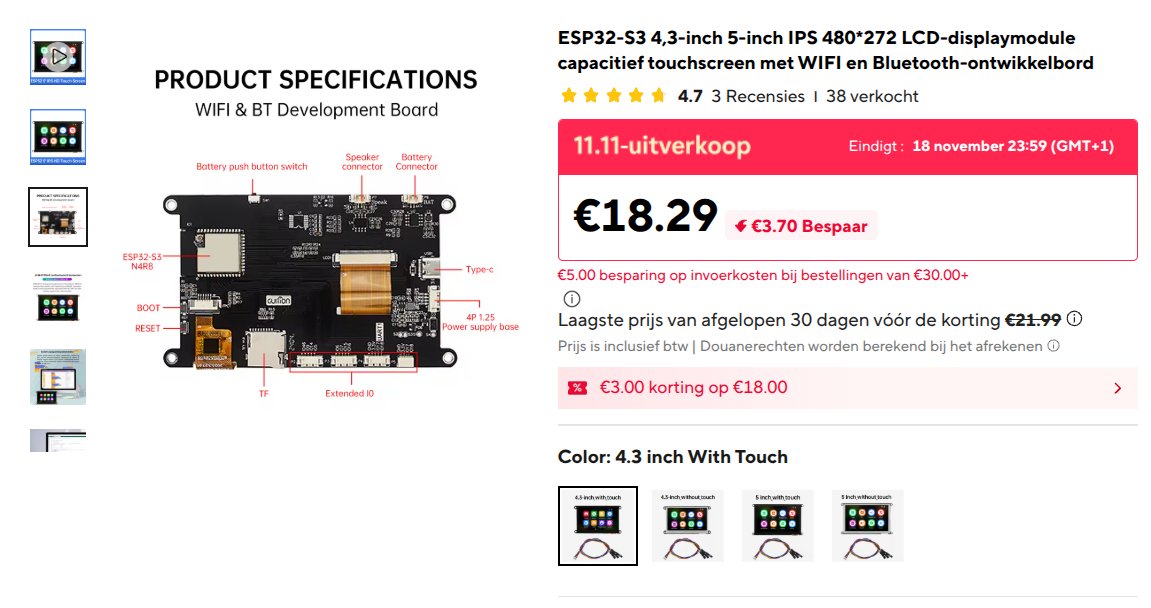
Build a touchscreen-based offline AI phone powered by an ESP32 microcontroller. This project creates a portable device with local messaging, weather updates, calendar functionality, and optional map support—all without relying on cloud services. The guide includes a complete wiring diagram, parts list, and step-by-step assembly instructions for connecting the touchscreen display and configuring power.
The firmware provides Wi-Fi connectivity for initial setup, Bluetooth for local device sharing, optional microSD card support for expanded storage, and a security PIN system to protect your data. Follow the assembly outline to configure the touchscreen interface, set up local messaging, enable the idle clock display, and customize your offline phone with optional apps and features.
Wiring diagram
Assemble it in 10 steps
1. Use the built-in touchscreen
This build uses only the JC4827W543C capacitive touchscreen board. No external components or wiring are needed.
- This firmware is not for the 5-inch or resistive-touch version.
2. Connect USB power
Set the board on a non-metal surface and connect a USB data cable. Leave the battery, speaker and expansion connectors empty.
- Bluetooth is a custom text link, not headphone audio. The tools page streams audio on your phone or computer only, not on the board.
- Wi-Fi messages and the local setup page are not end-to-end encrypted. Use only a trusted local network. The access point password is pocket1234; do not store sensitive information.
- Notification forwarding needs a separate phone companion app, which is not included. This is not WhatsApp or watch emulation. The experimental web reader supports plain HTTP text only.
- The SD card is never automatically formatted. Back up the card before use. This replaces the factory demo; back up valuable existing data first.
3. Configure Wi-Fi on the touchscreen
On first boot or after a firmware update, use the setup menu. Tap WIFI, choose a network number and press SEND, then enter its password. Open settings and tap AUTO to request approximate location and current timezone offset over the internet. Tap DONE to finish. Use Aa for capital letters and the symbols key for punctuation.
- Music streams need network access. A phone joined to the device access point may have no internet; after setup join your home network and open the device address shown by the status command instead.
4. Animations and Bluetooth files
Type charge demo for a clearly marked ten-second animation, not a real battery reading. Incoming messages animate the notification strip. Open /transfer for the custom BLE file protocol and browser helper. Files now go to microSD /data, not internal flash. They are not executable apps or playable music.
- Battery charging circuitry, connector polarity and status sensing have not been verified. Keep the battery connector empty; use USB power for this build. No real charging or battery percentage indicator is implemented.
- BLE file transfers are unauthenticated, limited to 256 KiB and require a compatible custom client. Web Bluetooth usually cannot run on the device HTTP page; follow the secure-context instructions on the transfer page. Standard phone Bluetooth file sharing is not supported.
5. Prepare optional microSD storage
With USB unplugged, insert a backed-up FAT32 microSD card in the built-in TF slot. The firmware creates /data, /data/music and /apps directories without repartitioning the card. Type storage to check detection. Insert and remove only with power off. No external card module or wires are needed. SYS firmware and connection settings stay in internal flash. Notes and transferred files use the SD card only; existing internal files are not migrated. Put plain text files in /apps and use app NAME.txt to read them; executable apps are not supported.
- Data and apps are separate directories, not physical SD partitions. A missing or incompatible card disables user file storage. Never remove the card during a transfer.
- AUTO shares your public IP with ip-api.com over unencrypted HTTP. Location is approximate. The automatic timezone is a current offset, not a daylight-saving rule; rerun AUTO after seasonal changes or set the timezone rule manually.
6. Use touch wake and the idle clock
After 60 seconds without touch, the display shows an idle clock. Any tap returns to the interface without triggering a key. Settings toggles the clock; idle SECONDS changes the timeout from 15 to 3600 seconds. Touch polling, CPU, Wi-Fi and Bluetooth remain running so this is not deep sleep or a battery-saving shutdown.
- The LCD backlight stays powered even when AOD is off. Battery type, charging status and polarity are not auto-detected. Continue using USB only until battery requirements are verified.
7. Open the built-in app launcher
Type apps and press SEND, or open Settings and tap APPS. Two pages contain Clock, Weather, Stopwatch, Timer, Tasks, Notes, Calendar, Breathe, Calculator, Convert, Dice, Screen Light, Messages, Chat, Settings and System. HOME returns to the launcher and CHAT returns to the keyboard. Tasks supports eight entries; tap an entry to remove it. Tasks saves to microSD when available and otherwise lasts only until restart. Type cards to list the existing SD text cards. Stopwatch and timer state are session-only. Screen Light shows a white screen without changing the backlight hardware. The breathing guide is a simple optional relaxation animation, not a health measurement.
- This is a Wear OS-inspired interface, not Wear OS. Android apps, WhatsApp, fitness sensors, headphone audio and battery readings are not added. Timer alerts are visual only. Tasks and notes are not encrypted; do not store sensitive information.
8. Agenda and local sharing
Launcher page 3 adds Agenda, PocketDrop, Counter, Decide, Focus, Quick Help, Shared Files and About. In Agenda tap ADD and type event YYYY-MM-DD HH:MM Title. Up to 12 events are stored on SD; without SD they last for this session. Delete using event delete NUMBER. For sharing, open PocketDrop and tap RECEIVE, open its shown URL on a sender on the same Wi-Fi or the Pocket access point, enter the six-digit code and upload. Then tap ACCEPT or REJECT on the handheld. Files go to /data/inbox with their names preserved; existing files are not overwritten. Retrieve via /drop-file?name=FILENAME. No internet or phone is required to use Agenda; file sharing requires another device with a web browser.
- PocketDrop is not Apple AirDrop or automatic device discovery. It is a local HTTP browser upload limited to 256 KiB per file. Receive mode expires after two minutes. Use a trusted network; transfers and stored files are not encrypted. The code is a temporary access check, not secure pairing.
- Agenda reminders are visual only and require correct time and a powered device. Events more than five minutes overdue are not alerted. After restart a recent event can alert again. No recurrence or background wake from power off. Counter and focus timer are session-only. Focus replaces the existing timer.
9. Install optional apps and use local maps
Type apps to open the five-page catalog of 40 app packages. Plus signs mark uninstalled apps. Select a tile and tap INSTALL to unpack its bundled manifest and help resources to /apps/pocketNUMBER on microSD. Nothing is installed automatically, and installation needs no internet. The shared native engine stays in internal firmware; these are not executable SD apps or Android packages. Settings and setup are always available outside the optional catalog. To uninstall type uninstall NUMBER (0-39 in catalog order); personal data stays. New tools include Maps, Bookmarks, Journal, Shopping, Habits (manual log), Water, Tip Split, Percent, Random, Password, Morse, Binary, Colors, Reaction, Multiply and Coin. Most tool results and games are session-only. Lists store plain text on SD, up to about 4 KiB; only the first 720 characters are displayed.
- Maps has no built-in roads, GPS, route planning, search or online map download. Set your location in Settings first. With power off, prepare /data/maps/roads.csv containing one lat1,lon1,lat2,lon2 segment per line, and optionally places.csv containing lat,lon,label. Use decimal degrees, no header. Up to 400 road segments and 40 places are read. Reinsert the card before USB power. Zoom buttons adjust the view around your configured location; segments crossing the view boundary may be omitted. Use your own or appropriately licensed geographic data. Not suitable for safety-critical navigation.
- Password tool displays generated text openly and does not save it. Do not use it for sensitive accounts. Water and habits are manual logs, not medical advice or sensor measurements. Existing battery and audio limitations remain unchanged. App installation extracts small resource packages; native code still ships in firmware, so uninstalling does not free firmware space.
10. Set a touchscreen PIN
Open Settings and tap PIN / LOCK, or type security. Use pin set followed by your own 4-8 digits. Type lock to test. The screen locks at restart and after the idle timeout; tap the screen and use the numeric keypad to unlock. Change it with pin change OLD NEW, or disable with pin off CURRENT. PIN entry commands are masked while typing. No camera or fingerprint reader is built into this board, so photos, video, face unlock and fingerprint unlock are not added.
- This is a convenience screen lock, not secure device encryption. The SD card and existing web and BLE services remain accessible. PIN hashing does not enable secure boot, flash encryption or tamper protection. Do not store sensitive information.
- Five wrong attempts pause the keypad for 30 seconds. This delay resets on reboot. Keep your PIN safe; forgotten PIN recovery requires erasing internal settings, not just a normal firmware update.
Deploy the firmware
#include <Arduino.h>
#include <WiFi.h>
#include <WebServer.h>
#include <WiFiUdp.h>
#include <HTTPClient.h>
#include <Preferences.h>
#include <SD.h>
#include "system.h"
#include <BLEDevice.h>
#include <BLEServer.h>
#include <BLEUtils.h>
#include <BLE2902.h>
#include <time.h>
bool passwordEntry();
String securityCommand(String);
#include "chat.h"
WebServer web(80); WiFiUDP udp; Preferences prefs;
String note, inbox="No messages", weather="Weather not fetched", lat="", lon="", zone="UTC0", apName;
char blePending[161]={0}; portMUX_TYPE mux=portMUX_INITIALIZER_UNLOCKED;
BLECharacteristic *tx=nullptr;
unsigned long lastWeather=0, lastMinute=0; bool fsOK=false, weatherDue=false;
const char *serviceUUID="6e400001-b5a3-f393-e0a9-e50e24dcca9e";
String clockText(){time_t n=time(nullptr); if(n<1700000000)return "Clock not synced (internet needed once)";char b[70];struct tm t;localtime_r(&n,&t);strftime(b,sizeof(b),"%a %Y-%m-%d %H:%M",&t);return b;}
void show(String s){answer=s;dirty=true;startNotice();}
void sendMessage(String s){s=s.substring(0,160); if(!s.length())return;String packet="PKT1|"+apName+"|"+s;udp.beginPacket(IPAddress(255,255,255,255),4210);udp.print(packet);udp.endPacket();if(tx){tx->setValue(s.c_str());tx->notify();}inbox="Me: "+s;show("Sent locally (no delivery confirmation): "+s);}
class LinkServer:public BLEServerCallbacks {void onDisconnect(BLEServer *s) override {s->getAdvertising()->start();}};
class Receiver:public BLECharacteristicCallbacks {void onWrite(BLECharacteristic *c) override {auto v=c->getValue();String s(v.c_str());s=s.substring(0,160);portENTER_CRITICAL(&mux);s.toCharArray(blePending,sizeof(blePending));portEXIT_CRITICAL(&mux);}};
#include "transfer.h"
String readPage(String url);
void saveNote(){if(fsOK){File f=SD.open("/data/note.txt","w");if(f){f.print(note);f.close();}}}
String wifiNames[12]; int wifiCount=0, wifiStage=0; bool scanBusy=false;
String chosenSSID;
bool passwordEntry(){return wifiStage==2 || input.startsWith("pin ");}
String networkCommand(String s){
String t=s;t.trim();String low=t;low.toLowerCase();
if(low=="cancel"){wifiStage=0;return "Setup cancelled.";}
if(wifiStage==1){int i=t.toInt()-1;if(i<0||i>=wifiCount)return "Enter a listed network number, or cancel.";chosenSSID=wifiNames[i];wifiStage=2;return "Network: "+chosenSSID+". Enter password (case sensitive), or /open for an open network. Use Aa and #+= keys. Password is hidden.";}
if(wifiStage==2){String pass=s=="/open"?String(""):s;if(pass.length()&& (pass.length()<8||pass.length()>63))return "Password must be 8-63 characters. Try again or cancel.";prefs.putString("ssid",chosenSSID);prefs.putString("pass",pass);WiFi.disconnect();WiFi.begin(chosenSSID.c_str(),pass.c_str());wifiStage=0;return "Connecting to "+chosenSSID+". Saved for restart. Type status to check. If connection fails, type wifi to try again.";}
if(low=="wifi")return "Standalone settings: wifi scan | wifi name YOUR NETWORK | wifi forget | location LAT,LON | timezone POSIX_RULE | time | weather | status. Aa switches case; #+= switches symbols. No phone needed. Internet still needs a 2.4 GHz router/hotspot.";
if(low=="wifi scan"){if(scanBusy)return "Scan in progress...";WiFi.scanDelete();WiFi.scanNetworks(true);scanBusy=true;return "Scanning 2.4 GHz networks... Results will appear here. Then enter the network number.";}
if(low.startsWith("wifi name ")){chosenSSID=s.substring(10);if(!chosenSSID.length()||chosenSSID.length()>32)return "Network name must be 1-32 bytes.";wifiStage=2;return "Enter Wi-Fi password, or /open. Password hidden. Use Aa and #+= keys.";}
if(low=="wifi forget"){wifiStage=0;prefs.remove("ssid");prefs.remove("pass");WiFi.disconnect();return "Saved Wi-Fi removed. Type wifi scan to reconnect.";}
if(low.startsWith("location ")){String v=t.substring(9);int comma=v.indexOf(',');if(comma<1)return "Use location LAT,LON, for example location 50.85,4.35";String a=v.substring(0,comma),b=v.substring(comma+1);char *end;double x=strtod(a.c_str(),&end);if(*end||x<-90||x>90)return "Invalid latitude.";double y=strtod(b.c_str(),&end);if(*end||!b.length()||y<-180||y>180)return "Invalid longitude.";lat=String(x,5);lon=String(y,5);prefs.putString("lat",lat);prefs.putString("lon",lon);weatherDue=true;return "Weather location saved.";}
if(low.startsWith("timezone ")){zone=t.substring(9);if(zone.length()>80)return "Timezone too long.";prefs.putString("tz",zone);configTzTime(zone.c_str(),"pool.ntp.org","time.google.com");return "Timezone saved. UTC: UTC0. Belgium: CET-1CEST,M3.5.0,M10.5.0/3";}
return "";
}
void networkTick(){if(!scanBusy)return;int n=WiFi.scanComplete();if(n==WIFI_SCAN_RUNNING)return;scanBusy=false;wifiCount=0;String result="Select network number: ";for(int i=0;i<n&&wifiCount<12;i++){String ss=WiFi.SSID(i);if(!ss.length())continue;bool duplicate=false;for(int j=0;j<wifiCount;j++)if(wifiNames[j]==ss)duplicate=true;if(duplicate)continue;wifiNames[wifiCount++]=ss;result+=String(wifiCount)+":"+ss+" | ";}WiFi.scanDelete();wifiStage=wifiCount?1:0;show(wifiCount?result:String("No networks found. Try wifi scan again or wifi name YOUR NETWORK. 2.4 GHz only."));}
String appCommand(String);
String organizerCommand(String);
String reply(String s){if(!wifiStage){String a=organizerCommand(s);if(a.length())return a;a=appCommand(s);if(a.length())return a;}String sec=securityCommand(s);if(sec.length())return sec;String sys=systemCommand(s);if(sys.length())return sys;String local=networkCommand(s);if(local.length())return local;String t=s;t.trim();t.toLowerCase();
if(t=="help"||t=="home")return "Commands: wifi, settings, wifi scan, charge demo, files, music, browser, browse URL, time, weather, status, note TEXT, notes, msg TEXT, inbox, timer SECONDS, help. Configure on this screen: type settings. Optional web file tools: open http://192.168.4.1 while on "+apName+" (password pocket1234). Chat is rule-based, not an LLM.";
if(t.startsWith("browse "))return readPage(s.substring(7));
if(t=="music"||t=="browser")return "Open http://192.168.4.1/tools on your phone. Streaming audio plays on your phone, not this board. Reader: browse http://example.com (HTTP text only).";
if(t=="charge demo"){chargeDemoUntil=millis()+10000;return "Charging animation DEMO for 10 seconds. No battery sensor or charging status is available.";}
if(t=="files")return "SD /data: Bluetooth and downloaded files, max 256 KiB each. /apps accepts text cards only; use apps or app NAME.txt. No executable app installation or music playback.";
if(t=="time"||t=="date")return clockText();
if(t=="status")return apName+" | Wi-Fi: "+(WiFi.status()==WL_CONNECTED?WiFi.localIP().toString():String("not connected"))+" | BLE: PocketLink text only, NOT headphone audio. Files: "+(fsOK?String(SD.usedBytes())+"/"+String(SD.totalBytes()):String("unavailable"));
if(t=="weather"){weatherDue=true;return weather+" | Will refresh if internet and location are configured.";}
if(t.startsWith("note ")){note=s.substring(5,505);saveNote();return "Note saved.";}
if(t=="notes")return note.length()?note:String("No note saved. Type note then your text.");
if(t.startsWith("msg ")){sendMessage(s.substring(4));return answer;}
if(t=="inbox")return inbox;
if(t.startsWith("timer ")){extern unsigned long alertDeadline;int n=t.substring(6).toInt();if(n<1||n>86400)return "Timer: enter 1 to 86400 seconds.";alertDeadline=millis()+n*1000UL;return "Visual timer started.";}
return botReply(s);
}
unsigned long alertDeadline=0;
String htmlEscape(String s){s.replace("&","&");s.replace("<","<");s.replace(">",">");s.replace("\"",""");return s;}
void page(){String p="<!doctype html><meta name=viewport content='width=device-width'><title>Pocket OS</title><h1>Pocket OS</h1><p><a href=/drop>PocketDrop file sharing</a></p><p><a href=/tools>Neon tools: live music and web reader</a></p><p>"+htmlEscape(clockText())+"</p><p>"+htmlEscape(weather)+"</p><p>Last message: "+htmlEscape(inbox)+"</p>";
p+="<h2>Wi-Fi and weather</h2><form method=post action=/config>Network name <input name=ssid maxlength=32><br>Password <input name=pass type=password maxlength=63><br>Latitude <input name=lat value='"+htmlEscape(lat)+"'><br>Longitude <input name=lon value='"+htmlEscape(lon)+"'><br>POSIX timezone <input name=tz value='"+htmlEscape(zone)+"'><p>UTC0 = UTC. Belgium: CET-1CEST,M3.5.0,M10.5.0/3</p><button>Save/connect</button></form>";
p+="<h2>Local messages</h2><p>Matching devices must share a Wi-Fi network. No relaying, encryption or delivery guarantee.</p><form method=post action=/msg><input name=text maxlength=160><button>Send</button></form><h2>Note</h2><form method=post action=/note><textarea name=text maxlength=500>"+htmlEscape(note)+"</textarea><button>Save</button></form>";
p+="<h2>File downloader</h2><p>Direct HTTP files only, maximum 256 KiB. Files stored on microSD in /data. No audio playback, streaming service support or HTTPS downloads.</p><form method=post action=/download><input name=url placeholder='http://...' maxlength=300><button>Download</button></form><p><a href=/file>Retrieve saved file</a></p><h2>Bluetooth PocketLink</h2><p>BLE text only. Use a BLE UART app: Nordic UART service, write RX, subscribe TX. Maximum 160 bytes per message; negotiate a suitable MTU or send short messages. Ordinary headphones cannot connect.</p>";
web.send(200,"text/html",p);}
void fetchWeather(){if(WiFi.status()!=WL_CONNECTED||!lat.length()||!lon.length()){weather="Set Wi-Fi and latitude/longitude in the web page.";return;}
HTTPClient h;h.setTimeout(3500);String url="http://api.open-meteo.com/v1/forecast?latitude="+lat+"&longitude="+lon+"¤t=temperature_2m,weather_code";
h.begin(url);int code=h.GET();if(code==200){String j=h.getString();int c=j.indexOf("\"current\":");int a=j.indexOf("\"temperature_2m\":",c);int b=j.indexOf("\"weather_code\":",c);if(c>=0&&a>=0&&b>=0){float temp=j.substring(a+17).toFloat();int wc=j.substring(b+15).toInt();weather=String(temp,1)+" C | WMO code "+String(wc)+" | "+clockText()+" | Open-Meteo";}else weather="Weather response not understood";}else weather="Weather unavailable: HTTP "+String(code);h.end();}
#include "extras.h"
#include "security.h"
#include "system_ui.h"
#include "organizer.h"
#include "pocket_apps.h"
void setup(){hardwareSetup();prefs.begin("pocket",false);securityInit();lat=prefs.getString("lat","");lon=prefs.getString("lon","");zone=prefs.getString("tz","UTC0");cardSPI.begin(12,11,13,10);fsOK=SD.begin(10,cardSPI,4000000);
if(fsOK){SD.mkdir("/data");SD.mkdir("/apps");SD.mkdir("/data/music");File f=SD.open("/data/note.txt","r");if(f){note=f.readString().substring(0,500);f.close();}else note="";}else note="";
aodEnabled=prefs.getBool("aod",true);idleSeconds=prefs.getInt("idle",60);
WiFi.mode(WIFI_AP_STA);apName="Pocket-"+String((uint32_t)ESP.getEfuseMac(),HEX);WiFi.softAP(apName.c_str(),"pocket1234");String ss=prefs.getString("ssid","");if(ss.length())WiFi.begin(ss.c_str(),prefs.getString("pass","").c_str());configTzTime(zone.c_str(),"pool.ntp.org","time.google.com");udp.begin(4210);
BLEDevice::init(apName.c_str());BLEServer *server=BLEDevice::createServer();server->setCallbacks(new LinkServer());BLEService *service=server->createService(serviceUUID);tx=service->createCharacteristic("6e400003-b5a3-f393-e0a9-e50e24dcca9e",BLECharacteristic::PROPERTY_NOTIFY);tx->addDescriptor(new BLE2902());auto rx=service->createCharacteristic("6e400002-b5a3-f393-e0a9-e50e24dcca9e",BLECharacteristic::PROPERTY_WRITE|BLECharacteristic::PROPERTY_WRITE_NR);rx->setCallbacks(new Receiver());auto fr=service->createCharacteristic("6e400004-b5a3-f393-e0a9-e50e24dcca9e",BLECharacteristic::PROPERTY_WRITE);fr->setCallbacks(new FileReceiver());service->start();BLEDevice::getAdvertising()->addServiceUUID(serviceUUID);BLEDevice::getAdvertising()->start();
web.on("/",page);dropSetup();
web.on("/transfer",[]{web.send_P(200,"text/html",transferPage);});
web.on("/bluetooth-file",[]{File f=SD.open("/data/bluetooth.bin","r");if(!f){web.send(404,"text/plain","No Bluetooth file");return;}web.sendHeader("Content-Disposition","attachment; filename=bluetooth.bin");web.streamFile(f,"application/octet-stream");f.close();});
web.on("/tools",[]{web.send_P(200,"text/html",toolsPage);});
web.on("/reader",HTTP_POST,[]{String result=readPage(web.arg("url").substring(0,300));show(result);web.send(200,"text/plain; charset=utf-8",result);});
web.on("/config",HTTP_POST,[]{String la=web.arg("lat"),lo=web.arg("lon");if(la.length()&&lo.length()){if(la.toFloat()<-90||la.toFloat()>90||lo.toFloat()<-180||lo.toFloat()>180){web.send(400,"text/plain","Invalid coordinates");return;}lat=String(la.toFloat(),5);lon=String(lo.toFloat(),5);prefs.putString("lat",lat);prefs.putString("lon",lon);}zone=web.arg("tz").substring(0,80);prefs.putString("tz",zone);configTzTime(zone.c_str(),"pool.ntp.org");if(web.arg("ssid").length()){prefs.putString("ssid",web.arg("ssid"));prefs.putString("pass",web.arg("pass"));WiFi.begin(web.arg("ssid").c_str(),web.arg("pass").c_str());}weatherDue=true;web.send(200,"text/plain","Saved. Return to the home page in a few seconds.");});
web.on("/msg",HTTP_POST,[]{sendMessage(web.arg("text"));web.send(200,"text/plain","Sent without delivery confirmation");});
web.on("/note",HTTP_POST,[]{note=web.arg("text").substring(0,500);saveNote();web.send(200,"text/plain","Saved");});
web.on("/file",HTTP_GET,[]{File f=SD.open("/data/download.bin","r");if(!f){web.send(404,"text/plain","No file");return;}web.sendHeader("Content-Disposition","attachment; filename=download.bin");web.streamFile(f,"application/octet-stream");f.close();});
web.on("/download",HTTP_POST,[]{String url=web.arg("url");if(!fsOK||!url.startsWith("http://")){web.send(400,"text/plain","Storage unavailable or URL is not HTTP");return;}HTTPClient h;h.setTimeout(4000);h.begin(url);int code=h.GET(),len=h.getSize();if(code!=200||len<0||len>262144){h.end();web.send(400,"text/plain","Need HTTP 200 and Content-Length of at most 256 KiB");return;}File f=SD.open("/data/temp","w");if(!f){h.end();web.send(500,"text/plain","Cannot open storage");return;}uint8_t buf[1024];int remain=len;unsigned long progress=millis();while(remain>0&&millis()-progress<5000){int n=h.getStreamPtr()->available();if(n){n=h.getStreamPtr()->readBytes(buf,min(n,min(remain,1024)));if(f.write(buf,n)!=(size_t)n)break;remain-=n;progress=millis();}else delay(2);}f.close();h.end();if(remain){SD.remove("/data/temp");web.send(500,"text/plain","Download failed; previous file kept");}else{SD.remove("/data/download.bin");SD.rename("/data/temp","/data/download.bin");web.send(200,"text/plain","Saved. No audio playback in this build.");}});
web.begin();answer="Welcome! Tap WIFI at the top to set up Wi-Fi here. Type settings for location and timezone. No phone needed. Use Aa for uppercase and #+= for symbols.";dirty=true;lastInteraction=millis();if(prefs.getString("build","")!=String(__DATE__ " " __TIME__)){menuOpen=true;answer="Welcome / updated! Tap WIFI, select your router and enter password. Tap AUTO for approximate weather location and timezone. Tap DONE to keep settings.";}}
void loop(){securityTick();organizerTick();appsTick();networkTick();fileTick();web.handleClient();int n=udp.parsePacket();if(n){char b[220];int k=udp.read(b,219);if(k>0){b[k]=0;String p=b;if(p.startsWith("PKT1|")&&!p.startsWith("PKT1|"+apName+"|")){inbox=p.substring(5);show("Wi-Fi message: "+inbox);}}}
String pending;portENTER_CRITICAL(&mux);pending=String(blePending);blePending[0]=0;portEXIT_CRITICAL(&mux);if(pending.length()){inbox="BLE: "+pending;show(inbox);}
static bool wasConnected=false;bool connected=WiFi.status()==WL_CONNECTED;if(connected&&!wasConnected)weatherDue=true;wasConnected=connected;
if((weatherDue||(millis()-lastWeather>1800000UL))&&connected){weatherDue=false;lastWeather=millis();fetchWeather();if(!menuOpen)show(weather);}
if(alertDeadline&&(int32_t)(millis()-alertDeadline)>=0){alertDeadline=0;show("TIMER FINISHED (visual alert only)");}
if(millis()/60000!=lastMinute){lastMinute=millis()/60000;Serial.println(clockText());}
chatLoop();}Remix this project
Make it yours in one click
Open a full copy of this project in your own Schematik workspace, diagram, code, parts, and assembly steps included. Swap the sensor, add features, or redesign the whole thing with AI. The author's original stays untouched.