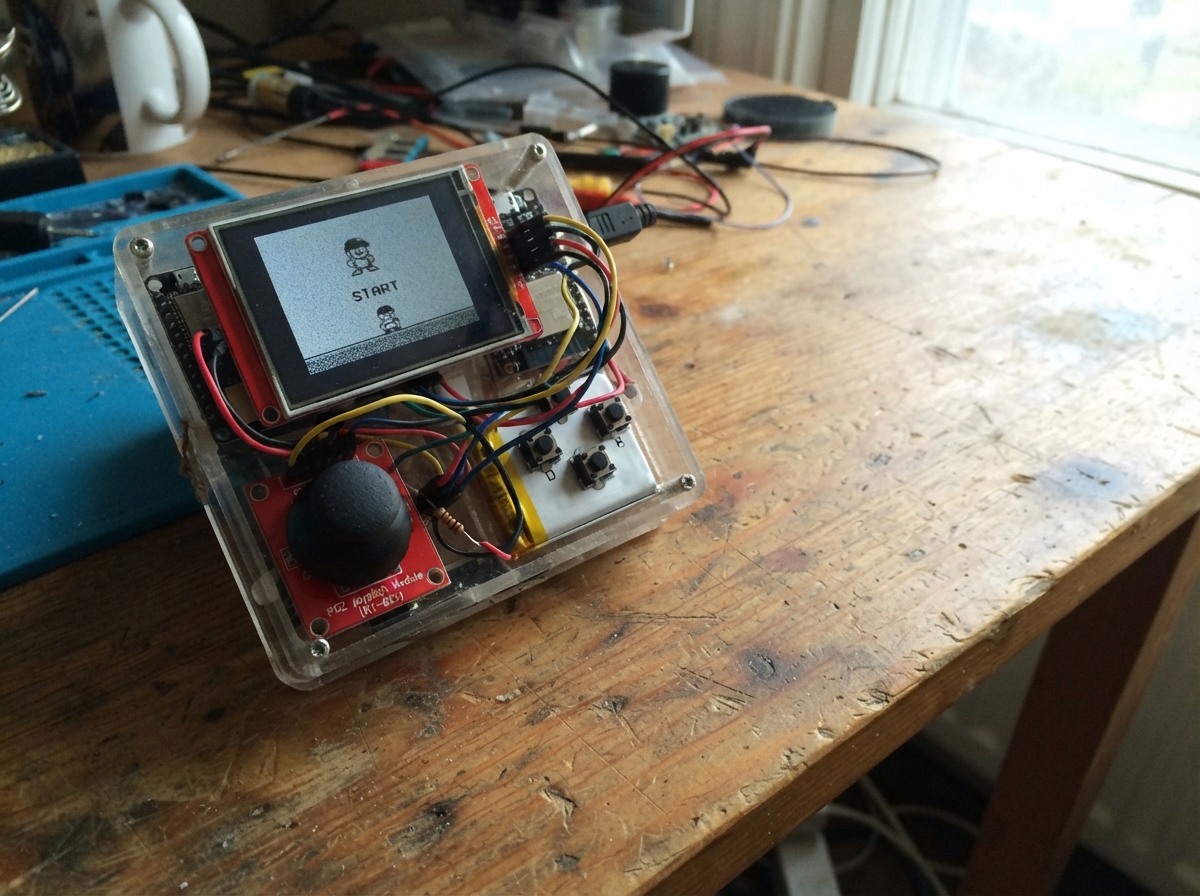
This project transforms an ESP32 microcontroller into a playable handheld arcade console featuring seven classic games: Snake, Pong, Breakout, Dodge, Racing, Catch, and Flap. The build combines an ILI9341 TFT touchscreen for vibrant graphics, a PS2 joystick module for intuitive controls, and minimal additional components to create a fully functional gaming device.
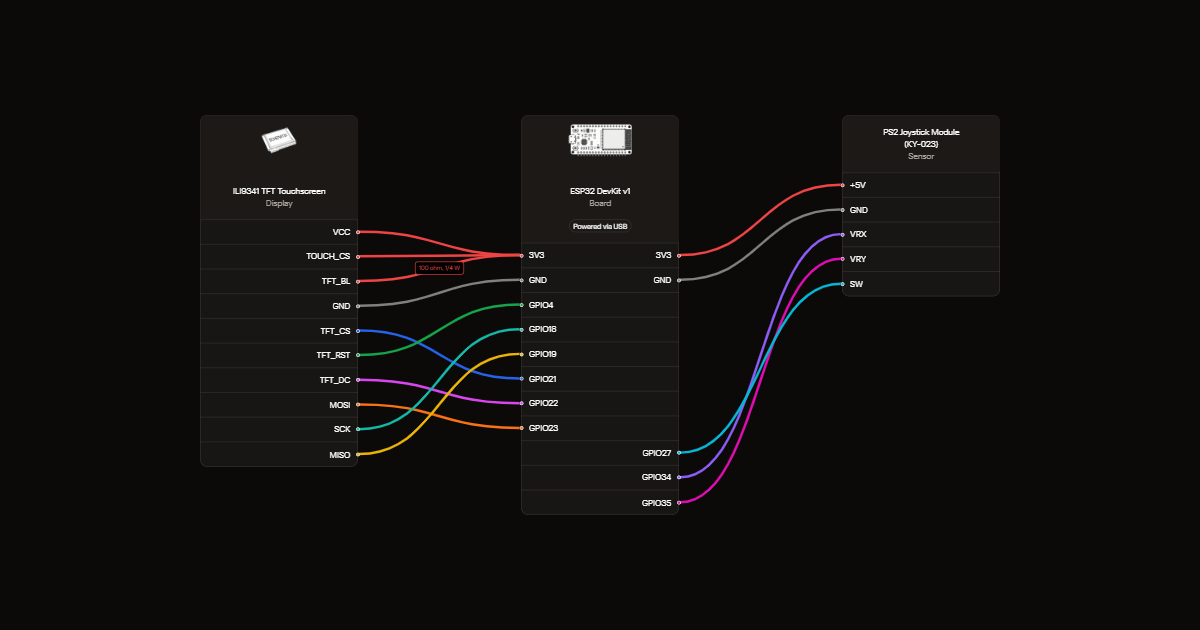
The guide provides a complete wiring diagram showing how to connect the touchscreen and joystick to the ESP32, a full parts list with component specifications, ready-to-upload firmware with all seven games pre-programmed, and step-by-step assembly instructions including critical safety notes about disconnecting power before modifications and protecting the display backlight.
Wiring diagram
Gather all the parts
Assemble it in 5 steps
1. Disconnect USB before changing wires
Use an ESP32 DevKit v1 and your existing ILI9341 screen and joystick. This console is powered by USB, with no battery.
2. Move two screen control wires
Move screen CS from GPIO15 to GPIO21 (selects the screen). Move DC from GPIO2 to GPIO22 (selects commands or picture data). Keep RST on GPIO4, MOSI on GPIO23 (data), SCK on GPIO18 (clock), and MISO on GPIO19 (return data).
- GPIO2 and GPIO15 are startup configuration pins; this project avoids them to reduce startup trouble.
3. Protect the backlight
Remove the direct LED-to-3.3V wire. Connect screen LED through the 100 ohm resistor to 3.3V. The resistor can face either way. Screen LED is called TFT_BL in the diagram. Keep VCC on 3.3V and GND on GND.
- The resistor limits backlight current; the screen may be dimmer than with a direct wire.
- If your screen has a touch T_CS pin, connect it to 3.3V to keep unused touch deselected. Leave T_IRQ and other touch pins disconnected. Touch is not used.
4. Check the joystick wiring
Keep VRX on GPIO34 (left/right), VRY on GPIO35 (up/down), and SW on GPIO27 (click). Keep VCC on 3.3V and GND on GND. The module's supply pin may be marked +5V but must use 3.3V here.
- Do not power the joystick from 5V: its outputs could damage the ESP32 inputs.
5. Prepare for first power
Check for loose strands and swapped power wires. Set the screen in landscape orientation. Leave the joystick centered when plugging in USB so the console can measure its resting position.
Review all connections
1. Connections between "screen" and "ESP32"
2. Connections between "backlight_resistor" and "ESP32"
3. Connections between "stick" and "ESP32"
Deploy the firmware
#include <Arduino.h>
#include <SPI.h>
#include <Adafruit_GFX.h>
#include <Adafruit_ILI9341.h>
Adafruit_ILI9341 tft(21,22,4);
constexpr uint16_t BG=0xD6B0, INK=0x1945;
constexpr int X_PIN=34,Y_PIN=35,SW_PIN=27;
int cx=2048,cy=2048,mode=0,choice=0,score=0;
int sx[600],sy[600],len,dx,dy,fx,fy;
int paddle=90,enemy=90,bx=160,by=110,vx=3,vy=2,misses=0;
uint32_t tick=0,nav=0,pressedAt=0,changed=0;
bool rawPrev=false,stable=false,longDone=false;
void text(int x,int y,const char *s,int size=2){tft.setCursor(x,y);tft.setTextSize(size);tft.setTextColor(INK,BG);tft.print(s);}
const char* titles[]={"SNAKE","PONG","BREAKOUT","DODGE","RACING","CATCH","FLAP"};
void hud(){tft.fillRect(0,0,320,24,BG);text(8,4,titles[mode-1]);tft.setCursor(180,4);tft.print(score);}
void menu(){mode=0;tft.fillScreen(BG);text(24,10,"POCKET ARCADE",3);for(int i=0;i<7;i++){text(35,46+i*22,i==choice?">":" ");text(60,46+i*22,titles[i]);}text(14,208,"Move: select  Click: play",1);text(14,226,"Hold click in game = menu",1);}
void food(){bool hit;do{fx=random(30);fy=random(18);hit=false;for(int i=0;i<len;i++)if(sx[i]==fx&&sy[i]==fy)hit=true;}while(hit);tft.fillRect(10+fx*10,32+fy*10,8,8,INK);}
void endGame(){mode=99;text(65,90,"GAME OVER",3);text(42,142,"Click for menu",2);}
void extraStart();
void extraUpdate(int x,int y,bool click);
void start(){score=0;tick=millis();tft.fillScreen(BG);mode=choice+1;hud();tft.drawRect(8,30,304,184,INK);if(mode==1){len=3;dx=1;dy=0;for(int i=0;i<len;i++){sx[i]=10-i;sy[i]=9;tft.fillRect(10+sx[i]*10,32+sy[i]*10,8,8,INK);}food();}else if(mode==2){paddle=90;enemy=90;bx=160;by=110;vx=3;vy=2;misses=0;tft.fillRect(16,paddle,5,36,INK);tft.fillRect(299,enemy,5,36,INK);tft.fillRect(bx,by,5,5,INK);}else{extraStart();}text(30,226,"Hold joystick button to exit",1);}
void snake(int x,int y){int ndx=dx,ndy=dy;if(abs(x)>abs(y)&&abs(x)>650){ndx=x>0?1:-1;ndy=0;}else if(abs(y)>650){ndx=0;ndy=y>0?1:-1;}if(ndx!=-dx||ndy!=-dy){dx=ndx;dy=ndy;}
if(millis()-tick<150)return;tick=millis();int nx=sx[0]+dx,ny=sy[0]+dy;bool eat=nx==fx&&ny==fy;
if(nx<0||nx>=30||ny<0||ny>=18){endGame();return;}for(int i=0;i<len-(eat?0:1);i++)if(nx==sx[i]&&ny==sy[i]){endGame();return;}
if(!eat)tft.fillRect(10+sx[len-1]*10,32+sy[len-1]*10,8,8,BG);else len++;
for(int i=len-1;i>0;i--){sx[i]=sx[i-1];sy[i]=sy[i-1];}sx[0]=nx;sy[0]=ny;tft.fillRect(10+nx*10,32+ny*10,8,8,INK);
if(eat){score++;hud();if(len==540){endGame();return;}food();}}
void pong(int y){if(millis()-tick<25)return;tick=millis();int old=paddle,oe=enemy;int move=abs(y)>450?y/350:0;paddle=constrain(paddle+move,32,176);enemy=constrain(enemy+((by>enemy+18)?2:-2),32,176);
tft.fillRect(16,old,5,36,BG);tft.fillRect(299,oe,5,36,BG);tft.fillRect(bx,by,5,5,BG);bx+=vx;by+=vy;if(by<=32||by>=207){vy=-vy;by=constrain(by,32,207);}
if(vx<0&&bx<=21&&bx>=15&&by+5>=paddle&&by<=paddle+36){vx=3;score++;hud();}if(vx>0&&bx+5>=299&&bx<=304&&by+5>=enemy&&by<=enemy+36)vx=-3;
if(bx<10||bx>306){if(bx<10)misses++;bx=160;by=110;vx=bx%2?3:-3;if(misses>=3){endGame();return;}}
tft.fillRect(16,paddle,5,36,INK);tft.fillRect(299,enemy,5,36,INK);tft.fillRect(bx,by,5,5,INK);}
// Shared state for the five additional games. Only changed objects are redrawn.
int px=150,py=110,ox=100,oy=35,speed=3,gate=100;
bool bricks[24];
bool overlap(int x,int y,int w,int h,int a,int b,int c,int d){return x<a+c&&x+w>a&&y<b+d&&y+h>b;}
void extraStart(){
 px=150;py=110;ox=random(24,280);oy=35;speed=3;gate=random(65,175);
 if(mode==3){bx=155;by=170;vx=3;vy=-3;for(int i=0;i<24;i++){bricks[i]=true;tft.fillRect(16+(i%8)*36,40+(i/8)*15,32,11,INK);}tft.fillRect(px,197,48,6,INK);tft.fillRect(bx,by,5,5,INK);}
 if(mode==4||mode==6){tft.fillRect(px,190,mode==6?38:14,10,INK);tft.fillRect(ox,oy,12,12,INK);}
 if(mode==5){px=1;ox=random(3);tft.drawFastVLine(110,32,180,INK);tft.drawFastVLine(210,32,180,INK);tft.fillRect(53+px*100,186,18,20,INK);tft.fillRect(53+ox*100,oy,18,22,INK);}
 if(mode==7){ox=270;py=110;vy=0;tft.fillRect(65,py,10,10,INK);tft.fillRect(ox,32,16,gate-32,INK);tft.fillRect(ox,gate+56,16,212-gate-56,INK);}
}
void extraUpdate(int x,int y,bool click){
 if(mode==7&&click)vy=-6;
 if(millis()-tick<35)return;tick=millis();
 if(mode==3){
  int old=px;px=constrain(px+(abs(x)>450?x/220:0),12,258);
  if(old!=px){tft.fillRect(old,197,48,6,BG);tft.fillRect(px,197,48,6,INK);}
  tft.fillRect(bx,by,5,5,BG);bx+=vx;by+=vy;
  if(bx<=11||bx>=303){vx=-vx;bx=constrain(bx,11,303);}if(by<=32){vy=abs(vy);by=32;}
  if(vy>0&&overlap(bx,by,5,5,px,197,48,6)){vy=-3;by=192;}
  for(int i=0;i<24;i++)if(bricks[i]&&overlap(bx,by,5,5,16+i%8*36,40+i/8*15,32,11)){bricks[i]=false;tft.fillRect(16+i%8*36,40+i/8*15,32,11,BG);vy=-vy;score++;hud();break;}
  if(by>207||score==24){endGame();return;}tft.fillRect(bx,by,5,5,INK);
 }else if(mode==4||mode==6){
  int width=mode==6?38:14,old=px;px=constrain(px+(abs(x)>450?x/220:0),12,308-width);
  if(old!=px){tft.fillRect(old,190,width,10,BG);tft.fillRect(px,190,width,10,INK);}
  tft.fillRect(ox,oy,12,12,BG);oy+=3+score/8;
  if(overlap(px,190,width,10,ox,oy,12,12)){if(mode==4){endGame();return;}score++;hud();oy=35;ox=random(14,294);}
  if(oy>200){if(mode==6){endGame();return;}score++;hud();oy=35;ox=random(14,294);}
  tft.fillRect(ox,oy,12,12,INK);
 }else if(mode==5){
  int old=px;if(abs(x)>650&&millis()-nav>180){px=constrain(px+(x>0?1:-1),0,2);nav=millis();}
  if(old!=px){tft.fillRect(53+old*100,186,18,20,BG);tft.fillRect(53+px*100,186,18,20,INK);}
  tft.fillRect(53+ox*100,oy,18,22,BG);oy+=4+score/6;
  if(px==ox&&oy+22>=186&&oy<=206){endGame();return;}
  if(oy>208){oy=35;ox=random(3);score++;hud();}tft.fillRect(53+ox*100,oy,18,22,INK);
 }else if(mode==7){
  tft.fillRect(65,py,10,10,BG);tft.fillRect(ox,32,16,gate-32,BG);tft.fillRect(ox,gate+56,16,212-gate-56,BG);
  vy=constrain(vy+1,-6,7);py+=vy;ox-=3;
  if(py<32||py+10>212||(ox<75&&ox+16>65&&(py<gate||py+10>gate+56))){endGame();return;}
  if(ox+16<10){ox=288;gate=random(60,151);score++;hud();}
  tft.fillRect(ox,32,16,gate-32,INK);tft.fillRect(ox,gate+56,16,212-gate-56,INK);tft.fillRect(65,py,10,10,INK);
 }
}
void setup(){Serial.begin(115200);pinMode(SW_PIN,INPUT_PULLUP);analogReadResolution(12);SPI.begin(18,19,23,21);tft.begin(20000000);tft.setRotation(1);tft.fillScreen(BG);text(16,80,"Keep joystick centered",2);text(16,115,"Calibrating...",2);delay(600);long ax=0,ay=0;for(int i=0;i<64;i++){ax+=analogRead(X_PIN);ay+=analogRead(Y_PIN);delay(4);}cx=ax/64;cy=ay/64;randomSeed(micros());menu();}
void loop(){bool click=false;uint32_t now=millis();bool raw=digitalRead(SW_PIN)==LOW;if(raw!=rawPrev){changed=now;rawPrev=raw;}if(raw!=stable&&now-changed>30){stable=raw;if(stable){pressedAt=now;longDone=false;}else if(!longDone){if(mode==0)start();else if(mode==99)menu();else click=true;}}
if(stable&&!longDone&&now-pressedAt>800){longDone=true;menu();}
int x=analogRead(X_PIN)-cx,y=analogRead(Y_PIN)-cy;
if(mode==0&&abs(y)>650&&now-nav>230){choice=(choice+(y>0?1:6))%7;nav=now;menu();}else if(mode==1)snake(x,y);else if(mode==2)pong(y);else if(mode>=3&&mode<=7)extraUpdate(x,y,click);delay(2);}
Remix this project
Make it yours in one click
Open a full copy of this project in your own Schematik workspace, diagram, code, parts, and assembly steps included. Swap the sensor, add features, or redesign the whole thing with AI. The author's original stays untouched.