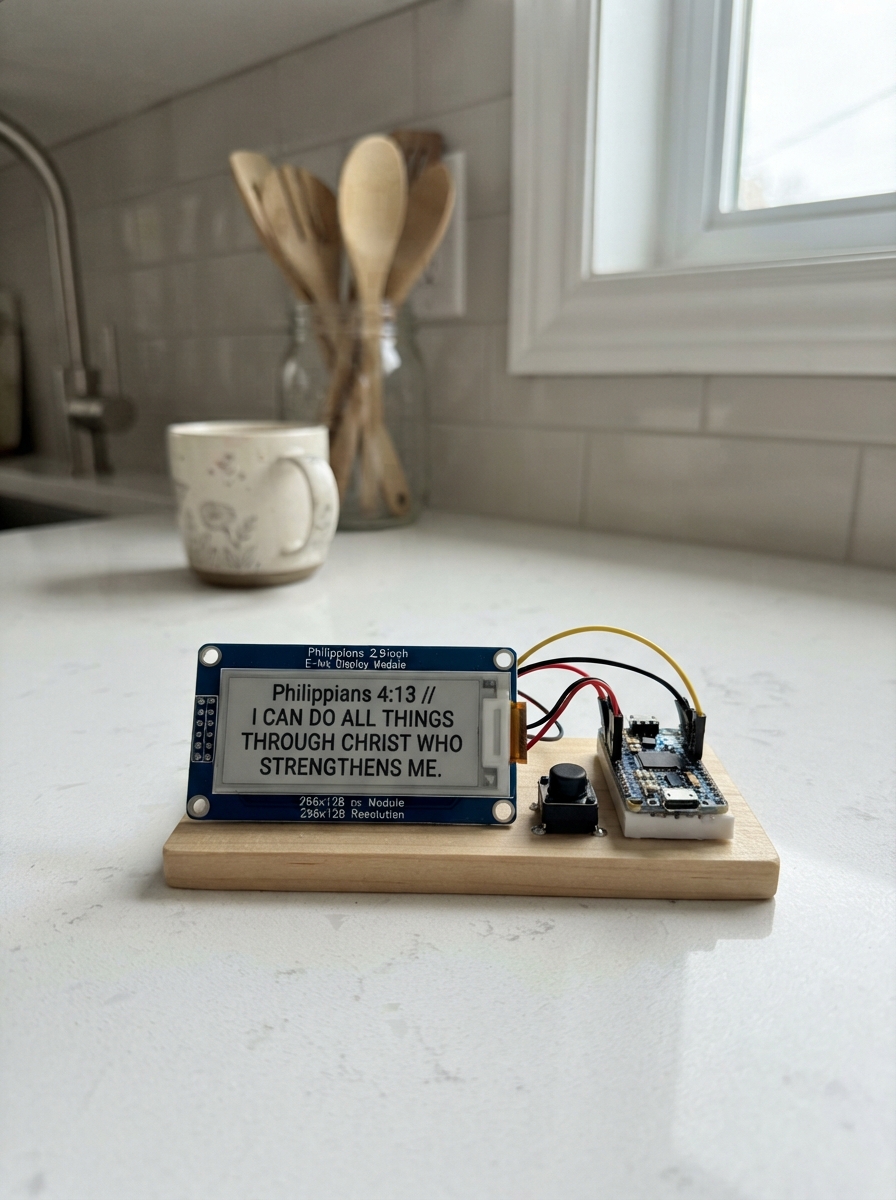
This project displays Bible verses on a 2.9-inch e-ink screen powered by an ESP32, with push buttons to navigate through verses organized by topic. The low-power e-ink display makes it ideal for a bedside devotional or meditation station that can run for weeks on a single charge.
The guide includes a complete wiring diagram, parts list, and firmware with a curated collection of verses across ten topics including Peace, Hope, Strength, Love, and more. Assembly takes just minutes—connect the display via SPI, add two buttons for topic and verse selection, and load the firmware to start browsing scripture.
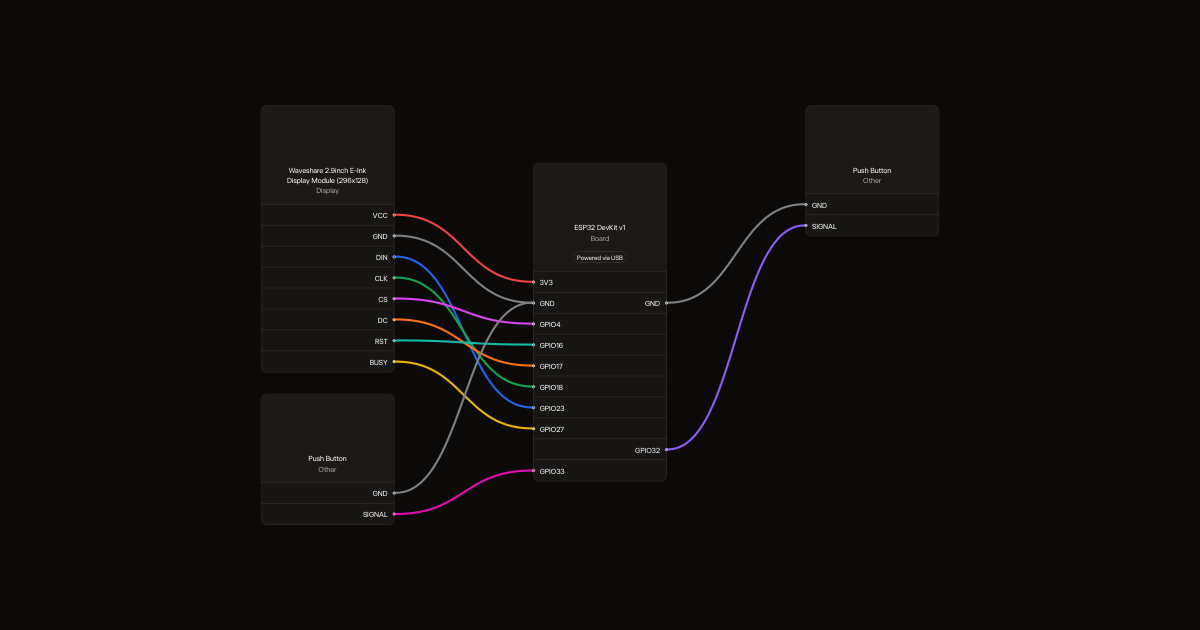
Wiring diagram
Gather all the parts
Assemble it in 4 steps
1. Choose the matching screen
Use an ESP32 DevKit v1 and the Waveshare 2.9-inch black-and-white e-Paper Module V2, 296 by 128 pixels, with its driver board. This firmware is not for a bare panel, a three-colour screen, or a different display revision.
2. Connect screen power and data
With USB unplugged, connect VCC to 3V3 and GND to GND. Connect DIN to GPIO23 (data), CLK to GPIO18 (clock), CS to GPIO4 (screen selection), DC to GPIO17 (commands), RST to GPIO16 (reset), and BUSY to GPIO27 (screen-ready signal).
- Use 3.3 V, not 5 V. Swapped power wires can damage the screen.
3. Add the two buttons
Use two normally-open momentary switches. Connect the Topic switch between GPIO32 and GND, and Next between GPIO33 and GND. The firmware supplies the pull-up resistors internally. On a four-legged switch, choose contacts that connect only when pressed, not the two already joined legs. Label the buttons Topic and Next.
4. Read and keep a verse
USB supplies the power; no battery is needed. Topic cycles Peace, Hope, Strength, Love, Anger, Sadness, Anticipation, Joy, Trust, and Fear. Next cycles three verses per topic. Wait until the screen finishes flashing before pressing again or unplugging USB. The verse remains visible without power, and the saved selection returns when USB power is restored.
- Screen flashing during a refresh is normal. E-paper has no backlight, so read it in ambient light.
- Keep the fragile glass display supported and do not bend it.
Review all connections
1. Connections between "screen" and "ESP32"
2. Connections between "topic" and "ESP32"
3. Connections between "next" and "ESP32"
Deploy the firmware
#include <Arduino.h>
#include <SPI.h>
#include <Preferences.h>
#include <GxEPD2_BW.h>
GxEPD2_BW<GxEPD2_290_T94_V2, GxEPD2_290_T94_V2::HEIGHT> display(GxEPD2_290_T94_V2(4,17,16,27));
Preferences prefs;
struct Verse { const char* reference; const char* text; };
const char* topics[] = {"Peace", "Hope", "Strength", "Love", "Anger", "Sadness", "Anticipation", "Joy", "Trust", "Fear"};
constexpr uint8_t topicCount = sizeof(topics) / sizeof(topics[0]);
const Verse verses[][3] = {
 {{"Psalm 46:10", "Be still, and know that I am God: I will be exalted among the heathen, I will be exalted in the earth."},
 {"John 14:27", "Peace I leave with you, my peace I give unto you: not as the world giveth, give I unto you. Let not your heart be troubled, neither let it be afraid."},
 {"Psalm 4:8", "I will both lay me down in peace, and sleep: for thou, LORD, only makest me dwell in safety."}},
 {{"Psalm 56:3", "What time I am afraid, I will trust in thee."},
 {"Romans 12:12", "Rejoicing in hope; patient in tribulation; continuing instant in prayer;"},
 {"Psalm 71:5", "For thou art my hope, O Lord GOD: thou art my trust from my youth."}},
 {{"Philippians 4:13", "I can do all things through Christ which strengtheneth me."},
 {"Psalm 27:1", "The LORD is my light and my salvation; whom shall I fear? the LORD is the strength of my life; of whom shall I be afraid?"},
 {"Psalm 18:1", "I will love thee, O LORD, my strength."}},
 {{"1 John 4:19", "We love him, because he first loved us."},
 {"1 Corinthians 16:14", "Let all your things be done with charity."},
 {"John 15:12", "This is my commandment, That ye love one another, as I have loved you."}},
 {{"Psalm 37:8", "Cease from anger, and forsake wrath: fret not thyself in any wise to do evil."},
 {"Proverbs 15:1", "A soft answer turneth away wrath: but grievous words stir up anger."},
 {"James 1:20", "For the wrath of man worketh not the righteousness of God."}},
 {{"Psalm 147:3", "He healeth the broken in heart, and bindeth up their wounds."},
 {"Matthew 5:4", "Blessed are they that mourn: for they shall be comforted."},
 {"Psalm 126:5", "They that sow in tears shall reap in joy."}},
 {{"Psalm 130:5", "I wait for the LORD, my soul doth wait, and in his word do I hope."},
 {"Romans 12:12", "Rejoicing in hope; patient in tribulation; continuing instant in prayer;"},
 {"Lamentations 3:25", "The LORD is good unto them that wait for him, to the soul that seeketh him."}},
 {{"Philippians 4:4", "Rejoice in the Lord alway: and again I say, Rejoice."},
 {"Psalm 118:24", "This is the day which the LORD hath made; we will rejoice and be glad in it."},
 {"1 Thessalonians 5:16", "Rejoice evermore."}},
 {{"Psalm 56:3", "What time I am afraid, I will trust in thee."},
 {"Proverbs 3:5", "Trust in the LORD with all thine heart; and lean not unto thine own understanding."},
 {"Psalm 118:8", "It is better to trust in the LORD than to put confidence in man."}},
 {{"Psalm 56:4", "In God I will praise his word, in God I have put my trust; I will not fear what flesh can do unto me."},
 {"Psalm 27:1", "The LORD is my light and my salvation; whom shall I fear? the LORD is the strength of my life; of whom shall I be afraid?"},
 {"Psalm 34:4", "I sought the LORD, and he heard me, and delivered me from all my fears."}}
};
uint8_t category=0, verseIndex=0;
struct Button {
 int pin; bool raw=true, stable=true; uint32_t changed=0;
 bool pressed() {
  bool now=digitalRead(pin);
  if(now!=raw) {raw=now; changed=millis();}
  if(now!=stable && millis()-changed>=40) {stable=now; return !stable;}
  return false;
 }
};
Button topicButton{32}, nextButton{33};
// Word wrapping with the built-in 6x8 font at double size.
void drawVerse(const char* text) {
 String remaining(text); int y=25;
 while(remaining.length()) {
  int n=remaining.length()>23 ? 23 : remaining.length();
  if(n<(int)remaining.length()) {
   int space=remaining.lastIndexOf(' ',n);
   if(space>0) n=space;
  }
  display.setCursor(8,y); display.print(remaining.substring(0,n));
  remaining.remove(0,n); remaining.trim(); y+=17;
 }
}
void render() {
 display.setFullWindow(); display.firstPage();
 do {
  display.fillScreen(GxEPD_WHITE); display.setTextColor(GxEPD_BLACK);
  display.setTextWrap(false); display.setTextSize(1);
  display.setCursor(8,5); display.print(topics[category]); display.print("  /  KJV");
  display.drawLine(8,17,287,17,GxEPD_BLACK);
  display.setTextSize(2); drawVerse(verses[category][verseIndex].text);
  display.setTextSize(1); display.setCursor(8,113);
  display.print(verses[category][verseIndex].reference);
  display.setCursor(218,113); display.print(verseIndex+1); display.print(" of 3");
 } while(display.nextPage());
 display.hibernate();
 Serial.println("Verse ready. You may unplug USB now.");
}
void setup() {
 Serial.begin(115200);
 pinMode(32,INPUT_PULLUP); pinMode(33,INPUT_PULLUP);
 prefs.begin("verses",false);
 category=prefs.getUChar("topic",0)%topicCount; verseIndex=prefs.getUChar("verse",0)%3;
 SPI.begin(18,19,23,4);
 display.init(115200,true,2,false); display.setRotation(1);
 render();
}
void loop() {
 bool topicPressed=topicButton.pressed(), nextPressed=nextButton.pressed();
 if(topicPressed || nextPressed) {
  if(topicPressed) {category=(category+1)%topicCount; verseIndex=0;}
  else verseIndex=(verseIndex+1)%3;
  prefs.putUChar("topic",category); prefs.putUChar("verse",verseIndex);
  render();
  // Discard presses made while the slow screen refresh was running.
  topicButton.raw=topicButton.stable=digitalRead(32);
  nextButton.raw=nextButton.stable=digitalRead(33);
 }
 delay(10);
}
Remix this project
Make it yours in one click
Open a full copy of this project in your own Schematik workspace, diagram, code, parts, and assembly steps included. Swap the sensor, add features, or redesign the whole thing with AI. The author's original stays untouched.