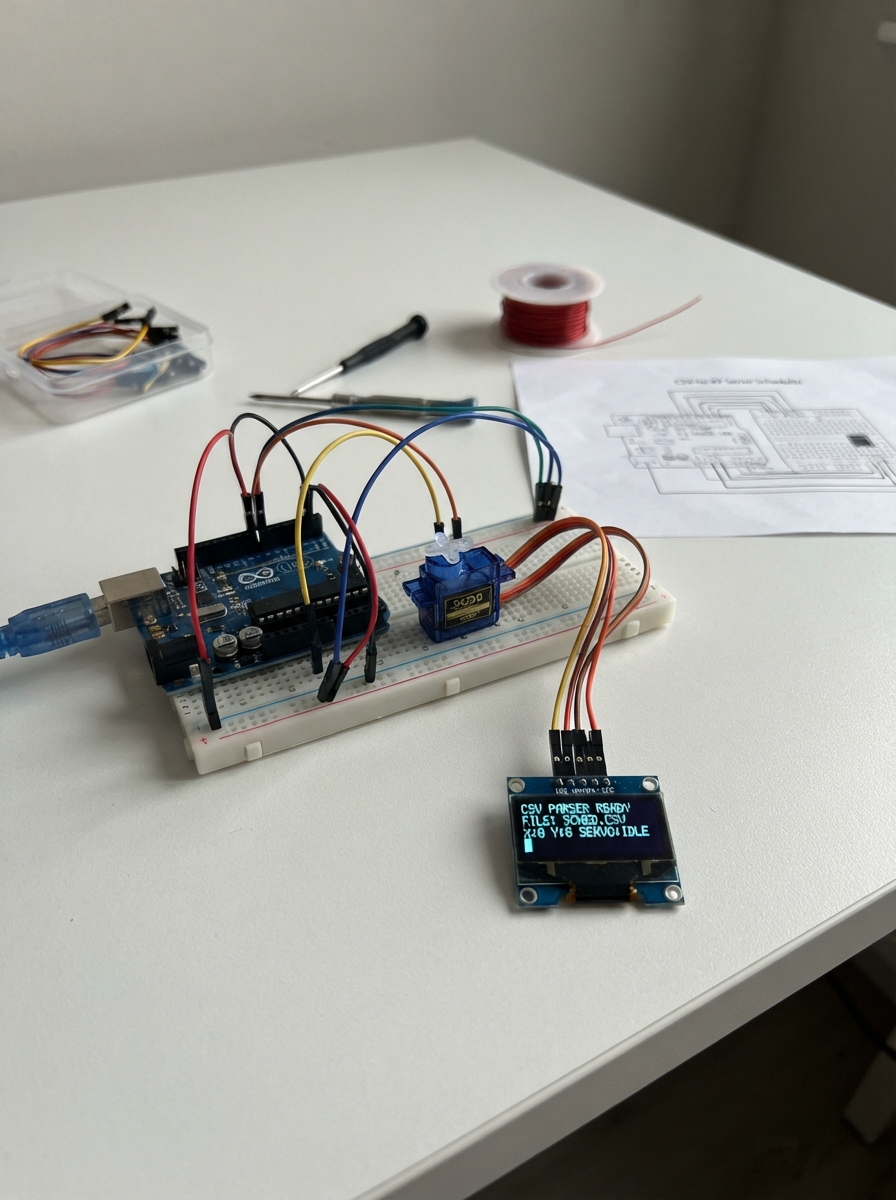
This project uses an ESP32 microcontroller and SG90 servos to execute motion sequences defined in CSV files. The servos drive small-scale XY positioning mechanisms, making it useful for plotters, camera rigs, or other precision movement applications that need to follow programmed paths.
The guide provides a wiring diagram for connecting the servos to the ESP32, a complete parts list, and firmware with a web dashboard for uploading CSV motion data and controlling playback. Assembly involves wiring the unloaded servos to their respective pins, then uploading motion sequences as CSV files to schedule servo movements with precise timing and positioning.
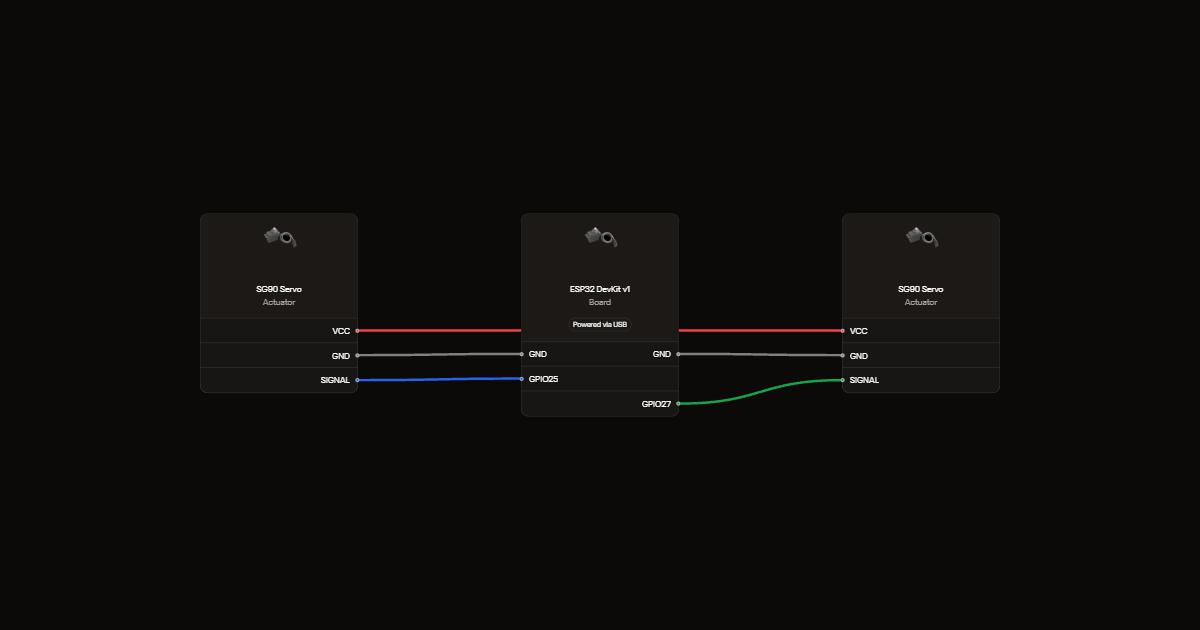
Wiring diagram
Gather all the parts
Assemble it in 2 steps
1. Wire the unloaded servos
With power off, connect X signal to GPIO25 and Y signal to GPIO27. Connect both servo grounds and the negative of a regulated 5 V, 2 A supply to ESP32 GND. Connect both servo power wires to supply positive only. Power the ESP32 by USB.
- Keep the horns unloaded and clear of fingers. Servos center on startup. Never apply 5 V to GPIO or 3V3.
2. Play a CSV
Deploy, join Shake-Preview with password ShakePreview2026, and open http://192.168.4.1. Load a CSV and send RUN. STOP holds position; switch off servo power to remove torque.
Review all connections
1. Connections between "servo_x" and "ESP32"
2. Connections between "servo_y" and "ESP32"
Deploy the firmware
#include <Arduino.h>
#include <math.h>
#include <WiFi.h>
#include <WebServer.h>
#include <Preferences.h>
WiFiServer bridgeServer(8766);
WiFiClient bridgeClient;
Preferences preferences;
String bridgeKey, networkLine;
bool bridgeAuthenticated=false;
unsigned long bridgeLastActivity=0;
#include "dashboard.h"
WebServer server(80);
String terminalLog;
class Console : public Print {
 public:
 size_t write(uint8_t c) override { return write(&c,1); }
 size_t write(const uint8_t *buffer, size_t size) override {
  Serial.write(buffer,size);
  if(bridgeAuthenticated && bridgeClient.connected()) bridgeClient.write(buffer,size);
  for(size_t i=0;i<size;i++) terminalLog += char(buffer[i]);
  if(terminalLog.length()>12000) terminalLog.remove(0,terminalLog.length()-10000);
  return size;
 }
};
Console console;
bool pwmReady;
void servoWrite(int pin, int angle) { ledcWrite(pin, ((1000 + angle * 1000 / 180) * 16383 + 10000) / 20000); }
// CSV ENE/ENN are displacement in centimetres; TABLE remains a scaled mm preview.
struct Row { double t,e,n; };
Row rows[2000];
size_t count=0;
bool receiving=false, valid=false;
// User-reported total travel: X base 100 mm; Y upper frame 60 mm.
// Centered numerical preview only; not verified safe working travel.
constexpr double maxSpanX=50.0, maxSpanY=30.0;
double scaleX=maxSpanX,scaleY=maxSpanY,ppmX=419430.4,ppmY=419430.4;
String line;
bool playing=false;
unsigned long started,frame;
size_t idx;
double ex,ny,ax=90,ay=90;
void playback(){
 if(!playing || millis()-frame<20)return;
 frame=millis(); double t=(frame-started)/1000.0;
 while(idx+1<count-1 && t>=rows[idx+1].t)++idx;
 auto a=rows[idx],b=rows[idx+1]; double f=fmin(1,(t-a.t)/(b.t-a.t));
 double x=90+(ex?30*((1-f)*(a.e-rows[0].e)/ex+f*(b.e-rows[0].e)/ex):0);
 double y=90+(ny?30*((1-f)*(a.n-rows[0].n)/ny+f*(b.n-rows[0].n)/ny):0);
 ax+=constrain(x-ax,-1.0,1.0); ay+=constrain(y-ay,-1.0,1.0);
 if (pwmReady) { servoWrite(25,lround(ax)); servoWrite(27,lround(ay)); }
 if(t>=rows[count-1].t && fabs(x-ax)<0.01 && fabs(y-ay)<0.01){playing=false;console.println("DONE: holding position");}
}
void command(String s) {
 s.trim();
 if(s=="STOP"){playing=false;console.println("STOPPED: holding position");return;}
 if(s=="BEGIN") {playing=false;count=0; receiving=true;valid=false;console.println("READY");return;}
 if(s=="END") {receiving=false;valid=count>=2;console.println(valid?"LOADED":"ERROR: need at least two rows");return;}
 if(s.startsWith("CONFIG,")) {
  double a,b,c,d;char extra;
  if(sscanf(s.c_str(),"CONFIG,%lf,%lf,%lf,%lf%c",&a,&b,&c,&d,&extra)==4 && isfinite(a)&&isfinite(b)&&isfinite(c)&&isfinite(d)&&a>0&&b>0&&a<=maxSpanX&&b<=maxSpanY&&c>0&&d>0 && a*c<100000000 && b*d<100000000) {
   scaleX=a;scaleY=b;ppmX=c;ppmY=d;console.println("CONFIGURED: preview only");
  } else console.println("ERROR CONFIG: X span must be >0 and <=50 mm; Y >0 and <=30 mm; positive pulses/mm and pulse bounds required");
  return;
 }
 if(s=="RUN"){
  if(!valid || playing){console.println("Load CSV first or stop current playback");return;}
  ex=ny=0;
  for(size_t i=0;i<count;i++){ex=fmax(ex,fabs(rows[i].e-rows[0].e));ny=fmax(ny,fabs(rows[i].n-rows[0].n));}
  if(!isfinite(ex)||!isfinite(ny)){console.println("ERROR displacement too large");return;}
  idx=0;started=frame=millis();playing=true;console.println("PLAYING");return;
 }
 if(s=="TABLE") {
  if(!valid || ppmX==0){console.println("ERROR: load CSV first");return;}
  double ex=0,ny=0;
  for(size_t i=0;i<count;i++){ex=fmax(ex,fabs(rows[i].e-rows[0].e));ny=fmax(ny,fabs(rows[i].n-rows[0].n));}
  console.println("t_s,x_mm,y_mm,x_target_pulses,y_target_pulses,dx_pulses,dy_pulses,x_rate_pps,y_rate_pps,x_speed_mm_s,y_speed_mm_s,xy_speed_mm_s,x_rotation_rev,y_rotation_rev");
  long px=0,py=0;
  double previousX=0,previousY=0;
  for(size_t i=0;i<count;i++) {
   double x=ex?scaleX*(rows[i].e-rows[0].e)/ex:0;
   double y=ny?scaleY*(rows[i].n-rows[0].n)/ny:0;
   long nx=lround(x*ppmX),nn=lround(y*ppmY);
   double dt=i?rows[i].t-rows[i-1].t:1;
   double speedX=i?fabs(x-previousX)/dt:0;
   double speedY=i?fabs(y-previousY)/dt:0;
   double speedXY=hypot(speedX,speedY);
   console.printf("%.6f,%.6f,%.6f,%ld,%ld,%ld,%ld,%.3f,%.3f,%.6f,%.6f,%.6f,%.9f,%.9f\n",rows[i].t,x,y,nx,nn,nx-px,nn-py,i?fabs(nx-px)/dt:0,i?fabs(nn-py)/dt:0,speedX,speedY,speedXY,nx/4194304.0,nn/4194304.0);
   px=nx;py=nn;previousX=x;previousY=y;
  }
  console.println("TABLE_END");return;
 }
 if(receiving) {
  if(s=="t_s,ENE,ENN")return;
  double t,e,n;char extra;
  if(count>=2000 || sscanf(s.c_str(),"%lf,%lf,%lf%c",&t,&e,&n,&extra)!=3 || !isfinite(t)||!isfinite(e)||!isfinite(n)||t<0||t>3600 || (count==0 && t!=0) || (count && t<=rows[count-1].t)) {
   receiving=false;valid=false;console.println("ERROR CSV: finite ascending time starting at zero; max 2000 rows, 3600 seconds");return;
  }
  rows[count++]={t,e,n};console.println("OK");return;
 }
 console.println("Commands: BEGIN, CSV rows, END, CONFIG,x_span_mm,y_span_mm,x_pulses_per_mm,y_pulses_per_mm, TABLE, RUN, STOP.");
}
void setup(){
 pwmReady = ledcAttach(25,50,14) && ledcAttach(27,50,14);
 if (!pwmReady) { ledcDetach(25); Serial.println("Servo PWM setup failed"); }
 if (pwmReady) { servoWrite(25,90); servoWrite(27,90); }
 Serial.setRxBufferSize(4096);Serial.begin(115200);line.reserve(160);
 preferences.begin("shake-net",false);
 bridgeKey=preferences.isKey("key") ? preferences.getString("key", "") : String();
 WiFi.mode(WIFI_AP_STA);
 String ssid=preferences.isKey("ssid") ? preferences.getString("ssid", "") : String();
 if(ssid.length()) WiFi.begin(ssid.c_str(),preferences.getString("pass", "").c_str());
 bridgeServer.begin();
 WiFi.softAP("Shake-Preview", "ShakePreview2026");
 server.on("/",HTTP_GET,[](){server.send_P(200,"text/html; charset=utf-8",dashboard);});
 server.on("/network",HTTP_GET,[](){
  server.send(200,"text/html", "<meta name='viewport' content='width=device-width'><h2>Wireless bridge setup</h2><p>Trusted home Wi-Fi only. Bench servos can move. Enter a private bridge key of 16 to 64 letters or digits. Keep it secret.</p><form method='POST' action='/network'><p>Wi-Fi name <input name='ssid' maxlength='32' required></p><p>Wi-Fi password <input name='pass' type='password' maxlength='63'></p><p>Private bridge key <input name='key' type='password' minlength='16' maxlength='64' required></p><button>Save and connect</button></form><p><a href='/network-status'>Show connection address</a></p>");
 });
 server.on("/network-status",HTTP_GET,[](){
  server.send(200,"text/plain",WiFi.status()==WL_CONNECTED ? "ESP32 Wi-Fi address: " + WiFi.localIP().toString() + "\nBridge port: 8766" : "Not connected yet. Wait and refresh, or check Wi-Fi details at /network. Use 2.4 GHz Wi-Fi.");
 });
 server.on("/network",HTTP_POST,[](){
  String ssid=server.arg("ssid"),pass=server.arg("pass"),key=server.arg("key");
  bool keyOK=key.length()>=16 && key.length()<=64;
  for(size_t i=0;i<key.length();i++) if(!isalnum((unsigned char)key[i])) keyOK=false;
  if(!ssid.length() || ssid.length()>32 || pass.length()>63 || !keyOK){server.send(400,"text/plain","Invalid Wi-Fi details or key; key must be 16-64 letters/digits.");return;}
  if(bridgeClient.connected()) bridgeClient.stop();
  bridgeAuthenticated=false;
  preferences.putString("ssid",ssid);preferences.putString("pass",pass);preferences.putString("key",key);bridgeKey=key;
  WiFi.begin(ssid.c_str(),pass.c_str());
  server.send(200,"text/html","Saved. <a href='/network-status'>Check connection address</a>. Wait a few seconds, then refresh. Credentials stay on this ESP32; use a trusted network only.");
 });
 server.on("/log",HTTP_GET,[](){server.send(200,"text/plain",terminalLog);});
 server.on("/command",HTTP_POST,[](){
  String text=server.arg("plain");
  if(text.length()>160){server.send(413,"text/plain","Command too long");return;}
  command(text);server.send(200,"text/plain","Command processed; see terminal");
 });
 server.on("/data",HTTP_GET,[](){
  server.setContentLength(CONTENT_LENGTH_UNKNOWN);server.send(200,"text/csv","");
  server.sendContent("t_s,ENE,ENN\n");
  if(valid) for(size_t i=0;i<count;i++){
   char buf[128];snprintf(buf,sizeof(buf),"%.9g,%.9g,%.9g\n",rows[i].t,rows[i].e,rows[i].n);server.sendContent(buf);
  }
  server.sendContent("");
 });
 server.begin();
 console.println("Phone Wi-Fi: Shake-Preview; password: ShakePreview2026; page: http://192.168.4.1");
 console.println("Default preview: X base +/-50 mm (100 mm total), Y upper +/-30 mm (60 mm total); 419430.4 pulses/mm; not safe motion limits");
 console.println("Bench servo scheduler ready");
}
void loop(){
 playback();
 server.handleClient();
 if(!bridgeClient.connected()) {
  bridgeAuthenticated=false;networkLine="";
  bridgeClient=bridgeServer.available();
  if(bridgeClient) {bridgeClient.setNoDelay(true);bridgeLastActivity=millis();}
 }
 if(bridgeClient.connected() && !bridgeAuthenticated && millis()-bridgeLastActivity>10000) bridgeClient.stop();
 while(bridgeClient.connected() && bridgeClient.available()) {
  char c=bridgeClient.read();bridgeLastActivity=millis();
  if(c=='\n') {
   if(!bridgeAuthenticated) {
    if(bridgeKey.length() && networkLine=="AUTH,"+bridgeKey) {bridgeAuthenticated=true;bridgeClient.println("AUTH_OK");}
    else {bridgeClient.println("ERROR authentication");bridgeClient.stop();}
   } else command(networkLine);
   networkLine="";
  } else if(c!='\r') {
   if(networkLine.length()<159) networkLine+=c;
   else {bridgeClient.stop();bridgeAuthenticated=false;networkLine="";receiving=false;valid=false;playing=false;}
  }
 }
 while(Serial.available()){
  char c=Serial.read();
  if(c=='\n'||c==';'){command(line);line="";}
  else if(c!='\r'){if(line.length()<159)line+=c;else{line="";receiving=false;valid=false;playing=false;console.println("ERROR line too long");}}
 }
}
Remix this project
Make it yours in one click
Open a full copy of this project in your own Schematik workspace, diagram, code, parts, and assembly steps included. Swap the sensor, add features, or redesign the whole thing with AI. The author's original stays untouched.