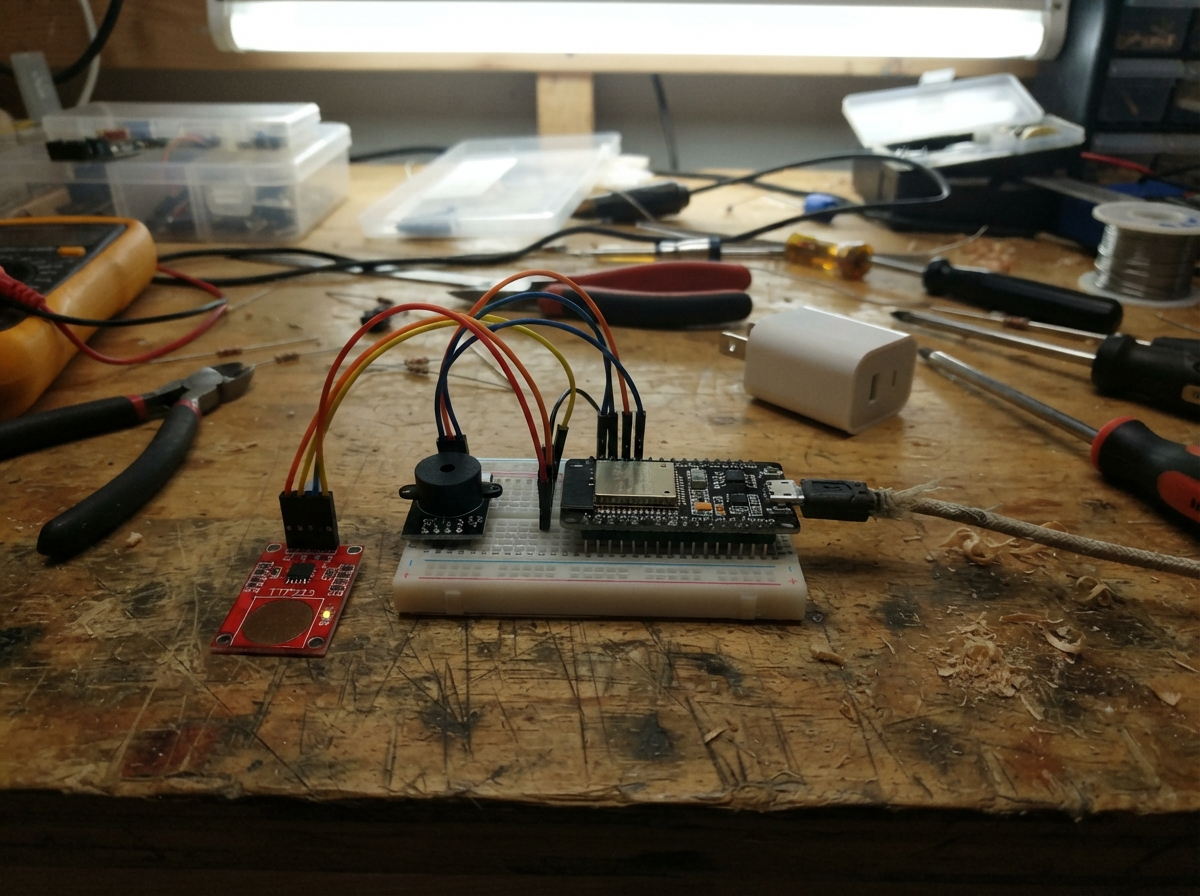
Build a handheld pocket arcade controller powered by an ESP32 microcontroller. This project combines capacitive touch sensing with audio feedback to create an interactive gaming device that connects to a web-based arcade platform featuring multiple games with adjustable difficulty levels.
The guide includes a complete wiring diagram showing how to connect the TTP223 touch sensor module and piezo buzzer to the ESP32, a full parts list, step-by-step assembly instructions for the handheld enclosure, and ready-to-flash firmware that handles touch input detection, WiFi connectivity, and game communication. Makers will have everything needed to assemble the controller and start playing neon-themed arcade games.
Wiring diagram
Gather all the parts
Assemble it in 5 steps
1. Make a handheld base
Secure a small breadboard and the ESP32 side by side on stiff cardboard, insulating the underside of the board. Put the two touch modules at opposite edges for your thumbs. Keep the USB socket accessible and use short jumper wires. Use only the header row that starts with 3V3 and GND; leave the opposite header unconnected. Check the printed labels rather than counting pins.
- Use touch modules with headers already fitted. The wide ESP32 may cover most holes if placed directly across a small breadboard.
2. Connect the touch pads
With USB unplugged, connect both VCC pins to ESP32 3V3 and both GND pins to the GND next to 3V3 on that same header row. Left SIG goes to GPIO18 and right SIG to GPIO19; these wires carry your button presses. Keep the modules in default momentary active-high mode with their mode solder bridges open.
- Use 3.3 V rather than 5 V so touch outputs cannot damage the ESP32.
3. Add arcade sound
Connect the passive piezo SIG lead to GPIO21 for sound and the other lead to the same GND next to 3V3. This passive piezo needs no series resistor. Remove the old LEDs, resistors and motion sensor entirely.
- Use the listed small passive piezo
- not a magnetic speaker or high-current buzzer.
4. Secure the controller
Secure wires to the backing and leave touch faces uncovered. Use USB power from a computer or an enclosed USB power bank, with cable strain relief. Keep fingers off the pads during power-up so they calibrate correctly.
- This is a gentle handheld prototype; a loose breadboard is not shake-proof.
5. Open your pocket arcade
Press Deploy, then connect your phone to Wi-Fi Neon-Drift with password neondrift. Stay connected if it reports no internet. Open http://192.168.4.1 in your browser. Choose one of four games and a difficulty, then press START. Left and right pads control each game; touching both activates the action explained on screen. Phone buttons also work. Only one phone can connect at a time.
- Pause before switching games. Select a new game and press START to load it.
- Scores are saved in this browser per game and difficulty, not on the ESP32. Clearing browser data removes them.
- A lost connection stops gameplay until the controller reconnects. Switching away from the page pauses the game; press PAUSE to resume.
- Fullscreen availability depends on your phone browser. Sound comes from the controller piezo, not the phone.
Review all connections
1. Connections between "touch_left" and "ESP32"
2. Connections between "touch_right" and "ESP32"
3. Connections between "sound" and "ESP32"
Deploy the firmware
#include <Arduino.h>
#include <WiFi.h>
#include <WebServer.h>
WebServer server(80);
const int TL=18,TR=19,BZ=21;
uint32_t counts[3]={0,0,0};
int stable=0,candidate=0; uint32_t changed=0;
const char page[] PROGMEM=R"HTML(
<!doctype html><html><head><meta name="viewport" content="width=device-width,initial-scale=1,user-scalable=no"><title>Neon Pocket Arcade</title><style>
*{box-sizing:border-box}body{margin:0;background:#07091b;color:#cfffff;font:15px system-ui;text-align:center}h1{color:#39ffda;margin:10px}canvas{width:min(90vw,400px);height:auto;max-height:60vh;border:2px solid #32ddff;border-radius:14px;touch-action:none}button,select{background:#16354b;color:#fff;border:1px solid #35ddd0;border-radius:9px;padding:10px;margin:4px}#hud{margin:8px}#status{color:#ffde77} .pad{min-width:110px;background:#22506a}</style></head><body><h1>NEON POCKET ARCADE</h1>
<select id="game"><option value="drift">Neon Drift</option><option value="catch">Star Catcher</option><option value="pong">Neon Rally</option><option value="reflex">Reflex Rush</option></select><select id="difficulty"><option value="1">Chill</option><option value="1.5" selected>Arcade</option><option value="2">Turbo</option></select>
<p id="hud"></p><canvas id="c" width="400" height="500"></canvas><p id="status">Connecting…</p><p id="help"></p>
<button id="start">START / RESTART</button><button id="pause">PAUSE</button><button id="mute">SOUND ON</button><button id="full">FULLSCREEN</button><div><button class="pad" id="left">◀ LEFT</button><button class="pad" id="both">BOTH</button><button class="pad" id="right">RIGHT ▶</button></div><p>Wi-Fi: Neon-Drift · No internet needed</p><script>
const $=s=>document.getElementById(s),c=$('c'),x=c.getContext('2d');
let mode='drift',level=1.5,score=0,best={},alive=false,paused=false,muted=false,connected=false,lastReply=0,old=null,last=performance.now(),lane=1,objects=[],timer=0,shield=0,cool=0,lives=3,px=200,ball={},target=0,deadline=0,combo=0,reason='Choose a game and press START',paint='',bgTime=0;
try{best=JSON.parse(localStorage.arcadeBest||'{}')||{};muted=localStorage.arcadeMute==='1'}catch(e){};
const help={drift:'Left/right: change lane · Both: shield (5s recharge)',catch:'Left/right: move basket · Catch stars, avoid red bombs · Both: clear screen (6s recharge)',pong:'Left/right: move paddle · Both: center paddle · Keep the ball alive',reflex:'Tap the glowing side · Gold means BOTH · Wrong or late costs a life'};
function sound(k){if(!muted)fetch('/sound?k='+k).catch(()=>{})}
function save(){let key=mode+'-'+level;best[key]=Math.max(best[key]||0,Math.floor(score));try{localStorage.arcadeBest=JSON.stringify(best)}catch(e){}}
function end(){alive=false;save();reason='GAME OVER · Press START or both pads';sound(2)}
function newTarget(){target=Math.floor(Math.random()*3);deadline=Math.max(.45,1.9/level-score*.008)}
function serve(){ball={x:200,y:250,vx:(Math.random()<.5?-1:1)*130*level,vy:190*level}}
function start(){if(!connected){reason='Connect the controller first';return}mode=$('game').value;level=+$('difficulty').value;score=0;lane=1;px=200;objects=[];timer=0;shield=0;cool=0;lives=3;combo=0;paused=false;alive=true;serve();newTarget();sound(0)}
function input(k){if(!connected)return;if(!alive){if(k===2)start();return}if(paused)return;
if(mode==='reflex'){if(k===target){score+=10+Math.min(10,combo++);sound(0);newTarget()}else{combo=0;lives--;sound(2);newTarget();if(!lives)end()}return}
if(k===2){if(mode==='drift'&&cool<=0){shield=1.3;cool=5;sound(1)}if(mode==='catch'&&cool<=0){objects=[];cool=6;sound(1)}if(mode==='pong')px=200;return}
if(mode==='pong')px=Math.max(45,Math.min(355,px+(k===0?-44:44)));else lane=Math.max(0,Math.min(2,lane+(k===0?-1:1)))}
$('start').onclick=start;$('pause').onclick=()=>{if(alive)paused=!paused};$('mute').onclick=()=>{muted=!muted;try{localStorage.arcadeMute=muted?'1':'0'}catch(e){}};$('full').onclick=()=>{if(document.fullscreenElement){document.exitFullscreen?.()}else{document.documentElement.requestFullscreen?.().catch(()=>{})}};
['left','right','both'].forEach((id,k)=>$(id).onpointerdown=e=>{e.preventDefault();input(k)});
document.addEventListener('keydown',e=>{if(e.repeat||/SELECT|BUTTON/.test(document.activeElement.tagName))return;if(['ArrowLeft','ArrowRight',' '].includes(e.key)){e.preventDefault();input(e.key==='ArrowLeft'?0:e.key==='ArrowRight'?1:2)}});
document.addEventListener('visibilitychange',()=>{if(document.hidden&&alive)paused=true});
async function poll(){try{let r=await fetch('/input',{cache:'no-store'});if(!r.ok)throw 0;let a=await r.json();let was=connected&&performance.now()-lastReply<1200;connected=true;lastReply=performance.now();if(old&&was)for(let k=0;k<3;k++){let n=Math.min(4,(a[k]-old[k])>>>0);while(n--)input(k)}old=a}catch(e){connected=false}setTimeout(poll,40)}poll();
function rect(a,b,w,h,color){x.fillStyle=color;x.fillRect(a,b,w,h)}function text(s,y,size=24,color='#fff'){x.fillStyle=color;x.font='bold '+size+'px system-ui';x.textAlign='center';x.fillText(s,200,y)}
function frame(t){let dt=Math.min(.04,(t-last)/1000);last=t;let online=connected&&t-lastReply<1200;let running=alive&&!paused&&online;
if(running){bgTime+=dt;cool=Math.max(0,cool-dt);shield=Math.max(0,shield-dt);
if(mode==='drift'||mode==='catch'){timer-=dt;if(mode==='drift')score+=dt*10;
if(timer<=0){objects.push({l:Math.floor(Math.random()*3),y:-20,bomb:mode==='catch'&&Math.random()<.25});timer=Math.max(.28,.95/level-score*.0003)}
for(let o of objects){o.y+=dt*(135*level+Math.min(180,score*.35));if(o.l===lane&&Math.abs(o.y-438)<24){o.y=600;if(mode==='drift'){if(shield<=0){end();break}else sound(1)}else if(o.bomb){lives--;sound(2);if(!lives){end();break}}else{score+=10;sound(0)}}else if(o.y>490&&mode==='catch'&&!o.bomb){o.y=600;lives--;if(!lives){end();break}}}objects=objects.filter(o=>o.y<520)}
if(mode==='pong'){ball.x+=ball.vx*dt;ball.y+=ball.vy*dt;if(ball.x<8){ball.x=8;ball.vx=Math.abs(ball.vx)}if(ball.x>392){ball.x=392;ball.vx=-Math.abs(ball.vx)}if(ball.y<8){ball.y=8;ball.vy=Math.abs(ball.vy)}if(ball.vy>0&&ball.y>=428&&ball.y<=447&&Math.abs(ball.x-px)<51){ball.y=427;ball.vy=-Math.min(500,Math.abs(ball.vy)*1.035);ball.vx=(ball.x-px)*7;score+=10;sound(0)}if(ball.y>515){lives--;sound(2);if(!lives)end();else serve()}}
if(mode==='reflex'){deadline-=dt;if(deadline<=0){lives--;combo=0;sound(2);if(!lives)end();else newTarget()}}}
// All games animate continuously; static controls update only on state changes.
rect(0,0,400,500,'#090e24');for(let i=0;i<12;i++)rect((i*83)%400,(i*47+bgTime*35)%500,2,8,'#17435d');
if(mode==='drift'||mode==='catch'){for(let i=1;i<3;i++)rect(i*400/3,0,1,500,'#194363');for(let o of objects){let ox=o.l*400/3+400/6;if(mode==='drift'||o.bomb)rect(ox-23,o.y-18,46,36,'#ff397c');else{ x.fillStyle='#ffe764';x.beginPath();x.arc(ox,o.y,12,0,7);x.fill()}}let p=lane*400/3+400/6;rect(p-27,423,54,28,'#34ffe0');if(shield>0){x.strokeStyle='#ffee66';x.beginPath();x.arc(p,438,40,0,7);x.stroke()}}
if(mode==='pong'){rect(px-45,440,90,12,'#36ffdc');x.fillStyle='#ffe464';x.beginPath();x.arc(ball.x||200,ball.y||250,8,0,7);x.fill()}
if(mode==='reflex'){rect(20,130,170,200,target===0?'#18bda3':'#183447');rect(210,130,170,200,target===1?'#18bda3':'#183447');text(target===2?'BOTH!':target===0?'LEFT!':'RIGHT!',245,42,target===2?'#ffe56a':'#fff');rect(20,355,360*Math.max(0,deadline)/(Math.max(.45,1.9/level-score*.008)),10,'#ffe56a');text('Combo '+combo,400,20)}
if(!alive||paused||!online){rect(0,180,400,120,'#090e24e8');text(!online?'CONNECTING…':paused?'PAUSED':score?'GAME OVER':'READY?',230);text(!online?'Join Neon-Drift Wi-Fi':paused?'Press PAUSE to resume':'START or touch both pads',267,17)}
let h='Score '+Math.floor(score)+' · Best '+(best[mode+'-'+level]||0)+(mode==='drift'?'':' · Lives '+lives);if($('hud').textContent!==h)$('hud').textContent=h;
let st=!online?'Controller offline — paused':!alive?reason:paused?'Paused':cool>0?'Power recharging: '+Math.ceil(cool)+'s':'Controller connected · Ready';if($('status').textContent!==st)$('status').textContent=st;
let he=help[alive?mode:$('game').value];if($('help').textContent!==he)$('help').textContent=he;let mu=muted?'SOUND OFF':'SOUND ON';if($('mute').textContent!==mu)$('mute').textContent=mu;requestAnimationFrame(frame)}requestAnimationFrame(frame);
</script></body></html>
)HTML";
void setup(){
 Serial.begin(115200);pinMode(TL,INPUT);pinMode(TR,INPUT);pinMode(BZ,OUTPUT);digitalWrite(BZ,LOW);
 WiFi.mode(WIFI_AP);bool ok=WiFi.softAP("Neon-Drift","neondrift",1,false,1);
 Serial.println(ok?"Join Wi-Fi Neon-Drift / password neondrift. Open http://192.168.4.1":"Wi-Fi failed; restart board.");
 server.on("/",[](){server.send_P(200,"text/html",page);});
 server.on("/input",[](){char b[100];snprintf(b,sizeof(b),"[%lu,%lu,%lu]",(unsigned long)counts[0],(unsigned long)counts[1],(unsigned long)counts[2]);server.sendHeader("Cache-Control","no-store");server.send(200,"application/json",b);});
 server.on("/sound",[](){int k=server.arg("k").toInt();tone(BZ,k==2?2000:k==1?4000:3000,k==2?250:70);server.send(200,"text/plain","ok");});
 server.begin();
}
void loop(){
 // A short chord window lets two thumb presses become one shield action.
 int v=(digitalRead(TL)?1:0)|(digitalRead(TR)?2:0);
 if(v!=candidate){candidate=v;changed=millis();}
 if(candidate!=stable&&millis()-changed>=45){
  int before=stable;stable=candidate;
  // Beep locally on each new press, independent of Wi-Fi and browser audio.
  int pressed=stable & ~before;
  if(pressed)tone(BZ,stable==3?2600:pressed==1?2200:3000,90);
  if(stable==3)counts[2]++;
  else if(before==0&&stable)counts[stable==1?0:1]++;
 }
 server.handleClient();delay(1);
}
Remix this project
Make it yours in one click
Open a full copy of this project in your own Schematik workspace, diagram, code, parts, and assembly steps included. Swap the sensor, add features, or redesign the whole thing with AI. The author's original stays untouched.