Community project
Live Flight Radar Scanner
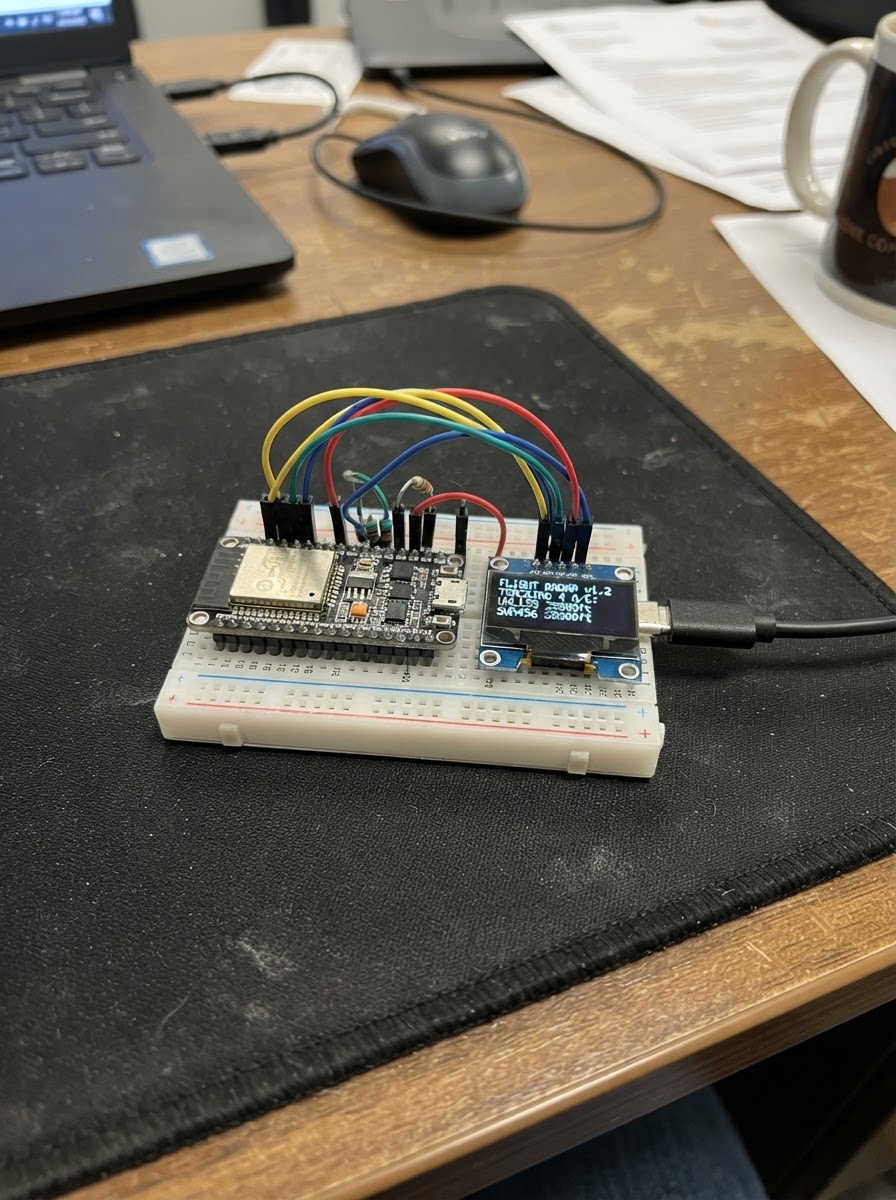
This project turns an ESP32 into a live flight radar scanner that displays aircraft positions on a circular radar display. The device connects to Wi-Fi and pulls real-time flight data from public aviation APIs, showing aircraft callsigns and locations within a configurable range around a reference airport.
Builders will receive a complete parts list, wiring diagram showing connections between the ESP32, circular LCD display, rotary encoder, and haptic motor, plus pre-written firmware and step-by-step assembly instructions. The guide covers Wi-Fi configuration, uploading the sketch, and testing the radar display to confirm live aircraft tracking.
Wiring diagram
Assemble it in 3 steps
1. Inspect the built-in parts
Use the Waveshare ESP32-S3-Knob-Touch-LCD-1.8 as supplied. The round screen, touch surface, turning knob, vibration motor driver, and audio jack circuitry are already connected inside the board, so do not add jumper wires to them.
- Keep the screen’s protective film on until you finish handling the board.
- Do not connect wires to the board’s internal screen or touch pins; using those pins for another device can stop the built-in screen or touch surface from working.
2. Connect power and data
Plug a USB data cable into the board’s USB connector and then into your computer. The cable powers the board and lets Schematik send the firmware.
- Use a USB cable that carries data; some charging-only cables provide power but cannot transfer the program.
- Place the board on a dry, non-metal surface so the underside cannot touch loose metal objects.
3. Set the Wi-Fi details
Before deploying, replace YOUR_WIFI_NAME and YOUR_WIFI_PASSWORD near the top of the firmware with the name and password of the Wi-Fi network the board should join. The radar needs internet access to ask for aircraft positions near ONT.
- A normal 2.4 GHz Wi-Fi network is the simplest choice for this board.
- Keep your Wi-Fi password private if you share screenshots or copies of the firmware.
Deploy the firmware
#include <Arduino.h>
#include <WiFi.h>
#include <WiFiClientSecure.h>
#include <HTTPClient.h>
#include <ArduinoJson.h>
#include <Wire.h>
#include <Arduino_GFX_Library.h>

// Replace these two placeholders with the Wi-Fi network name and password.

// Hoisted type definitions
struct Plane {
  float latitude;
  float longitude;
  char callsign[10];
};


// Forward declarations
void hapticClick();
void drawHeader(const char *status);
void drawRadar();
bool fetchPlanes();
void connectWifi();

static const char *WIFI_SSID = "YOUR_WIFI_NAME";
static const char *WIFI_PASSWORD = "YOUR_WIFI_PASSWORD";

// Ontario International Airport (ONT), California.
static constexpr float ONT_LAT = 34.0560f;
static constexpr float ONT_LON = -117.6012f;
static constexpr float RANGE_DEG = 0.55f;

constexpr int LCD_CS = 14;
constexpr int LCD_SCK = 13;
constexpr int LCD_D0 = 15;
constexpr int LCD_D1 = 16;
constexpr int LCD_D2 = 17;
constexpr int LCD_D3 = 18;
constexpr int LCD_RST = 21;
constexpr int LCD_BL = 47;
constexpr int I2C_SDA = 11;
constexpr int I2C_SCL = 12;
constexpr int ENC_A = 8;
constexpr int ENC_B = 7;
constexpr int HAPTIC_EN = 0;

Arduino_DataBus *bus = new Arduino_ESP32QSPI(LCD_CS, LCD_SCK, LCD_D0, LCD_D1, LCD_D2, LCD_D3);
Arduino_GFX *gfx = new Arduino_ST77916(bus, LCD_RST, 0, true, 360, 360);


Plane planes[24];
uint8_t planeCount = 0;
uint32_t lastFetchMs = 0;
uint32_t lastWifiAttemptMs = 0;
int lastEncoderA = HIGH;
bool fetchFailed = false;
const uint32_t FETCH_INTERVAL_MS = 30000;

void hapticClick() {
  // Ask the built-in DRV2605 driver to play a short click on its LRA motor.
  Wire.beginTransmission(0x5A);
  Wire.write(0x01); Wire.write(0x00);
  Wire.endTransmission();
  Wire.beginTransmission(0x5A);
  Wire.write(0x04); Wire.write(47);
  Wire.endTransmission();
  Wire.beginTransmission(0x5A);
  Wire.write(0x0C); Wire.write(1);
  Wire.endTransmission();
}

void drawHeader(const char *status) {
  gfx->fillRect(0, 0, 360, 34, 0x0010);
  gfx->setTextColor(0xFFFF);
  gfx->setTextSize(2);
  gfx->setCursor(13, 9);
  gfx->print("ONT FLIGHT RADAR");
  gfx->setTextSize(1);
  gfx->setCursor(315, 12);
  gfx->print(status);
}

void drawRadar() {
  const int cx = 180;
  const int cy = 198;
  gfx->fillScreen(0x0000);
  drawHeader(WiFi.status() == WL_CONNECTED ? "LIVE" : "WI-FI");
  gfx->drawCircle(cx, cy, 135, 0x03E0);
  gfx->drawCircle(cx, cy, 90, 0x02A0);
  gfx->drawCircle(cx, cy, 45, 0x02A0);
  gfx->drawFastHLine(cx - 135, cy, 271, 0x02A0);
  gfx->drawFastVLine(cx, cy - 135, 271, 0x02A0);
  gfx->setTextColor(0x07E0);
  gfx->setTextSize(1);
  gfx->setCursor(176, 55); gfx->print("N");
  gfx->setCursor(313, 194); gfx->print("E");
  gfx->setCursor(176, 338); gfx->print("S");
  gfx->setCursor(39, 194); gfx->print("W");
  gfx->fillCircle(cx, cy, 5, 0xFFE0);
  gfx->setTextColor(0xFFFF);
  gfx->setCursor(cx + 8, cy + 6); gfx->print("ONT");

  for (uint8_t i = 0; i < planeCount; i++) {
    int x = cx + (int)((planes[i].longitude - ONT_LON) / RANGE_DEG * 135.0f);
    int y = cy - (int)((planes[i].latitude - ONT_LAT) / RANGE_DEG * 135.0f);
    if (x < 45 || x > 315 || y < 63 || y > 333) continue;
    gfx->fillTriangle(x, y - 5, x - 4, y + 5, x + 4, y + 5, 0xF800);
    gfx->setTextColor(0xFFFF);
    gfx->setCursor(x + 6, y - 4);
    gfx->print(planes[i].callsign);
  }

  gfx->fillRect(0, 340, 360, 20, 0x0010);
  gfx->setTextColor(fetchFailed ? 0xF800 : 0x07E0);
  gfx->setCursor(8, 347);
  if (WiFi.status() != WL_CONNECTED) gfx->print("Add Wi-Fi name and password in code");
  else if (fetchFailed) gfx->print("Radar data unavailable - retrying");
  else { gfx->print(planeCount); gfx->print(" aircraft | refresh 30 s"); }
}

bool fetchPlanes() {
  if (WiFi.status() != WL_CONNECTED) return false;
  WiFiClientSecure client;
  client.setInsecure();
  HTTPClient http;
  String url = "https://opensky-network.org/api/states/all?lamin=" + String(ONT_LAT - RANGE_DEG, 4) +
               "&lomin=" + String(ONT_LON - RANGE_DEG, 4) + "&lamax=" + String(ONT_LAT + RANGE_DEG, 4) +
               "&lomax=" + String(ONT_LON + RANGE_DEG, 4);
  if (!http.begin(client, url)) return false;
  int result = http.GET();
  if (result != HTTP_CODE_OK) { http.end(); return false; }

  JsonDocument doc;
  DeserializationError error = deserializeJson(doc, http.getStream());
  http.end();
  if (error || !doc["states"].is<JsonArray>()) return false;

  planeCount = 0;
  for (JsonVariant state : doc["states"].as<JsonArray>()) {
    if (planeCount >= 24) break;
    JsonArray s = state.as<JsonArray>();
    if (s.size() < 7 || s[5].isNull() || s[6].isNull()) continue;
    planes[planeCount].longitude = s[5].as<float>();
    planes[planeCount].latitude = s[6].as<float>();
    const char *name = s[1].isNull() ? "AIRCRAFT" : s[1].as<const char *>();
    snprintf(planes[planeCount].callsign, sizeof(planes[planeCount].callsign), "%.9s", name);
    planeCount++;
  }
  return true;
}

void connectWifi() {
  if (String(WIFI_SSID) == "YOUR_WIFI_NAME") return;
  WiFi.mode(WIFI_STA);
  WiFi.begin(WIFI_SSID, WIFI_PASSWORD);
}

void setup() {
  pinMode(LCD_BL, OUTPUT);
  digitalWrite(LCD_BL, HIGH);
  pinMode(HAPTIC_EN, OUTPUT);
  digitalWrite(HAPTIC_EN, HIGH);
  pinMode(ENC_A, INPUT_PULLUP);
  pinMode(ENC_B, INPUT_PULLUP);
  Wire.begin(I2C_SDA, I2C_SCL);
  gfx->begin();
  gfx->setRotation(0);
  connectWifi();
  drawRadar();
}

void loop() {
  int encoderA = digitalRead(ENC_A);
  if (encoderA != lastEncoderA && encoderA == LOW) {
    hapticClick();
    lastFetchMs = 0; // Turning the knob refreshes the view right away.
  }
  lastEncoderA = encoderA;

  if (WiFi.status() != WL_CONNECTED && millis() - lastWifiAttemptMs > 10000) {
    lastWifiAttemptMs = millis();
    connectWifi();
  }
  if (WiFi.status() == WL_CONNECTED && millis() - lastFetchMs >= FETCH_INTERVAL_MS) {
    lastFetchMs = millis();
    fetchFailed = !fetchPlanes();
    drawRadar();
  }
  delay(5);
}
Remix this project
Make it yours in one click
Open a full copy of this project in your own Schematik workspace — diagram, code, parts, and assembly steps included. Swap the sensor, add features, or redesign the whole thing with AI. The author's original stays untouched.