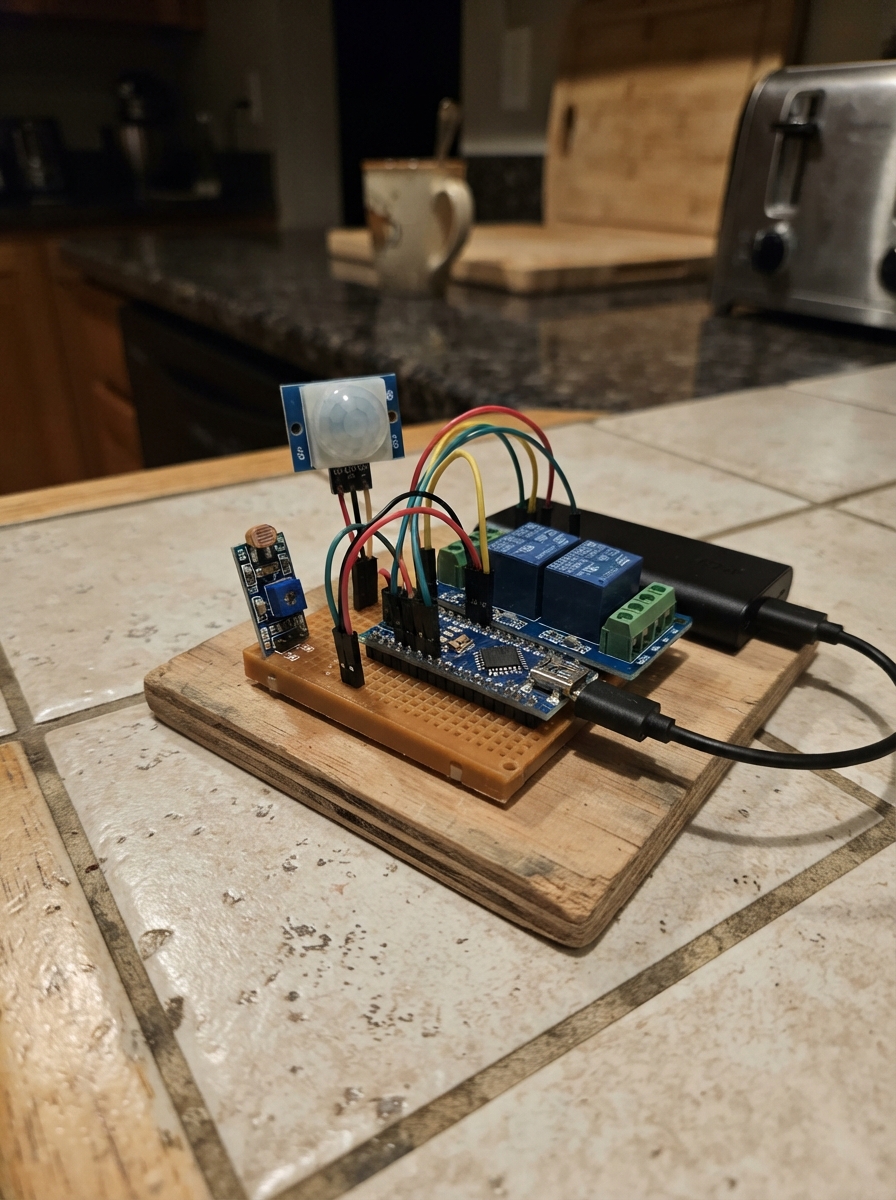
This project builds a smart light controller that turns on a lamp only when it's dark outside and motion is detected nearby. It combines an Arduino Uno with a PIR motion sensor, an LDR light sensor module, and a relay to safely switch AC or DC lighting loads. Perfect for hallways, porches, or security lighting that should only activate at night.
The guide includes a complete wiring diagram showing how to connect the motion and light sensors to the Arduino's digital inputs, wire the relay module to control power to the lamp, and upload the firmware that implements the logic. Assembly steps cover safe handling of the bulb circuit and proper sensor placement for reliable detection.
Wiring diagram

Gather all the parts
Assemble it in 5 steps
1. Keep the bulb wiring safe
Unplug the bulb circuit before touching the relay terminals. Use a relay module inside a non-metal enclosure. The Arduino only controls the relay module; do not connect any bulb wire to an Arduino pin.
- For a low-voltage DC bulb, the relay contact side can be built on a breadboard only if the bulb supply and relay current are within the board and wire ratings.
- Mains-powered bulbs can cause electric shock or fire. Have a qualified adult or electrician wire the mains plug, bulb holder, fuse, enclosure, and relay contacts.
2. Connect the motion sensor
Connect the PIR sensor VCC pin to the Uno 5V pin (power), GND to an Uno GND pin (ground), and OUT to Uno D2 (motion signal). Point its white dome toward the area where you want movement detected.
- After power is connected, wait about one minute for the PIR sensor to settle before testing.
- Do not cover the white dome; it needs a clear view of the moving person.
3. Connect the day-and-night sensor
Connect the LDR module VCC pin to Uno 5V (power), GND to Uno GND (ground), and DO to Uno D3 (day-or-night signal). Leave AO unconnected. Place the LDR where it sees the room brightness but does not directly see the bulb.
- Turn the module's small adjustment screw slowly while covering and uncovering the LDR until its indicator changes at the brightness you call night.
- Keep the bulb's own light away from the LDR, otherwise the bulb can repeatedly turn itself off and on.
4. Connect the relay control side
Connect relay VCC to Uno 5V (power), relay GND to Uno GND (ground), and relay IN to Uno D8 (control signal). All three modules must share the Arduino ground so their signal wires have the same reference.
- Many relay modules click when they change state; that click is normal.
- Do not connect the relay's screw terminals to the Arduino 5V, GND, or any Arduino signal pin.
5. Wire the bulb through the relay contacts
With power unplugged, route one bulb supply wire through the relay COM and normally-open NO terminals, so the bulb is disconnected while the relay is off. Leave the normally-closed NC terminal unused unless you deliberately want the opposite behavior.
- For a DC bulb, COM is usually connected to the positive supply wire and NO goes to the bulb positive wire; the bulb's other wire goes back to the DC supply negative.
- Never handle bare relay-contact or bulb wires while powered. Mains wiring must be enclosed and completed by a qualified person.
Review all connections
1. Connections between "pir_1" and "Arduino"
2. Connections between "ldr_module_1" and "Arduino"
3. Connections between "relay_1" and "Arduino"
Deploy the firmware
#include <Arduino.h>
// Night-motion light controller for Arduino Uno
// LM393 LDR module: DO is normally LOW when it is dark.
// Most 5 V relay modules are active LOW; change RELAY_ON/RELAY_OFF if yours differs.

const uint8_t PIR_PIN = 2;
const uint8_t LDR_DO_PIN = 3;
const uint8_t RELAY_PIN = 8;

const uint8_t DARK_LEVEL = LOW;
const uint8_t RELAY_ON = LOW;
const uint8_t RELAY_OFF = HIGH;

void setup() {
  pinMode(PIR_PIN, INPUT);
  pinMode(LDR_DO_PIN, INPUT);

  // Keep the bulb off while the Arduino starts.
  digitalWrite(RELAY_PIN, RELAY_OFF);
  pinMode(RELAY_PIN, OUTPUT);
}

void loop() {
  const bool isDark = (digitalRead(LDR_DO_PIN) == DARK_LEVEL);
  const bool motionDetected = (digitalRead(PIR_PIN) == HIGH);

  // The lamp can turn on only when it is dark AND the PIR sees motion.
  if (isDark && motionDetected) {
    digitalWrite(RELAY_PIN, RELAY_ON);
  } else {
    digitalWrite(RELAY_PIN, RELAY_OFF);
  }
}
Remix this project
Make it yours in one click
Open a full copy of this project in your own Schematik workspace, diagram, code, parts, and assembly steps included. Swap the sensor, add features, or redesign the whole thing with AI. The author's original stays untouched.