Community project
OLED Snake Game
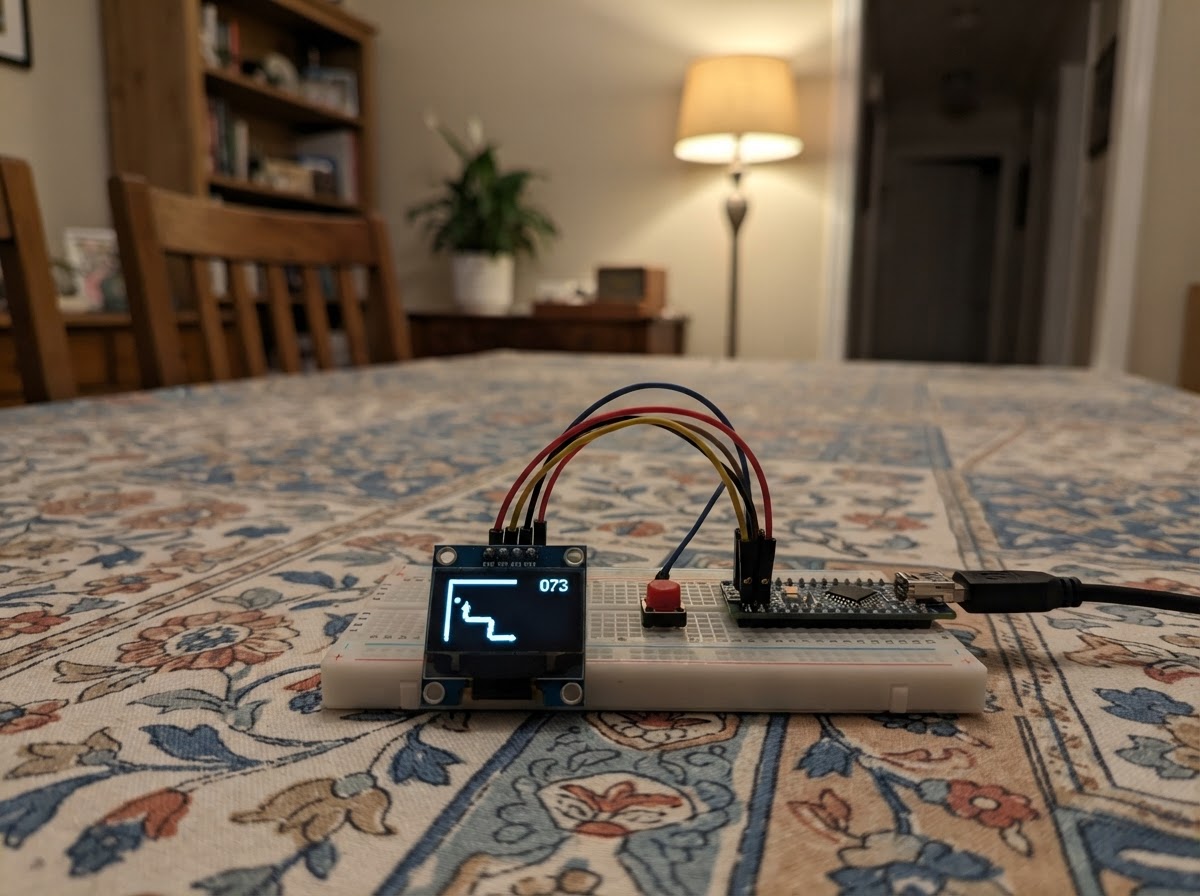
Build a playable Snake game on a compact OLED display using an ESP32 microcontroller and four directional buttons. Guide the snake around the grid, eat food to grow longer, and avoid colliding with yourself as the game speeds up. This guide includes a complete wiring diagram, parts list, and ready-to-flash firmware that handles collision detection, score tracking, and smooth gameplay mechanics.
Assembly takes just minutes: mount the ESP32, wire the SSD1306 OLED display via I2C, connect the four push buttons for directional control, and upload the provided code. Once powered on, the game is ready to play with responsive button controls and a dynamic difficulty curve that increases speed as your score climbs.
Wiring diagram

Gather all the parts
Assemble it in 4 steps
1. 先把开发板放好
把 ESP32 DevKit V1 放在面包板中间,让左右两排针脚分别落在面包板两侧,方便之后插线。暂时不要把 USB 线接上。
- 面包板中间有一条缝,开发板跨过这条缝放置时,两边针脚不会短接。
- 接线时不要让裸露导线碰到相邻针脚,否则可能让开发板无法启动。
2. 连接小屏幕
用四根杜邦线连接 OLED:OLED 的 VCC 接 ESP32 的 3V3,GND 接 GND,SDA 接 GPIO21,SCL 接 GPIO22。
- 屏幕上通常印有 VCC、GND、SDA、SCL;先确认文字再插线。
- VCC → 3V3(电源),GND → GND(地线),SDA → GPIO21(数据),SCL → GPIO22(时钟)。
- 不要把 OLED 的 VCC 接到 5V;接错电源线可能损坏屏幕。
3. 接上四个方向键
每个轻触按键各使用一对相对的脚:上键一侧接 GPIO25、另一侧接 GND;下键接 GPIO26 和 GND;左键接 GPIO27 和 GND;右键接 GPIO32 和 GND。按键没有正负极,但同一个按键的两根线必须接在相对的两侧,而不是同侧两个脚。
- GPIO25 → 上键一脚(信号),另一脚 → GND(地线)。
- GPIO26 → 下键一脚(信号),另一脚 → GND(地线)。
- GPIO27 → 左键一脚(信号),另一脚 → GND(地线)。
- GPIO32 → 右键一脚(信号),另一脚 → GND(地线)。
- 所有按键的地线可以共用同一条面包板地线排。
- 轻触按键的同侧两只脚本来就是连通的;若接在同侧,按下时不会有任何变化。
4. 检查后通电
逐根检查屏幕的 VCC、GND、SDA、SCL 和四个按键的信号线都接到指定位置,再用 USB 线把 ESP32 接到电脑。
- 屏幕亮起后,蛇会自动向右移动;按方向键控制它。撞到边缘或自己时,按任意方向键开始新一局。
- 确认没有把 3V3 和 GND 接反后再通电;电源接反可能损坏屏幕或开发板。
Review all connections
1. Connections between "oled_1" and "ESP32"
2. Connections between "button_up" and "ESP32"
3. Connections between "button_down" and "ESP32"
4. Connections between "button_left" and "ESP32"
5. Connections between "button_right" and "ESP32"
Deploy the firmware
#include <Arduino.h>
#include <Wire.h>
#include <Adafruit_GFX.h>
#include <Adafruit_SSD1306.h>


// Hoisted type definitions
struct Cell { uint8_t x; uint8_t y; };

enum Direction : uint8_t { UP, DOWN, LEFT, RIGHT };


// Forward declarations
bool sameCell(const Cell &a, const Cell &b);
bool isOpposite(Direction a, Direction b);
bool snakeContains(const Cell &cell, uint8_t count);
void placeFood();
void startGame();
bool readRequestedDirection(Direction &requested);
bool moveSnake();
void drawGame();

constexpr int OLED_SDA = 21;
constexpr int OLED_SCL = 22;
constexpr int UP_PIN = 25;
constexpr int DOWN_PIN = 26;
constexpr int LEFT_PIN = 27;
constexpr int RIGHT_PIN = 32;
constexpr uint8_t SCREEN_WIDTH = 128;
constexpr uint8_t SCREEN_HEIGHT = 64;
constexpr uint8_t CELL_SIZE = 4;
constexpr uint8_t GRID_WIDTH = SCREEN_WIDTH / CELL_SIZE;
constexpr uint8_t GRID_HEIGHT = SCREEN_HEIGHT / CELL_SIZE;
constexpr uint8_t MAX_SNAKE = 120;
constexpr unsigned long START_STEP_MS = 180;
constexpr unsigned long MIN_STEP_MS = 70;

Adafruit_SSD1306 display(SCREEN_WIDTH, SCREEN_HEIGHT, &Wire, -1);


Cell snake[MAX_SNAKE];
Cell food;
uint8_t snakeLength;
uint16_t score;
Direction direction;
Direction queuedDirection;
bool gameOver;
unsigned long lastStep;

bool sameCell(const Cell &a, const Cell &b) { return a.x == b.x && a.y == b.y; }

bool isOpposite(Direction a, Direction b) {
  return (a == UP && b == DOWN) || (a == DOWN && b == UP) ||
         (a == LEFT && b == RIGHT) || (a == RIGHT && b == LEFT);
}

bool snakeContains(const Cell &cell, uint8_t count) {
  for (uint8_t i = 0; i < count; ++i) if (sameCell(snake[i], cell)) return true;
  return false;
}

void placeFood() {
  do {
    food.x = random(GRID_WIDTH);
    food.y = random(GRID_HEIGHT);
  } while (snakeContains(food, snakeLength));
}

void startGame() {
  snakeLength = 4;
  score = 0;
  direction = RIGHT;
  queuedDirection = RIGHT;
  gameOver = false;
  const uint8_t startX = GRID_WIDTH / 2;
  const uint8_t startY = GRID_HEIGHT / 2;
  for (uint8_t i = 0; i < snakeLength; ++i) snake[i] = {static_cast<uint8_t>(startX - i), startY};
  placeFood();
  lastStep = millis();
}

bool readRequestedDirection(Direction &requested) {
  if (digitalRead(UP_PIN) == LOW) { requested = UP; return true; }
  if (digitalRead(DOWN_PIN) == LOW) { requested = DOWN; return true; }
  if (digitalRead(LEFT_PIN) == LOW) { requested = LEFT; return true; }
  if (digitalRead(RIGHT_PIN) == LOW) { requested = RIGHT; return true; }
  return false;
}

bool moveSnake() {
  direction = queuedDirection;
  Cell next = snake[0];
  if (direction == UP) {
    if (next.y == 0) { gameOver = true; return true; }
    --next.y;
  } else if (direction == DOWN) {
    if (next.y == GRID_HEIGHT - 1) { gameOver = true; return true; }
    ++next.y;
  } else if (direction == LEFT) {
    if (next.x == 0) { gameOver = true; return true; }
    --next.x;
  } else {
    if (next.x == GRID_WIDTH - 1) { gameOver = true; return true; }
    ++next.x;
  }

  const bool eating = sameCell(next, food);
  const uint8_t collisionCount = eating ? snakeLength : snakeLength - 1;
  if (snakeContains(next, collisionCount)) { gameOver = true; return true; }

  if (eating && snakeLength < MAX_SNAKE) ++snakeLength;
  for (uint8_t i = snakeLength - 1; i > 0; --i) snake[i] = snake[i - 1];
  snake[0] = next;
  if (eating) { ++score; placeFood(); }
  return true;
}

void drawGame() {
  display.clearDisplay();
  for (uint8_t i = 0; i < snakeLength; ++i) {
    display.fillRect(snake[i].x * CELL_SIZE, snake[i].y * CELL_SIZE, CELL_SIZE, CELL_SIZE, SSD1306_WHITE);
  }
  display.drawRect(food.x * CELL_SIZE, food.y * CELL_SIZE, CELL_SIZE, CELL_SIZE, SSD1306_WHITE);
  if (gameOver) {
    display.fillRect(12, 20, 104, 25, SSD1306_BLACK);
    display.drawRect(12, 20, 104, 25, SSD1306_WHITE);
    display.setTextColor(SSD1306_WHITE);
    display.setTextSize(1);
    display.setCursor(22, 25);
    display.print("GAME OVER  ");
    display.print(score);
    display.setCursor(19, 35);
    display.print("Press a direction");
  }
  display.display();
}

void setup() {
  pinMode(UP_PIN, INPUT_PULLUP);
  pinMode(DOWN_PIN, INPUT_PULLUP);
  pinMode(LEFT_PIN, INPUT_PULLUP);
  pinMode(RIGHT_PIN, INPUT_PULLUP);
  Wire.begin(OLED_SDA, OLED_SCL);
  if (!display.begin(SSD1306_SWITCHCAPVCC, 0x3C)) while (true) delay(1000);
  randomSeed(micros());
  startGame();
  drawGame();
}

void loop() {
  Direction requested;
  if (readRequestedDirection(requested)) {
    if (gameOver) {
      startGame();
      drawGame();
      delay(120);
      return;
    }
    if (!isOpposite(requested, direction)) queuedDirection = requested;
  }

  const unsigned long stepMs = max(MIN_STEP_MS, START_STEP_MS - score * 4UL);
  if (!gameOver && millis() - lastStep >= stepMs) {
    lastStep = millis();
    moveSnake();
    drawGame();
  }
  delay(10);
}
Remix this project
Make it yours in one click
Open a full copy of this project in your own Schematik workspace — diagram, code, parts, and assembly steps included. Swap the sensor, add features, or redesign the whole thing with AI. The author's original stays untouched.