Community project
Portable Media Map Player
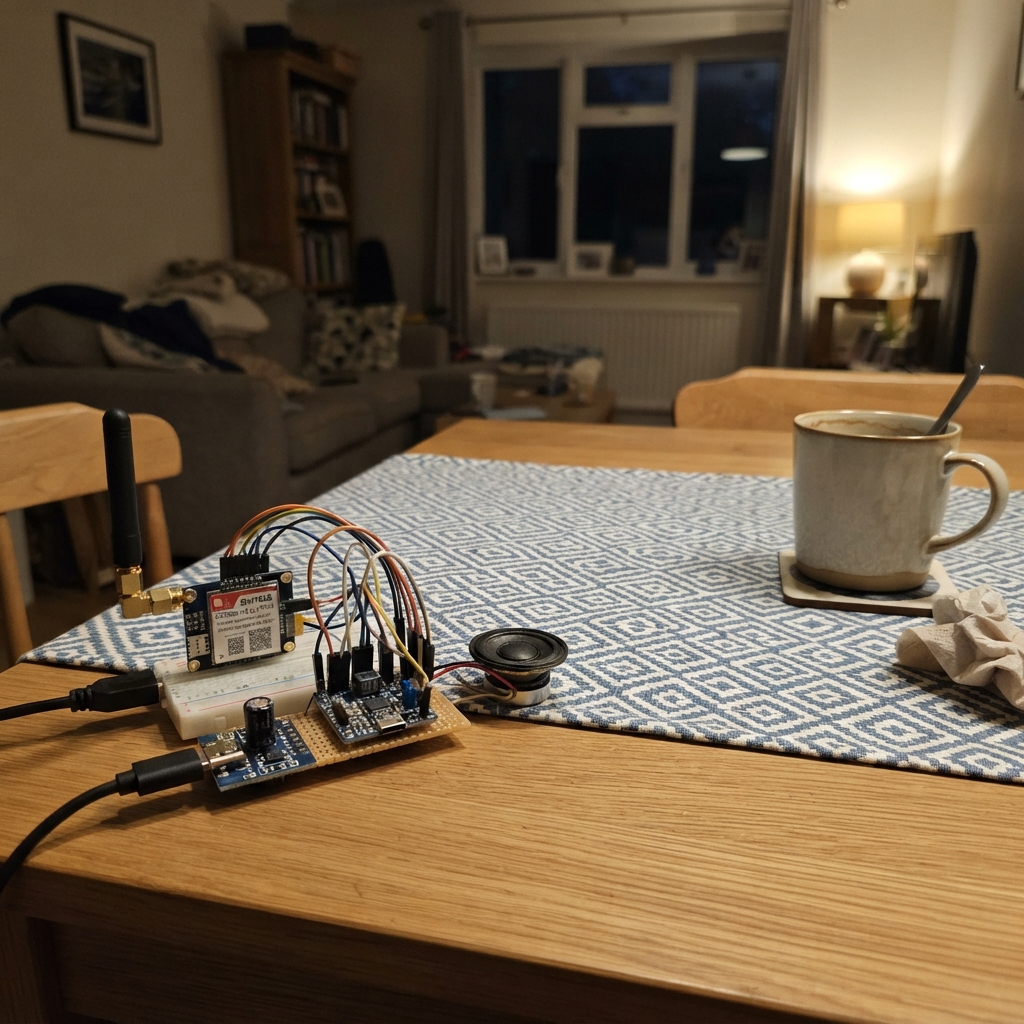
The Portable Media Map Player is a compact, LTE-connected device that streams and displays media content with integrated audio playback and real-time map access. Built around an ESP32 microcontroller, it combines a SIM7600 cellular module for data connectivity, a MAX98357A amplifier with speaker for audio output, and a display interface for visual content.
This guide provides a complete parts list, wiring diagram, and step-by-step assembly instructions to get the device operational. Builders will learn how to configure the ESP32 firmware, establish LTE connectivity through the SIM7600 module, integrate microSD card storage, and route audio through the Class-D amplifier. The project demonstrates practical integration of cellular, audio, and display subsystems in a portable form factor.
Wiring diagram

Gather all the parts
Assemble it in 5 steps
1. Fit the screen board and microSD card
Mount the Waveshare ESP32-S3-Touch-LCD-3.5 where its screen will be visible. Format a microSD card as FAT32, then insert it into the board’s built-in card slot. Make folders named music and video if you will add local media files later.
- The metal contacts on the card must face the socket contacts; do not force the card.
- Do not insert or remove the card while the board is powered, because that can corrupt the files.
2. Wire the speaker amplifier
Connect the MAX98357A VIN pin to the board 3V3 pin (power), its GND pin to a board GND pin (ground), BCLK to GPIO14 (audio clock), LRC to GPIO15 (audio timing), and DIN to GPIO16 (audio sound data). Connect MAX98357A SPK+ to the speaker POS terminal (sound output) and MAX98357A SPK- to the speaker NEG terminal (sound output).
- Keep the two speaker wires together and short to reduce noise.
- Do not connect either speaker terminal to GND — both terminals are driven by the amplifier and doing so can damage it.
3. Wire the 4G module control pins
Connect SIM7600 TXD to ESP32 GPIO18 (4G data sent to the board), SIM7600 RXD to ESP32 GPIO17 (4G commands sent from the board), SIM7600 PWRKEY to ESP32 GPIO21 (turn-on signal), and SIM7600 GND to the same GND used by the ESP32 (ground). Insert an activated nano-SIM card into the SIM7600’s own card holder and attach the LTE antenna supplied for the module.
- TX and RX are crossed on purpose: the modem’s TX goes to the board’s receive pin.
- Use a SIM7600 breakout whose UART pins accept 3.3 V logic; otherwise add a level shifter.
- Never power the SIM7600 without its antenna attached — transmitting without an antenna can damage the radio.
4. Give the 4G module its strong 5 V supply
Connect the 5 V adapter positive lead to SIM7600 VCC (power) and the adapter GND lead to SIM7600 GND (ground). Place the 1000 µF capacitor beside the SIM7600: connect its long positive lead to SIM7600 VCC (power) and its striped negative lead to SIM7600 GND (ground). Keep the ESP32 ground connected to this same ground.
- A short, thicker pair of 5 V and GND wires between the supply and SIM7600 helps prevent 4G transmission bursts from resetting the device.
- The capacitor is polarized: reversing its + and - leads can make it overheat or burst. Do not use the ESP32’s small 3.3 V rail to power the SIM7600.
5. Power and deploy the device
Leave the 4G supply off at first, connect the ESP32 screen board to your computer with its USB cable, then use Schematik’s Deploy button to flash the firmware. After the display starts, connect the regulated 5 V supply to the 4G module.
- The initial dashboard can be changed through the USB serial connection: h for Home, m for Music, v for Video, and g for the Map page.
- Make sure 5 V and GND are not swapped before turning on the 4G supply — swapped power can damage the modem.
Review all connections
1. Connections between "power_adapter" and "ESP32"
2. Connections between "bulk_capacitor" and "ESP32"
3. Connections between "sim7600_4g" and "ESP32"
4. Connections between "audio_amp" and "ESP32"
Deploy the firmware
#include <Arduino.h>
#include <SPI.h>
#include <SD.h>
#include <Wire.h>
#include <Arduino_GFX_Library.h>
#include <TCA9554.h>

constexpr int LCD_SCK = 5;
constexpr int LCD_MOSI = 1;
constexpr int LCD_MISO = 2;
constexpr int LCD_DC = 3;
constexpr int LCD_BACKLIGHT = 6;
constexpr int SD_CS = 10;
constexpr int TCA9554_ADDR = 0x20;
constexpr int TCA9554_LCD_RESET = 1;

constexpr int MODEM_RX_PIN = 18;
constexpr int MODEM_TX_PIN = 17;
constexpr int MODEM_PWRKEY_PIN = 21;
constexpr int I2S_BCLK_PIN = 14;
constexpr int I2S_LRCK_PIN = 15;
constexpr int I2S_DOUT_PIN = 16;

// Replace this placeholder and add your cellular APN before enabling online maps.
const char *GOOGLE_MAPS_STATIC_API_KEY = "PASTE_RESTRICTED_MAPS_STATIC_API_KEY_HERE";

enum ScreenPage : uint8_t { HOME, MUSIC, VIDEO, MAP };
ScreenPage page = HOME;
bool sdReady = false;
HardwareSerial ModemSerial(1);

TCA9554 ioExpander(TCA9554_ADDR, &Wire);
Arduino_DataBus *bus = new Arduino_ESP32SPI(LCD_DC, GFX_NOT_DEFINED, LCD_SCK, LCD_MOSI, LCD_MISO);
Arduino_GFX *gfx = new Arduino_ST7796(bus, GFX_NOT_DEFINED, 0, true, 320, 480);

void header(const char *title) {
  gfx->fillScreen(0x0841);
  gfx->fillRect(0, 0, 320, 45, 0x001F);
  gfx->setTextColor(0xFFFF);
  gfx->setTextSize(2);
  gfx->setCursor(12, 14);
  gfx->print(title);
}

void button(int y, uint16_t color, const char *label) {
  gfx->fillRoundRect(20, y, 280, 54, 8, color);
  gfx->setTextColor(0xFFFF);
  gfx->setTextSize(2);
  gfx->setCursor(38, y + 18);
  gfx->print(label);
}

void showHome() {
  header("Smart Media Device");
  button(65, 0x07E0, "MUSIC PLAYER");
  button(135, 0xF800, "VIDEO PLAYER");
  button(205, 0x001F, "GOOGLE MAP");
  gfx->setTextColor(0xFFFF);
  gfx->setTextSize(1);
  gfx->setCursor(20, 290);
  gfx->print("microSD: ");
  gfx->print(sdReady ? "ready" : "not found");
  gfx->setCursor(20, 310);
  gfx->print("4G: insert an activated nano-SIM in the SIM7600 holder.");
  gfx->setCursor(20, 332);
  gfx->print("Use USB serial: h=home, m=music, v=video, g=map.");
}

void showMusic() {
  header("Music Player");
  gfx->setTextColor(0xFFFF);
  gfx->setTextSize(2);
  gfx->setCursor(20, 70);
  gfx->print("Music storage");
  gfx->setTextSize(1);
  gfx->setCursor(20, 110);
  gfx->print("Copy WAV music files into /music on a FAT32 microSD card.");
  gfx->setCursor(20, 132);
  gfx->print("Speaker amp: I2S BCLK=14, LRCK=15, DATA=16.");
  gfx->setCursor(20, 154);
  gfx->print("A decoder can be added for the precise audio format you use.");
  button(390, 0x780F, "HOME");
}

void showVideo() {
  header("Video Player");
  gfx->setTextColor(0xFFFF);
  gfx->setTextSize(2);
  gfx->setCursor(20, 70);
  gfx->print("Video storage");
  gfx->setTextSize(1);
  gfx->setCursor(20, 110);
  gfx->print("Copy 320x480-or-smaller MJPEG clips into /video on microSD.");
  gfx->setCursor(20, 132);
  gfx->print("MP4/H.264 cannot be decoded in real time by this ESP32-S3.");
  button(390, 0x780F, "HOME");
}

void showMap() {
  header("Google Map");
  gfx->setTextColor(0xFFFF);
  gfx->setTextSize(2);
  gfx->setCursor(20, 70);
  gfx->print("4G map connection");
  gfx->setTextSize(1);
  gfx->setCursor(20, 112);
  gfx->print("Set the SIM APN and a restricted Google Maps Static API key.");
  gfx->setCursor(20, 134);
  gfx->print("Key status: ");
  gfx->print(String(GOOGLE_MAPS_STATIC_API_KEY).startsWith("PASTE_") ? "not configured" : "configured");
  gfx->setCursor(20, 164);
  gfx->print("Modem UART: ESP RX=18, TX=17, PWRKEY=21.");
  button(390, 0x780F, "HOME");
}

void renderPage() {
  if (page == HOME) showHome();
  else if (page == MUSIC) showMusic();
  else if (page == VIDEO) showVideo();
  else showMap();
}

void setup() {
  Serial.begin(115200);
  Wire.begin(8, 7);
  ioExpander.begin(OUTPUT, 0x00);
  ioExpander.pinMode1(TCA9554_LCD_RESET, OUTPUT);
  ioExpander.write1(TCA9554_LCD_RESET, LOW);
  delay(20);
  ioExpander.write1(TCA9554_LCD_RESET, HIGH);
  pinMode(LCD_BACKLIGHT, OUTPUT);
  digitalWrite(LCD_BACKLIGHT, HIGH);
  gfx->begin();
  gfx->setRotation(0);
  SPI.begin(LCD_SCK, LCD_MISO, LCD_MOSI, SD_CS);
  sdReady = SD.begin(SD_CS, SPI);
  pinMode(MODEM_PWRKEY_PIN, OUTPUT);
  digitalWrite(MODEM_PWRKEY_PIN, HIGH);
  ModemSerial.begin(115200, SERIAL_8N1, MODEM_RX_PIN, MODEM_TX_PIN);
  renderPage();
}

void loop() {
  if (!Serial.available()) return;
  char key = tolower(Serial.read());
  if (key == 'h') page = HOME;
  else if (key == 'm') page = MUSIC;
  else if (key == 'v') page = VIDEO;
  else if (key == 'g') page = MAP;
  else return;
  renderPage();
}
Remix this project
Make it yours in one click
Open a full copy of this project in your own Schematik workspace — diagram, code, parts, and assembly steps included. Swap the sensor, add features, or redesign the whole thing with AI. The author's original stays untouched.