Community project
Reckless Driver
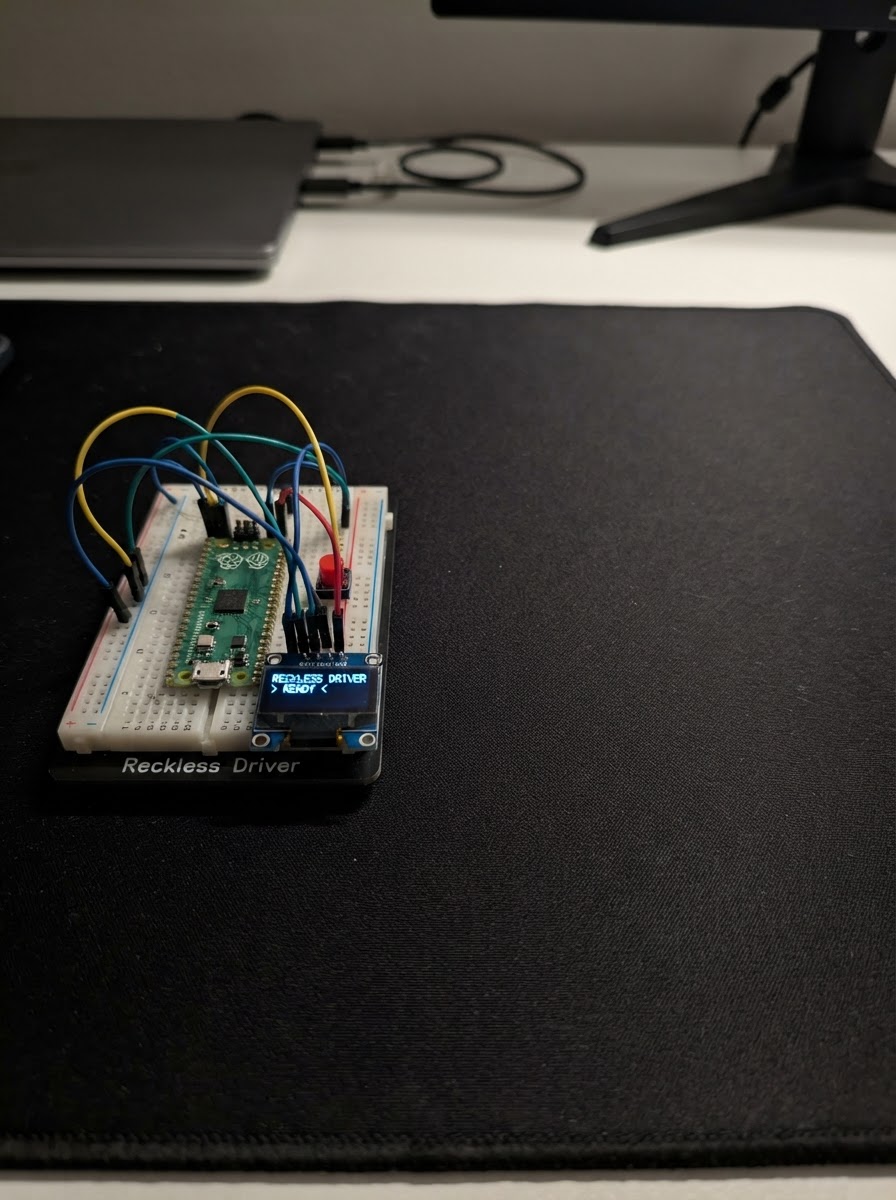
Reckless Driver is a retro-style driving game that runs on an ESP32 microcontroller with an SSD1306 OLED display. Players navigate a car down a scrolling road, steering left and right with push buttons to avoid oncoming traffic and rack up distance. The game features procedurally generated obstacles, increasing speed milestones, and collision detection.
This guide provides a complete parts list, wiring diagram for the OLED display and steering buttons, and the full Arduino firmware needed to get the game running. Assembly takes just a few minutes—connect the display via I2C, wire up the two steering buttons to the ESP32 GPIO pins, and load the code to start playing.
Wiring diagram

Gather all the parts
Assemble it in 4 steps
1. Disconnect USB and identify the button terminals
Unplug the ESP32 before wiring. Use two normally-open momentary pushbuttons. On a 4-leg tactile button, the two legs on each same side are internally connected; use one leg from each opposite side so pressing the button joins the two wires.
- Keep the existing OLED wiring: VCC to 3V3, GND to GND, SDA to GPIO21, and SCL to GPIO22.
- The buttons do not need external resistors because the firmware enables the ESP32 internal pull-up resistors.
- Do not wire a button between 3V3 and a GPIO in this design; each button must connect its GPIO to GND when pressed.
2. Wire the left steering button
Connect one terminal of left_button to ESP32 GPIO25. Connect its opposite terminal to any ESP32 GND pin.
- When pressed, the left button reads LOW and steers the road/car view left.
- Use a breadboard row or a jumper wire to share the ESP32 ground connection.
- Do not use adjacent legs from the same side of a four-leg tactile switch; they are already connected and the button will appear permanently pressed.
3. Wire the right steering button
Connect one terminal of right_button to ESP32 GPIO26. Connect its opposite terminal to the same ESP32 GND rail used by the left button.
- When pressed, the right button reads LOW and steers the road/car view right.
- Both buttons may share the same GND pin or breadboard ground rail.
- Keep GPIO25 and GPIO26 separate; joining their signal wires would make left and right inputs indistinguishable.
4. Check the complete wiring before power
Confirm oled_096 VCC goes to 3V3, OLED GND and both button ground terminals go to ESP32 GND, OLED SDA goes to GPIO21, OLED SCL goes to GPIO22, left_button signal goes to GPIO25, and right_button signal goes to GPIO26.
- A brief startup screen says “USE LEFT / RIGHT.”
- The simulator recentres gradually after you release both buttons; pressing both together also recentres it.
- Do not change any wiring while USB power is connected.
Review all connections
1. Connections between "oled_096" and "ESP32"
2. Connections between "left_button" and "ESP32"
3. Connections between "right_button" and "ESP32"
Deploy the firmware
#include <Arduino.h>
#include <Wire.h>
#include <Adafruit_GFX.h>
#include <Adafruit_SSD1306.h>


struct Obstacle {
  float z;
  float lane;
};


// Forward declarations
int16_t roadCenterAt(int16_t y, float curve);
int16_t roadHalfWidthAt(int16_t y);
void resetObstacle(Obstacle &obstacle, float startZ);
void resetGame();
void drawRoad(float curve);
void drawRoadsidePosts(float curve);
void drawObstacleCar(int16_t x, int16_t y, int16_t size);
void drawObstacles(float curve);
void drawPlayerCar(float curve);
void drawGameOver();
void drawStartScreen();
void drawFrame();
void updateSteering(uint32_t now, bool leftPressed, bool rightPressed);
bool collidedWithObstacle();
void updateObstacles();

constexpr int OLED_SDA = 21;
constexpr int OLED_SCL = 22;
constexpr int LEFT_BUTTON_PIN = 25;
constexpr int RIGHT_BUTTON_PIN = 26;
constexpr uint8_t OLED_ADDRESS = 0x3C;
constexpr int SCREEN_WIDTH = 128;
constexpr int SCREEN_HEIGHT = 64;
constexpr int HORIZON_Y = 19;
constexpr int ROAD_BOTTOM_Y = 63;
constexpr uint32_t FRAME_INTERVAL_MS = 50;
constexpr uint32_t STEER_REPEAT_MS = 140;
constexpr uint8_t OBSTACLE_COUNT = 2;
constexpr uint8_t START_SPEED_MPH = 55;

Adafruit_SSD1306 display(SCREEN_WIDTH, SCREEN_HEIGHT, &Wire, -1);


Obstacle obstacles[OBSTACLE_COUNT];
uint32_t lastFrameMs = 0;
uint32_t lastSteerMoveMs = 0;
float drivePhase = 0.0f;
float playerLane = 0.0f;
float distanceMiles = 0.0f;
uint8_t currentSpeedMph = START_SPEED_MPH;
float nextSpeedMilestoneMiles = 0.1f;
bool gameOver = false;
bool startScreen = true;
bool previousLeftPressed = false;
bool previousRightPressed = false;

int16_t roadCenterAt(int16_t y, float curve) {
  const float depth = float(y - HORIZON_Y) / float(ROAD_BOTTOM_Y - HORIZON_Y);
  return int16_t(64.0f + curve * depth * depth);
}

int16_t roadHalfWidthAt(int16_t y) {
  const float depth = float(y - HORIZON_Y) / float(ROAD_BOTTOM_Y - HORIZON_Y);
  return int16_t(7.0f + 53.0f * depth);
}

void resetObstacle(Obstacle &obstacle, float startZ) {
  obstacle.z = startZ;
  obstacle.lane = float(random(-68, 69)) / 100.0f;
}

void resetGame() {
  playerLane = 0.0f;
  drivePhase = 0.0f;
  distanceMiles = 0.0f;
  currentSpeedMph = START_SPEED_MPH;
  nextSpeedMilestoneMiles = 0.1f;
  // Keep the two cars far apart so the road has time to breathe.
  resetObstacle(obstacles[0], 0.18f);
  resetObstacle(obstacles[1], 0.68f);
  gameOver = false;
}

void drawRoad(float curve) {
  const int16_t horizonCenter = roadCenterAt(HORIZON_Y, curve);
  const int16_t bottomCenter = roadCenterAt(ROAD_BOTTOM_Y, curve);
  const int16_t bottomHalfWidth = roadHalfWidthAt(ROAD_BOTTOM_Y);
  display.drawLine(horizonCenter, HORIZON_Y, bottomCenter - bottomHalfWidth, ROAD_BOTTOM_Y, SSD1306_WHITE);
  display.drawLine(horizonCenter, HORIZON_Y, bottomCenter + bottomHalfWidth, ROAD_BOTTOM_Y, SSD1306_WHITE);

  for (int i = 0; i < 7; ++i) {
    float z = fmodf(drivePhase * 0.48f + i * 0.16f, 1.0f);
    if (z < 0.08f) z += 0.92f;
    const float z2 = z * z;
    const int16_t y = int16_t(HORIZON_Y + z2 * (ROAD_BOTTOM_Y - HORIZON_Y));
    const int16_t dashLength = int16_t(1 + 8 * z2);
    const int16_t center = roadCenterAt(y, curve);
    display.drawLine(center, y, center, min<int16_t>(ROAD_BOTTOM_Y, y + dashLength), SSD1306_WHITE);
  }
}

void drawRoadsidePosts(float curve) {
  for (int i = 0; i < 5; ++i) {
    const float z = fmodf(drivePhase * 0.34f + i * 0.23f, 1.0f);
    const float z2 = z * z;
    const int16_t y = int16_t(HORIZON_Y + z2 * (ROAD_BOTTOM_Y - HORIZON_Y));
    const int16_t height = int16_t(2 + 9 * z2);
    const int16_t width = int16_t(1 + 3 * z2);
    const int16_t center = roadCenterAt(y, curve);
    const int16_t edge = roadHalfWidthAt(y);
    display.fillRect(center - edge - 5 - width, y - height, width, height, SSD1306_WHITE);
    display.fillRect(center + edge + 5, y - height, width, height, SSD1306_WHITE);
  }
}

void drawObstacleCar(int16_t x, int16_t y, int16_t size) {
  // A rear-view car silhouette that grows as it approaches.
  const int16_t width = max<int16_t>(5, size * 2 + 2);
  const int16_t height = max<int16_t>(4, size + 3);
  display.drawRoundRect(x - width / 2, y - height / 2, width, height, 1, SSD1306_WHITE);
  display.drawFastHLine(x - width / 2 + 1, y, width - 2, SSD1306_WHITE);
  display.drawPixel(x - width / 2 + 1, y + height / 2 - 1, SSD1306_WHITE);
  display.drawPixel(x + width / 2 - 2, y + height / 2 - 1, SSD1306_WHITE);
}

void drawObstacles(float curve) {
  for (uint8_t i = 0; i < OBSTACLE_COUNT; ++i) {
    const float z2 = obstacles[i].z * obstacles[i].z;
    const int16_t y = int16_t(HORIZON_Y + z2 * (ROAD_BOTTOM_Y - HORIZON_Y));
    const int16_t edge = roadHalfWidthAt(y);
    const int16_t x = roadCenterAt(y, curve) + int16_t(obstacles[i].lane * (edge - 3));
    const int16_t size = max<int16_t>(2, int16_t(2 + 5 * z2));
    drawObstacleCar(x, y, size);
  }
}

void drawPlayerCar(float curve) {
  constexpr int16_t CAR_Y = 56;
  const int16_t roadCenter = roadCenterAt(CAR_Y, curve);
  const int16_t carTravel = roadHalfWidthAt(CAR_Y) - 9;
  const int16_t x = roadCenter + int16_t(playerLane * carTravel);
  display.fillTriangle(x, CAR_Y - 7, x - 8, CAR_Y + 6, x + 8, CAR_Y + 6, SSD1306_WHITE);
  display.drawFastHLine(x - 11, CAR_Y + 7, 23, SSD1306_WHITE);
  display.drawFastVLine(x - 8, CAR_Y + 5, 3, SSD1306_WHITE);
  display.drawFastVLine(x + 8, CAR_Y + 5, 3, SSD1306_WHITE);
}

void drawGameOver() {
  display.clearDisplay();
  display.drawRect(1, 1, 126, 62, SSD1306_WHITE);
  display.setTextColor(SSD1306_WHITE);
  display.setTextSize(2);
  display.setCursor(15, 15);
  display.print("GAME OVER");
  display.setTextSize(1);
  display.setCursor(30, 39);
  display.print("SCORE: ");
  display.print(distanceMiles, 1);
  display.print(" MI");
  display.setCursor(17, 52);
  display.print("PRESS A BUTTON");
  display.display();
}

void drawStartScreen() {
  display.clearDisplay();
  display.setTextColor(SSD1306_WHITE);
  display.setTextSize(2);
  display.setCursor(8, 5);
  display.print("RECKLESS");
  display.setCursor(29, 22);
  display.print("DRIVER");

  // Lower side-view car, leaving the title screen free of instructions.
  display.drawRoundRect(23, 49, 82, 9, 3, SSD1306_WHITE);
  display.fillRect(40, 45, 43, 5, SSD1306_WHITE);
  display.drawLine(47, 45, 54, 41, SSD1306_WHITE);
  display.drawLine(54, 41, 72, 41, SSD1306_WHITE);
  display.drawLine(72, 41, 80, 45, SSD1306_WHITE);
  display.fillCircle(39, 58, 4, SSD1306_WHITE);
  display.fillCircle(89, 58, 4, SSD1306_WHITE);
  display.fillCircle(39, 58, 1, SSD1306_BLACK);
  display.fillCircle(89, 58, 1, SSD1306_BLACK);
  display.display();
}

void drawFrame() {
  const float curve = sinf(drivePhase * 0.75f) * 12.0f;
  display.clearDisplay();
  display.drawLine(0, HORIZON_Y, SCREEN_WIDTH - 1, HORIZON_Y, SSD1306_WHITE);
  drawRoad(curve);
  drawRoadsidePosts(curve);
  drawObstacles(curve);
  drawPlayerCar(curve);
  display.setTextColor(SSD1306_WHITE);
  display.setTextSize(1);
  display.setCursor(2, 2);
  display.print(distanceMiles, 1);
  display.print(" MI");
  display.setCursor(91, 2);
  display.print(currentSpeedMph);
  display.print(" MPH");
  display.display();
}

void updateSteering(uint32_t now, bool leftPressed, bool rightPressed) {
  if (leftPressed != rightPressed && now - lastSteerMoveMs >= STEER_REPEAT_MS) {
    playerLane += leftPressed ? -0.12f : 0.12f;
    playerLane = constrain(playerLane, -0.86f, 0.86f);
    lastSteerMoveMs = now;
  }
}

bool collidedWithObstacle() {
  for (uint8_t i = 0; i < OBSTACLE_COUNT; ++i) {
    if (obstacles[i].z > 0.80f && obstacles[i].z < 0.98f && fabsf(playerLane - obstacles[i].lane) < 0.25f) return true;
  }
  return false;
}

void updateObstacles() {
  for (uint8_t i = 0; i < OBSTACLE_COUNT; ++i) {
    obstacles[i].z += 0.010f;
    // Start well beyond the horizon after a pass to create a long clear gap.
    if (obstacles[i].z >= 1.05f) {
      resetObstacle(obstacles[i], float(random(-32, -16)) / 100.0f);
    }
  }
}

void setup() {
  pinMode(LEFT_BUTTON_PIN, INPUT_PULLUP);
  pinMode(RIGHT_BUTTON_PIN, INPUT_PULLUP);
  Wire.begin(OLED_SDA, OLED_SCL);
  if (!display.begin(SSD1306_SWITCHCAPVCC, OLED_ADDRESS)) while (true) delay(1000);
  randomSeed(micros());
  resetGame();
  startScreen = true;
  drawStartScreen();
}

void loop() {
  const uint32_t now = millis();
  const bool leftPressed = digitalRead(LEFT_BUTTON_PIN) == LOW;
  const bool rightPressed = digitalRead(RIGHT_BUTTON_PIN) == LOW;

  if (startScreen) {
    if (leftPressed || rightPressed) {
      resetGame();
      startScreen = false;
      lastFrameMs = now;
      lastSteerMoveMs = now;
    }
    previousLeftPressed = leftPressed;
    previousRightPressed = rightPressed;
    delay(20);
    return;
  }

  if (gameOver) {
    const bool newPress = (leftPressed && !previousLeftPressed) || (rightPressed && !previousRightPressed);
    if (newPress) resetGame();
    else drawGameOver();
    previousLeftPressed = leftPressed;
    previousRightPressed = rightPressed;
    delay(20);
    return;
  }

  if (now - lastFrameMs >= FRAME_INTERVAL_MS) {
    const uint32_t elapsedMs = now - lastFrameMs;
    lastFrameMs = now;
    updateSteering(now, leftPressed, rightPressed);
    distanceMiles += (float(currentSpeedMph) * float(elapsedMs)) / 3600000.0f;
    // Each completed tenth of a mile permanently adds 1 MPH for this run.
    while (distanceMiles >= nextSpeedMilestoneMiles) {
      ++currentSpeedMph;
      nextSpeedMilestoneMiles += 0.1f;
    }
    drivePhase += 0.035f;
    updateObstacles();
    if (collidedWithObstacle()) gameOver = true;
    else drawFrame();
  }
  previousLeftPressed = leftPressed;
  previousRightPressed = rightPressed;
}
Remix this project
Make it yours in one click
Open a full copy of this project in your own Schematik workspace — diagram, code, parts, and assembly steps included. Swap the sensor, add features, or redesign the whole thing with AI. The author's original stays untouched.