Community project
Scrolling Hello World Display
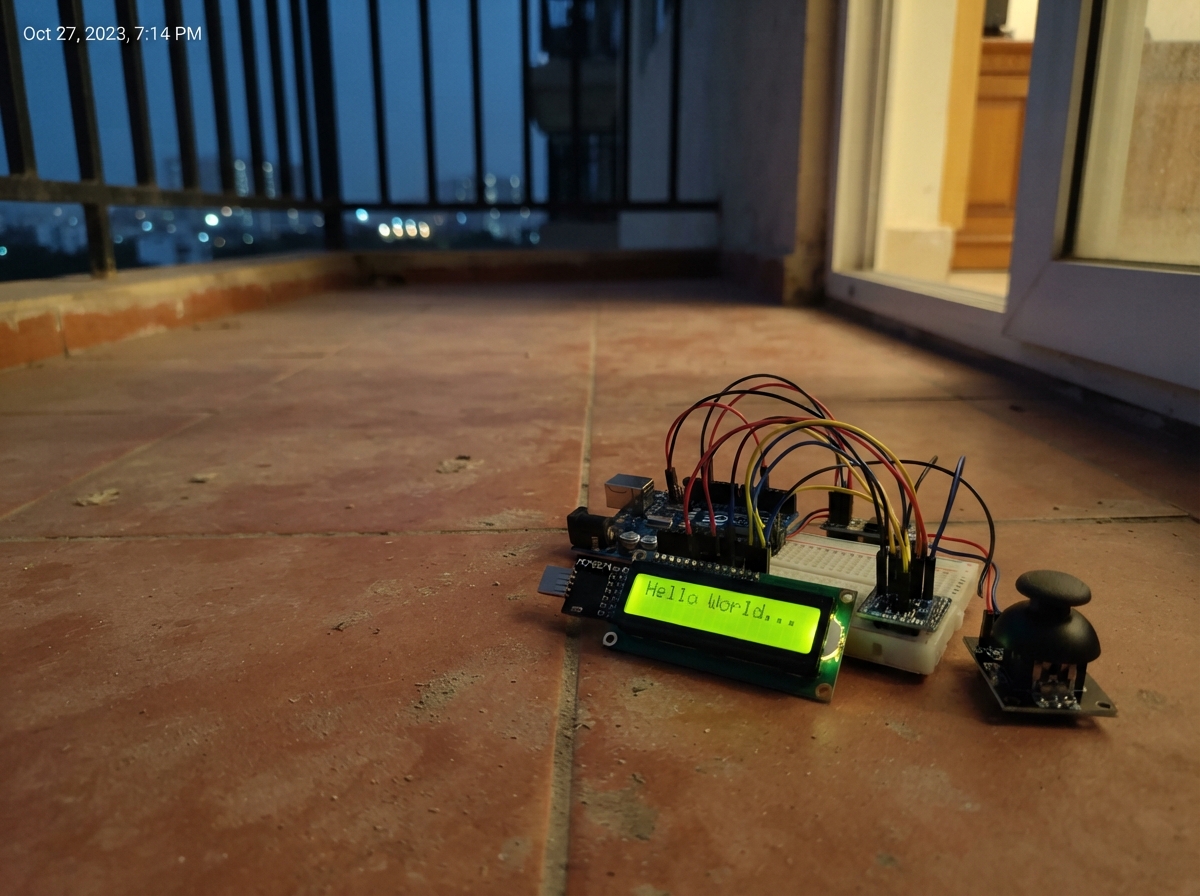
This project turns an ESP32 into a retro arcade game console displayed on a 16x2 character LCD. Players control a spaceship with the KY-023 joystick, dodging falling rocks and firing shots to rack up points on a classic scrolling display.
The guide provides a complete wiring diagram showing how to connect the LCD1602 via I2C using the PCF8574 module, integrate the BSS138 level shifter for safe signal translation, and wire up the joystick controls. Assembly steps, a full parts list, and ready-to-upload firmware with custom character graphics are included to get the game running immediately.
Wiring diagram

Gather all the parts
Assemble it in 4 steps
1. Stromversorgung trennen
Ziehe das USB-Kabel ab, bevor du Leitungen steckst. Behalte das vorhandene LCD und den Pegelwandler bei.
- Verdrahten unter Spannung kann bei einem Kurzschluss das Board beschädigen.
2. Display und Pegelwandler verbinden
LCD VCC → 5V (Versorgung), LCD GND → GND (Masse). Pegelwandler LV → 3V3 (3,3-V-Versorgung), HV → 5V (5-V-Versorgung), GND → GND (gemeinsame Masse). GPIO21 → LV1 und HV1 → LCD SDA (Daten). GPIO22 → LV2 und HV2 → LCD SCL (Takt). Falls der Pegelwandler zwei GND-Anschlüsse hat, verbinde beide mit GND.
- Prüfe, dass der mit 5V/VIN beschriftete Board-Pin bei USB-Versorgung tatsächlich 5 V bereitstellt.
- Verbinde die LCD-Datenleitungen nicht direkt mit dem ESP32: 5-V-Signale können seine Pins beschädigen.
- Vertauschte VCC- und GND-Leitungen können das Display beschädigen.
3. Joystick anschließen
Joystick VCC → 3V3 (Versorgung), GND → GND (Masse), VRx → GPIO34 (X-Messwert), VRy → GPIO35 (Y-Messwert), SW → GPIO32 (Knopfsignal). Manche Module beschriften VCC mit +5V; für diesen Aufbau kommt dort trotzdem ausschließlich 3,3 V an.
- Versorge den Joystick nicht mit 5 V: Seine analogen Ausgänge könnten dann die ESP32-Eingänge beschädigen.
4. Aufbau kontrollieren
Prüfe jede Verbindung und entferne lose Drahtenden. Richte den Joystick so aus, dass kleine X-Werte links und kleine Y-Werte oben entsprechen. Nach Anschluss der Versorgung kannst du den kleinen Kontrastregler am LCD-Modul vorsichtig drehen, bis die Zeichen sichtbar sind.
- Bei diagonaler Bewegung wird die stärker ausgelenkte Achse angezeigt. Ein kleiner Bereich um die Mitte verhindert springende Richtungsanzeigen.
Review all connections
1. Connections between "lcd" and "ESP32"
2. Connections between "level" and "ESP32"
3. Connections between "joystick" and "ESP32"
Deploy the firmware
#include <Arduino.h>
#include <Wire.h>
#include <LiquidCrystal_I2C.h>

constexpr int SDA_PIN = 21;
constexpr int SCL_PIN = 22;
constexpr uint8_t LCD_COLUMNS = 16;
constexpr int X_PIN = 34;
constexpr int Y_PIN = 35;
constexpr int BUTTON_PIN = 32;
int centerX = 2048;
int centerY = 2048;
constexpr int DEAD_ZONE = 200;
constexpr bool INVERT_X = true;
constexpr bool INVERT_Y = true; // Achsentausch unten: rechts <-> oben, links <-> unten.
constexpr uint32_t UPDATE_INTERVAL_MS = 50;
constexpr uint32_t SHOT_COOLDOWN_MS = 500;
struct Object { int col; uint8_t row; uint8_t shape; bool active; };
Object rocks[8] = {};
Object shots[8] = {};
uint8_t playerRow = 0;
bool gameOver = false;
uint32_t score = 0;
uint32_t lastShot = 0, lastRockMove = 0, lastShotMove = 0, lastSpawn = 0;
uint8_t shipGlyph[8] = {16,24,28,31,28,24,16,0};
uint8_t rockGlyphA[8] = {0,14,31,27,31,14,0,0};
uint8_t rockGlyphB[8] = {4,14,29,31,23,14,4,0};
uint8_t rockGlyphC[8] = {0,10,31,14,31,10,0,0};
LiquidCrystal_I2C lcd(0x27, LCD_COLUMNS, 2);
char previousRows[2][LCD_COLUMNS] = {};
uint32_t lastUpdate = 0;
bool displayReady = false;
bool buttonRaw = false;
bool buttonPressed = false;
uint32_t buttonChangedAt = 0;

void renderRow(uint8_t row, const char* text) {
  const size_t length = strlen(text);
  for (uint8_t column = 0; column < LCD_COLUMNS; ++column) {
    const char nextChar = column < length ? text[column] : ' ';
    if (previousRows[row][column] != nextChar) {
      lcd.setCursor(column, row);
      lcd.write(static_cast<uint8_t>(nextChar));
      previousRows[row][column] = nextChar;
    }
  }
}

int readAxis(int pin) {
  uint32_t sum = 0;
  for (int i = 0; i < 8; ++i) sum += analogRead(pin);
  return static_cast<int>((sum + 4) / 8);
}

void resetGame(uint32_t now) {
  for (auto &r : rocks) r.active = false;
  for (auto &s : shots) s.active = false;
  playerRow = 0;
  score = 0;
  gameOver = false;
  lastShot = now - SHOT_COOLDOWN_MS;
  lastRockMove = lastShotMove = lastSpawn = now;
}

void checkHits() {
  for (auto &r : rocks) {
    if (!r.active) continue;
    for (auto &s : shots) {
      if (s.active && s.row == r.row && s.col == r.col) {
        r.active = s.active = false;
        ++score;
        break;
      }
    }
    if (r.active && r.col == 0 && r.row == playerRow) gameOver = true;
  }
}

void updateGame(uint32_t now) {
  if (gameOver) return;
  int dx = readAxis(X_PIN) - centerX;
  int dy = readAxis(Y_PIN) - centerY;
  if (INVERT_X) dx = -dx;
  if (INVERT_Y) dy = -dy;
  const int swappedX = dy;
  dy = dx;
  dx = swappedX;
  if (dy < -450) playerRow = 1;
  else if (dy > 450) playerRow = 0;
  checkHits();
  if (gameOver) return;
  if (dx > 450 && uint32_t(now - lastShot) >= SHOT_COOLDOWN_MS) {
    for (auto &s : shots) {
      if (!s.active) {
        s = {1, playerRow, 0, true};
        lastShot = now;
        break;
      }
    }
  }
  checkHits();
  if (uint32_t(now - lastShotMove) >= 100) {
    lastShotMove = now;
    for (auto &s : shots) if (s.active && ++s.col > 15) s.active = false;
    checkHits();
  }
  if (uint32_t(now - lastRockMove) >= 700) {
    lastRockMove = now;
    for (auto &r : rocks) if (r.active && --r.col < 0) r.active = false;
    checkHits();
  }
  if (!gameOver && uint32_t(now - lastSpawn) >= 1600) {
    lastSpawn = now;
    for (auto &r : rocks) {
      if (!r.active) {
        r = {15, static_cast<uint8_t>(random(2)), static_cast<uint8_t>(random(2, 5)), true};
        break;
      }
    }
    checkHits();
  }
}

void updateDisplay() {
  if (gameOver) {
    char line[17];
    snprintf(line, sizeof(line), "Treffer: %lu", static_cast<unsigned long>(score));
    renderRow(0, line);
    renderRow(1, "Knopf: Neustart");
    return;
  }
  char frame[2][17];
  for (int row = 0; row < 2; ++row) {
    memset(frame[row], ' ', 16);
    frame[row][16] = '\0';
  }
  frame[playerRow][0] = 1;
  for (const auto &s : shots) if (s.active) frame[s.row][s.col] = '-';
  for (const auto &r : rocks) if (r.active) frame[r.row][r.col] = r.shape;
  renderRow(0, frame[0]);
  renderRow(1, frame[1]);
}

void setup() {
  Serial.begin(115200);
  pinMode(X_PIN, INPUT);
  pinMode(Y_PIN, INPUT);
  pinMode(BUTTON_PIN, INPUT_PULLUP);
  analogReadResolution(12);
  analogSetPinAttenuation(X_PIN, ADC_11db);
  analogSetPinAttenuation(Y_PIN, ADC_11db);
  // Joystick beim Einschalten loslassen: eigene Mitte fuer jede Achse.
  delay(300);
  uint32_t sumX = 0, sumY = 0;
  for (int i = 0; i < 64; ++i) {
    sumX += readAxis(X_PIN);
    sumY += readAxis(Y_PIN);
    delay(5);
  }
  centerX = constrain(static_cast<int>(sumX / 64), DEAD_ZONE + 1, 4094 - DEAD_ZONE);
  centerY = constrain(static_cast<int>(sumY / 64), DEAD_ZONE + 1, 4094 - DEAD_ZONE);
  buttonRaw = buttonPressed = digitalRead(BUTTON_PIN) == LOW;
  Wire.begin(SDA_PIN, SCL_PIN);
  Wire.setClock(100000);
  Wire.beginTransmission(0x27);
  if (Wire.endTransmission() != 0) {
    Serial.println("Kein LCD an 0x27: Versorgung, SDA/SCL und Adresse pruefen.");
    return;
  }
  lcd.init();
  lcd.backlight();
  lcd.createChar(1, shipGlyph);
  lcd.createChar(2, rockGlyphA);
  lcd.createChar(3, rockGlyphB);
  lcd.createChar(4, rockGlyphC);
  lcd.clear(); // Nur einmal beim Start.
  randomSeed(micros() ^ analogRead(X_PIN));
  resetGame(millis());
  updateDisplay();
  displayReady = true;
  lastUpdate = millis();
}

void loop() {
  const uint32_t now = millis();
  const bool pressed = digitalRead(BUTTON_PIN) == LOW;
  if (pressed != buttonRaw) {
    buttonRaw = pressed;
    buttonChangedAt = now;
  }
  if (static_cast<uint32_t>(now - buttonChangedAt) >= 25 && buttonPressed != buttonRaw) {
    buttonPressed = buttonRaw;
    if (buttonPressed && gameOver) resetGame(now);
  }
  if (!displayReady) return;
  if (static_cast<uint32_t>(now - lastUpdate) >= UPDATE_INTERVAL_MS) {
    lastUpdate = now;
    updateGame(now);
    updateDisplay();
  }
}
Remix this project
Make it yours in one click
Open a full copy of this project in your own Schematik workspace — diagram, code, parts, and assembly steps included. Swap the sensor, add features, or redesign the whole thing with AI. The author's original stays untouched.