Community project
Touchscreen Block Breaker with Rainbow LEDs
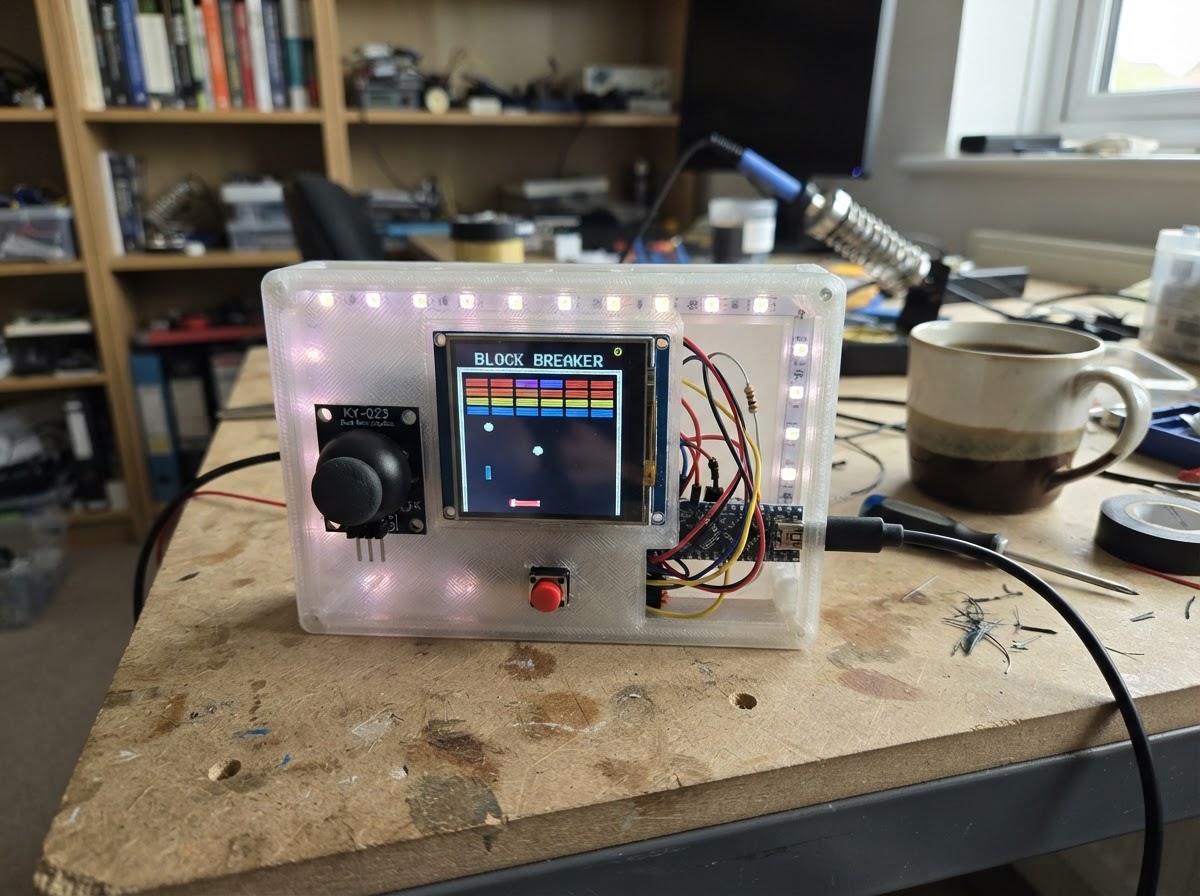
Build a classic block breaker arcade game on an ESP32 with a colorful touchscreen display and dynamic RGB lighting. Control the paddle with a joystick, break bricks across seven levels, and watch WS2812B LEDs pulse with rainbow colors as you play. This guide includes a complete wiring diagram, parts list, and ready-to-upload firmware with game state management, save slots, and boss-level challenges.
Assemble the ILI9341 TFT display, joystick module, and addressable LED strip to the ESP32, then load the game firmware to start playing. The guide walks through power distribution, SPI bus configuration, and GPIO wiring, plus instructions for selecting and loading saved games from the onboard storage.
Wiring diagram

Gather all the parts
Assemble it in 6 steps
1. Power the TFT safely
Connect tft_touch VCC to ESP32 3V3 and connect TFT GND to ESP32 GND. Do not power the TFT from 5 V.
- The ESP32 uses 3.3 V logic, matching this SPI TFT connection.
- Turn power off before making or changing connections.
2. Wire the TFT display bus
Connect TFT MOSI to GPIO23, MISO to GPIO19, SCK to GPIO18, CS to GPIO15, DC to GPIO27, and RESET to GPIO26. The touch-controller pin is not used by this version of the game.
- Keep the SPI wires short.
- The SD-card socket is not used.
- Do not add extra pull-up or pull-down resistors to the TFT CS connection on GPIO15.
3. Connect the joystick and action button
Power joystick from ESP32 3V3 and GND. Connect joystick VRx to GPIO34; this moves the paddle and chooses a save file. Connect one start_button terminal to GPIO32 and the other to GND.
- The joystick Y output is unused.
- The button uses the ESP32 internal pull-up, so it needs no resistor.
- Do not power the joystick from 5 V: its analog output could damage the ESP32 ADC input.
4. Connect the WS2812B data wire
Connect ESP32 GPIO33 through data_resistor (330 ohm) to the DIN end of led_strip. Follow the arrows on the strip and use DIN, not DOUT.
- Keep the GPIO33-to-first-LED data wire as short as practical.
- This project intentionally has no level shifter. A 3.3 V data signal to a 5 V WS2812B strip often works but is not guaranteed; flicker or no response means a level shifter would be needed.
5. Power the LED strip and share ground
Connect strip_supply 5 V positive to led_strip 5 V and strip_supply negative to led_strip GND. Connect strip_supply negative to ESP32 GND. Place strip_capacitor across the strip input: positive lead to 5 V and negative/striped lead to GND.
- Use thicker wires for the LED strip 5 V and GND connections.
- Observe capacitor polarity. Do not power the ESP32 from a second supply while its 5 V/VIN pin is connected to the strip supply.
6. Select and play a save file
Power the ESP32 and strip supply. On the colorful save screen, move the joystick left or right to select one of seven files, then press the button to open it. Press the button again to play. During play or while paused, hold the button for 1.5 seconds to save the current file and return to the save screen.
- Each file is stored in ESP32 flash and remains after power-off.
- An unused file starts a new game; an existing file continues its saved score, lives, and remaining bricks.
- Do not disconnect power while a save is being written immediately after a block hit or ball loss.
Review all connections
1. Connections between "tft_touch" and "ESP32"
2. Connections between "joystick" and "ESP32"
3. Connections between "start_button" and "ESP32"
4. Connections between "strip_supply" and "ESP32"
5. Connections between "led_strip" and "ESP32"
6. Connections between "data_resistor" and "ESP32"
7. Connections between "strip_capacitor" and "ESP32"
Deploy the firmware
#include <Arduino.h>
#include <SPI.h>
#include <Preferences.h>
#include <Adafruit_GFX.h>
#include <Adafruit_ILI9341.h>
#include <FastLED.h>

#define TFT_CS 15
#define TFT_DC 27
#define TFT_RST 26
#define TFT_MOSI 23
#define TFT_MISO 19
#define TFT_SCK 18
#define JOYSTICK_X 34
#define JOYSTICK_Y 35
#define START_BUTTON 32
#define LED_DATA 33
#define LED_COUNT 19

enum Mode { MENU, READY, PLAY, FINISHED };

// Forward declarations

// Forward declarations
void drawLives();

const char* ns(uint8_t n);
bool isBoss();
uint16_t brickColor(int r);
void center(const char* s,int y,uint16_t c,uint8_t z);
void panel(const char* a,const char* b,uint16_t c);
void scan();
void menu();
void hud();
void drawBrick(int r,int c);
void drawPaddle(int x);
void drawBall(float x,float y);
void drawBoss(bool erase);
void buildLevel();
bool remain();
uint64_t mask();
void unmask(uint64_t m);
void save();
bool load(int n);
void resetPositions();
void fresh();
void scene();
void openFile();
void exitMenu();
void nextLevel();
void buttonPress();
void lostBall();
void tick();

const uint16_t NAVY=0x000F, PURPLE=0x801F, PINK=0xF81F, ORANGE=0xFD20, GOLD=0xFEA0, MINT=0x07F5, SKY=0x867F, GREY=0x4208;
const int W=320,H=240,HUD=25,ROWS=6,COLS=8,BW=37,BH=13,GAP=2,PW=58,PH=8,PY=219,R=4;
const uint8_t SLOTS=7, LAST_LEVEL=7;

Adafruit_ILI9341 tft(TFT_CS,TFT_DC,TFT_RST);
Preferences prefs;
CRGB leds[LED_COUNT];
bool bricks[ROWS][COLS], used[SLOTS];
Mode mode=MENU;
int selected=0, slot=-1, px, opx;
float bx,by,obx,oby,dx,dy;
uint16_t score;
uint8_t lives, level=1, bossHP, hue;
float bossX=110, oldBossX=110, bossDX=1.15;
uint32_t frame,rainbow,lastMove;

const char* ns(uint8_t n) { static const char* a[SLOTS]={"bb0","bb1","bb2","bb3","bb4","bb5","bb6"}; return a[n]; }
bool isBoss() { return level==3 || level==7; }
uint16_t brickColor(int r) { const uint16_t c[ROWS]={PURPLE,PINK,ILI9341_RED,ORANGE,GOLD,MINT}; return c[(r+level-1)%ROWS]; }

void center(const char* s,int y,uint16_t c,uint8_t z) {
  int16_t x1,y1; uint16_t w,h; tft.setTextSize(z); tft.setTextColor(c); tft.getTextBounds(s,0,y,&x1,&y1,&w,&h); tft.setCursor((W-w)/2,y); tft.print(s);
}
void panel(const char* a,const char* b,uint16_t c) {
  tft.fillRoundRect(20,135,280,55,8,NAVY); tft.drawRoundRect(20,135,280,55,8,c); center(a,143,c,2); center(b,169,ILI9341_WHITE,1);
}
void scan() {
  for(int i=0;i<SLOTS;i++) { prefs.begin(ns(i),true); used[i]=prefs.getBool("v",false); prefs.end(); }
}
void menu() {
  tft.fillScreen(NAVY); tft.fillRect(0,0,W,35,PURPLE); center("BLOCK BREAKER",7,GOLD,2); center("7 FILE CAMPAIGN",42,SKY,2);
  for(int i=0;i<SLOTS;i++) {
    int y=66+i*23; uint16_t fill=i==selected?PINK:GREY;
    tft.fillRoundRect(28,y,264,19,5,fill); tft.drawRoundRect(28,y,264,19,5,i==selected?ILI9341_WHITE:SKY);
    tft.setTextSize(1); tft.setTextColor(ILI9341_WHITE,fill); tft.setCursor(40,y+6); tft.print("FILE "); tft.print(i+1);
    tft.setCursor(176,y+6);
    if(used[i]) { prefs.begin(ns(i),true); uint8_t l=prefs.getUChar("lv",1); prefs.end(); tft.print("LEVEL "); tft.print(l); }
    else tft.print("NEW GAME");
  }
  center("JOYSTICK UP/DOWN: CHOOSE   BUTTON: OPEN",228,MINT,1);
}
void drawLives() {
  const int startX=281, y=11;
  for(int i=0;i<3;i++) {
    int x=startX+i*12;
    uint16_t color=i<lives ? PINK : GREY;
    // Two circles plus a small triangle create a clear heart at this HUD size.
    tft.fillCircle(x-3,y-2,3,color);
    tft.fillCircle(x+3,y-2,3,color);
    tft.fillTriangle(x-6,y-1,x+6,y-1,x,y+6,color);
    if(i<lives) tft.drawPixel(x-2,y-3,ILI9341_WHITE);
  }
}
void hud() {
  tft.fillRect(0,0,W,HUD,NAVY); tft.drawFastHLine(0,HUD-1,W,SKY); tft.setTextSize(1);
  tft.setTextColor(GOLD,NAVY); tft.setCursor(8,8); tft.print("FILE "); tft.print(slot+1);
  tft.setTextColor(MINT,NAVY); tft.setCursor(72,8); tft.print("LEVEL "); tft.print(level); tft.print("/7");
  tft.setTextColor(ILI9341_WHITE,NAVY); tft.setCursor(151,8); tft.print("SCORE "); tft.print(score);
  drawLives();
}
void drawBrick(int r,int c) {
  int x=7+c*(BW+GAP),y=HUD+8+r*(BH+GAP);
  if(!bricks[r][c]) { tft.fillRect(x-1,y-1,BW+2,BH+3,ILI9341_BLACK); return; }
  tft.fillRoundRect(x+1,y+2,BW,BH,4,GREY); tft.fillRoundRect(x,y,BW,BH,4,brickColor(r));
  tft.drawRoundRect(x,y,BW,BH,4,ILI9341_WHITE); tft.drawFastHLine(x+5,y+2,BW-10,ILI9341_WHITE);
}
void drawPaddle(int x) { tft.fillRoundRect(x,PY+2,PW,PH,4,GREY); tft.fillRoundRect(x,PY,PW,PH,4,SKY); tft.drawFastHLine(x+8,PY+2,PW-16,ILI9341_WHITE); }
void drawBall(float x,float y) { tft.fillCircle(x,y,R,PINK); tft.drawCircle(x,y,R,ILI9341_WHITE); tft.fillCircle(x-1,y-1,1,ILI9341_WHITE); }
void drawBoss(bool erase=false) {
  int x=(int)oldBossX, y=120;
  if(erase) { tft.fillRect(x-2,y-2,104,38,ILI9341_BLACK); return; }
  x=(int)bossX; tft.fillRoundRect(x,y,100,33,10,ILI9341_RED); tft.drawRoundRect(x,y,100,33,10,GOLD);
  tft.fillCircle(x+27,y+15,7,ILI9341_WHITE); tft.fillCircle(x+73,y+15,7,ILI9341_WHITE); tft.fillCircle(x+27,y+15,3,NAVY); tft.fillCircle(x+73,y+15,3,NAVY);
  tft.fillRoundRect(x+25,y+25,50,4,2,NAVY); tft.fillRect(x+3,y+3,bossHP*94/12,3,GOLD);
}
void buildLevel() {
  for(int r=0;r<ROWS;r++) for(int c=0;c<COLS;c++) {
    bool on=true;
    if(level==2) on=((r+c)%2==0 || r==0);
    else if(level==3) on=(r<3 || c==0 || c==7);
    else if(level==4) on=(r==0 || r==5 || c==r || c==7-r);
    else if(level==5) on=(r<2 || (r+c)%3!=1);
    else if(level==6) on=((r%2==0) || c==0 || c==7);
    else if(level==7) on=(r<4 || c==0 || c==7);
    bricks[r][c]=on;
  }
  bossHP=isBoss()?12:0; bossX=oldBossX=110; bossDX=level==7?1.75:1.15;
}
bool remain() { for(int r=0;r<ROWS;r++) for(int c=0;c<COLS;c++) if(bricks[r][c]) return true; return false; }
uint64_t mask() { uint64_t m=0; int b=0; for(int r=0;r<ROWS;r++) for(int c=0;c<COLS;c++,b++) if(bricks[r][c]) m|=1ULL<<b; return m; }
void unmask(uint64_t m) { int b=0; for(int r=0;r<ROWS;r++) for(int c=0;c<COLS;c++,b++) bricks[r][c]=(m&(1ULL<<b))!=0; }
void save() {
  if(slot<0) return; uint64_t m=mask(); prefs.begin(ns(slot),false);
  prefs.putBool("v",true); prefs.putUInt("lo",(uint32_t)m); prefs.putUInt("hi",(uint32_t)(m>>32)); prefs.putUShort("sc",score); prefs.putUChar("li",lives); prefs.putUChar("lv",level); prefs.putUChar("bh",bossHP); prefs.end(); used[slot]=true;
}
bool load(int n) {
  prefs.begin(ns(n),true); bool ok=prefs.getBool("v",false);
  if(ok) { uint64_t lo=prefs.getUInt("lo",0), hi=prefs.getUInt("hi",0); unmask(lo|(hi<<32)); score=prefs.getUShort("sc",0); lives=prefs.getUChar("li",3); level=prefs.getUChar("lv",1); bossHP=prefs.getUChar("bh",isBoss()?12:0); }
  prefs.end(); return ok && level>=1 && level<=LAST_LEVEL && lives>0;
}
void resetPositions() { px=opx=(W-PW)/2; bx=obx=W/2; by=oby=PY-R-2; dx=2.25; dy=-2.25; }
void fresh() { level=1; score=0; lives=3; buildLevel(); resetPositions(); }
void scene() { tft.fillScreen(ILI9341_BLACK); hud(); for(int r=0;r<ROWS;r++) for(int c=0;c<COLS;c++) drawBrick(r,c); if(isBoss()) drawBoss(); drawPaddle(px); drawBall(bx,by); }
void openFile() {
  slot=selected; if(!load(slot)) fresh(); else { resetPositions(); bossX=oldBossX=110; bossDX=level==7?1.75:1.15; }
  mode=READY; scene(); panel("READY!","BUTTON TO PLAY",GOLD);
}
void exitMenu() { if(mode==PLAY||mode==READY) save(); mode=MENU; slot=-1; scan(); menu(); }
void nextLevel() {
  if(level>=LAST_LEVEL) { mode=FINISHED; save(); panel("CAMPAIGN CLEAR!","BUTTON: PLAY AGAIN",MINT); return; }
  level++; buildLevel(); resetPositions(); save(); mode=READY; scene();
  char msg[25]; snprintf(msg,sizeof(msg),"LEVEL %d",level); panel(msg,isBoss()?"BOSS FIGHT!":"BUTTON TO START",isBoss()?ILI9341_RED:GOLD);
}
void buttonPress() {
  if(mode==MENU) openFile();
  else if(mode==READY) { tft.fillRect(20,135,280,55,ILI9341_BLACK); mode=PLAY; save(); }
  else if(mode==FINISHED) { fresh(); mode=READY; save(); scene(); panel("NEW CAMPAIGN","BUTTON TO PLAY",GOLD); }
}
void lostBall() {
  lives--; buildLevel(); resetPositions(); mode=READY; scene();
  if(!lives) { mode=FINISHED; save(); panel("GAME OVER","BUTTON: NEW GAME",ILI9341_RED); }
  else { save(); panel("BALL LOST","BLOCKS REBUILT - BUTTON",ORANGE); }
}
void tick() {
  px=constrain(map(analogRead(JOYSTICK_X),0,4095,0,W-PW),0,W-PW);
  if(px!=opx) { tft.fillRect(opx-1,PY-1,PW+2,PH+4,ILI9341_BLACK); drawPaddle(px); opx=px; }
  tft.fillRect((int)obx-R-1,(int)oby-R-1,R*2+3,R*2+3,ILI9341_BLACK); drawPaddle(px);
  if(isBoss()) { drawBoss(true); oldBossX=bossX; bossX+=bossDX; if(bossX<5||bossX>215) { bossDX=-bossDX; bossX+=bossDX; } drawBoss(); }
  bx+=dx; by+=dy;
  if(bx<=R||bx>=W-R-1) { dx=-dx; bx=constrain(bx,(float)R,(float)(W-R-1)); }
  if(by<=HUD+R) { dy=-dy; by=HUD+R; }
  if(dy>0 && by+R>=PY && by-R<=PY+PH && bx+R>=px && bx-R<=px+PW) { dx=(bx-(px+PW/2.0))/(PW/2.0)*3.5; if(fabs(dx)<.75) dx=dx<0?-.75:.75; dy=-fabs(dy); by=PY-R; }
  if(by-R>H) { lostBall(); return; }
  if(isBoss() && bx+R>=bossX && bx-R<=bossX+100 && by+R>=120 && by-R<=153) { bossHP--; score+=25; dy=-dy; by=155; hud(); if(!bossHP && !remain()) { nextLevel(); return; } save(); }
  for(int r=0;r<ROWS;r++) for(int c=0;c<COLS;c++) {
    int x=7+c*(BW+GAP),y=HUD+8+r*(BH+GAP);
    if(bricks[r][c] && bx+R>=x && bx-R<=x+BW && by+R>=y && by-R<=y+BH) {
      bricks[r][c]=false; drawBrick(r,c); dy=-dy; score+=10; hud();
      if(!remain() && (!isBoss() || bossHP==0)) { nextLevel(); return; }
      save(); r=ROWS; break;
    }
  }
  obx=bx; oby=by; if(mode==PLAY) drawBall(bx,by);
}
void setup() {
  pinMode(START_BUTTON,INPUT_PULLUP); analogReadResolution(12);
  SPI.begin(TFT_SCK,TFT_MISO,TFT_MOSI,TFT_CS); tft.begin(); tft.setRotation(1);
  FastLED.addLeds<WS2812B,LED_DATA,GRB>(leds,LED_COUNT); FastLED.setBrightness(96); FastLED.clear(true);
  scan(); menu();
}
void loop() {
  if(millis()-rainbow>=35) { rainbow=millis(); fill_rainbow(leds,LED_COUNT,hue++,255/LED_COUNT); FastLED.show(); }
  static bool last=HIGH,longDone=false; static uint32_t down=0; bool now=digitalRead(START_BUTTON);
  if(last==HIGH && now==LOW) { down=millis(); longDone=false; }
  if(now==LOW && !longDone && mode!=MENU && millis()-down>=1500) { exitMenu(); longDone=true; }
  if(last==LOW && now==HIGH && !longDone) buttonPress(); last=now;
  if(mode==MENU) { int y=analogRead(JOYSTICK_Y); if(millis()-lastMove>180 && (y<900||y>3200)) { selected=(selected+(y<900?-1:1)+SLOTS)%SLOTS; lastMove=millis(); menu(); } return; }
  if(mode==PLAY && millis()-frame>=20) { frame=millis(); tick(); }
}
Remix this project
Make it yours in one click
Open a full copy of this project in your own Schematik workspace — diagram, code, parts, and assembly steps included. Swap the sensor, add features, or redesign the whole thing with AI. The author's original stays untouched.