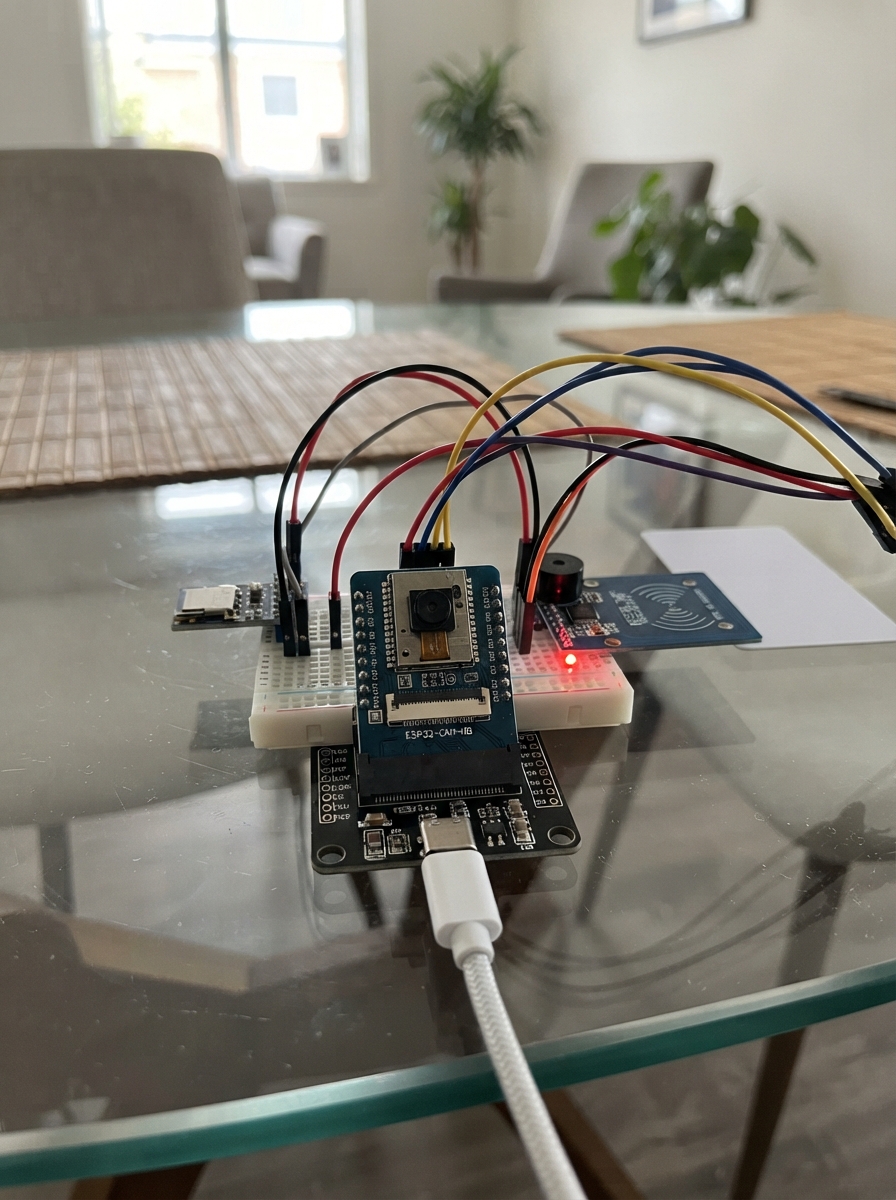
This project builds a visual product authentication system using an ESP32-CAM that captures and compares product images. By registering a reference photo of an authentic product, the system can verify whether subsequent images match the original, helping detect counterfeits or unauthorized substitutes. The guide includes a wiring diagram for the ESP32-CAM-MB with USB-C power, a parts list, complete firmware with web interface, and step-by-step assembly instructions.
The authentication works by analyzing image data and comparing visual similarity between a registered product and test images. Users can adjust the sensitivity threshold through a web dashboard to balance between strict matching and real-world variations in lighting and positioning. This approach is suitable for small-scale verification tasks, though the guide emphasizes that it's a visual comparison tool rather than cryptographic authentication, so results should be tested thoroughly before deployment.
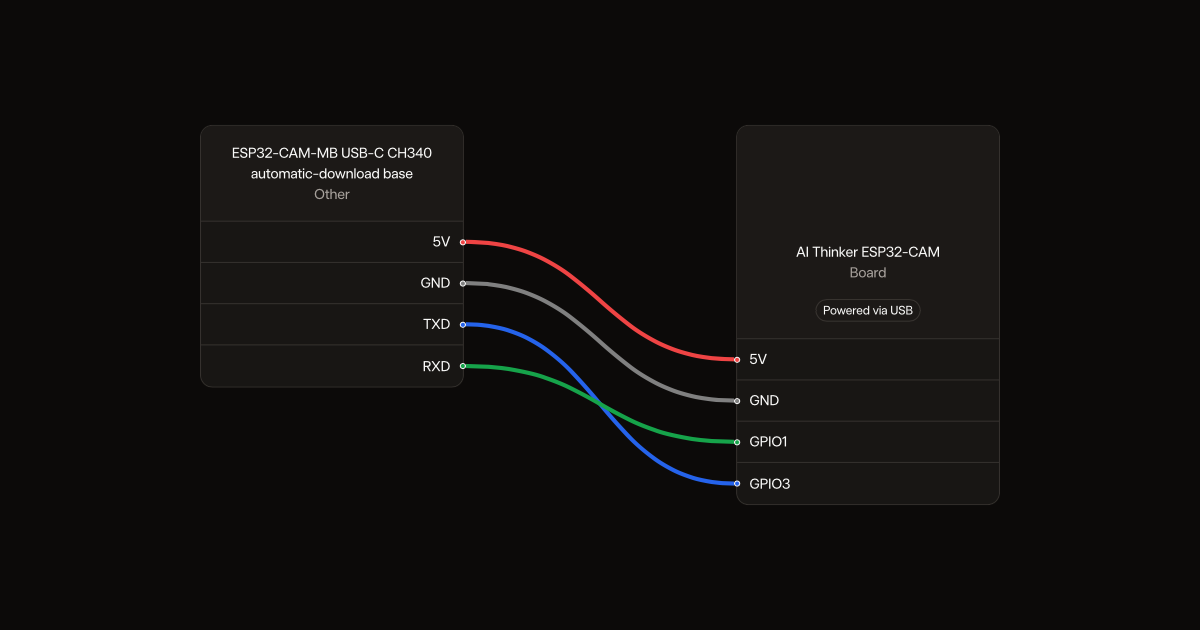
Wiring diagram
Gather all the parts
Assemble it in 3 steps
1. Seat the camera board
With USB disconnected, plug the AI Thinker ESP32-CAM into the matching ESP32-CAM-MB automatic-download base. Align the 5V and GND labels on both boards. The socket makes the power and serial connections shown in the wiring. The OV2640 camera is already part of the camera board.
- Reversed or offset insertion can damage both boards. Use a base with 3.3 V serial logic, not a 5 V serial adapter.
2. Make a repeatable scanning position
Secure the camera facing a plain background. Mark a spot for the product so each scan has the same angle and distance. Use steady room lighting and keep the product in focus. Leave the microSD slot empty.
3. Connect USB power
Connect the base to your Mac with a short USB data cable. Leave the base attached during use.
- If the board repeatedly restarts, try a shorter cable and a reliable powered USB port.
Review all connections
1. Connections between "usbbase" and "ESP32"
Deploy the firmware
#include <Arduino.h>
#include <WiFi.h>
#include <WebServer.h>
#include <Preferences.h>
#include "esp_camera.h"
#include <math.h>
WebServer server(80);
Preferences prefs;
bool ready=false, enrolled=false;
uint8_t reference[768];
const char page[] PROGMEM=R"HTML(<!doctype html><html><meta name="viewport" content="width=device-width"><title>Product Check</title><style>body{font:18px sans-serif;max-width:650px;margin:30px auto;padding:15px}button{padding:12px;margin:8px}img{width:320px;image-rendering:auto}</style><h1>Product appearance check</h1><p>One registered product. Put it in the same position, on a plain background, with the same lighting. Fill the camera view with the product.</p><img id="view"><p><button onclick="preview()">Preview</button><button onclick="act('enroll')">Register / replace product</button><button onclick="act('check')">Check product</button><button onclick="act('forget')">Forget</button></p><p id="result"></p><label>Maximum difference: <input id="limit" type="number" min="1" max="80" value="18"></label><p>Lower is stricter. This is a simple image comparison, not authentication. Photos and identical-looking products may pass. Test with both matching and different products before selecting a limit.</p><script>function preview(){document.getElementById('view').src='/preview?t='+Date.now()}async function act(a){try{let r=await fetch('/'+a+'?limit='+document.getElementById('limit').value,{method:'POST'});document.getElementById('result').textContent=await r.text();preview()}catch(e){document.getElementById('result').textContent='Connection lost'}}preview();</script></html>)HTML";
camera_fb_t* capture(){
  if(!ready)return nullptr;
  // Discard queued old frame so a newly placed product is used.
  camera_fb_t* f=esp_camera_fb_get(); if(f)esp_camera_fb_return(f);
  return esp_camera_fb_get();
}
bool signature(uint8_t* out){
  camera_fb_t* f=capture(); if(!f)return false;
  if(f->format!=PIXFORMAT_RGB565 || f->len<f->width*f->height*2){esp_camera_fb_return(f);return false;}
  for(int gy=0;gy<16;gy++)for(int gx=0;gx<16;gx++){
    unsigned sums[3]={0,0,0};int n=0;
    for(int y=gy*f->height/16;y<(gy+1)*f->height/16;y++)
      for(int x=gx*f->width/16;x<(gx+1)*f->width/16;x++){
        int p=(y*f->width+x)*2; uint16_t c=(f->buf[p]<<8)|f->buf[p+1];
        sums[0]+=((c>>11)&31)*255/31;sums[1]+=((c>>5)&63)*255/63;sums[2]+=(c&31)*255/31;n++;
      }
    for(int k=0;k<3;k++)out[(gy*16+gx)*3+k]=sums[k]/n;
  }
  esp_camera_fb_return(f);return true;
}
void preview(){
  camera_fb_t* f=capture();if(!f){server.send(503,"text/plain","Camera unavailable");return;}
  // Convert to a 24-bit BMP; no filesystem or separate asset upload needed.
  size_t stride=(f->width*3+3)&~3, size=54+stride*f->height;
  uint8_t* b=(uint8_t*)malloc(size);
  if(!b){esp_camera_fb_return(f);server.send(503,"text/plain","Not enough memory");return;}
  memset(b,0,size);b[0]='B';b[1]='M';
  auto put=[&](int o,uint32_t v){for(int i=0;i<4;i++)b[o+i]=(v>>(8*i))&255;};
  put(2,size);put(10,54);put(14,40);put(18,f->width);put(22,f->height);b[26]=1;b[28]=24;
  for(int y=0;y<f->height;y++)for(int x=0;x<f->width;x++){
    int p=(y*f->width+x)*2;uint16_t c=(f->buf[p]<<8)|f->buf[p+1];
    size_t q=54+(f->height-1-y)*stride+x*3;
    b[q]=(c&31)*255/31;b[q+1]=((c>>5)&63)*255/63;b[q+2]=((c>>11)&31)*255/31;
  }
  esp_camera_fb_return(f);
  server.sendHeader("Cache-Control","no-store");server.setContentLength(size);server.send(200,"image/bmp","");
  server.client().write(b,size);free(b);
}
void setup(){
  Serial.begin(115200);
  camera_config_t c={};
  c.ledc_channel=LEDC_CHANNEL_0;c.ledc_timer=LEDC_TIMER_0;
  c.pin_d0=5;c.pin_d1=18;c.pin_d2=19;c.pin_d3=21;c.pin_d4=36;c.pin_d5=39;c.pin_d6=34;c.pin_d7=35;
  c.pin_xclk=0;c.pin_pclk=22;c.pin_vsync=25;c.pin_href=23;
  c.pin_sccb_sda=26;c.pin_sccb_scl=27;c.pin_pwdn=32;c.pin_reset=-1;
  // esp_camera_init pulses PWDN high then low before sensor initialization.
  c.xclk_freq_hz=20000000;c.pixel_format=PIXFORMAT_RGB565;c.frame_size=FRAMESIZE_QQVGA;
  c.fb_count=1;c.grab_mode=CAMERA_GRAB_WHEN_EMPTY;
  ready=esp_camera_init(&c)==ESP_OK;
  prefs.begin("product",false);enrolled=prefs.getBytesLength("template")==sizeof(reference);
  if(enrolled)prefs.getBytes("template",reference,sizeof(reference));
  WiFi.mode(WIFI_AP);WiFi.softAP("ProductCheck","ProductCheck42");
  server.on("/",HTTP_GET,[]{server.send_P(200,"text/html",page);});
  server.on("/preview",HTTP_GET,preview);
  server.on("/enroll",HTTP_POST,[]{uint8_t s[768];if(!signature(s)){server.send(503,"text/plain","Camera capture failed");return;}
    if(prefs.putBytes("template",s,sizeof(s))!=sizeof(s)){server.send(500,"text/plain","Could not save product");return;}
    memcpy(reference,s,sizeof(s));enrolled=true;server.send(200,"text/plain","Product registered and saved through power-off.");});
  server.on("/check",HTTP_POST,[]{if(!enrolled){server.send(409,"text/plain","Register a product first.");return;}uint8_t s[768];
    if(!signature(s)){server.send(503,"text/plain","Camera capture failed");return;}
    float score=0;for(int i=0;i<768;i++)score+=abs((int)s[i]-reference[i]);score/=768;
    float limit=server.arg("limit").toFloat();if(limit<1||limit>80)limit=18;
    server.send(200,"text/plain",String(score<=limit?"APPEARANCE MATCH":"NO MATCH")+" | Difference: "+String(score,1)+" / limit: "+String(limit,1)+". Not proof of identity.");});
  server.on("/forget",HTTP_POST,[]{prefs.remove("template");enrolled=false;server.send(200,"text/plain","Registration erased.");});
  server.begin();Serial.printf("Camera: %s. Join ProductCheck, password ProductCheck42; open http://192.168.4.1\n",ready?"ready":"FAILED");
}
void loop(){server.handleClient();delay(2);}
Remix this project
Make it yours in one click
Open a full copy of this project in your own Schematik workspace, diagram, code, parts, and assembly steps included. Swap the sensor, add features, or redesign the whole thing with AI. The author's original stays untouched.