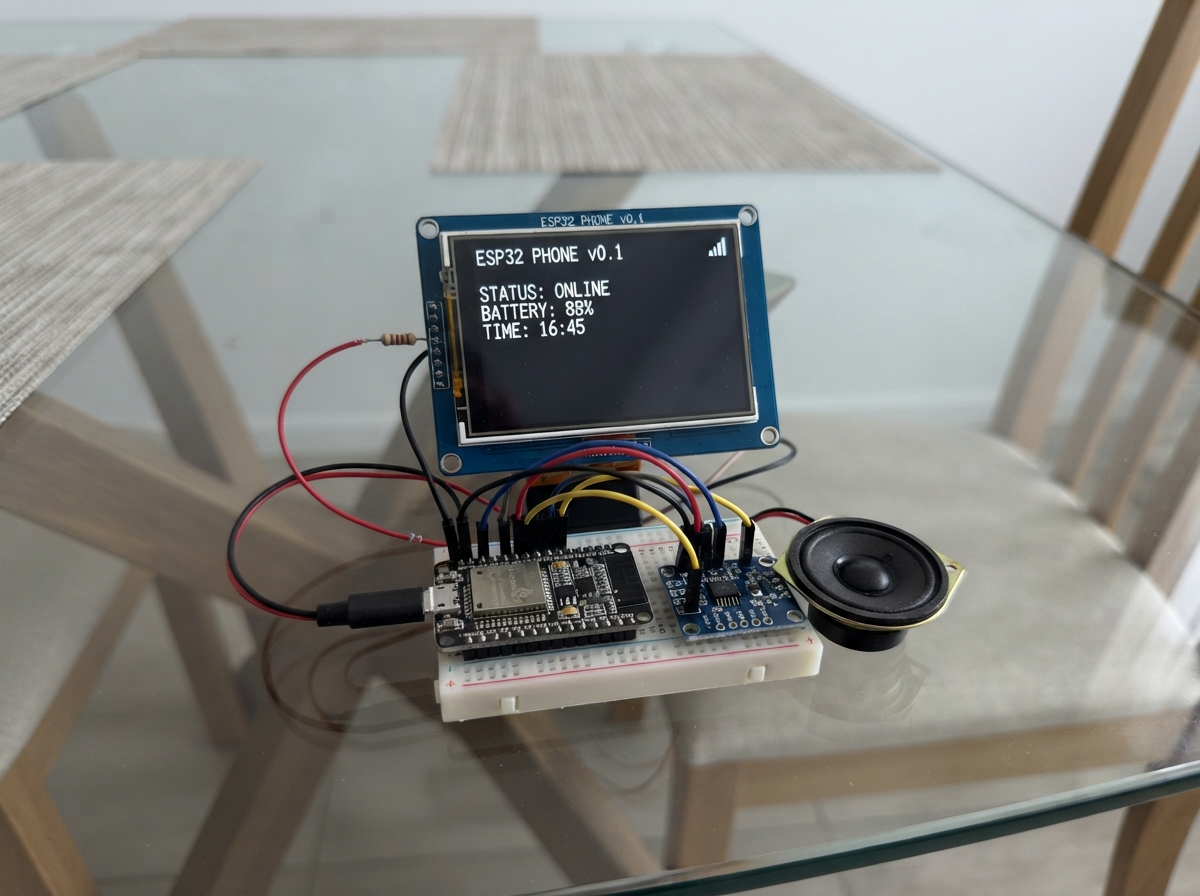
Build a portable touchscreen device powered by an ESP32 that combines a 2.8-inch color display, audio playback, and wireless connectivity. This project brings together a resistive-touch TFT screen, Class-D amplifier, and microSD card support to create a compact multimedia platform capable of displaying photos, playing music and radio streams, and responding to touch input.
The guide provides a complete wiring diagram, parts list, and step-by-step assembly instructions for safely connecting the display backlight, SPI signals, touch controller, and audio amplifier. Included firmware demonstrates how to build a responsive interface with gallery browsing, file management, audio playback, and web-based remote control via smartphone, along with troubleshooting steps for common startup issues.
Wiring diagram
Gather all the parts
Assemble it in 10 steps
1. Check the module and disconnect USB
Use the ESP32-S3-Zero, your single-row 2.8-inch ST7789 touch display with built-in SD slot, MAX98357A amplifier, 8-ohm 3W speaker and a 100-ohm 0.25W resistor. This replaces the old FriendlyELEC module and separate SD breakout. Connections below use printed signal names, never connector positions.
- The display controller is ST7789 as reported by you. SPI touch is assumed XPT2046-compatible. Pin labels alone do not identify the exact maker or backlight circuit.
- Disconnect USB before changing any wires. Use board GPIO labels, not physical pin positions. GPIO3 stays unused because it is a startup strapping pin. Do not connect LED directly to GPIO3; the unidentified backlight can also draw too much current for a GPIO.
2. Connect display and backlight power safely
Display VCC → board 3V3; GND → board GND. Connect board 3V3 → either end of the 100-ohm resistor, then the other end → display LED. LED means screen backlight, not a spare ESP32 GPIO. It stays on while powered.
- Remove the old display 5V wire. Do not connect 5V to VCC, LED or any display signal in this build.
- The resistor protects a direct LED input. Some modules already have a backlight driver or resistor. Brightness may be reduced; do not bypass the safety resistor with an unidentified module.
3. Connect the display signals
SCK → GPIO12 (clock); MOSI → GPIO11 (picture data); CS → GPIO10 (select screen); DC → GPIO9 (commands or picture data); RESET → GPIO8 (reset). Leave the display MISO pin disconnected because this firmware only writes to the display. Do not confuse it with T_DO or SD_MISO, which must be connected.
- Use short wires, ideally under 10 cm. Startup uses 10 MHz for reliability. Settings can cycle 10/20/40 MHz; maximum speed is not guaranteed for this unidentified module.
4. Wire touch and the built-in card slot
T_CLK → GPIO12 (touch clock); T_DIN → GPIO11 (data to touch); T_DO → GPIO13 (touch replies); T_CS → GPIO7 (select touch). Leave T_IRQ disconnected because firmware polls touch. On the SD connector, SD_SCK or SD_CLK → GPIO12; SD_MOSI or SD_DI → GPIO11; SD_MISO or SD_DO → GPIO13; SD_CS or SDCS → GPIO6. These are signal-name aliases, not assumed connector positions. The slot takes power from the display module; no separate SD breakout is needed.
- Display SCK alone does not necessarily connect the separate touch and SD headers internally. Connect every listed clock and data pin. Each device keeps its own chip-select wire.
- Only use the labelled SPI SD pins; do not wire unlabelled contacts or raw card contacts by guessed position. Insert or remove the card with USB disconnected.
5. Connect sound
MAX98357A VIN → board 5V (USB power); GND → GND; BCLK → GPIO1; LRC → GPIO2; DIN → GPIO4; SD → GPIO5 (mute). Leave GAIN open. Connect speaker positive to SPK+ and negative to SPK-. Only the amplifier uses 5V; its I2S signals accept 3.3V logic. Settings has the speaker test.
- Never connect either speaker terminal to GND, a GPIO or headphones. Use an 8-ohm 3W speaker and start with quiet audio.
6. Inspect and deploy
Check the 3.3V display supply, the LED series resistor and all select wires. Place boards on a dry non-metal surface. Plug in a USB-C data cable and press Deploy. Use a good USB supply rated at least 1 A. No battery or charging circuit is included. The first start of this firmware runs a new five-point touch calibration. Hold each cross steadily for about a quarter second, then lift fully before touching the next. Use a blunt plastic stylus. Calibration is saved. To recover later, hold the screen while powering on, keep holding until the calibration page appears, then lift; or use Settings > Calibrate touch. Calibration restarts if the five points do not agree.
- If USB is not detected, hold BOOT, press and release RESET, then release BOOT.
- A dark screen can mean a backlight or supply mismatch, not necessarily wrong SPI pins. Do not try 5V or remove the resistor to troubleshoot an unidentified module.
7. Use Gallery, files, audio and swipe menus
With USB disconnected, insert a FAT32-formatted microSD card, preferably 4–32 GB. Copy your files using a computer card reader before insertion. Home uses picture icons for Files, Gallery, Calculator, Calendar, Notes, Messages, Timer, Stopwatch, Games, Settings and Wi-Fi/BLE. Swipe down for Wi-Fi and BLE controls; swipe up for the icon drawer. Snake, Dino, Pong and Chess are inside Games. The existing five-point calibration is retained.
- Gallery lists folders and BMP/JPG/JPEG files. Use baseline JPEG, not progressive JPEG. JPEG is reduced by 1, 2, 4 or 8 to fit 240 by 232 pixels; larger images must be resized on a computer. BMP must be uncompressed 24-bit, maximum 240 by 232. TXT/CSV previews show the first 500 ASCII characters. Other file types can be downloaded through the phone web page, not necessarily viewed on the device.
- Tap a file for View/play, Move or Delete. Delete requires a second confirmation and is permanent. Back up your card first. Move opens a folder picker; open the destination folder and tap Paste. Tap the folder path at the top to go up while picking a destination. Moving never overwrites an existing destination. The web page accepts full source and destination paths and can remove empty folders.
- MP3 and uncompressed PCM 8/16-bit WAV play through the wired MAX98357A speaker. A .waw extension is also accepted for a WAV file. Start with small local files, standard mono/stereo audio at 8–48 kHz, and a low-volume recording. Audio starts at 15 percent gain. Stop playback before web downloads, moving or deleting files. Leaving the player stops playback. Corrupt or unsupported files may fail.
- Notes and Messages use a 120-character keyboard. Tap ABC/abc/123 to switch letter and symbol sets. Save stores a note on the device and writes /note.txt when an SD card is mounted. Send delivers a reply to the phone web page. Messages are temporary, local only, and disappear after reset; this is not SMS or an internet messaging service.
- In Snake use the four arrow buttons. In Dino tap to jump. In Pong tap horizontally to position the paddle and keep the ball in play. Tap after game over to retry. Home exits; swiping still opens the menus. These are simple single-player games, not phone-quality graphics.
- Swipe up on the lock screen and enter the existing six-digit passcode; the default is 111122 if it was never changed. A small blue flower is built in, or put a baseline JPEG at /background.jpg on the FAT32 card. Clock uses internet time over Wi-Fi or time copied from the phone web page. Settings adjusts the UTC offset in 15-minute steps; daylight-saving changes are manual. Calendar follows this clock and has previous/next month buttons. Timer is 1–180 minutes; the timer and stopwatch reset after power loss. Timer tones wait until audio playback has stopped. Do not use this as a safety alarm.
- The display initializes once at 10 MHz and shows a boot-only colour test for 1.5 seconds. Settings offers 10/20/40 MHz, but reboot returns to 10 MHz for reliability. Static pages redraw only when changed; games update their play area as objects move. Long wires, card speed, image decoding and web downloads affect responsiveness. Instantaneous response is not guaranteed.
- ESP32-S3 supports 2.4 GHz Wi-Fi and Bluetooth Low Energy only. This firmware scans BLE advertisements but does not pair with arbitrary Bluetooth devices or stream to a party speaker. Ordinary Bluetooth speakers need Bluetooth Classic audio, which this chip lacks. 5-GHz-only, enterprise and login-page Wi-Fi networks are not supported by this setup form.
- Device-side MP4 video playback is not implemented. You can download an MP4 file to your phone through the web page and play it there if the phone supports its format. This is not Android or iOS, and cannot run their apps.
8. Connect your phone for web control and messages
After deployment and calibration, swipe down. The screen shows the web login password. Join Pocket-Setup on your phone using Wi-Fi password pocket123, then open http://192.168.4.1 in its browser. Log in as pocket with the separate eight-character password shown on the gadget. The page offers Wi-Fi credentials, app launching, folder browsing, viewing/downloading files, move/delete actions, notes, local messages, shared chess, browser-only tic-tac-toe and memory pairs, and coordinate-based remote taps. Chess uses piece letters — K king, Q queen, R rook, B bishop, N knight and P pawn. Start New AI to play white against a simple computer, or New friend for white on the gadget and black on the phone. Tap the source square then destination. Pawns automatically become queens. Repetition and 50-move draw claims are not implemented. Use the web page only on a trusted local network; its login and traffic are not encrypted. Use browser Back after saving Wi-Fi credentials.
- Enter your supported 2.4 GHz network name and password on the web page. The gadget keeps its own access point available while connecting to that network. Your phone may warn that Pocket-Setup has no internet; remain connected to use the controls.
- The access point and web controls start at boot and remain available when returning Home. To join a 2.4 GHz Wi-Fi network on the gadget, swipe down, scan WiFi, tap a result, type its password and tap Join. The ABC, abc, 123 and symbol buttons change keyboard sets. You can instead enter Wi-Fi details on the phone page. Your phone may need to reconnect to Pocket-Setup after the gadget joins a network. Saved network details and the separate web password survive reset.
- Deploy uploads firmware only. Photos, songs and other files must already be on your physical SD card. Power off before inserting or removing the card; use Settings > Mount SD if the card failed to mount.
- Use web control only in a trusted place. Web control uses local HTTP, not encrypted HTTPS. Do not expose or port-forward it to the internet. Closing WiFi setup is recommended when not in use. File deletion is permanent; keep backups.
9. Check the boot test if the screen stays blank
On power-up look for red, green and blue bars and DISPLAY SPI TEST, then the menu or touch-calibration crosses. If there is no backlight glow, unplug USB and check 3V3 → 100-ohm resistor → LED and the common ground. If it glows but shows no bars, check CS → GPIO10, RESET → GPIO8, DC → GPIO9, MOSI → GPIO11 and SCK → GPIO12. For this test remove the SD card with power off. Serial messages at 115200 baud report each startup stage but cannot prove the screen received pixels.
- Software cannot fix an incompatible supply or controller. The exact module regulator and backlight circuit remain unverified. Keep display VCC and LED on 3.3V; do not try 5V as a blank-screen fix.
- The SD, touch and amplifier wires are unchanged. A failed display must not be assumed fixed just because flashing succeeded.
10. Music, radio, keyboard and photos
Swipe down for controls and swipe up for apps after unlocking. Apps has Music / radio and Audio maker buttons. The QWERTY keyboard has a permanent number row. Offline music plays MP3 or PCM WAV from SD through the wired speaker. For online music or internet radio, join internet Wi-Fi and enter a direct HTTP MP3 stream URL on the phone web page. The stream is saved for Play saved stream in Music. Audio maker saves a 1–10 second sine-wave tone as /tone.wav; it never overwrites an existing file. Delete or move that file before making another. Gallery centers baseline JPEGs and fits non-interlaced PNGs up to 2048 by 2048 pixels to the screen.
- Internet radio is not an FM receiver. No tuner or microphone is fitted. YouTube, Spotify, protected streams, HTTPS-only audio, AAC and playlist URLs are not supported by this MP3 stream player. Network stalls and large photos can delay touch response. Start with low speaker volume.
Review all connections
1. Connections between "screen" and "ESP32"
2. Connections between "backlight_r" and "ESP32"
3. Connections between "amp" and "ESP32"
Deploy the firmware
#include <Arduino.h>
#include <SPI.h>
#include <Adafruit_GFX.h>
#include <Adafruit_ST7789.h>
#include <driver/i2s.h>
#include <math.h>
#include <XPT2046_Touchscreen.h>
#include <WiFi.h>
#include <WiFiClientSecure.h>
#include <HTTPClient.h>
#include <FS.h>
using fs::FS;
#include <WebServer.h>
#include <Preferences.h>
#include <time.h>
#include <SD.h>
#include <BLEDevice.h>
#include <BLEScan.h>
#include <AudioFileSourceSD.h>
#include <AudioFileSourceICYStream.h>
#include <AudioGeneratorMP3.h>
#include <AudioGeneratorWAV.h>
#include <TJpg_Decoder.h>
#include <PNGdec.h>
// Single-row ST7789 module, XPT2046-compatible touch and integrated SD.
// Shared SPI: SCK/T_CLK/SD_SCK=12, MOSI/T_DIN/SD_MOSI=11,
// T_DO/SD_MISO=13; display MISO is unused. CS: LCD=10, touch=7, SD=6.
// LED backlight: 3V3 through external 100-ohm resistor (no GPIO).
// Do not use GPIO3: it is reserved as a strapping pin on this board.
class PocketDisplay : public Adafruit_ST7789 {
public:
PocketDisplay() : Adafruit_ST7789(&SPI,10,9,8) {}
// init() invokes begin() internally. Slow the initialization commands too,
// not just the drawing that happens after init().
void begin(uint32_t freq=0) override {
Adafruit_ST77xx::begin(10000000);
}
void drawString(const String &s,int x,int y,int font=2) {
setCursor(x,y); print(s);
}
void drawCentreString(const String &s,int x,int y,int font=2) {
setCursor(x-s.length()*6*textsize_x/2,y); print(s);
}
};
PocketDisplay tft;
XPT2046_Touchscreen touch(7);
const uint16_t TFT_WHITE=ST77XX_WHITE, TFT_YELLOW=ST77XX_YELLOW;
int volume=15;
bool audioReady=false;
void initAudio() {
pinMode(5,OUTPUT); digitalWrite(5,LOW); // amplifier muted until test
i2s_config_t c={};
c.mode=(i2s_mode_t)(I2S_MODE_MASTER|I2S_MODE_TX);
c.sample_rate=16000;
c.bits_per_sample=I2S_BITS_PER_SAMPLE_16BIT;
c.channel_format=I2S_CHANNEL_FMT_RIGHT_LEFT;
c.communication_format=I2S_COMM_FORMAT_STAND_I2S;
c.intr_alloc_flags=0; c.dma_buf_count=4; c.dma_buf_len=128;
c.use_apll=false; c.tx_desc_auto_clear=true;
i2s_pin_config_t pins={};
pins.mck_io_num=I2S_PIN_NO_CHANGE; pins.bck_io_num=1;
pins.ws_io_num=2; pins.data_out_num=4; pins.data_in_num=I2S_PIN_NO_CHANGE;
if(i2s_driver_install(I2S_NUM_0,&c,0,nullptr)!=ESP_OK)return;
if(i2s_set_pin(I2S_NUM_0,&pins)!=ESP_OK)return;
i2s_zero_dma_buffer(I2S_NUM_0); audioReady=true;
}
void playTone() {
if(!audioReady)return;
i2s_zero_dma_buffer(I2S_NUM_0);
digitalWrite(5,HIGH); // left channel; identical samples in both channels
int16_t samples[256];
for(int block=0;block<16;++block) {
for(int j=0;j<128;++j) {
int n=block*128+j;
float envelope=fminf(1.0f,fminf(n/160.0f,(2047-n)/160.0f));
int16_t v=(int16_t)((8000*volume/100.0f)*envelope*sinf(2*PI*660*n/16000.0f));
samples[2*j]=samples[2*j+1]=v;
}
size_t written=0;
i2s_write(I2S_NUM_0,samples,sizeof(samples),&written,portMAX_DELAY);
}
// Let the final DMA blocks finish before muting the amp.
delay(40); digitalWrite(5,LOW); i2s_zero_dma_buffer(I2S_NUM_0);
}
TaskHandle_t audioTaskHandle=nullptr;
void audioWorker(void *) {
while(true) {ulTaskNotifyTake(pdTRUE,portMAX_DELAY);playTone();}
}
void soundTest();
WebServer server(80);
Preferences prefs;
uint16_t BG=0x1082, FG=0xFFFF, GRAY=0x2945;
bool lightMode=false; int settingsTab=0;
void applyTheme(){BG=lightMode?0xEF7D:0x1082;FG=lightMode?0x0843:0xFFFF;GRAY=lightMode?0xCE79:0x2945;}
enum Page {HOME,FILES,IMAGES,CALC,SETTINGS,RADIO,NOTES,TIMER,STOPWATCH,PREVIEW,APPS,ACTIONS,PLAYER,CALENDAR,CHAT,GAME,GAMELIST,CHESS,CONTROL,TICTACTOE,MEMORY,MUSIC,MAKER,UTILITY};
Page page=HOME;
bool dirty=true,down=false,portal=false,connectPending=false,sdReady=false;
String ssid,password,lastClock,lastDate,lastTimer,note,message;
// Versioned affine calibration handles exchanged axes, mirroring and skew.
struct TouchMap { float x[3], y[3]; } touchMap;
const int16_t targetX[5]={24,215,215,24,120};
const int16_t targetY[5]={24,24,295,295,160};
float rawX[5],rawY[5];
uint8_t touchSamples=0;
int32_t touchSumX=0,touchSumY=0;
int16_t sampleMinX=4095,sampleMaxX=0,sampleMinY=4095,sampleMaxY=0;
uint32_t releaseSince=0;
int cal=0,utcOffset=0;
uint32_t nextTouch=0,nextTick=0,elapsed=0,started=0;
bool running=false,timerOn=false,ringing=false;
uint32_t countdownDeadline=0,timerMinutes=5,lastRing=0;
uint32_t displayHz=10000000;
String calcValue="0",calcStored=""; double accumulator=0; char operation=0; bool fresh=true;
String folder="/",paths[6],names[6]; bool dirs[6]; int filePage=0,fileCount=0; bool moreFiles=false;
File bmpFile;
uint32_t bmpOffset=0,bmpStride=0;
int bmpW=0,bmpH=0,bmpRow=0; bool bmpBottom=true;
uint8_t pixels[240*3]; uint16_t linePixels[240];
String previewText;
int wifiState=-3; // -3 idle, -2 scanning, -1 failed, >=0 result count
BLEScan *bleScan=nullptr;
volatile bool bleDone=false;
bool bleBusy=false;
String radioLines[4];
String scanRows[32],scanSsids[32],scanJson="[]"; bool wifiCompose=false; String wifiDraft,chosenSsid; int scanCount=0,scanOffset=0;
String scanKind="No scan yet";
void showScanRows(){for(int i=0;i<4;i++)radioLines[i]=scanOffset+i<scanCount?scanRows[scanOffset+i]:"";}
#include "lvgl_grid.h"
void text(const String &s,int x,int y,int size=1) {
uiWidget(s,x,y,240-x,size>=2?32:18,false,0,size);
}
void button(const String &s,int x,int y,int w,int h) {
uiWidget(s,x,y,w,h,true,lightMode?0x387b9c:0x253e58);
}
bool hit(int x,int y,int a,int b,int w,int h) {return x>=a&&x<a+w&&y>=b&&y<b+h;}
void valueBox(const String &s,int x,int y,int w,int h,int size=1) {
uiWidget(s,x,y,w,h,false,0,size);
}
void resetTouchSamples() {
touchSamples=0;touchSumX=touchSumY=0;
sampleMinX=sampleMinY=4095;sampleMaxX=sampleMaxY=0;
}
void calibrationScreen(bool retry=false) {
tft.fillScreen(BG);
text("Touch setup "+String(cal)+"/5",20,70,2);
text("Hold cross steady, then lift",20,105);
text("Use a blunt plastic stylus",20,120);
text(retry?"Not accurate - try again":"Touch the centre of each cross",20,200);
int x=targetX[cal-1],y=targetY[cal-1];
tft.drawCircle(x,y,12,FG);
tft.drawLine(x-16,y,x+16,y,FG);tft.drawLine(x,y-16,x,y+16,FG);
}
void startCalibration() {
cal=1;down=true;releaseSince=0;resetTouchSamples();calibrationScreen();
}
bool fitTouchMap() {
// Normalized raw coordinates keep the least-squares system well scaled.
float m[3][5]={};
for(int k=0;k<5;k++) {
float v[3]={rawX[k]/4095.0f,rawY[k]/4095.0f,1};
for(int i=0;i<3;i++) {
for(int j=0;j<3;j++)m[i][j]+=v[i]*v[j];
m[i][3]+=v[i]*targetX[k];m[i][4]+=v[i]*targetY[k];
}
}
for(int i=0;i<3;i++) {
int pivot=i;
for(int k=i+1;k<3;k++)if(fabsf(m[k][i])>fabsf(m[pivot][i]))pivot=k;
if(fabsf(m[pivot][i])<0.0001f)return false;
for(int j=0;j<5;j++){float v=m[i][j];m[i][j]=m[pivot][j];m[pivot][j]=v;}
float d=m[i][i];for(int j=i;j<5;j++)m[i][j]/=d;
for(int k=0;k<3;k++)if(k!=i){float f=m[k][i];for(int j=i;j<5;j++)m[k][j]-=f*m[i][j];}
}
TouchMap candidate;
for(int i=0;i<3;i++){candidate.x[i]=m[i][3];candidate.y[i]=m[i][4];}
for(int k=0;k<5;k++) {
float x=rawX[k]/4095.0f,y=rawY[k]/4095.0f;
float dx=candidate.x[0]*x+candidate.x[1]*y+candidate.x[2]-targetX[k];
float dy=candidate.y[0]*x+candidate.y[1]*y+candidate.y[2]-targetY[k];
if(!isfinite(dx)||!isfinite(dy)||dx*dx+dy*dy>14*14)return false;
}
touchMap=candidate;return true;
}
void acceptCalibrationPoint(float x,float y) {
rawX[cal-1]=x;rawY[cal-1]=y;
if(cal<5){++cal;calibrationScreen();return;}
if(!fitTouchMap()){cal=1;calibrationScreen(true);return;}
prefs.putBytes("touchMap",&touchMap,sizeof(touchMap));
prefs.putUInt("touchVer",2);
cal=0;dirty=true;
}
#include "apps.h"
void mountSD() {
stopTrack();
SD.end();sdReady=SD.begin(6,SPI,10000000);
if(sdReady&&SD.cardType()==CARD_NONE){SD.end();sdReady=false;}
message=sdReady?"SD ready":"No SD: insert FAT32 card";
}
void listFiles() {
fileCount=0;moreFiles=false;
if(!sdReady){message="No SD. Settings > Mount SD";return;}
File dir=SD.open(folder);
if(!dir||!dir.isDirectory()){folder="/";message="Cannot open folder";return;}
int skip=filePage*6,seen=0;
// At most 32 pages per folder keeps navigation bounded.
while(true) {
File f=dir.openNextFile();if(!f)break;
String name=f.name();int slash=name.lastIndexOf('/');if(slash>=0)name=name.substring(slash+1);
String lower=name;lower.toLowerCase();bool isDir=f.isDirectory();f.close();
if(page==IMAGES&&!isDir&&!lower.endsWith(".bmp")&&!lower.endsWith(".jpg")&&!lower.endsWith(".jpeg")&&!lower.endsWith(".png"))continue;
if(seen++<skip)continue;
if(fileCount==6){moreFiles=true;break;}
names[fileCount]=(isDir?"[+] ":"")+name;
paths[fileCount]=(folder=="/"?"/":folder+"/")+name;dirs[fileCount]=isDir;fileCount++;
}
dir.close();message="";
}
uint16_t read16(File &f) {uint16_t a=f.read();return a|((uint16_t)f.read()<<8);}
uint32_t read32(File &f) {uint32_t a=read16(f);return a|((uint32_t)read16(f)<<16);}
void openPreview(String path) {
bmpFile.close();jpgPath="";previewText="";message="";dirty=true;
String lower=path;lower.toLowerCase();
File f=SD.open(path,FILE_READ);
if(!f){message="Cannot open file";return;}
if(lower.endsWith(".png")||lower.endsWith(".jpg")||lower.endsWith(".jpeg")) {
f.close(); jpgPath=path; page=PREVIEW; return;
} else if(lower.endsWith(".mp3")||lower.endsWith(".wav")||lower.endsWith(".waw")) {
f.close();startTrack(path);page=PLAYER;return;
} else if(lower.endsWith(".mp4")) {
f.close();message="MP4 decoding unsupported on S3";return;
} else if(lower.endsWith(".bmp")) {
bool valid=read16(f)==0x4D42;read32(f);read32(f);uint32_t offset=read32(f),header=read32(f);
int32_t w=(int32_t)read32(f),h=(int32_t)read32(f);
uint16_t planes=read16(f),depth=read16(f);uint32_t compression=read32(f);
if(!valid||header<40||w<1||w>240||h==0||h>232||h< -232||planes!=1||depth!=24||compression!=0) {
message="Use 24-bit BMP <=240x232";f.close();return;
}
bmpW=w;bmpH=abs(h);bmpBottom=h>0;bmpOffset=offset;bmpStride=(w*3+3)&~3;
if((uint64_t)offset+(uint64_t)bmpStride*bmpH>f.size()){message="Truncated BMP";f.close();return;}
bmpRow=0;bmpFile=f;
} else if(lower.endsWith(".txt")||lower.endsWith(".csv")) {
while(f.available()&&previewText.length()<500) {char c=f.read();previewText+=c=='\n'?'\n':((c>=32&&c<127)?c:' ');}
f.close();
} else {f.close();message="Preview: BMP, TXT or CSV only";}
page=PREVIEW;dirty=true;
}
void drawImageRow() {
if(page!=PREVIEW||!bmpFile||bmpRow>=bmpH)return;
int source=bmpBottom?bmpH-1-bmpRow:bmpRow;
if(!bmpFile.seek(bmpOffset+source*bmpStride)||bmpFile.read(pixels,bmpW*3)!=(size_t)bmpW*3) {
bmpFile.close();message="SD read failed";dirty=true;return;
}
for(int i=0;i<bmpW;i++)linePixels[i]=tft.color565(pixels[i*3+2],pixels[i*3+1],pixels[i*3]);
// SD transaction is finished before starting the display transaction.
tft.drawRGBBitmap((240-bmpW)/2,38+bmpRow,linePixels,bmpW,1);
if(++bmpRow>=bmpH)bmpFile.close();
}
void saveNote() {
prefs.putString("note",note);message="Saved on device";
if(sdReady){SD.remove("/note.txt");File f=SD.open("/note.txt",FILE_WRITE);if(f){bool ok=f.print(note)==note.length();f.close();message=ok?"Saved + SD /note.txt":"SD write failed";}else message="Device saved; SD failed";}
}
void switchPage(Page p) {
deleteConfirm=false;
// Web control stays available until explicitly closed.
if(page==PLAYER && p!=PLAYER)stopTrack();
jpgPath="";
if(page==PREVIEW)bmpFile.close();
page=p;message="";dirty=true;lastClock="";lastDate="";lastTimer="";
if(p!=NOTES&&chatCompose){note=savedDraft;chatCompose=false;}
if(p!=NOTES&&wifiCompose){note=wifiDraft;wifiCompose=false;}
if(p==FILES||p==IMAGES){folder="/";filePage=0;listFiles();}
}
void bleComplete(BLEScanResults results){bleDone=true;}
void startBLE() {
stopTrack();
if(bleBusy)return;
if(wifiState==-2){message="Wait for Wi-Fi scan";dirty=true;return;}
if(!bleScan){BLEDevice::init("Pocket");bleScan=BLEDevice::getScan();bleScan->setActiveScan(true);}
for(int i=0;i<4;i++)radioLines[i]="";
bleDone=false;bleBusy=true;bleScan->clearResults();
if(!bleScan->start(8,bleComplete,false)){bleBusy=false;message="BLE scan failed";}
else message="Active BLE scan (8 seconds)";
dirty=true;
}
void startWifi() {
stopTrack();
if(bleBusy||wifiState==-2){message="Wait for current scan";dirty=true;return;}
WiFi.scanDelete();wifiState=-2;
for(int i=0;i<4;i++)radioLines[i]="";
int result=WiFi.scanNetworks(true);if(result==WIFI_SCAN_FAILED){wifiState=-1;message="Wi-Fi scan failed";}else message="Scanning Wi-Fi...";
dirty=true;
}
void draw() {
if(locked) { drawLockScreen(); dirty=false; return; }
tft.fillScreen(BG);
if(page>=APPS) {drawExtra();}
else if(page==HOME) {
drawWallpaper();
tft.fillRoundRect(6,3,228,25,8,0x0843);
uiWidget(WiFi.status()==WL_CONNECTED?LV_SYMBOL_WIFI " Wi-Fi":"Local",149,6,83,20,false,0);
uiWidget("USB",104,6,40,20,false,0);
drawAppGrid(false);
} else {
const char *titles[]={"","SD files","Gallery","Calculator","Settings","Wi-Fi / BLE scan","Notes","Countdown timer","Stopwatch","SD preview"};
text(page==NOTES&&wifiCompose?"WiFi password":titles[page],8,10,2);button("Home",8,280,224,32);
if(page==FILES||page==IMAGES) {
text((moving?"Up: ":"")+folder.substring(0,moving?32:37),8,34);
for(int i=0;i<fileCount;i++)button(names[i].substring(0,34),8,50+i*28,224,25);
button(moving?"Paste":"Up",8,224,65,28);button("Prev",87,224,65,28);button("Next",167,224,65,28);
if(!fileCount&&!message.length())text("Folder is empty",8,80);
} else if(page==CALC) {
const char *keys[]={"7","8","9","/","4","5","6","*","1","2","3","-","C","0",".","+"};
for(int i=0;i<16;i++)button(keys[i],8+(i%4)*57,75+(i/4)*38,53,34);
button("=",8,232,224,32);
} else if(page==SETTINGS) {
if(settingsTab==0){
const String rows[]={"Appearance: "+String(lightMode?"Light":"Dark"),"Speaker / volume: "+String(volume)+"%","Wi-Fi / connect / BLE scan","Phone / web / security","Display / SD / time / lock"};
for(int i=0;i<5;i++){tft.fillRect(8,44+i*40,224,36,GRAY);text(rows[i],14,57+i*40);text(">",218,57+i*40);}
} else if(settingsTab==1){
text("Wired speaker volume",8,48,2);text(String(volume)+"%",90,90,2);
button("-5",8,125,105,38);button("+5",127,125,105,38);
button("Stop music",8,174,105,32);button("Test",127,174,105,32);
button("Ringtone test",8,212,224,24);button("Settings list",8,240,224,28);
} else if(settingsTab==2){
text("Connect phone to Pocket-Setup",8,48);text("AP password: pocket123",8,70);
text("Web: "+WiFi.softAPIP().toString(),8,102);text("User: pocket",8,124);text("Pass: "+webPass,8,146);
text("Change passwords in web settings",8,185);button("Settings list",8,240,224,28);
} else {
button("Touch calibration",8,44,224,30);button("Mount SD",8,80,105,30);button("Lock",127,80,105,30);
text("Time zone: "+String(utcOffset)+" min",8,132);button("-15 min",8,154,105,32);button("+15 min",127,154,105,32);
text("Set time from phone web controls",8,210);button("Settings list",8,240,224,28);
}
} else if(page==RADIO) {
text(WiFi.status()==WL_CONNECTED?("Online: "+WiFi.SSID()).substring(0,36):"WiFi disconnected",8,32);
button("Scan WiFi",8,46,105,28);button("Scan BLE",127,46,105,28);
for(int i=0;i<4;i++){tft.drawRect(8,80+i*22,224,21,0x4A69);text(radioLines[i].substring(0,36),11,86+i*22);}
button("Prev",8,174,65,26);button("Next",87,174,65,26);button("AP on",167,174,65,26);
if(portal){text("Web: "+WiFi.softAPIP().toString(),8,207);text("User: pocket Pass: "+webPass,8,220);text("AP: Pocket-Setup / pocket123",8,233);}
text(scanKind=="Wi-Fi"?"Tap network to connect":"BLE scan only; no BT audio",8,247);
} else if(page==NOTES) {
String keys=keyChars();
int pos=0;for(int row=0;row<4;row++){for(int col=0;col<keyboardRowCount(row);col++)uiWidget(String(keys[pos++]),keyboardRowX(row)+col*24+1,91+row*29,22,27,true,row==0?0x176e96:0x253e58,2);}
button("Space",8,211,68,28);button("Del",84,211,68,28);button(wifiCompose?"Join":chatCompose?"Send":"Save",160,211,72,28);
button(keyMode==0?"ABC":keyMode==1?"abc":keyMode==2?"123":"#%$",8,244,58,27);text("120 chars",82,254);
} else if(page==TIMER) {
text("Duration: "+String(timerMinutes)+" min",8,80,2);
button("-1 min",8,118,105,34);button("+1 min",127,118,105,34);
button(timerOn?"Cancel":"Start",8,169,105,38);button("Silence",127,169,105,38);
text("Keep USB connected.",8,226);text("Timer does not survive reset.",8,243);
} else if(page==STOPWATCH) {
button(running?"Pause":"Start",8,155,105,42);button("Reset",127,155,105,42);
} else if(page==PREVIEW) {
button("Back to files",8,280,224,32);
if(jpgPath.length()){String e=jpgPath;e.toLowerCase();if(e.endsWith(".png"))drawPng(jpgPath);else drawJpeg(jpgPath);}
if(previewText.length()) {
int col=0,row=0;String line;
for(unsigned i=0;i<previewText.length()&&row<27;i++) {
char c=previewText[i];if(c=='\n'||col==37){text(line,8,38+row++*8);line="";col=0;if(c=='\n')continue;}
line+=c;col++;
}if(row<27)text(line,8,38+row*8);
}
}
}
if(message.length()&&page!=HOME)text(message.substring(0,37),8,266);
dirty=false;lastClock="";lastDate="";lastTimer="";
}
void dynamicValues() {
if(locked) { if(!unlockPad){time_t n=time(nullptr);String minute=String((long)(n/60));if(minute!=lastClock){lastClock=minute;drawLockScreen();}} return; }
if(page==HOME) {
time_t now=time(nullptr);String clock="--:--",date="Set time on phone";
if(now>=1700000000){now+=utcOffset*60;struct tm t;gmtime_r(&now,&t);char b[32];strftime(b,sizeof(b),"%H:%M",&t);clock=b;strftime(b,sizeof(b),"%a %d %b %Y",&t);date=b;}
if(clock!=lastClock){valueBox(clock,12,6,86,22);lastClock=clock;}
if(date!=lastDate){valueBox(date+" | "+weatherLine,8,37,224,32);lastDate=date;}
} else if(page==CALC) {
if(calcValue!=lastClock){valueBox(calcValue.substring(0,18),8,44,224,20,2);lastClock=calcValue;}
} else if(page==NOTES) {
if(note!=lastClock) {
String shown=note;if(wifiCompose){shown="";for(unsigned i=0;i<note.length();i++)shown+='*';}
uiWidget(shown,8,42,224,42,false,0);lastClock=note;
}
} else if(page==TIMER||page==STOPWATCH) {
uint32_t sec=page==TIMER?(timerOn?(uint32_t)max(0L,(long)(countdownDeadline-millis()+999))/1000:0):(elapsed+(running?millis()-started:0))/1000;
char b[32];snprintf(b,sizeof(b),"%02lu:%02lu:%02lu",(unsigned long)(sec/3600),(unsigned long)((sec/60)%60),(unsigned long)(sec%60));
String v=ringing&&page==TIMER?"TIME UP!":String(b);
if(v!=lastTimer){valueBox(v,8,page==TIMER?42:80,224,28,3);lastTimer=v;}
}
}
void calculator(char key) {
if(key=='C'){calcValue="0";accumulator=0;operation=0;fresh=true;return;}
if((key>='0'&&key<='9')||key=='.') {
if(fresh){calcValue=key=='.'?"0":"";fresh=false;}
if(key=='.'&&calcValue.indexOf('.')>=0)return;
if(calcValue.length()<15){if(calcValue=="0"&&key!='.')calcValue="";calcValue+=key;}return;
}
double rhs=calcValue.toDouble();
if(operation) {
if(operation=='/'&&rhs==0){calcValue="Error";operation=0;fresh=true;return;}
switch(operation){case '+':accumulator+=rhs;break;case '-':accumulator-=rhs;break;case '*':accumulator*=rhs;break;case '/':accumulator/=rhs;break;}
char b[28];snprintf(b,sizeof(b),"%.8g",accumulator);calcValue=b;
} else accumulator=rhs;
operation=key=='='?0:key;fresh=true;
}
void tap(int x,int y) {
if(locked){
if(!unlockPad) return;
// Keep the touch zones aligned with the visible 3-by-3 keypad.
if(y>=160&&y<256){int col=x/80,row=(y-160)/32; if(col<3&&row<3){char digit='1'+row*3+col; if(unlockInput.length()<6)unlockInput+=digit;lockNotice="";
if(unlockInput.length()==6){
if(unlockInput==prefs.getString("lockPass","111122")){locked=false;unlockPad=false;keypadPainted=false;unlockInput="";page=HOME;}
else{unlockInput="";lockNotice="Wrong passcode";}
}
dirty=true;return;}}
if(y>=258&&y<288){if(x<80){unlockInput="";lockNotice="";dirty=true;}else if(x<160){if(unlockInput.length())unlockInput.remove(unlockInput.length()-1);dirty=true;}else if(unlockInput==prefs.getString("lockPass","111122")){locked=false;unlockPad=false;unlockInput="";dirty=true;}else{unlockInput="";lockNotice="Wrong passcode";dirty=true;} }
return;
}
if(page>=APPS){tapExtra(x,y);return;}
if(page!=HOME&&y>=280){if(page==PREVIEW){switchPage(FILES);}else switchPage(HOME);return;}
if(page==HOME) {
tapPhoneHome(x,y);
} else if(page==FILES||page==IMAGES) {
if(y>=30&&y<49&&moving){int slash=folder.lastIndexOf('/');folder=slash>0?folder.substring(0,slash):"/";filePage=0;listFiles();dirty=true;}
else if(y>=50&&y<218){int i=(y-50)/28;if(i<fileCount){if(dirs[i]){folder=paths[i];filePage=0;listFiles();dirty=true;}else if(!moving){selected=paths[i];page=ACTIONS;dirty=true;}}}
else if(y>=224&&y<252){if(x<80&&moving){bool ok=moveFile(selected,(folder=="/"?"/":folder+"/")+baseName(selected));moving=false;listFiles();message=ok?"Moved":"Move failed; destination exists?";dirty=true;return;}if(x<80){int slash=folder.lastIndexOf('/');folder=slash>0?folder.substring(0,slash):"/";filePage=0;}else if(x<160){if(filePage)filePage--;}else if(moreFiles)filePage++;listFiles();dirty=true;}
} else if(page==CALC) {
if(y>=75&&y<227&&x>=8&&x<236){int col=(x-8)/57,row=(y-75)/38;if(row<4&&col<4)calculator("789/456*123-C0.+"[row*4+col]);}
else if(y>=232&&y<264)calculator('=');
} else if(page==SETTINGS) {
if(settingsTab==0&&y>=44&&y<244){int row=(y-44)/40;
if(row==0){lightMode=!lightMode;applyTheme();prefs.putBool("light",lightMode);}
else if(row==1)settingsTab=1;else if(row==2)switchPage(RADIO);else if(row==3)settingsTab=2;else settingsTab=3;
}else if(y>=240&&y<268)settingsTab=0;
else if(settingsTab==1){if(y>=125&&y<163){volume=constrain(volume+(x<120?-5:5),0,100);audioOut.SetGain(volume/100.0f);prefs.putInt("volume",volume);}else if(y>=174&&y<206){if(x<120)stopTrack();else soundTest();}else if(y>=212&&y<236){stopTrack();ringAlert();}}
else if(settingsTab==3){if(y>=44&&y<74)startCalibration();else if(y>=80&&y<110){if(x<120)mountSD();else{locked=true;unlockPad=false;}}else if(y>=154&&y<186){utcOffset=constrain(utcOffset+(x<120?-15:15),-720,840);prefs.putInt("utc",utcOffset);}}
dirty=true;
} else if(page==RADIO) {
if(y>=46&&y<74){if(x<120)startWifi();else startBLE();}
else if(y>=80&&y<168&&scanKind=="Wi-Fi"){int i=scanOffset+(y-80)/22;if(i<scanCount&&scanSsids[i].length()){chosenSsid=scanSsids[i];wifiDraft=note;wifiCompose=true;note="";switchPage(NOTES);message="Password then Join (blank: open)";}}
else if(y>=174&&y<200){if(x<80)scanOffset=max(0,scanOffset-4);else if(x<160&&scanOffset+4<scanCount)scanOffset+=4;else if(x>=160)setupPortal();showScanRows();dirty=true;}
} else if(page==NOTES) {
if(y>=91&&y<207){int key=keyboardHit(x,y);if(key>=0&¬e.length()<120)note+=keyChars()[key];}
else if(y>=211&&y<239){if(x<80){if(note.length()<120)note+=' ';}else if(x<156){if(note.length())note.remove(note.length()-1);}else{if(wifiCompose){ssid=chosenSsid;password=note.substring(0,63);prefs.putString("ssid",ssid);prefs.putString("pass",password);note=wifiDraft;wifiCompose=false;connectPending=true;switchPage(RADIO);message="Connecting to "+ssid;}else if(chatCompose){outbox=note;note=savedDraft;chatCompose=false;switchPage(CHAT);}else saveNote();dirty=true;}}
else if(y>=244&&y<271&&x<66){keyMode=(keyMode+1)%4;dirty=true;}
} else if(page==TIMER) {
if(y>=118&&y<152){timerMinutes=constrain((int)timerMinutes+(x<120?-1:1),1,180);dirty=true;}
else if(y>=169&&y<207){if(x<120){timerOn=!timerOn;if(ringing)stopTrack();ringing=false;if(timerOn)countdownDeadline=millis()+timerMinutes*60000;}else {ringing=false;stopTrack();}dirty=true;}
} else if(page==STOPWATCH&&y>=155&&y<197) {
if(x<120){if(running)elapsed+=millis()-started;else started=millis();running=!running;dirty=true;}
else {elapsed=0;started=millis();lastTimer="";}
}
}
void setup() {
Serial.begin(115200); // Do not wait for a computer: display starts standalone.
// Deselect EVERY device before enabling the shared clock and data wires.
for(int pin:{10,7,6}){digitalWrite(pin,HIGH);pinMode(pin,OUTPUT);}
digitalWrite(5,LOW);pinMode(5,OUTPUT); // mute amplifier during startup
digitalWrite(8,HIGH);pinMode(8,OUTPUT);
delay(150); // allow the external module's supply to settle
Serial.println("POCKET: starting ST7789, SCK12 MOSI11 CS10 DC9 RST8, 10MHz");
SPI.begin(12,13,11,10);
// Library drives RESET low then high and sends sleep-out/display-on.
// The begin() override above guarantees conservative init command speed.
tft.init(240,320,SPI_MODE0);
tft.setRotation(0);tft.setSPISpeed(10000000);tft.setTextWrap(false);
Serial.println("POCKET: LCD commands sent (no display readback)");
tft.fillScreen(BG);
prefs.begin("pocket-s3",false);drawerLoad();
backgroundPath=prefs.getString("background","/background.jpg");ringtonePath=prefs.getString("ringtone","");
streamURL=prefs.getString("stream","");
lightMode=prefs.getBool("light",false);applyTheme();volume=constrain(prefs.getInt("volume",15),0,100);audioOut.SetGain(volume/100.0f);
// Ignore old 40MHz preference on each cold start while troubleshooting.
displayHz=10000000;
Serial.println("POCKET: starting touch and audio");
touch.begin();touch.setRotation(0);initAudio();
// Audio decoding and UI share one task: no simultaneous SPI/I2S users.
Serial.println("POCKET: mounting SD (card optional)");
mountSD();message="";
Serial.println(sdReady?"POCKET: SD ready":"POCKET: no SD; continuing without card");
bool validTouch=prefs.getUInt("touchVer",0)==2 &&
prefs.getBytesLength("touchMap")==sizeof(touchMap);
if(validTouch){
prefs.getBytes("touchMap",&touchMap,sizeof(touchMap));
for(int i=0;i<3;i++)if(!isfinite(touchMap.x[i])||!isfinite(touchMap.y[i]))validTouch=false;
}
// Hold the screen during startup to recover without using misaligned menus.
if(touch.touched())validTouch=false;
utcOffset=constrain(prefs.getInt("utc",0),-720,840);note=prefs.getString("note","").substring(0,120);
// Boot directly into the real UI: no SPI test, splash or animation.
// Show it before radio/web initialization so networking cannot delay it.
if(!validTouch)startCalibration();
else {dirty=true;draw();}
WiFi.mode(WIFI_STA);ssid=prefs.getString("ssid","");password=prefs.getString("pass","");
if(ssid.length())WiFi.begin(ssid.c_str(),password.c_str());
configTime(0,0,"pool.ntp.org","time.nist.gov");
setupPortal();
Serial.println("POCKET: setup complete, UI running");
}
void loop() {
static uint32_t heartbeat=0;
if(millis()-heartbeat>=5000){
heartbeat=millis();Serial.printf("POCKET: UI alive, display %lu MHz, SD %s\n",
(unsigned long)(displayHz/1000000),sdReady?"ready":"absent");
}
if(portal)server.handleClient();
mediaTick();gameTick();
if(connectPending){connectPending=false;WiFi.begin(ssid.c_str(),password.c_str());}
if(wifiState==-2) {
int n=WiFi.scanComplete();
if(n!=WIFI_SCAN_RUNNING){wifiState=n;message=n>=0?String(n)+" WiFi networks (top 4)":"WiFi scan failed";
scanCount=constrain(n,0,32);scanOffset=0;scanKind="Wi-Fi";scanJson="[";
for(int i=0;i<scanCount;i++){scanSsids[i]=WiFi.SSID(i);scanRows[i]=WiFi.SSID(i).substring(0,17)+" "+String(WiFi.RSSI(i))+" ch"+String(WiFi.channel(i));if(i)scanJson+=",";scanJson+="{\"name\":"+jsonString(WiFi.SSID(i))+",\"address\":"+jsonString(WiFi.BSSIDstr(i))+",\"rssi\":"+String(WiFi.RSSI(i))+",\"channel\":"+String(WiFi.channel(i))+",\"secured\":"+(WiFi.encryptionType(i)==WIFI_AUTH_OPEN?"false":"true")+"}";}
scanJson+="]";showScanRows();
WiFi.scanDelete();if(page==RADIO)dirty=true;
}
}
if(bleDone) {
bleDone=false;bleBusy=false;BLEScanResults *results=bleScan->getResults();int n=results->getCount();
message=String(n)+" BLE devices (first 4)";
scanCount=min(n,32);scanOffset=0;scanKind="BLE active";scanJson="[";
for(int i=0;i<scanCount;i++){BLEAdvertisedDevice d=results->getDevice(i);String name=d.haveName()?String(d.getName().c_str()):"Unnamed";String addr=d.getAddress().toString().c_str();scanRows[i]=name.substring(0,20)+" "+String(d.getRSSI());if(i)scanJson+=",";scanJson+="{\"name\":"+jsonString(name)+",\"address\":"+jsonString(addr)+",\"rssi\":"+String(d.getRSSI())+",\"services\":"+jsonString(d.haveServiceUUID()?String(d.getServiceUUID().toString().c_str()):String(""))+"}";}
scanJson+="]";showScanRows();
bleScan->clearResults();if(page==RADIO)dirty=true;
}
uint32_t now=millis();
if(timerOn&&(int32_t)(now-countdownDeadline)>=0){timerOn=false;ringing=true;lastRing=now-1500;lastTimer="";}
// Chimes run in a separate task so touch and display remain responsive.
if(ringing&&(uint32_t)(now-lastRing)>=1500){lastRing=now;ringAlert();}
if((int32_t)(now-nextTouch)>=0) {
nextTouch=now+8;
TS_Point p=touch.getPoint();
if(p.z<400) {
resetTouchSamples();
if(!releaseSince)releaseSince=now;
if(now-releaseSince>=(locked&&unlockPad?16:64)){if(gestureActive&&!cal)finishGesture();gestureActive=false;down=false;}
} else {
if(!cal&&gestureActive){float u=p.x/4095.0f,v=p.y/4095.0f;gestureX=constrain((int)lroundf(touchMap.x[0]*u+touchMap.x[1]*v+touchMap.x[2]),0,239);gestureY=constrain((int)lroundf(touchMap.y[0]*u+touchMap.y[1]*v+touchMap.y[2]),0,319);}
releaseSince=0;
if(!down && p.x>0 && p.x<4095 && p.y>0 && p.y<4095) {
sampleMinX=min(sampleMinX,p.x);sampleMaxX=max(sampleMaxX,p.x);
sampleMinY=min(sampleMinY,p.y);sampleMaxY=max(sampleMaxY,p.y);
if(sampleMaxX-sampleMinX>140 || sampleMaxY-sampleMinY>140)resetTouchSamples();
else {
touchSumX+=p.x;touchSumY+=p.y;++touchSamples;
if(touchSamples>=(cal?12:3)) {
float rx=(float)touchSumX/touchSamples,ry=(float)touchSumY/touchSamples;
down=true;resetTouchSamples();
if(cal)acceptCalibrationPoint(rx,ry);
else {
float u=rx/4095.0f,v=ry/4095.0f;
int x=lroundf(touchMap.x[0]*u+touchMap.x[1]*v+touchMap.x[2]);
int y=lroundf(touchMap.y[0]*u+touchMap.y[1]*v+touchMap.y[2]);
// Reject far-out readings rather than turning them into edge taps.
if(x>=-8&&x<=247&&y>=-8&&y<=327){gestureActive=true;gestureStartedAt=millis();gestureStartX=gestureX=constrain(x,0,239);gestureStartY=gestureY=constrain(y,0,319);if(locked&&unlockPad){keypadPressHandled=true;tap(gestureX,gestureY);}
else if(!locked&&page==GAME)gameTouch(gestureX,gestureY);}
}
}
}
}
}
}
if(!cal){if(!locked && WiFi.status()==WL_CONNECTED && (weatherNext==0 || (int32_t)(now-weatherNext)>=0)){ updateWeather(); weatherNext=millis()+1200000UL; dirty=true; } if(dirty)draw();if((int32_t)(now-nextTick)>=0){nextTick=now+100;dynamicValues();}drawImageRow();}
delay(1);
}Remix this project
Make it yours in one click
Open a full copy of this project in your own Schematik workspace, diagram, code, parts, and assembly steps included. Swap the sensor, add features, or redesign the whole thing with AI. The author's original stays untouched.