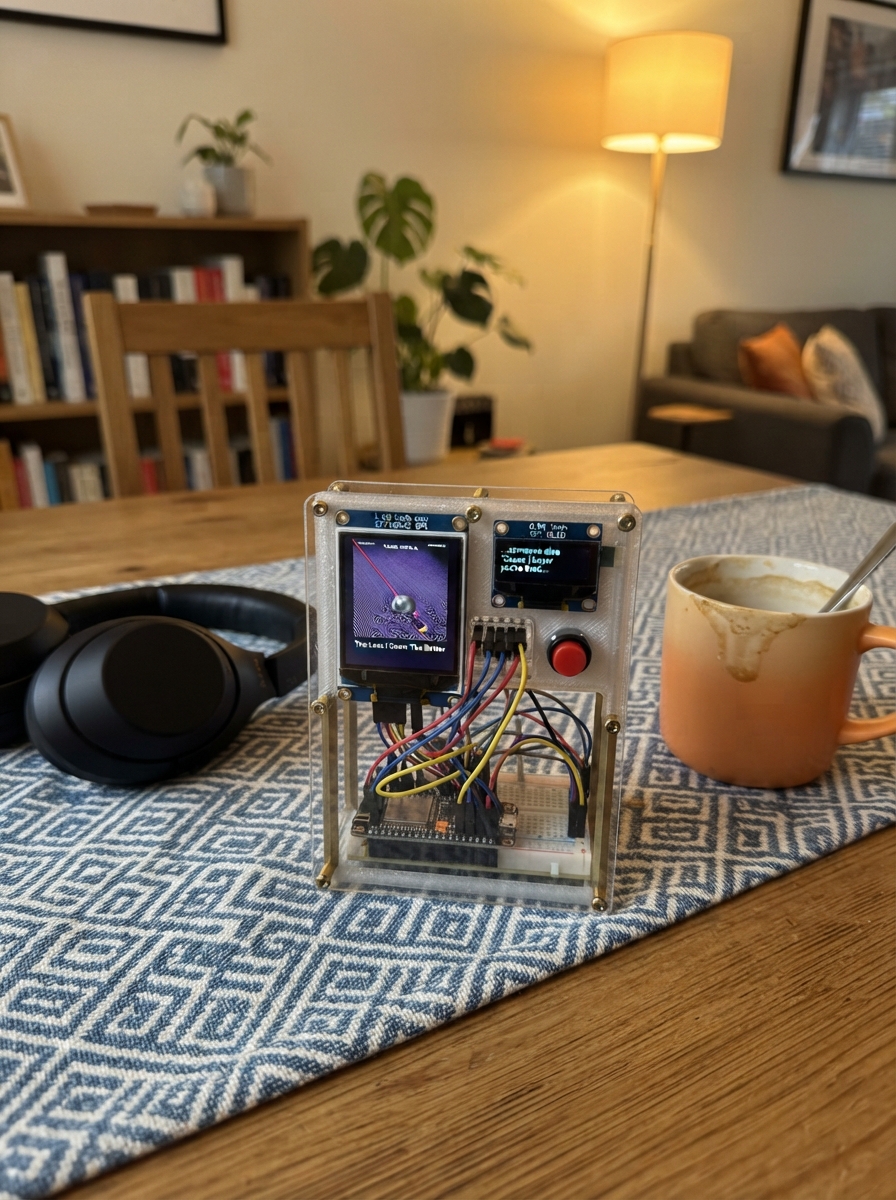
This project builds a Spotify lyrics display that showcases song quotes and track information on a vibrant 1.69-inch color LCD screen. The Raspberry Pi Pico reads from a curated database of lyrics, album details, and timing information, presenting them in an attractive format that celebrates favorite tracks and memorable lines.
The guide provides a complete wiring diagram, parts list, and step-by-step assembly instructions for connecting the ST7789V2 display and push button to the Pico. Included firmware demonstrates how to populate the display with quote data, manage screen updates, and add interactivity through the button control to cycle through different entries.
Wiring diagram
Gather all the parts
Assemble it in 6 steps
1. Prepare the Pico and screen
Unplug USB. Use a Pico with soldered headers, a breadboard and eight jumper wires. This build assumes the common ST7789V2 240x280 module with onboard backlight current limiting.
- Check the screen pin labels, not the wire colours or connector order. Do not connect power to a signal pin.
2. Connect power and backlight
Connect VCC and BL to Pico 3V3 OUT (physical pin 36). Connect GND to Pico GND (physical pin 38). BL keeps the module backlight on.
- Use 3.3 V, not VBUS or 5 V. The specified module includes its backlight resistor; do not connect a bare backlight LED directly to power.
3. Connect the screen signals
Connect DIN to GP19 (physical pin 25, picture data), CLK to GP18 (pin 24, timing), CS to GP17 (pin 22, screen selection), DC to GP20 (pin 26, command or picture selection), and RST to GP21 (pin 27, reset). DIN may be labelled SDA or MOSI; CLK may be SCL or SCK; RST may be RES.
- GP numbers are not physical pin numbers. Do not use I2C wiring just because the screen labels say SDA and SCL.
4. Inspect before powering
Check all eight wires. Ensure no exposed contacts touch each other. Connect the Pico to your Mac with a USB data cable and press Deploy. The display shows your 40 supplied quotes in order, advancing once per button press and repeating after quote 40. After deployment it only needs USB power; no Mac helper or Spotify account is required.
5. Add the animal-fact display
With USB unplugged, connect the seven-pin SPI OLED: VCC to 3V3 OUT (physical pin 36), GND to GND (pin 38), D1 to GP4 (pin 6, data), D0 to GP5 (pin 7, clock), RES to GP6 (pin 9, reset), CS to GP7 (pin 10, selection), and DS to GP8 (pin 11, command/data). Keep all large-screen wiring. The larger screen shows the quote, track, album, supplied timestamp and artist. The upside-down OLED shows a random animal fact. Each button press advances the quote and picks a different fact; there is no timer.
- Use 3.3 V. This build assumes a 128x64 SSD1306 SPI OLED. DS is interpreted as the command/data pin usually labelled DC; the supplied labels do not confirm the controller or that unusual label.
6. Add the next-quote button
With USB unplugged, connect a normally-open momentary push button between GP10 (physical pin 14) and GND (physical pin 13). The internal pull-up means no external resistor is needed. On a four-leg tactile button, use contacts from the two separate switched sides, not two legs that are permanently connected. Press and release to advance one quote; holding it does not repeat. Quote 40 wraps to quote 1. Both screens keep their text visible until the next press. Animal facts are stored on the Pico; internet is not needed.
- Connect the button only to GP10 and ground, not to 3.3 V or 5 V.
Review all connections
1. Connections between "screen" and "Raspberry Pi Pico"
2. Connections between "oled" and "Raspberry Pi Pico"
3. Connections between "next_button" and "Raspberry Pi Pico"
Deploy the firmware
#include <Arduino.h>
#include <Adafruit_GFX.h>
#include <Adafruit_ST7789.h>
#include <Adafruit_SSD1306.h>
Adafruit_SSD1306 oled(128, 64, 4, 5, 8, 6, 7);
bool oledReady = false;
Adafruit_ST7789 screen(17, 20, 19, 18, 21);
struct Entry { const char *quote, *track, *time, *album; };
const Entry entries[] = {
{"She want the old me, but he died due to lack of love.","Alternative Outro","3:12","Alternative Trap (2013)"},
{"My mama think I'm changing, I'm just growing up.","Count on Me","1:05","Alternative Trap (2013)"},
{"No matter how far I go, I never forget where I started.","Everything Outside","2:20","Alternative Trap (2013)"},
{"I put my soul in this music, I hope you're listening.","Cocaine Woman","1:45","Alternative Trap (2013)"},
{"I'm a product of my environment, but I'm trying to break the cycle.","Nicky Wilson","1:11","Alternative Trap (2013)"},
{"You can't save me, I have to save myself.","Chinatown","2:02","Alternative Trap (2013)"},
{"Xanax got me pacing, why the fuck am I chasing?","XAN CAGE","0:58","Body High (2014)"},
{"I'm trying to find peace in a world full of chaos.","REFLECTIONS","1:22","Body High (2014)"},
{"I'm chasing a feeling that I might never find again.","WITCHCRAFT","2:04","Body High (2014)"},
{"I'm just a quiet kid with a lot on my mind.","HIDDEN PLACE","0:45","Body High (2014)"},
{"I can't even lie, I miss how it used to be before the money got involved.","Double Check","0:56","Son of Sam (2016)"},
{"I'm too far gone to look back now.","Syrup Talk","1:38","Son of Sam (2016)"},
{"You say you love me, but it's just when it's convenient.","MISS ME ME_MYSELF","0:51","Watch My Back (2017)"},
{"You know you wrong, but you love the attention.","SHOW TIME","1:04","Watch My Back (2017)"},
{"I gave you my heart and you played with it like a toy.","POKER FACE","0:33","Watch My Back (2017)"},
{"I can see right through you, no matter what you say.","NO WNA","1:10","Watch My Back (2017)"},
{"Of course I care, I just don't know how to show it anymore.","ARE U WIT ME","0:44","Watch My Back (2017)"},
{"I care about you, but I care about me more right now.","ME MYSELF & I","0:22","Days B4 III (2019)"},
{"We was in a good space, now we just giving each other space.","GO AWAY!!","0:54","Days B4 III (2019)"},
{"I'm too high to argue with you about who loves who more.","WAY 2 RARE","1:12","Days B4 III (2019)"},
{"You hate the fact that I don't need you anymore.","LEFT 4 DEAD","0:48","Days B4 III (2019)"},
{"I didn't lose you, you lost me.","LAST TIME MENTIONING","2:01","Days B4 III (2019)"},
{"I'm too far gone to look back now.","SEND ME ON MY WAY","1:30","Days B4 III (2019)"},
{"I missed the flight because I was getting too high, but I guess everything happens for a reason.","OUT MY WAY","1:08","Freewave 3 (2019)"},
{"Lean in my cup, it's a regular day.","POLITICS","0:14","Freewave 3 (2019)"},
{"I got codeine habits, but I'm still a star.","MORE THAN EVER","0:50","Freewave 3 (2019)"},
{"I'm too loyal for my own good, and that's the scary part.","OF COURSE YOU WON'T","1:15","Freewave 3 (2019)"},
{"I don't trust nobody, not even my own shadow.","INTERLUDE","0:37","Freewave 3 (2019)"},
{"I keep my circle small because people change when the lights get bright.","GLORY BOY","1:42","Freewave 3 (2019)"},
{"I might buy a new car just to put my feelings in it.","NIGO","1:03","Almost There (2020)"},
{"The money make the pain fade away, but it don't cure it.","RUNNIN WITH","0:28","Almost There (2020)"},
{"We used to talk for hours, now we don't even say hi.","PICK A FLAW","1:19","Almost There (2020)"},
{"I'm on the highway to heaven, but I'm speeding in a hellcat.","PRADA TUNE","0:41","Almost There (2020)"},
{"I'm in Hollywood, but I'm too Chicago for these industry rules.","ARCHITECT","0:42","FLAWLESS LIKE ME (2022)"},
{"I'm in a Trackhawk, chasing my demons.","KAPITOL DENIM","0:15","FLAWLESS LIKE ME (2022)"},
{"I'm addicted to the lifestyle, but I hate the pressure.","LIFE MOCKERY","1:02","FLAWLESS LIKE ME (2022)"},
{"I made a million dollars before I made a right choice.","GEEKED N BLESSED","1:18","FLAWLESS LIKE ME (2022)"},
{"It's a flawless victory, but it still feels empty.","VVS KEYS","0:55","FLAWLESS LIKE ME (2022)"},
{"I'm a real geek boy, but I still function with the blocks.","GEMINI HOME VIDEO","0:34","GEMINI (2024)"},
{"I thought you were my twin, but you're just another lesson.","TWIN COIN","1:05","GEMINI (2024)"}
};
constexpr unsigned count = sizeof(entries) / sizeof(entries[0]);
unsigned current = 0;
constexpr uint8_t NEXT_BUTTON = 10;
bool lastReading = HIGH;
bool stableButton = HIGH;
unsigned long buttonChangedAt = 0;
// Wrap at spaces, preserving every word rather than truncating long quotes.
void wrapped(String text, int y, uint8_t size, uint16_t color) {
  screen.setTextSize(size);
  screen.setTextColor(color);
  int columns = 216 / (6 * size);
  while (text.length()) {
    int n = text.length();
    if (n > columns) {
      n = columns;
      int space = text.lastIndexOf(' ', columns);
      if (space > 0) n = space;
    }
    screen.setCursor(12, y);
    screen.print(text.substring(0, n));
    text = text.substring(n);
    text.trim();
    y += 8 * size + 4;
  }
}
const char *animalFacts[] = {
  "Octopuses have three hearts and blue blood.",
  "Butterflies taste using sensors on their feet.",
  "Wombats produce cube-shaped droppings.",
  "Sea otters use rocks to crack open shellfish.",
  "A hummingbird can fly backwards.",
  "An elephant's trunk has no bones.",
  "Sharks have skeletons made of cartilage, not bone.",
  "Honeybees use dances to share food locations.",
  "Male seahorses carry developing young in a pouch.",
  "Giraffes usually have seven neck vertebrae, like humans.",
  "Owls cannot move their eyes in their sockets.",
  "Penguins are birds, but they cannot fly.",
  "Bats are the only mammals capable of powered flight.",
  "Dolphins breathe air through a blowhole.",
  "Polar bears have black skin beneath their fur.",
  "A group of lions is called a pride.",
  "Flamingos get their pink color from pigments in food.",
  "Crocodiles can replace lost teeth throughout life.",
  "Cats use their whiskers to sense nearby objects.",
  "Axolotls can regrow lost limbs."
};
constexpr unsigned factCount = sizeof(animalFacts) / sizeof(animalFacts[0]);
unsigned factIndex = 0;
void drawEntry() {
  const Entry &e = entries[current];
  screen.fillScreen(ST77XX_BLACK);
  wrapped(String("LUCKI  [") + e.time + "]", 10, 2, ST77XX_CYAN);
  wrapped(e.album, 36, 1, ST77XX_WHITE);
  wrapped(e.track, 54, 1, ST77XX_CYAN);
  wrapped(String('"') + e.quote + '"', 92, 2, ST77XX_WHITE);
  screen.setTextSize(1);
  screen.setTextColor(ST77XX_CYAN);
  screen.setCursor(12, 260);
  screen.print(current + 1); screen.print(" / "); screen.print(count);
  screen.print("   Press for next");
  if (oledReady) {
    oled.clearDisplay();
    oled.setTextSize(1);
    oled.setTextColor(SSD1306_WHITE);
    oled.setTextWrap(true);
    oled.setCursor(0, 0);
    oled.println("ANIMAL FACT");
    oled.setCursor(0, 16);
    oled.print(animalFacts[factIndex]);
    oled.display();
  }
}
void setup() {
  pinMode(NEXT_BUTTON, INPUT_PULLUP);
  oledReady = oled.begin(SSD1306_SWITCHCAPVCC);
  oled.setRotation(2); // Rotate the OLED 180 degrees; leave the LCD unchanged.
  screen.init(240, 280);
  screen.setRotation(0);
  screen.setTextWrap(false);
  randomSeed(micros());
  factIndex = random(factCount);
  drawEntry();
}
void loop() {
  const bool reading = digitalRead(NEXT_BUTTON);
  const unsigned long now = millis();
  if (reading != lastReading) {
    lastReading = reading;
    buttonChangedAt = now;
  }
  // Require a stable contact for 30 ms to reject switch bounce.
  if (reading != stableButton && now - buttonChangedAt >= 30UL) {
    stableButton = reading;
    if (stableButton == LOW) {
      current = (current + 1) % count;
      // Pick a new fact without repeating the one already shown.
      factIndex = (factIndex + 1 + random(factCount - 1)) % factCount;
      drawEntry();
    }
  }
  delay(1);
}
Remix this project
Make it yours in one click
Open a full copy of this project in your own Schematik workspace, diagram, code, parts, and assembly steps included. Swap the sensor, add features, or redesign the whole thing with AI. The author's original stays untouched.
Related projects
Portable AX.25 Radio TNC
Raspberry Pi Pico · November 5, 2026Kelvin J. HIll
ESP32 RS485 Temperature Monitor
Raspberry Pi Pico · November 3, 2026Pasindu Vidushan
Indoor Air Quality Monitor
Raspberry Pi Pico · October 28, 2026Patrik Michalek