Community project
Touchscreen Gas Brake Racer
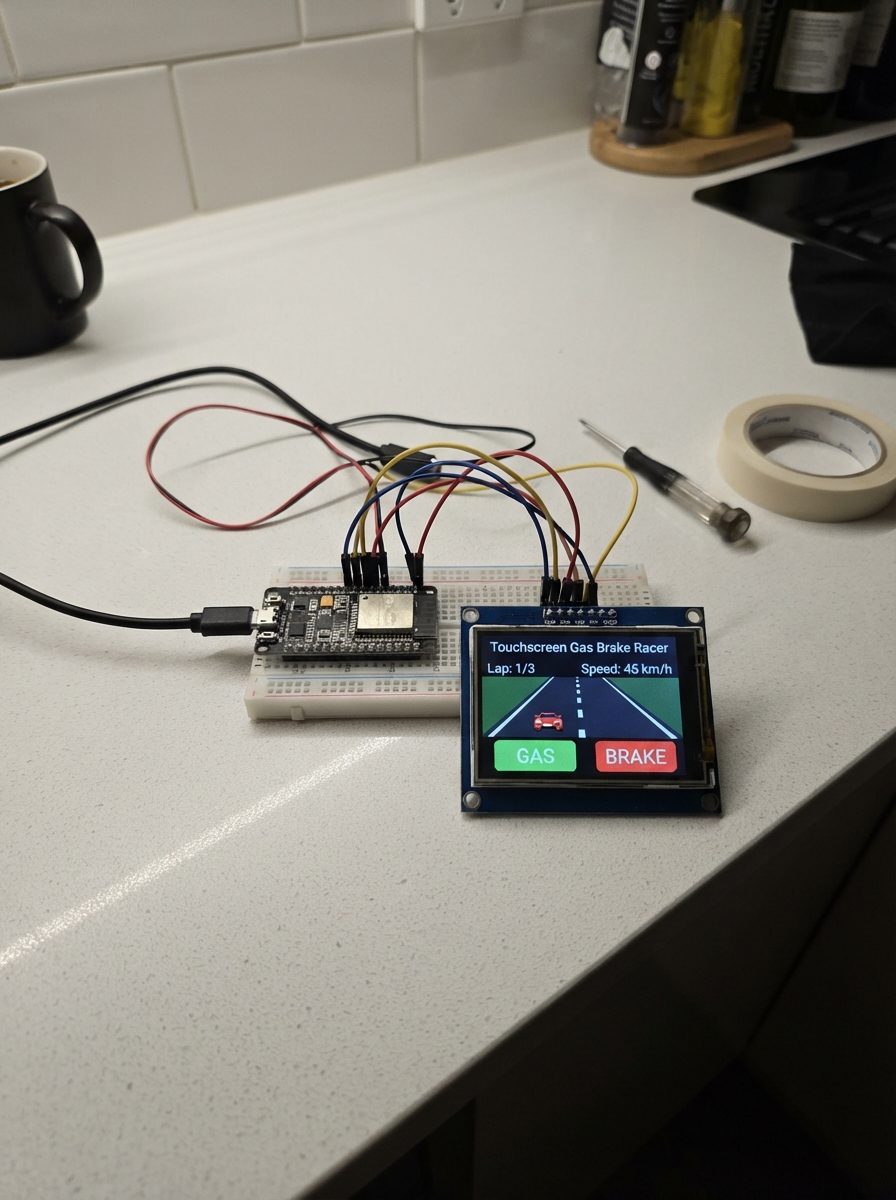
Build a racing game on the Cheap Yellow Display (CYD) touchscreen where players navigate a car down a scrolling road, avoiding obstacles by tapping gas and brake controls. The ESP32 microcontroller reads touch input from the 2.8-inch ILI9341 display and renders real-time graphics, creating an interactive arcade-style experience that fits in your hand.
This guide provides the complete wiring diagram for connecting the CYD to the ESP32, a full parts list, and the firmware code needed to run the game. Assembly is straightforward—position the display where you can comfortably reach the on-screen controls, then upload the code and start racing.
Wiring diagram
Assemble it in 2 steps
1. Place the CYD where you can reach the screen
Put the Cheap Yellow Display flat on a non-metal surface with the screen facing up. This game uses the built-in screen and touch panel, so do not add any loose wires or parts.
- Keep the board still while playing so your finger taps land on the marked controls.
- Do not place the bare board on metal or loose wires because that can short its contacts.
2. Use the on-screen driving controls
Hold GAS at the lower right to speed up and BRAKE at the lower left to slow down. Touch the left shoulder of the road where it says TURN LEFT to steer left, or the right shoulder where it says TURN RIGHT to steer right. Avoid the red car; after a crash, tap either pedal to start again.
- The road edges limit how far the blue car can move, so it cannot leave the road.
Deploy the firmware
#include <Arduino.h>

// CYD 2.8-inch display wiring.
#define USER_SETUP_LOADED
#define ILI9341_DRIVER
#define TFT_WIDTH 240
#define TFT_HEIGHT 320
#define TFT_MOSI 13
#define TFT_MISO 12
#define TFT_SCLK 14
#define TFT_CS 15
#define TFT_DC 2
#define TFT_RST -1
#define TFT_BL 21
#define TFT_BACKLIGHT_ON HIGH
#define USE_HSPI_PORT
#define SPI_FREQUENCY 40000000
#include <TFT_eSPI.h>
#include <XPT2046_Touchscreen.h>


// Hoisted type definitions
struct Obstacle { int x; float y; };

enum Control { NONE, BRAKE, GAS, LEFT, RIGHT };


// Forward declarations
Control readControl();
void drawCar(TFT_eSprite &canvas, int x, int y, uint16_t color);
void drawPedals(Control control);
void drawStaticScreen();
void renderRoad();
void resetGame();
void showCrash();

constexpr int DISPLAY_BACKLIGHT_PIN = 21;
constexpr int TOUCH_CS = 33;
constexpr int TOUCH_IRQ = 36;
constexpr int TOUCH_SCK = 25;
constexpr int TOUCH_MISO = 39;
constexpr int TOUCH_MOSI = 32;
constexpr int SCREEN_W = 320;
constexpr int SCREEN_H = 240;
constexpr int ROAD_X = 42;
constexpr int ROAD_W = 236;
constexpr int ROAD_BOTTOM = 180;
constexpr int CAR_W = 26;
constexpr int CAR_H = 42;
constexpr int CAR_Y = 128;


TFT_eSPI tft;
TFT_eSprite roadSprite(&tft);
XPT2046_Touchscreen touch(TOUCH_CS, TOUCH_IRQ);
Obstacle obstacle = {145, -60};
int carX = 147;
float speedKph = 0;
float stripeOffset = 0;
unsigned long score = 0;
unsigned long lastFrame = 0;
bool crashed = false;
Control shownControl = NONE;

Control readControl() {
  if (!touch.touched()) return NONE;
  TS_Point point = touch.getPoint();
  int x = constrain(map(point.x, 200, 3800, 0, SCREEN_W), 0, SCREEN_W - 1);
  int y = constrain(map(point.y, 240, 3800, 0, SCREEN_H), 0, SCREEN_H - 1);

  if (y >= 190) return x < SCREEN_W / 2 ? BRAKE : GAS;
  if (y < ROAD_BOTTOM && x < 105) return LEFT;
  if (y < ROAD_BOTTOM && x > 215) return RIGHT;
  return NONE;
}

void drawCar(TFT_eSprite &canvas, int x, int y, uint16_t color) {
  canvas.fillRoundRect(x, y, CAR_W, CAR_H, 5, color);
  canvas.fillRect(x + 5, y + 6, CAR_W - 10, 12, TFT_LIGHTGREY);
  canvas.fillRect(x - 3, y + 6, 3, 10, TFT_BLACK);
  canvas.fillRect(x + CAR_W, y + 6, 3, 10, TFT_BLACK);
  canvas.fillRect(x - 3, y + CAR_H - 16, 3, 10, TFT_BLACK);
  canvas.fillRect(x + CAR_W, y + CAR_H - 16, 3, 10, TFT_BLACK);
}

void drawPedals(Control control) {
  tft.fillRoundRect(5, 190, 150, 43, 8, control == BRAKE ? TFT_RED : 0x7800);
  tft.fillRoundRect(165, 190, 150, 43, 8, control == GAS ? TFT_GREEN : 0x03E0);
  tft.setTextColor(TFT_WHITE);
  tft.setTextSize(2);
  tft.setCursor(43, 204); tft.print("BRAKE");
  tft.setCursor(213, 204); tft.print("GAS");
}

void drawStaticScreen() {
  tft.fillScreen(0x03EF);
  tft.fillRect(ROAD_X, 0, ROAD_W, ROAD_BOTTOM, 0x4208);
  drawPedals(NONE);
  tft.setTextColor(TFT_WHITE, 0x03EF);
  tft.setTextSize(1);
  tft.setCursor(4, 82); tft.print("TURN");
  tft.setCursor(4, 93); tft.print("LEFT");
  tft.setCursor(282, 82); tft.print("TURN");
  tft.setCursor(282, 93); tft.print("RIGHT");
}

void renderRoad() {
  roadSprite.fillSprite(0x4208);
  roadSprite.fillRect(0, 0, 5, ROAD_BOTTOM, TFT_WHITE);
  roadSprite.fillRect(ROAD_W - 5, 0, 5, ROAD_BOTTOM, TFT_WHITE);
  for (int y = -30; y < ROAD_BOTTOM; y += 38) {
    int stripeY = (static_cast<int>(y + stripeOffset) % 210) - 15;
    roadSprite.fillRect(115, stripeY, 7, 22, TFT_WHITE);
  }
  drawCar(roadSprite, carX - ROAD_X, CAR_Y, TFT_BLUE);
  drawCar(roadSprite, obstacle.x - ROAD_X, static_cast<int>(obstacle.y), TFT_RED);
  roadSprite.fillRect(0, 0, 92, 22, TFT_BLACK);
  roadSprite.setTextColor(TFT_WHITE, TFT_BLACK);
  roadSprite.setTextSize(1);
  roadSprite.setCursor(5, 4); roadSprite.printf("%3d km/h", static_cast<int>(speedKph));
  roadSprite.setCursor(5, 14); roadSprite.printf("Score %lu", score);
  roadSprite.pushSprite(ROAD_X, 0);
}

void resetGame() {
  carX = 147;
  speedKph = 0;
  stripeOffset = 0;
  score = 0;
  obstacle = {random(65, 230), -CAR_H};
  crashed = false;
}

void showCrash() {
  tft.fillRoundRect(48, 55, 224, 72, 10, 0x7800);
  tft.setTextColor(TFT_WHITE, 0x7800);
  tft.setTextSize(2);
  tft.setCursor(87, 70); tft.print("CRASH!");
  tft.setTextSize(1);
  tft.setCursor(68, 101); tft.print("Tap a pedal to restart");
}

void setup() {
  pinMode(DISPLAY_BACKLIGHT_PIN, OUTPUT);
  digitalWrite(DISPLAY_BACKLIGHT_PIN, HIGH);
  tft.init();
  tft.setRotation(1);
  roadSprite.setColorDepth(16);
  roadSprite.createSprite(ROAD_W, ROAD_BOTTOM);
  SPI.begin(TOUCH_SCK, TOUCH_MISO, TOUCH_MOSI, TOUCH_CS);
  touch.begin();
  touch.setRotation(1);
  randomSeed(esp_random());
  resetGame();
  drawStaticScreen();
  renderRoad();
}

void loop() {
  unsigned long now = millis();
  if (now - lastFrame < 50) return;
  float dt = lastFrame == 0 ? 0.05f : (now - lastFrame) / 1000.0f;
  lastFrame = now;
  Control control = readControl();

  if (crashed) {
    if (control == BRAKE || control == GAS) {
      resetGame();
      drawStaticScreen();
      shownControl = NONE;
      renderRoad();
    }
    return;
  }

  if (control == GAS) speedKph = min(120.0f, speedKph + 42.0f * dt);
  else if (control == BRAKE) speedKph = max(0.0f, speedKph - 95.0f * dt);
  else speedKph = max(0.0f, speedKph - 12.0f * dt);

  if (control == LEFT) carX -= static_cast<int>(130.0f * dt);
  if (control == RIGHT) carX += static_cast<int>(130.0f * dt);
  carX = constrain(carX, ROAD_X + 8, ROAD_X + ROAD_W - CAR_W - 8);

  stripeOffset += speedKph * dt * 0.75f;
  obstacle.y += (35.0f + speedKph * 1.15f) * dt;
  score += static_cast<unsigned long>(speedKph * dt);
  if (obstacle.y > ROAD_BOTTOM) {
    obstacle.x = random(65, 230);
    obstacle.y = -CAR_H;
    score += 100;
  }

  if (control != shownControl) {
    drawPedals(control);
    shownControl = control;
  }
  renderRoad();

  bool overlapX = carX < obstacle.x + CAR_W && carX + CAR_W > obstacle.x;
  bool overlapY = CAR_Y < obstacle.y + CAR_H && CAR_Y + CAR_H > obstacle.y;
  if (overlapX && overlapY) {
    crashed = true;
    showCrash();
  }
}
Remix this project
Make it yours in one click
Open a full copy of this project in your own Schematik workspace — diagram, code, parts, and assembly steps included. Swap the sensor, add features, or redesign the whole thing with AI. The author's original stays untouched.
Related projects
Smart NFC Attendance Terminal
ESP32 · October 1, 2026นายชัยบูรณ์ บัวศิริ
Crea El Esquema De Conexiones Pin Pin Para
ESP32 · October 1, 2026Samuel Roa
ESP32 Metal Detector
ESP32 · September 30, 2026Oscar Luis Bustamante Valdivia