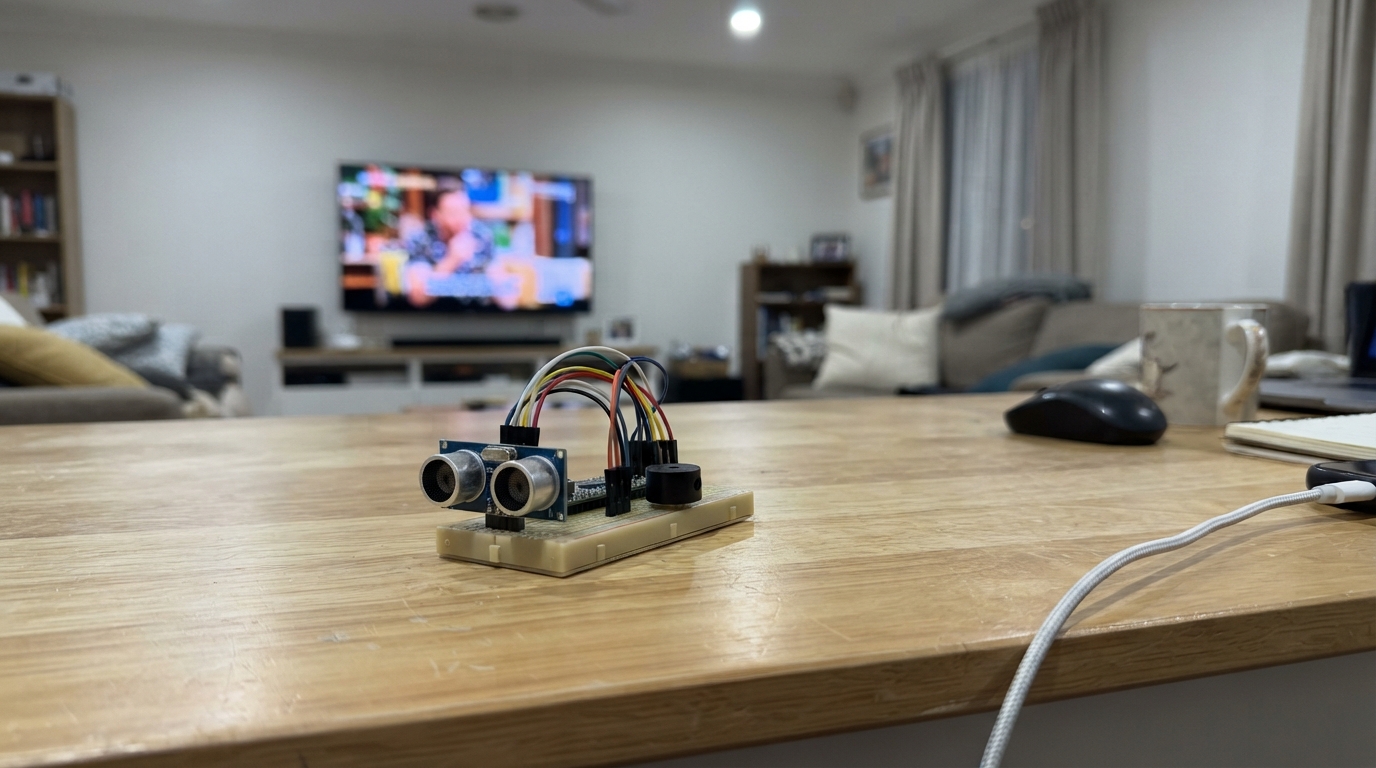
This project builds a proximity alarm that detects nearby objects and sounds a buzzer when they get too close. An HC-SR04 ultrasonic distance sensor measures the distance to objects in front of it, and an Arduino Uno processes the measurements to trigger a piezo buzzer whenever something enters the alarm zone.
The guide includes a complete wiring diagram showing how to connect the distance sensor and buzzer to the Arduino, a full parts list, and ready-to-upload firmware that lets you adjust the alarm distance from 2 to 400 centimeters. Assembly takes just a few minutes and requires no soldering if using a breadboard.
Wiring diagram
Gather all the parts
Assemble it in 3 steps
1. Connect the distance sensor
Unplug USB first. Connect HC-SR04 VCC to Nano 5V and GND to GND. Connect TRIG to D9 (starts a measurement) and ECHO to D10 (returns the distance pulse). Read the printed pin labels on the sensor.
- Reversing VCC and GND can damage the sensor.
2. Connect the piezo buzzer
Use a small passive piezo buzzer such as the PS1240, not a loud magnetic buzzer. Connect one lead to D3 (sound signal) and the other to GND.
3. Position the sensor
Point the two round sensor faces toward the area to monitor. The alarm sounds for objects between 2 and 100 cm away and stops when no valid nearby echo is returned. Power the Nano through its USB connector.
- Soft, small or angled objects may not return a reliable echo. This is not a safety alarm.
Review all connections
1. Connections between "sonar" and "Arduino"
2. Connections between "buzzer" and "Arduino"
Deploy the firmware
#include <Arduino.h>

const uint8_t TRIG_PIN = 9;
const uint8_t ECHO_PIN = 10;
const uint8_t BUZZER_PIN = 3;
// Change this to choose the alarm distance (2 to 400 cm).
const unsigned int ALARM_DISTANCE_CM =110;
bool buzzing = false;

void setup() {
  pinMode(TRIG_PIN, OUTPUT);
  digitalWrite(TRIG_PIN, LOW);
  pinMode(ECHO_PIN, INPUT);
  pinMode(BUZZER_PIN, OUTPUT);
  digitalWrite(BUZZER_PIN, LOW);
}

void loop() {
  digitalWrite(TRIG_PIN, LOW);
  delayMicroseconds(2);
  digitalWrite(TRIG_PIN, HIGH);
  delayMicroseconds(10);
  digitalWrite(TRIG_PIN, LOW);
  const unsigned long duration = pulseIn(ECHO_PIN, HIGH, 30000UL);
  // Zero means no echo, not an object at zero distance.
  const float distanceCm = duration / 58.0f;
  const bool detected = duration > 0 && distanceCm >= 2.0f &&
                        distanceCm <= ALARM_DISTANCE_CM;
  if (detected != buzzing) {
    buzzing = detected;
    if (buzzing) tone(BUZZER_PIN, 4000);
    else noTone(BUZZER_PIN);
  }
  delay(65); // Leave at least 60 ms between measurements.
}
Remix this project
Make it yours in one click
Open a full copy of this project in your own Schematik workspace, diagram, code, parts, and assembly steps included. Swap the sensor, add features, or redesign the whole thing with AI. The author's original stays untouched.